Vue Router 3: routing for Vue 2 and migration considerations
🚦 The official router for Vue 2
At a glance
- What is it?
- Vue Router 3 maps URLs to components in Vue 2 applications. Both Vue 2 and this router line have reached end of life; Vue 3 uses Vue Router 4, with a separate migration path.
- Who is it for?
- Vue Router 3 remains relevant when maintaining a Vue 2 application, but both have reached end of life. For new Vue 3 work, use the Vue Router 4 documentation; for an existing application, plan and test migration rather than treating a package update as sufficient.
- Can I use it commercially?
- Yes. MIT is a permissive licence: you can use, modify and sell software built on it, as long as you keep its copyright and licence notices.
- Is it still maintained?
- Activity is slowing. The repository last received commits 7 months ago.
- What is it written in?
- Mainly JavaScript, according to GitHub's language statistics.
Answers come from the project's GitHub data, last synced on November 15, 2026, and from our analysis. They are not legal advice.
Star history
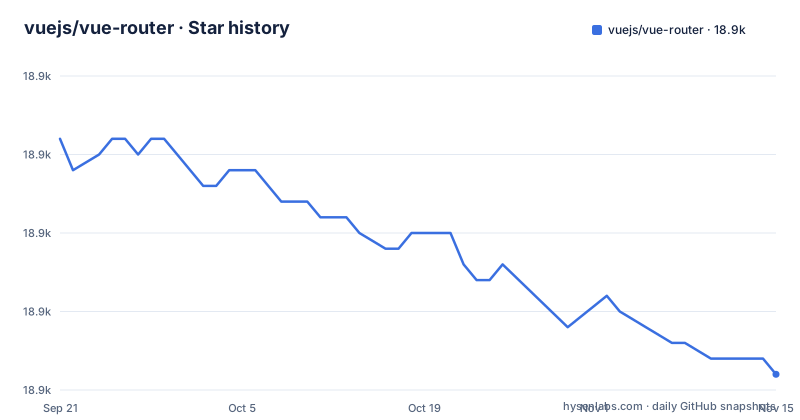
- vuejs/vue-router18,851 ★ · -15
| Repository | 2026-09-21 | 2026-11-15 |
|---|---|---|
| vuejs/vue-router | 18.9k | 18.9k |
-15 Stars in the last 55 days, measured from the daily GitHub snapshot. Compare with other projects
Editorial analysis
The first line of the README says both Vue 2 and this router are end of life
The README opens with a blockquote and it is the most important thing on the page. This is vue-router 3.0, which works only with Vue 2.0, and both have reached end of life.
Then it gives you two exits. For the 1.x router, there is a 1.0 branch. For Vue Router 4, which is the one for Vue 3, there is a different repository, vuejs/router.
So the project states its own status in the first paragraph and routes you elsewhere, and everything after that is maintenance material. The funding section is consistent with that reading: ongoing development is made possible entirely by the support of sponsors, with a GitHub Sponsors link and a one-time PayPal donation, and a tiered list of companies from a job board at the top down to a JavaScript meta framework at the bottom.
The practical consequence is a dependency decision rather than a technical one. Existing Vue 2 applications should assess the risks of continuing on an unsupported stack and plan an upgrade. Vue 3 uses Vue Router 4, published under the same npm package name; migration involves upgrading versions and adapting APIs and application behavior, not merely changing repositories.
The newest tag is v3.6.5 from 2022, and the branch has taken commits since
The release list is three patch versions inside a month: v3.6.3 on 2022-08-23, v3.6.4 on 2022-08-25 and v3.6.5 on 2022-09-06. The manifest still declares 3.6.5.
The last push to the repository was 2026-04-14, and the default branch is dev rather than main. So the last push came about three and a half years after the newest published tag.
That gap has a practical shape. If you are on the 3.6.5 release, everything that happened on the branch after September 2022 is invisible to you, including any fix. If you build from the branch, you may be running changes that are not in the release you installed; identify the exact commit and review its history and test results. The changelog is the file to read, and the README points at it on the dev branch.
So the version question has three answers, as with any maintained-but-not-released project: a Git tag, the current development branch and the npm registry are distinct sources. Check the exact npm version and changelog rather than assuming the branch and published package match.
The test command is five stages and two of them are type checks
The test script is a chain, and it is worth reading as a list of the tools a contributor needs:
npm run lint && npm run flow && npm run test:unit && npm run test:e2e && npm run test:typesLinting is eslint over the source, the examples and the tests. Flow is a separate type checker with its own configuration file at the root and its own check command. Unit tests run under Jasmine with a configuration path pointing into the test directory. End to end tests run through a separate runner. And the last stage is a TypeScript types test, which is a different thing from the Flow check, so the project carries two type systems at once.
The consequence is that the development setup is not light. A contributor needs a linter, Flow, a TypeScript check, a Jasmine configuration, an end to end runner, and a built distribution, because the development scripts are `yarn` to install, `yarn build` to build the distribution files, `yarn dev` to serve the examples, `yarn test` to lint and run all tests, and `yarn docs` to serve the documentation.
There is also a small collision in that list worth knowing: the examples server and the documentation server are both documented as serving on localhost:8080, so their default port settings conflict if both are started together; consult each server's options for changing its port.
The end to end suite still names Internet Explorer and Android 4.4
The end to end CI invocation is a single line, and two details in it are remarkable for a project whose README declares end of life.
The first is the environment list. The command passes a flag naming two environments, ie and android44, alongside a Nightwatch browser configuration path. This names Internet Explorer and Android 4.4 configurations; it does not establish that those environments currently run or pass in CI.
The second is the tool. The runner script is invoked directly through node, and the configuration is a Nightwatch browsers file, which is a browser automation harness from the era when that was the default choice.
The configuration reflects attention to older clients, but a configuration alone is not a current compatibility guarantee. For a library at end of life, that is arguably the right target: the applications still running Vue 2 are the ones on old browsers, and the tests are aimed at them.
The cost is on the contributor. Running those configurations requires access to the corresponding browser environments, so contributors should check current test infrastructure and documentation.
Four published formats, and Node gets a different ESM file from a bundler
The manifest describes the same library four ways, and the exports map is where it gets interesting.
The legacy fields are straightforward: a main pointing at the CommonJS build, a module field pointing at the ES module build, and both the unpkg and jsdelivr fields pointing at the same file, which is the browser build. The typings field points into a types directory.
The exports map for the root entry is not a single import target. Under import there is a node condition pointing at one module file and a default condition pointing at the ES module build, under require there is the CommonJS build, and under types there is the declaration file. A resolver that honors the Node condition can select a different entry from one using the default condition; actual behavior depends on the resolver and its configured conditions.
There is a second published entry, a composables subpath, with its own import, require and types conditions, and those three files exist at the repository root alongside their declaration file. Two of the export keys also pass everything through, one for the dist directory and one for the types directory, so a consumer can reach into either by path.
For anyone reading a build failure in this package, the four fields and the nested node condition are the first place to look, because a wrong resolution shows up as a module that exists in the tarball and is not the one that got loaded.
The published tarball includes src, and the build output is committed
Two facts about distribution are visible in the manifest and the release instructions, and together they tell you what you actually install.
The first is the files list. Alongside the distribution JavaScript and modules, the type declarations, the three composables files and two Vetur JSON files, the list includes the source directory. So the published package contains the source, not only the build.
The second is the release procedure, which is written out as a list of steps under a release script. You ensure the tests pass, you build the distribution files with a version argument, you build the changelog, you commit the distribution files and the changelog together in a single commit whose message carries the version in a build prefix, you cut a version with npm, you push the tag and the branch, and you publish to npm.
Committing build files makes a tagged build easier to inspect, but does not by itself prove that a registry tarball contains identical bytes. A lockfile can record a resolved version and integrity hash; verify the actual artifact when provenance matters. The consequence of shipping the source is that you can read the code you are running without a source map, which for an end of life dependency is the more useful of the two.
The changelog being generated as part of the release rather than written by hand is worth noting too, since it is where you would look first to find out what a given tag contains.
Editorial conclusion
Vue Router 3 remains relevant when maintaining a Vue 2 application, but both have reached end of life. For new Vue 3 work, use the Vue Router 4 documentation; for an existing application, plan and test migration rather than treating a package update as sufficient. Verify the installed version, available support and your application's routes, guards and browser requirements before changing dependencies.
Frequently asked questions
What is a vue router used for?
Vue Router maps URLs to Vue components and manages navigation in single-page applications. Version 3 supports Vue 2; its guide covers nested routes, dynamic parameters, navigation guards and history mode.
how to install vue router
For a Vue 2 project, install the compatible major version with `npm install vue-router@3`. In a module-based application, import Vue and VueRouter and call `Vue.use(VueRouter)` before creating the router. Follow the Vue Router 3 guide for setup; Vue 3 uses version 4.
what is vue router
Vue Router is the official routing library for Vue. This repository covers version 3 for Vue 2; the guide maps routes to components and renders matches with router-view.
vue router alternative
The repository names no third party alternatives. The two references it gives are its own: the 1.0 branch for the previous 1.x router, and the separate vuejs/router repository for Vue Router 4, which is the version for Vue 3. A community chat server and an official forum are listed for questions.
Official sources
Add this badge to your README
If you maintain this project, the badge below links readers to this analysis and shows its maintenance status from the daily GitHub snapshot. Paste the markdown into your README; add ?metric=license or ?metric=stars to the image URL for a different field.

[](https://hysenlabs.com/projects/vuejs-vue-router)Star history chart for your README
[](https://hysenlabs.com/projects/vuejs-vue-router)Was this useful?