wayback: eight install channels, a -c flag used for two things, and forked archive clients
An archiving tool with an IM-style interface that prioritizes privacy and accessibility, integrated with various archival services including Internet Archive, archive.today, Ghostarchive, IPFS, Telegraph, and file systems.
At a glance
- What is it?
- A Go web archiver whose front end is a chat interface, sending pages to four archival services and pulling them back out through seven chat networks. Its own Docker example uses a flag as a channel name where the flag list defines it as a config path, and its dependency list is mostly its author's forks.
- Who is it for?
- wayback is a good fit for an archivist who already lives in a chat client and wants preservation to be a message rather than a browser session, and the seven daemon transports plus the ability to publish results back into a channel or an issue tracker are things no ordinary archiver does. Two things to weigh.
- Can I use it commercially?
- Yes, with conditions. GPL-3.0 is a copyleft licence: if you distribute software that includes it, you must release that software's source code under the same licence. Running it internally without distributing it does not trigger that obligation.
- Is it still maintained?
- Yes. The repository last received commits 2 days ago.
- What is it written in?
- Mainly Go, according to GitHub's language statistics.
Answers come from the project's GitHub data, last synced on November 25, 2026, and from our analysis. They are not legal advice.
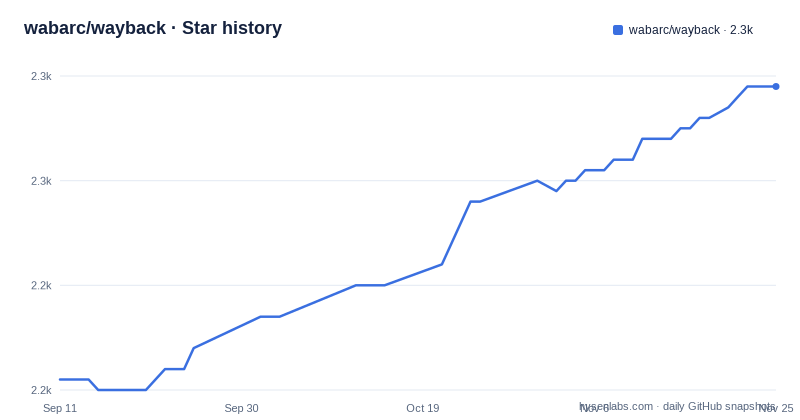
Star history
- wabarc/wayback2,259 ★ · +28
| Repository | 2026-09-11 | 2026-11-25 |
|---|---|---|
| wabarc/wayback | 2.2k | 2.3k |
28 Stars in the last 75 days, measured from the daily GitHub snapshot. Compare with other projects
Editorial analysis
An archiver with a chat interface bolted to the front
The design decision that separates this from every other archiver is stated in one line of the description: the interface is modelled on a chat client. Capture and retrieval both happen as messages, and the tool can run as a daemon on seven networks, which the feature list names as IRC, Matrix, a Telegram bot, a Discord bot, Mastodon, Twitter and XMPP. It can also send results back out, publishing to a Telegram channel, to Mastodon and to GitHub issues, so an archival record can land in a channel or a tracker without anyone opening a browser. Two further items in that list are worth pulling out. It can serve itself as a Tor hidden service as well as a local web entry, so the search and playback side is reachable without a clearnet address. And it can write archived files to disk for offline use, which means the capture is yours even when the service that stored it is not.
go install github.com/wabarc/wayback/cmd/wayback@latestEight install channels, three of them piping a script into a shell
The installation section is longer than the usage section, which tells you something about the audience. There are eight documented routes: a binary from the release page placed on your PATH, a Go install of the command subpackage, the project's own install script piped to a shell, a third-party binary service also piped to a shell, a Snap package, an APT repository, an RPM repository and a Homebrew tap. Three of those eight execute a script fetched over the network directly into a shell, which is the usual convenience and the usual risk. The two repository routes are the careful ones and also the longest: each imports a signing key into a system-wide location and writes a repository file into a system directory, with the RPM route pinning a version and turning on package signature checking, and the APT route declaring three architectures.
curl -fsSL https://get.wabarc.eu.org | shThe repository also ships a man page and a sample configuration file at its root.
The Docker example uses a flag as a channel name
The help output on the page is the authority on what the flags mean, and it is cut off partway through the flag list, immediately after a short flag with no description. Two flags are readable before the cut: a channel identifier flag for a Telegram channel, and a short flag with a long name that takes a configuration file path and searches three locations in order, the current directory, the home directory and a system-wide path. Now look at the container example. It runs the daemon on Telegram, passes a bot token, and then in the second variant passes a channel username to that same short flag. Under the help output that flag is the configuration file path, so either the example is wrong or the flag means two different things depending on which daemon is running. A user copying that line gets a config file path where they meant a channel.
docker run -d wabarc/wayback wayback -d telegram -t YOUR-BOT-TOKEN -c YOUR-CHANNEL-USERNAMEThe IPFS example has a second prompt on its continuation line
The pinning example is given twice, once in a form that works and once in a form that does not. The working version exports three environment variables on separate lines and then invokes the tool. The second version sets the same three variables inline before the command, split across two lines with a backslash at the end of the first. The problem is on the second line: it begins with another shell prompt marker, so pasting the block runs the first line as a command that sets two variables and then fails on the trailing backslash, and runs the second line as a separate command. The three values it sets are a slot name, an API key and a secret for a pinning service, which means the block that documents this feature also documents how to leak a credential into a shell history. The tool's own summary block shows the inline form on a single unbroken line, where it works.
$ WAYBACK_SLOT=pinata WAYBACK_APIKEY=YOUR-PINATA-APIKEY \
$ WAYBACK_SECRET=YOUR-PINATA-SECRET wayback --ip https://www.fsf.org
The archiver forks its clients instead of depending on them
The module file is where the maintenance model becomes visible. For the archival services it talks to, the dependencies are not the upstream projects but the author's own copies: forked clients for one of the two commercial archiving sites, for the internet archive, for a privacy-oriented archiving service, for the content pinning service, plus the author's own logging and helper modules and small clients for a catbox service and an image host. The rest of the dependency list is a normal archiver's shopping list: an HTML parser, a readability extractor, a single-page archiving library, a media downloader, a Mastodon client, a Nostr client, a Slack client, a Discord client, a Twitter client with OAuth one signing, a Notion client, a table renderer, a queue, an ID generator, the Prometheus client and a command line parser. The fork decision is a real trade: it means the tool keeps working when an upstream client stops compiling, and it means upstream fixes and API changes arrive only when the author merges them.
The compose file publishes a browser debug port
The compose file is three services on one network and two volume mounts, and two of its choices deserve a second look before anyone runs it on a public host. The first service is a headless Chrome image with its debugging port published on the host, which is the control channel for a headless browser; anything that can reach that port can drive the browser and read what it renders. The host's shared memory directory is bind-mounted in as well, which is a standard workaround for a browser running with a small default. The second service is a search engine, bound to all interfaces rather than loopback, with its port also published and its analytics switched off, and the file sets no key for it. The third service is the tool itself, on its own port, pointed at a data volume and given the search endpoint twice, once for the archive service and once for playback.
MEILI_NO_ANALYTICS=true
MEILI_HTTP_ADDR=0.0.0.0:7700
MEILI_ENV=production
IPFS credentials arrive as build arguments
The image build passes the pinning service credentials in as build arguments and then sets them as environment variables inside the builder stage, which is the standard way a secret ends up baked into a layer. The same builder stage copies a cross-compilation helper image to the root of the filesystem so the build can target several architectures from one machine, installs a C toolchain and headers, and runs a build script with cache mounts for the Go build cache and module cache. The runtime stage is a plain Alpine image with a set of labels pointing at the project and its licence, and two build arguments that decide which countries the tool refuses to route through. One inconsistency in that file is easy to miss: the builder targets a current Go release on Alpine while the runtime layer pins a much older Alpine line, so the image you ship is older than the toolchain you built it with.
The default Tor routing skips most Western exit countries
Two build arguments decide where traffic is not routed, and they are lists of country codes. One excludes a set of fourteen countries from the routing network, and the other excludes those same fourteen plus fourteen more from being used as exit nodes. The additions are the notable part: among the countries whose exit nodes are excluded by default are the United Kingdom, the United States, Canada, Australia, New Zealand, France, Germany, Italy, Spain, the Netherlands, Norway, Belgium and Denmark. So a default build will not emerge through most Western networks, which is a deliberate positioning choice and also means the defaults do not match what a user in one of those countries expects from a privacy tool. Elsewhere the page has the same pattern of promising more than it delivers: a screenshots section opens eight subsections, one per service, with no images under any of them, and the document ends on a heading that is a single letter.
Editorial conclusion
wayback is a good fit for an archivist who already lives in a chat client and wants preservation to be a message rather than a browser session, and the seven daemon transports plus the ability to publish results back into a channel or an issue tracker are things no ordinary archiver does. Two things to weigh. The archiver forks the upstream clients for the services it talks to rather than depending on them, so it will not pick up upstream changes on its own. And the default container exposes a headless browser's debug port and binds the search engine to every interface, so the compose file is a development arrangement and should not be published to a public host unchanged.
Frequently asked questions
What is wabarc/wayback?
It is a web archiving and playback tool with an interface modelled on a chat client. It captures pages to the Internet Archive, archive.today, IPFS, Telegraph, a privacy-oriented archiving service and local disks, then retrieves them through a search and playback service aimed at archivists and researchers.
How do I install wayback?
Eight channels are documented: a binary from the release page placed on your PATH, go install of the command package, the project's own install script piped to a shell, a third-party binary service piped to a shell, Snap, an APT repository with a keyring, an RPM repository with signature checking, and a Homebrew tap.
Which chat services can wayback run as a daemon on?
IRC, Matrix, a Telegram bot, a Discord bot, Mastodon, Twitter and XMPP. It can also publish results back out, to a Telegram channel, to Mastodon and to GitHub issues, and it can serve itself as a Tor hidden service.
What does the wayback docker-compose file start?
A headless Chrome image with its debugging port published on the host and the host shared memory directory mounted, a Meilisearch instance bound to all interfaces with analytics disabled and no key set in the file, and the wayback service itself pointed at a data volume and at that search endpoint for both archiving and playback.
What storage can wayback keep archived files in?
The compose file points the service at a data volume for storage and at a Meilisearch endpoint for search and playback, the project description lists file systems among the integration targets, and the module file includes a PostgreSQL driver.
Official sources
Add this badge to your README
If you maintain this project, the badge below links readers to this analysis and shows its maintenance status from the daily GitHub snapshot. Paste the markdown into your README; add ?metric=license or ?metric=stars to the image URL for a different field.

[](https://hysenlabs.com/projects/wabarc-wayback)Star history chart for your README
[](https://hysenlabs.com/projects/wabarc-wayback)Was this useful?