workerman: an event-driven socket framework that treats PHP as a resident process
An asynchronous event driven PHP socket framework. Supports HTTP, Websocket, SSL and other custom protocols.
At a glance
- What is it?
- Instead of one request per process, workerman keeps workers resident and dispatches events, which is why its examples look like server code and not like controllers.
- Who is it for?
- workerman earns its place when the work you are doing is holding connections open rather than serving documents. The API is small enough to read in an afternoon, and the fact that `Worker::runAll()` is the last line of every example tells you the whole design: you write a long-lived process and register callbacks, not request handlers.
- Can I use it commercially?
- Yes. MIT is a permissive licence: you can use, modify and sell software built on it, as long as you keep its copyright and licence notices.
- Is it still maintained?
- Yes. The repository last received commits 14 days ago.
- What is it written in?
- Mainly PHP, according to GitHub's language statistics.
Answers come from the project's GitHub data, last synced on October 22, 2026, and from our analysis. They are not legal advice.
Star history
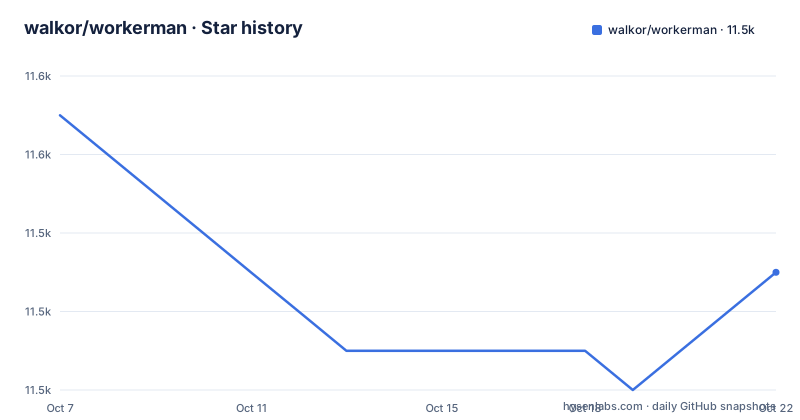
- walkor/workerman11,547 ★ · -4
| Repository | 2026-10-07 | 2026-10-22 |
|---|---|---|
| walkor/workerman | 11.6k | 11.5k |
-4 Stars in the last 15 days, measured from the daily GitHub snapshot. Compare with other projects
Editorial analysis
Installing through composer and the platform it demands
Installation is one composer command:
composer require workerman/workermanThe requirements section is stricter than that line suggests. A POSIX compatible operating system is required, with Linux, macOS and BSD named, and the POSIX and PCNTL extensions must be present. The Event, Swoole and Swow extensions are listed as recommended rather than required, on the grounds that they give better performance.
That PCNTL line is the one to internalize before anything else, because it rules out Windows. The framework forks worker processes and relies on POSIX signals and process control, none of which exist natively on Windows. This is a server-side project, not a desktop one, and the README is upfront about the cost of the architecture rather than hiding it.
The repository is a small PHP package by any measure: `composer.json`, `src/`, `tests/`, `phpunit.xml.dist`, `phpstan.neon.dist`, `SECURITY.md`, and an `MIT-LICENSE.txt`. The presence of a static analysis config and a separate security policy in a project this size says something about how it is maintained. The last push to the default branch was on 2026-08-29, and the current line is version 5.2.
A Worker object is a listening socket, and count is its process count
Every example in the README builds on the same three ideas, so it is worth stating them once. A `Worker` is created with a URI that says what kind of server to open, callbacks are attached to it as properties, and `Worker::runAll()` starts everything and blocks.
The URI is the protocol and the address in one string. The HTTP example opens port 2345:
use Workerman\Worker;

require_once __DIR__ . '/vendor/autoload.php';

$http_worker = new Worker('http://0.0.0.0:2345');

// 4 processes
$http_worker->count = 4;
The `count` property is the part that surprises people arriving from PHP-FPM. It is not a thread pool setting or a queue size. It is the number of operating system processes that will listen on that socket, so setting it to 4 means four separate PHP processes each accept connections and each run your `onMessage` callback. The kernel distributes incoming connections across them.
That model has an immediate consequence for anything you write inside the callback: state that lives in a PHP variable lives in one process. A session array, a counter, or a cache held in a global is not shared between the four processes, and a client that reconnects may land on a different one. Workerman gives you the primitives for cross-process work, and the `AsyncTcpConnection` example is the first of them, but it does not pretend that shared memory is automatic.
The TCP example is the same shape with a different protocol string:
$tcp_worker = new Worker('tcp://0.0.0.0:1234');

// 4 processes
$tcp_worker->count = 4;
The protocol prefix decides how bytes are framed. For TCP you get a stream and `onMessage` hands you whatever arrived, framed by the protocol's own rules. For HTTP and WebSocket the framework parses the message before your callback sees it.
One callback name, three different signatures
The same property name does different jobs depending on the worker, which is the main thing to get comfortable with. For a WebSocket worker, `onConnect` fires when a client connects, `onMessage` receives a decoded frame, and `onClose` fires when the connection ends. The payload is a connection object you call `send()` on.
$ws_worker = new Worker('websocket://0.0.0.0:2346');

$ws_worker->onMessage = function ($connection, $data) {
    $connection->send('Hello ' . $data);
};
For the HTTP worker the second argument is a request object rather than a raw string, and the callback's job is to write a response back through the connection:
$http_worker->onMessage = function ($connection, $request) {
    //$request->get();
    //$request->post();
    //$request->header();
    //$request->cookie();
    //$request->session();
    //$request->uri();
    //$request->path();
    //$request->method();

    $connection->send("Hello World");
};
Those commented accessors are worth reading closely, because they are the entire public surface of the request object as documented in the README: query parameters, body, headers, cookies, session, URI, path and method. There is no response object and no return value. You send on the connection. That is a lower-level shape than Laravel's request and response objects, and if you are used to a framework that returns a response, the adjustment is the biggest part of learning workerman.
Because the request object is passed to the callback, and because each worker is a separate process, the session accessor carries the same caveat as any per-process state. The README documents it exists; it does not document where the session data lives.
TLS is configured by passing a context array at construction and switching the transport, rather than by a separate server class:
$context = [
    'ssl' => [
        'local_cert'  => '/your/path/of/server.pem',
        'local_pk'    => '/your/path/of/server.key',
        'verify_peer' => false,
    ]
];

$ws_worker = new Worker('websocket://0.0.0.0:2346', $context);
The `verify_peer` default in the example is set to false, which is the kind of line that matters if you copy the example verbatim. For a server talking to clients that do not present certificates, that setting is unrelated to server identity, but it is worth understanding which side is being verified before reusing it.
Coroutines require an event loop extension you choose
The coroutine section of the README comes with an explicit condition: coroutines require the Swoole extension, the Swow extension, or the revolt event loop, and the same applies to everything after it. That is not a formality, it is the whole mechanism.
use Workerman\Coroutine;
use Workerman\Events\Swoole;
use Workerman\Protocols\Http\Request;
use Workerman\Worker;

$worker = new Worker('http://0.0.0.0:8001');

$worker->eventLoop = Swoole::class; // Or Swow::class or Fiber::class

$worker->onMessage = function (TcpConnection $connection, Request $request) {
    Coroutine::create(function () {
        echo file_get_contents("http://www.example.com/event/notify");
    });
    $connection->send('ok');
};
The `eventLoop` property is the switch. Assigning `Swoole::class`, `Swow::class`, or `Fiber::class` tells the worker which event loop implementation to drive its I/O with, and that is what allows a blocking-looking call such as `file_get_contents` on a remote URL to yield instead of freezing every other connection in the process. Without one of those extensions, the callback still runs, but the coroutine has nothing underneath it.
The example also shows the response pattern for coroutine work: the connection is answered immediately with `ok` while the outbound request continues in the background. That is fire and forget, and if you need the result you have to hold it yourself.
`Barrier` is the companion primitive for the case where you do need to wait. It creates a synchronization point, lets you spawn several coroutines, and blocks until all of them finish:
$barrier = Barrier::create();
for ($i=1; $i<5; $i++) {
    Coroutine::create(function () use ($barrier, $i) {
        file_get_contents("http://127.0.0.1:8002?task_id=$i");
    });
}
// Wait all coroutine done
Barrier::wait($barrier);
$connection->send('All Task Done');
The full README example runs a second worker on port 8002 as the task server, so the four requests are genuinely concurrent and then joined. Note that the loop starts at 1 and stops before 5, so it spawns four tasks. That off-by-one is in the README, and it is the kind of detail you would otherwise spend an afternoon on.
AsyncTcpConnection for outbound calls without blocking
Before coroutines existed in this codebase, the answer to outbound I/O was a client class. `AsyncTcpConnection` opens a non-blocking connection from inside a worker and exposes the same callback properties the server side uses.
use Workerman\Connection\AsyncTcpConnection;

$worker->onWorkerStart = function () {
    $ws_connection = new AsyncTcpConnection('ws://echo.websocket.org:80');
    $ws_connection->onConnect = function ($connection) {
        $connection->send('Hello');
    };
    $ws_connection->onMessage = function ($connection, $data) {
        echo "Recv: $data\n";
    };
    $ws_connection->connect();
};
The hook is `onWorkerStart`, not `onMessage`, because the outbound connection is made once when the process comes up rather than in response to inbound traffic. `connect()` is explicit, which means the connection object exists before it is connected and you attach handlers first.
Note the protocol URI in the example is `ws://` on port 80. The class name says TCP, but the same object speaks WebSocket, plain text, and frame protocols depending on the scheme you give it. That is why the README header for this example lists several of them.
The tree confirms the shape of the namespace. Everything lives under `src/`, and the class names used across the README, `Workerman\Worker`, `Workerman\Connection\AsyncTcpConnection`, `Workerman\Connection\TcpConnection`, `Workerman\Coroutine`, `Workerman\Coroutine\Barrier`, `Workerman\Events\Swoole` and `Workerman\Protocols\Http\Request`, map directly onto directories you would expect: connection objects, coroutine helpers, event loop implementations, and a protocols namespace with the HTTP request class.
Version 5.2 spent its effort on HTTP correctness
Reading the release notes for 5.2.0, 5.2.1 and 5.2.2 tells you what the maintainer considers worth doing in a socket framework, and the answer is request parsing rather than features.
5.2.0, published 2026-05-05, added support for chunked requests and then went through the HTTP and WebSocket classes properly: simplifying input, encode, decode, inflate and deflation paths in the Websocket class, refactoring ZLIB initialization options, improving cookie mapping and the JSON content type check in the request class, reworking WebSocket handshake error handling, and tightening header validation with named capture groups for Content-Length. It also made a missing Host header produce a 400 for HTTP/1.1 and disallowed lowercase methods and versions.
5.2.1, one day later, added an HTTP 431 status for header fields that are too large, fixed a regex against HTTP RFC 9112 section 2.3, validated the Host header format, fixed header extraction to account for buffer length, and added SOCKS5 proxy authentication. Then 5.2.2, on 2026-06-04, was a single fix for Host validation. Two patches in consecutive releases for header validation is a reasonable signal about how thin the trust boundary is when you parse HTTP yourself.
The practical consequence is that workerman is not simply an older Swoole. The parsing behavior around Host headers, methods, versions and oversized headers has been hardened recently and deliberately, against the spec rather than against test expectations. If you are evaluating this against PHP-FPM plus a standard web server, that is the axis worth comparing on, because FPM delegates parsing to something else entirely.
The README itself is a gallery of runnable examples rather than a manual. It ends with the beginning of a Parallel section and points everything else at manual.workerman.net, which is where the connection pool, database, and gateway material lives.
Editorial conclusion
workerman earns its place when the work you are doing is holding connections open rather than serving documents. The API is small enough to read in an afternoon, and the fact that `Worker::runAll()` is the last line of every example tells you the whole design: you write a long-lived process and register callbacks, not request handlers. The two costs are equally clear. Windows is not supported, because the framework needs POSIX and PCNTL, so deployment is a Linux or BSD box or a container. And the coroutine layer, which is where the throughput story gets interesting, requires Swoole, Swow, or the revolt event loop, so it is not free on a plain install. Start from the HTTP example, set `count` to the number of cores, and read the manual at manual.workerman.net for the parts the README only names.
Frequently asked questions
What is workerman in PHP?
An asynchronous, event-driven framework for building network applications in PHP, according to its own README. Instead of spawning a process per request the way PHP-FPM does, it keeps worker processes resident and dispatches callbacks for connect, message and close events, over HTTP, WebSocket or custom TCP protocols.
What does $worker->count = 4 do in workerman?
It sets the number of operating system processes that listen on that worker's socket. Each process runs your onMessage callback separately, and the kernel spreads incoming connections across them. Anything you keep in a PHP variable, such as a counter or a session array, therefore exists per process and is not shared between the four.
Does workerman support Windows?
Not natively. The README requires a POSIX compatible operating system, naming Linux, macOS and BSD, and requires the POSIX and PCNTL extensions, which is the process control machinery the worker model depends on. Windows users generally run it inside a Linux virtual machine or a WSL environment rather than on a native Windows host.
What is required to use workerman coroutines and Barrier?
An event loop extension. The README states that coroutines, and everything after them including Barrier, require the Swoole extension, the Swow extension, or the revolt event loop. You select one by assigning the worker eventLoop property to Swoole::class, Swow::class, or Fiber::class.
How do you enable SSL on a workerman server?
Pass an SSL context array as the second argument when constructing the Worker, then set the worker transport to 'ssl'. The context needs a local_cert path to your server certificate and a local_pk path to your key, and the same approach covers HTTPS since WebSocket plus SSL is simply wss.
Official sources
Add this badge to your README
If you maintain this project, the badge below links readers to this analysis and shows its maintenance status from the daily GitHub snapshot. Paste the markdown into your README; add ?metric=license or ?metric=stars to the image URL for a different field.

[](https://hysenlabs.com/projects/walkor-workerman)Star history chart for your README
[](https://hysenlabs.com/projects/walkor-workerman)Was this useful?