Bento keeps delivery state in process memory and expresses a whole pipeline in one YAML file
Fancy stream processing made operationally mundane. This repository is a fork of the original project before the license was changed.
At a glance
- What is it?
- Bento is a Go stream processor from WarpStream Labs that reads from one connector, runs processors, and writes to another, all declared in a config file. It tracks acknowledgements in memory instead of on disk, ships as a static binary or Docker image, and comes from a repository forked before a license change.
- Who is it for?
- Use Bento when you want a single binary or Docker image that moves messages between brokers, queues and databases with the pipeline defined in YAML, and your sources and sinks are at-least-once. Evaluate the delivery guarantees of your chosen sources and sinks if you need exactly-once behavior.
- Can I use it commercially?
- Check first. The repository uses a licence we do not classify automatically, so read its LICENSE file before any commercial use.
- Is it still maintained?
- Yes. The repository last received commits 2 days ago.
- What is it written in?
- Mainly Go, according to GitHub's language statistics.
Answers come from the project's GitHub data, last synced on November 7, 2026, and from our analysis. They are not legal advice.
Star history
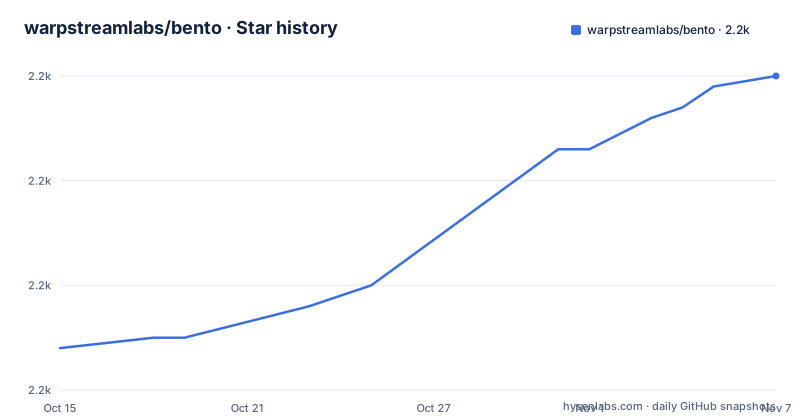
- warpstreamlabs/bento2,190 ★ · +26
| Repository | 2026-10-15 | 2026-11-07 |
|---|---|---|
| warpstreamlabs/bento | 2.2k | 2.2k |
26 Stars in the last 23 days, measured from the daily GitHub snapshot. Compare with other projects
Editorial analysis
A pipeline is one YAML file with an input, a list of processors and an output
Bento describes a stream pipeline declaratively. You write an input, a pipeline block of processing stages, and an output, and the single config file is the whole program. The README's example reads from GCP Pub/Sub, rewrites each message with a mapping, and writes to Redis Streams:
input:
  gcp_pubsub:
    project: foo
    subscription: bar

pipeline:
  processors:
    - mapping: |
        root.message = this
        root.meta.link_count = this.links.length()
        root.user.age = this.user.age.number()

output:
  redis_streams:
    url: tcp://TODO:6379
    stream: baz
    max_in_flight: 20
The mapping processor uses Bloblang, the project's own mapping language. In this snippet it copies the incoming message into root.message, counts the entries in this.links into root.meta.link_count, and coerces user.age to a number. Processors are where hydration, enrichment, transformation and filtering happen, and the docs site lists them separately from inputs and outputs.
The max_in_flight: 20 on the Redis output bounds how many messages that output holds unacknowledged at once. The TODO in the URL is the README's placeholder for your own host, so replace it before running.
Connector coverage is broad. The sources and sinks named include AWS (DynamoDB, Kinesis, S3, SQS, SNS), Azure Blob, Queue and Table storage, GCP Pub/Sub, Cloud Storage and BigQuery, Kafka, NATS JetStream, MQTT, AMQP 0.91 for RabbitMQ, Redis, Cassandra, Elasticsearch, HDFS, MongoDB, and SQL databases such as MySQL, PostgreSQL, Clickhouse and MSSQL. HTTP works as both server and client, websockets included. The README admits the full list does not fit and sends you to the docs site, and it invites an issue if the connector you want is missing. Check that list for your exact component name before committing to a design, because a missing connector means writing a Go plugin yourself.
Acknowledgements live in an in-process transaction model with no disk state
Bento processes and acknowledges messages with an in-process transaction model, and it keeps no disk-persisted state. Because of that, when you connect at-least-once sources to at-least-once sinks, it guarantees at-least-once delivery even through crashes, disk corruption or other unexpected server faults. There is no write-ahead log or local queue to lose.
The README calls this the default behavior and free of caveats, and says it makes deploying and scaling simpler. A pod can be killed and rescheduled onto a machine with an empty disk without any recovery step.
The guarantee has a stated precondition. It applies when the connected sources and sinks are themselves at-least-once. Connect an input that cannot redeliver, or an output that cannot accept a duplicate safely, and the pipeline inherits that weakness. At-least-once also means the same message can arrive at the output more than once after a failure, so downstream consumers need to tolerate duplicates. The README links a talk on the subject and does not claim exactly-once delivery anywhere.
The flip side of keeping no state on disk is that nothing on the Bento side remembers what already went through. Recovery after a crash depends entirely on the source redelivering whatever it never saw acknowledged. If you need a durable buffer between stages, that buffer has to be a broker or queue you run separately, because Bento does not provide one.
The install story is a Docker pull or a source build, and the license is unasserted
The install section opens with an admission: the release process is still in progress. The two routes it offers are compiling from source or pulling the image:
docker pull ghcr.io/warpstreamlabs/bentoThe repository does have tagged releases. The latest three are v1.22.0 on 2026-10-09, v1.21.2 on 2026-09-11 and v1.21.1 on 2026-08-26, and the last push landed on 2026-10-22. The repository is not archived. The README text predates this cadence, so the install sentence undersells what the release list shows.
Two facts about provenance matter more for a procurement review. The repository description says it is a fork of the original project before the license was changed. GitHub reports the license as NOASSERTION, meaning it could not match the LICENSE file to a known identifier. The README does not state the license terms. Read the LICENSE file itself and the CHANGELOG.md and CHANGELOG.old.md files at the top level before you put this into a commercial pipeline.
Docker runs take a mounted config file or a chain of -s overrides
Natively, the binary takes the config path with -c:
bento -c ./config.yamlWith Docker you have two options. The first mounts your file over /bento.yaml inside the container:
# Using a config file
docker run --rm -v /path/to/your/config.yaml:/bento.yaml ghcr.io/warpstreamlabs/bento

# Using a series of -s flags
docker run --rm -p 4195:4195 ghcr.io/warpstreamlabs/bento \
  -s "input.type=http_server" \
  -s "output.type=kafka" \
  -s "output.kafka.addresses=kafka-server:9092" \
  -s "output.kafka.topic=bento_topic"
The second form builds the whole config from -s flags, each one setting a dotted path such as output.kafka.topic. That suits a quick test with an HTTP server input feeding Kafka, and it exposes port 4195 for the HTTP side. The cost is readability: four flags for a trivial pipeline become unmanageable once you add processors, so the mounted file is the sensible choice for anything you intend to keep.
Note that the two examples use different container paths. The first mounts to /bento.yaml, while the Docker build section later mounts to /config.yaml with -c. Match the path to the image you actually run.
Two HTTP endpoints separate a live process from a connected one
Bento serves health checks on two HTTP endpoints, and they answer different questions.
/ping works as a liveness probe because it always returns a 200. If the process is up and serving HTTP, it answers.
/ready works as a readiness probe. It serves a 200 only when both the input and the output are connected, and otherwise returns a 503. In Kubernetes terms, a pod stuck waiting on a broker will fail readiness and stay out of rotation, while its liveness probe keeps passing so the container is not restarted for something a restart cannot fix.
Metrics can be sent to Statsd or Prometheus, or exposed through a JSON HTTP endpoint, with more backends listed on the docs site. Bento also emits OpenTelemetry tracing events, which the README says can be used to visualise the processors within a pipeline.
The README says Bento exposes lots of metrics and does not enumerate them. To learn metric names and labels, read the metrics section of the docs site before you build dashboards or alerts.
Components that link external libraries need the x_bento_extra build tag
By default Bento does not build with components that require linking to external libraries. The README's example is the zmq4 input and outputs. If you want them, set the build tag x_bento_extra:
# With go
go install -tags "x_bento_extra" github.com/warpstreamlabs/bento/cmd/bento@latest

# Using make
make TAGS=x_bento_extra
Two warnings come with it. First, the tag may change or be broken out into granular tags for individual components outside major version releases, so a build script that depends on x_bento_extra can break on a minor upgrade. Second, if the dependencies are not present on the build machine you will see errors such as `ld: library not found for -lzmq`.
The practical effect is that the published Docker image and a plain go build give you the default component set. Anyone who needs a ZeroMQ connector must compile their own binary with the C library installed. The Makefile also defines a docker-cgo target alongside docker, which suggests a separate image path for such builds, but the README does not describe it.
Building from source and writing Go plugins both go through the same module
Building needs Go, with any currently supported version. The README gives the sequence:
git clone [email protected]:warpstreamlabs/bento
cd bento
make
go build -o bento ./cmd/bento/main.go
The Makefile sets LD_FLAGS to -w -s and injects the Version and DateBuilt values from git describe, so a binary built from an untagged checkout reports v0.0.0. The multi-stage Dockerfile produces a minimal image from scratch, built with make docker, and the README then runs it with the config and a data directory mounted and port 4195 published:
docker run --rm \
	-v /path/to/your/bento.yaml:/config.yaml \
	-v /tmp/data:/data \
	-p 4195:4195 \
	bento -c /config.yaml
Custom plugins are written in Go. The README points to the API docs on godoc, a set of plugin examples, and a plugin example module for setting up your own distribution of Bento. Linting uses golangci-lint through make lint, and the version pinned in the README's install command is v2.11.3, with the GitHub Action file named as the authority on what CI currently runs.
Contributions are welcome under the guidelines in CONTRIBUTING.md.
Editorial conclusion
Use Bento when you want a single binary or Docker image that moves messages between brokers, queues and databases with the pipeline defined in YAML, and your sources and sinks are at-least-once. Evaluate the delivery guarantees of your chosen sources and sinks if you need exactly-once behavior. The repository’s LICENSE contains MIT permission terms and notices for Bento and the original contributor; review those notices and any component-specific licences for your use.
Frequently asked questions
What is Bento?
Bento is a stream processor written in Go. It connects sources and sinks in a range of brokering patterns and runs hydration, enrichment, transformation and filter processors on payloads, with pipelines declared in a config file.
Is this Bento related to the Japanese lunch box?
No. warpstreamlabs/bento is a Go stream processor. It ships as a static binary, a Docker image or a serverless function, and has no connection to food.
Is Bento actually worth it for stream processing?
It guarantees at-least-once delivery with no disk-persisted state when sources and sinks are at-least-once. Its repository license shows as NOASSERTION, so check the LICENSE file first.
Official sources
Add this badge to your README
If you maintain this project, the badge below links readers to this analysis and shows its maintenance status from the daily GitHub snapshot. Paste the markdown into your README; add ?metric=license or ?metric=stars to the image URL for a different field.

[](https://hysenlabs.com/projects/warpstreamlabs-bento)Star history chart for your README
[](https://hysenlabs.com/projects/warpstreamlabs-bento)Was this useful?