go-shiori/shiori: a single-binary bookmark manager with an offline archive
Simple bookmark manager built with Go
At a glance
- What is it?
- Shiori is a Go bookmark manager that runs as a CLI or a web app, stores data in SQLite or a server database, and saves a readable copy of each page. It is aimed at people who want their bookmarks on their own disk.
- Who is it for?
- Adopt Shiori if you want bookmarks and offline page copies on storage you control, and if a CLI plus a small web UI is enough. Skip it if you need sync across devices without running a server, or a hosted service.
- Can I use it commercially?
- Yes. MIT is a permissive licence: you can use, modify and sell software built on it, as long as you keep its copyright and licence notices.
- Is it still maintained?
- Yes. The repository last received commits 19 days ago.
- What is it written in?
- Mainly Go, according to GitHub's language statistics.
Answers come from the project's GitHub data, last synced on November 13, 2026, and from our analysis. They are not legal advice.
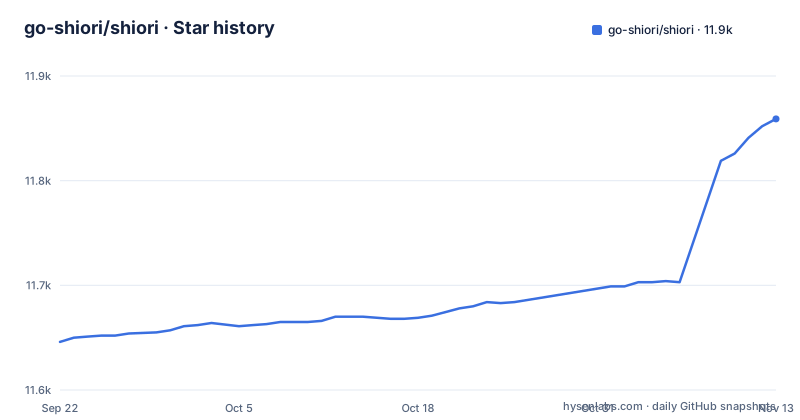
Star history
- go-shiori/shiori11,859 ★ · +213
| Repository | 2026-09-22 | 2026-11-13 |
|---|---|---|
| go-shiori/shiori | 11.6k | 11.9k |
213 Stars in the last 52 days, measured from the daily GitHub snapshot. Compare with other projects
Editorial analysis
What Shiori is for, and who should care
Shiori describes itself as a simple bookmarks manager written in Go, intended as a simple clone of Pocket. The distinction that matters is where the data lives. A hosted read-later service owns the database, the retention policy and the export format. Shiori ships as a single binary that you run yourself, so the bookmark list, the tags and the saved page content sit on your machine or your server.
The intended audience is narrow but real. You are comfortable with a terminal, or you are willing to run a small web service and point a browser at it. You want a searchable list of links plus a readable copy of pages that may disappear. You do not want to operate a database cluster, though the README lists sqlite3, PostgreSQL, MariaDB and MySQL as supported backends, so a shared server database is an option rather than a requirement.
The README also lists import and export through the Netscape Bookmark file format and import from Pocket. Those two paths are what make the tool practical to try: you can move an existing list in, and you can move it out again without writing a script against the database.
The single binary, the database layer and the offline archive
The repository layout backs up the single-binary claim. main.go sits at the top level, the application code lives under internal/, and the web interface is a separate webapp/ directory built with a small top-level package.json that pulls in less and clean-css-cli. The Go module declares github.com/spf13/cobra for the command structure, github.com/jmoiron/sqlx and github.com/huandu/go-sqlbuilder for database access, and drivers for the four backends the README names. The front end is compiled and embedded, which is why one executable can serve both the CLI and the web UI.
The archive feature is the part with real machinery behind it. The module depends on github.com/go-shiori/go-readability for extracting the readable content of a page and github.com/go-shiori/warc for web archive output. The README states that where possible, by default shiori parses the readable content and creates an offline archive of the webpage, and it shows a comparison image between reader mode and archive mode. There is also a dependency on github.com/mxschmitt/playwright-go, which points at browser-driven fetching for pages that need a real rendering engine. The README does not document when that path is chosen over a plain HTTP fetch.
Search is another implementation detail worth knowing before you commit. The module requires git.sr.ht/~emersion/go-sqlite3-fts5 and modernc.org/sqlite, which indicates full-text search is wired into the SQLite path. The README does not say how search behaves on PostgreSQL, MariaDB or MySQL, so if search quality is the reason you are choosing a server backend, that is an open question the documentation does not answer.
Installing Shiori and adding your first bookmark
The README does not contain install commands. It says the application is distributed as a single binary and points to a docs folder in the repository, with the project's documentation at docs/index.md. The repository defines a container image.
The Dockerfile builds a scratch image, sets SHIORI_DIR to /shiori, exposes port 8080 and runs the binary with the server subcommand as its default command. The repository also contains a docker-compose.yaml, but its own header comment says it is for development purposes only and should be edited to fit your needs. The compose file runs the service with the server subcommand and --log-level debug, maps port 8080, and sets SHIORI_DIR to /srv/shiori. Read that file as a development harness, not a deployment recipe.
services:
  shiori:
    container_name: shiori
    command:
      - "server"
      - "--log-level"
      - "debug"
    ports:
      - "8080:8080"
    environment:
      SHIORI_DIR: /srv/shiori
The excerpt shows a container named shiori, the server command, port 8080 published, and one environment variable pointing at the data directory. The compose file also carries commented-out examples of SHIORI_DATABASE_URL for MariaDB and PostgreSQL, which tells you the backend is selected by URL rather than by a separate config file. If you leave it unset, you get the default SQLite behaviour.
The README does not list CLI flags. What it does state is the feature set: add, edit, delete and search bookmarks, a command line interface, and a web interface for people who do not want a terminal. The command surface beyond that has to come from the docs folder or from the binary's own help output, which is the first thing to check after installing.
Where Shiori is the wrong tool
The most concrete limitation is that the README documents no multi-user story. There is no mention of accounts, sharing, permissions or per-user libraries. If two people need separate bookmark collections from one instance, the documentation does not describe how that would work.
The second limitation is the archive itself. The README says shiori will parse readable content and create an offline archive where possible. The phrase where possible is doing a lot of work. Pages behind a login, pages that render entirely in JavaScript, and pages that block automated fetching are exactly the cases where an archive is least likely to succeed, and those are often the pages you most want to keep. The presence of playwright-go in the dependency list suggests the project has an answer for rendered pages, but the README does not explain when it is used or what it costs in memory and startup time.
The third is the database choice. SQLite is the default and the easiest to back up, since the whole state is a file under SHIORI_DIR. Moving to PostgreSQL or MySQL later is not a flag flip; the README lists the supported engines but says nothing about migrating data between them. Pick the backend you intend to keep before you import thousands of links.
Finally, there is no sync. Shiori is a server you run, not a service that reconciles bookmarks across your laptop and phone. If you want that without operating anything, this is the wrong shape of tool.
How it compares with linkding and wallabag
The honest comparison is with other self-hosted bookmark servers, and the difference is mostly in packaging and language. Shiori compiles to one Go binary and can run from a scratch container with no interpreter, no package manager and no runtime dependencies beyond the CA certificates and timezone data its Dockerfile copies in. That is a meaningfully smaller deployment surface than a Python or PHP application, which needs its runtime, its dependencies and usually a separate web server in front of it.
Against linkding, the split is similar: both are self-hosted bookmark managers with a web UI, but the operational story differs. Shiori's README emphasises the single binary and the offline archive; the archive is the feature that distinguishes it from a plain list of links. If you only want tags and a search box, the archive machinery is weight you are carrying for nothing.
Against wallabag, the emphasis is reversed. Wallabag is built around reading and archiving articles as its primary purpose. Shiori treats archiving as a default behaviour attached to a bookmark manager, and the README frames the tool as a Pocket clone first. If your workflow is "save this, read it later on a tablet," a reading-focused tool fits better. If your workflow is "keep a searchable list of links and a copy of each page in case it vanishes," Shiori's framing is closer to the mark.
Maintenance, upgrades and the MIT licence
The repository is not archived, and the last push was on 2026-10-26. The most recent release listed is v1.8.0 from 2025-09-26, preceded by v1.8.0-rc.1 on 2025-07-30 and v1.7.4 on 2025-01-03.
The upgrade cost is mostly determined by your backend. With SQLite, the state is a file under SHIORI_DIR, so an upgrade is replacing the binary or the image and keeping that directory. With PostgreSQL, MariaDB or MySQL, the binary and the schema can move independently, and the repository does not document a migration procedure. Before upgrading a server-backed instance, check the release notes for the version you are moving to; the README does not document rollback, so a database backup taken first is the only recovery path described in the repository.
The licence is MIT, which the README states plainly, and the project asks that enhancements be sent back as pull requests if possible. MIT permits commercial use and modification. That is a description of the licence text, not legal advice; if you are embedding Shiori in a product, read the LICENSE file in the repository yourself.
Editorial conclusion
Adopt Shiori if you want bookmarks and offline page copies on storage you control, and if a CLI plus a small web UI is enough. Skip it if you need sync across devices without running a server, or a hosted service. Before committing, install it, add a bookmark for a JavaScript-heavy page, check whether the archive is readable, and confirm which database backend you will keep long term, because the default SQLite file and a PostgreSQL URL are not interchangeable without a migration.
Frequently asked questions
How do I use go-shiori/shiori?
You run it either as a command line application or as a web application, according to the README. The container image starts the web server by default on port 8080, and the README lists adding, editing, deleting and searching bookmarks as the core operations.
What is go-shiori/shiori?
It is a simple bookmarks manager written in Go, described in the README as intended as a simple clone of Pocket. It is distributed as a single binary and supports sqlite3, PostgreSQL, MariaDB and MySQL as its database.
What databases can go-shiori/shiori use?
The README lists sqlite3, PostgreSQL, MariaDB and MySQL. The docker-compose.yaml shows the backend selected through the SHIORI_DATABASE_URL environment variable, with commented examples for a mysql:// and a postgres:// URL.
Does go-shiori/shiori save pages offline?
The README states that where possible, by default shiori will parse the readable content and create an offline archive of the webpage. It does not document which pages fail to archive or how the rendered-page path behaves.
Can go-shiori/shiori import bookmarks from Pocket?
Yes. The README lists importing bookmarks from Pocket, and also import and export through the Netscape Bookmark file format.
Official sources
Add this badge to your README
If you maintain this project, the badge below links readers to this analysis and shows its maintenance status from the daily GitHub snapshot. Paste the markdown into your README; add ?metric=license or ?metric=stars to the image URL for a different field.

[](https://hysenlabs.com/projects/go-shiori-shiori)Star history chart for your README
[](https://hysenlabs.com/projects/go-shiori-shiori)Was this useful?