Claude Code Cookbook: the plugin behind its 39 slash commands
A collection of settings to make Claude Code more useful.
At a glance
- What is it?
- Claude Code Cookbook wraps Claude Code with 39 slash commands, 9 expert roles and a single permissions hook. Its top-level page names only part of that catalogue, ships no install step, and leans on an MCP server it never configures.
- Who is it for?
- Adopt Claude Code Cookbook for its slash commands and its 9 role presets, and open `plugins/en/README.md` before anything else, because the top-level page names twenty-seven of the 39 commands and documents no install step. Pass on it if you need a versioned package: the tree records no licence identifier, the last push to main landed on 2026-04-15, and the one documented hook is `preserve-file-permissions.sh`.
- Can I use it commercially?
- Not without permission. GitHub finds no licence file in the repository, and without a licence all rights are reserved by default: you may read the code but not reuse it. Check the README, or ask the authors, before using it.
- Is it still maintained?
- Activity is slowing. The repository last received commits 6 months ago.
- What is it written in?
- Mainly Shell, according to GitHub's language statistics.
Answers come from the project's GitHub data, last synced on November 7, 2026, and from our analysis. They are not legal advice.
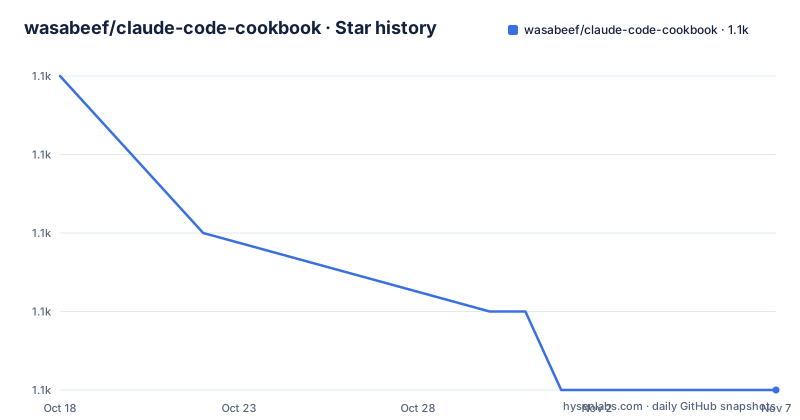
Star history
- wasabeef/claude-code-cookbook1,132 ★ · -4
| Repository | 2026-10-18 | 2026-11-07 |
|---|---|---|
| wasabeef/claude-code-cookbook | 1.1k | 1.1k |
-4 Stars in the last 20 days, measured from the daily GitHub snapshot. Compare with other projects
Editorial analysis
Twenty-seven commands appear where the count says thirty-nine
Claude Code Cookbook is a plugin repository, and its shape shows up fastest if you count the command tables rather than read the prose around them. Pull Request Management carries 6 entries: `/pr-list`, `/pr-issue`, `/pr-create`, `/pr-review`, `/pr-fix` and `/pr-auto-update`. Code Quality & Refactoring adds 6, Development Tools adds 6, Planning & Analysis adds 6, and Dependency Management holds 3 with `/update-node-deps`, `/update-flutter-deps` and `/update-rust-deps`. Those five categories name twenty-seven commands between them, while the same page claims 39 slash commands organized by category and then sends the reader elsewhere with the line "See your language plugin for the complete list of 39 commands with detailed documentation." So twelve commands ship in the repository and cannot be read from the page most people land on. They sit in the 8 language plugins under `plugins/`, in files named `plugins/en/README.md`, `plugins/ja/README.md`, `plugins/zh-cn/README.md` and their siblings. Finding out what a command actually does means choosing a language first, an odd tax on a repository whose primary language is recorded as Shell.
Roles dispatch through a namespace the command tables never show
Roles sit apart from commands, and the addressing differs as well. The catalogue holds 9 entries, `security`, `architect`, `frontend`, `backend`, `performance`, `qa`, `mobile`, `reviewer` and `analyzer`, each one a preset that puts Claude Code into a specialist mode for a slice of work. Their invocations in the README are namespaced, `/cook:role security` for a single role, and no entry in the command tables carries that prefix, so commands and roles are reached through two different schemes inside one plugin. The `--agent` option is where the cost model changes. Every role can run as an independent sub-agent, which keeps its transcript out of the main context, and `/cook:multi-role` takes a comma-separated list so several can run in parallel. The stated payoff is execution without interfering with main context. What the README does not state is how many sub-agents a single invocation may spawn, or what happens when two of them touch the same file at once.
One shell hook guards permissions, not confirmations
The automation story rests on a single script. `preserve-file-permissions.sh` is bound to the `PreToolUse` and `PostToolUse` events, and its stated job is saving and restoring file permissions to prevent unintended changes. One entry, in one table, is the entire hook surface documented at the top level. Set that against the opening promise, "Automate your workflow without unnecessary confirmations", and the gap is easy to name: an event hook can intercept a tool call, but the script shipped here does not suppress a confirmation, it repairs permissions afterwards. Hooks are wired through `settings.json`, so picking up that behaviour means editing a config file rather than typing anything. The tree carries `scripts/` and `settings.json` side by side, and with Shell as the recorded primary language this hook is the one piece that depends on the machine's shell rather than on Claude Code itself.
No install command exists, so first use starts in the language plugin
No installation step exists anywhere in the README. There is no clone command, no package manager invocation and no marketplace URL. The top-level entries are `.claude-plugin/`, `.github/`, `.gitignore`, `.markdownlint.json`, `.mcp.json`, `README.md`, `assets/`, `commitlint.config.js`, `lefthook.yml`, `package-lock.json`, `package.json`, `plugins/`, `scripts/` and `settings.json`, and nothing is published from them, since the single manifest, `package.json`, is marked `"private": true`. The documented route to a first real use therefore runs through the language plugins, one of the 8 READMEs under `plugins/`, where every command carries its own description. Once you have picked one, a role session looks like this.
# Normal mode (execute in main context)
/cook:role security
"Review this authentication system for vulnerabilities"

# Sub-agent mode (execute in independent context)
/cook:role security --agent
"Perform comprehensive security audit of entire project"

# Multiple roles in parallel
/cook:multi-role security,performance --agent
"Analyze system's security and performance comprehensively"
Three invocations, three execution shapes: run inline in the main context, run detached, run detached twice over. What you should see is Claude Code answering the quoted prompt, not a new binary appearing, because nothing here is compiled or installed on your behalf.
The sequential thinking command leans on an MCP server never configured
Most entries are prompt text you can read before running. One is not. `/sequential-thinking` is documented as thinking through complex problems step by step using Sequential Thinking MCP, which is a server outside the repository rather than a template inside it. The top-level tree does include `.mcp.json`, the natural home for MCP server definitions, but no server name, package, transport or configuration block appears anywhere in the README, so a reader cannot check what that command reaches for before typing it. Two more entries lean outward as well. `/task` launches specialized agents for autonomous search, research and analysis tasks, and `/check-fact` verifies accuracy by referencing codebase and documentation. Neither is a static prompt, and neither documents a failure path. If the MCP server is missing, the README is silent on what `/sequential-thinking` does next, and that silence is the practical limit of a cookbook that otherwise hands over its own prompt text.
Three dispatch paths: typed command, sub-agent, or event hook
The cookbook offers 3 routes to behaviour, and they differ in more than syntax. A slash command such as `/fix-error` or `/commit-message` costs a keystroke and a round trip, and the prompt travels with the repository, so you can read it before trusting it. A role dispatched with `--agent` moves work off the main context and buys parallelism, at the price of isolation, because a sub-agent hands back a result instead of an editable transcript. An event hook such as `preserve-file-permissions.sh` needs no prompt at all and fires on `PreToolUse` and `PostToolUse`, but it cannot be asked a question and cannot explain its own reasoning. Dependency handling splits along the same line: `/update-node-deps`, `/update-flutter-deps` and `/update-rust-deps` are 3 per-ecosystem commands, while `/semantic-commit` stays language-neutral and `/commit-message` stays language-blind. No competing collection is named anywhere and no comparison table exists, so this triage is the comparison a reader has to carry out alone.
The repository is private, so adoption means copying files
Upgrading this cookbook is not a version bump, because there is nothing to bump. `package.json` is marked `"private": true`, which rules out publishing it as a package, and the 3 dev dependencies it does pin exist for the repository's own commit and hook tooling:
{
  "private": true,
  "devDependencies": {
    "@commitlint/cli": "^20.5.0",
    "@commitlint/config-conventional": "^20.5.0",
    "lefthook": "^2.1.5"
  },
  "scripts": {
    "commitlint": "commitlint --edit"
  }
}
The `commitlint` script runs `commitlint --edit`, with `commitlint.config.js` and `lefthook.yml` sitting at the top level beside `.markdownlint.json`. Those caret ranges drift as upstream moves, and nothing in the repository refreshes them by itself, because the one documented hook fires on tool events rather than on a timer. Note also which ecosystems the 3 update commands target, Node.js, Flutter and Rust, inside a repository whose primary language is Shell. That mismatch is a fair signal that they were written for other people's codebases. The tree records no licence identifier, and the last push to main landed on 2026-04-15. With 8 language plugins and no sync script documented, two copies of one command can drift apart quietly.
Editorial conclusion
Adopt Claude Code Cookbook for its slash commands and its 9 role presets, and open `plugins/en/README.md` before anything else, because the top-level page names twenty-seven of the 39 commands and documents no install step. Pass on it if you need a versioned package: the tree records no licence identifier, the last push to main landed on 2026-04-15, and the one documented hook is `preserve-file-permissions.sh`. Check your own `settings.json` and `.mcp.json` before copying either over, since the README names no MCP server behind `/sequential-thinking`.
Frequently asked questions
How do I install Claude Code Cookbook?
The README gives no install step and names no package manager command. The top-level tree carries `.claude-plugin/`, `settings.json`, `.mcp.json`, `plugins/` and `scripts/`, and the only entry points offered are the 8 language READMEs under `plugins/`, such as `plugins/en/README.md`.
How many commands does Claude Code Cookbook contain?
The README states 39 slash commands organized by category. Its own tables name twenty-seven of them across five categories and then point to the language plugin for the complete list of 39.
Can a Claude Code Cookbook role run outside the main context?
Yes. Each role can run independently as a sub-agent using the `--agent` option, and `/cook:multi-role` takes a comma-separated list such as `security,performance` for parallel execution.
Does Claude Code Cookbook need an MCP server?
One command does. `/sequential-thinking` is documented as using Sequential Thinking MCP, and the tree contains `.mcp.json`, but the README shows no server entry, package name or configuration block for it.
Which pull request commands does Claude Code Cookbook ship?
Six of them: `/pr-list`, `/pr-issue`, `/pr-create`, `/pr-review`, `/pr-fix` and `/pr-auto-update`, covering prioritised listings, generated pull requests, systematic review, a 3-stage response to review comments, and automatic description and label updates.
Official sources
Add this badge to your README
If you maintain this project, the badge below links readers to this analysis and shows its maintenance status from the daily GitHub snapshot. Paste the markdown into your README; add ?metric=license or ?metric=stars to the image URL for a different field.

[](https://hysenlabs.com/projects/wasabeef-claude-code-cookbook)Star history chart for your README
[](https://hysenlabs.com/projects/wasabeef-claude-code-cookbook)Was this useful?