fastapi-langgraph-agent-production-ready-template: four places where its own files disagree
A production-ready FastAPI template for building AI agent applications with LangGraph integration. This template provides a robust foundation for building scalable, secure, and maintainable AI agent services.
At a glance
- What is it?
- This repository is a FastAPI plus LangGraph backend template with mem0 memory, JWT sessions, Alembic, Langfuse tracing and a Compose stack for local runs. Reading the Dockerfile, the Compose file, pyproject.toml and .env.example side by side turns up a health check that calls a missing binary, a guard that a placeholder satisfies, two Postgres drivers, and three different model counts.
- Who is it for?
- Take this template as a layout, not as a deployment. Its own files disagree about the model count, the version number and the default environment, and the pieces most likely to bite a real deployment are the ones the quickstart does not mention: a health check that needs curl, a JWT secret guard that the copied placeholder passes, and a database service pinned to linux/amd64.
- Can I use it commercially?
- Yes. MIT is a permissive licence: you can use, modify and sell software built on it, as long as you keep its copyright and licence notices.
- Is it still maintained?
- Yes. The repository last received commits 36 days ago.
- What is it written in?
- Mainly Python, according to GitHub's language statistics.
Answers come from the project's GitHub data, last synced on November 22, 2026, and from our analysis. They are not legal advice.
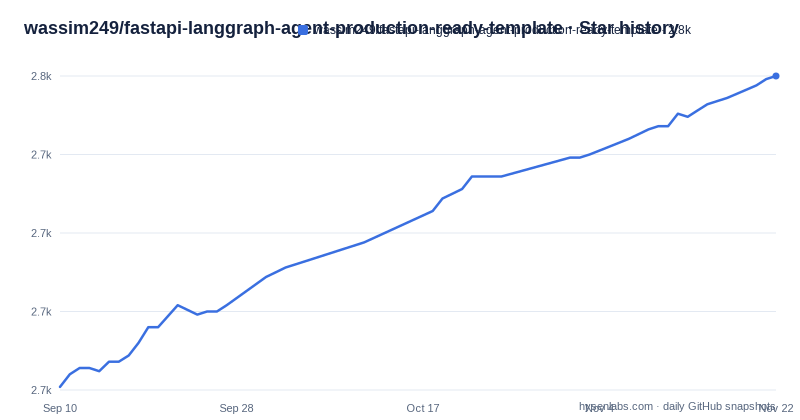
Star history
- wassim249/fastapi-langgraph-agent-production-ready-template2,750 ★ · +99
| Repository | 2026-09-10 | 2026-11-22 |
|---|---|---|
| wassim249/fastapi-langgraph-agent-production-ready-template | 2.7k | 2.8k |
99 Stars in the last 73 days, measured from the daily GitHub snapshot. Compare with other projects
Editorial analysis
The model count is 130, 136, and 59 in three different files
The sponsor block, the catalog and the environment template give three answers. The prose says Atlas Cloud gives you access to 130+ curated models through an OpenAI-compatible endpoint, the collapsible catalog header reads 136 available in total, and the comment next to the Atlas Cloud block inside .env.example says access 59+ LLMs with one key. The catalog itself is labelled a current selection and ends with a link to the vendor's live list, so the table is a snapshot of something that changes without a repository commit. Model identifiers do not line up either: the table lists openai/gpt-5.6-luna and deepseek-ai/deepseek-v4-pro with a provider prefix, while DEFAULT_LLM_MODEL in .env.example is the bare gpt-5.6-luna, which is the form a first-party OpenAI endpoint expects. The LLMRegistry in this template is described as built on langchain_openai.ChatOpenAI, so the identifier you put in that setting decides which of the two naming styles has to match.
The app health check calls a curl the image never installs
The Compose health check for the app service runs curl:
    healthcheck:
      test: ["CMD", "curl", "-f", "http://localhost:8000/health"]
      interval: 30s
      timeout: 10s
      retries: 3
      start_period: 10s
The Dockerfile installs exactly two packages, build-essential and libpq-dev, on top of python:3.13.2-slim, and curl is not among them. The two other services avoid this problem by checking a binary that ships in their own images: the database uses pg_isready against the postgres image and Valkey uses valkey-cli against the valkey image. Since the app service has restart: on-failure and its health check is what an orchestrator reads, this is the line to change first if you build the image as written. The entrypoint is /app/scripts/docker-entrypoint.sh, made executable before the image drops to the appuser account, so whatever health endpoint the container reports has to be registered by the time that script hands over to uvicorn on port 8000.
The JWT guard passes on the placeholder the quickstart copies
Compose refuses to start the app without a JWT secret, and the quickstart hands you a file that contains one:
git clone <repo-url> my-agent && cd my-agent
cp .env.example .env.development   # fill in your keys
make install
make docker-up                     # starts API + PostgreSQL
The Compose side reads JWT_SECRET_KEY=${JWT_SECRET_KEY:?JWT_SECRET_KEY must be set to a strong random value}, which fails only when the variable is empty. The file you just copied sets JWT_SECRET_KEY="CHANGE_ME_TO_A_RANDOM_32_PLUS_CHAR_STRING", so the guard is satisfied by the placeholder and the app starts. JWT_ALGORITHM is HS256 and JWT_ACCESS_TOKEN_EXPIRE_DAYS is 30, so a token that is signed with a shipped constant is valid for a month. The same example file also carries DEBUG=true, POSTGRES_PASSWORD=mypassword, and ALLOWED_ORIGINS limited to localhost:3000 and localhost:8000. None of this is a hidden default, all of it is visible in one file, and the quickstart only says to fill in your keys without saying which ones stop the stack from booting.
The database is pinned to linux/amd64 and the app bind mounts over its own image
The db service sets platform: linux/amd64 while the rest of the file does not, which means the Postgres container runs emulated on an arm64 host such as a Mac. It publishes 5432 to the host, keeps its data in a named volume, and checks pg_isready every 10 seconds with five retries before anything depends on it. The app service then bind mounts ./app over /app/app and ./logs over /app/logs. That second pair is worth thinking about against the Dockerfile, which installs the project itself with uv sync --frozen after copying the whole tree: whatever Python code ships in the image is shadowed by the host directory at run time, so the lock file and the running code can drift apart in a way that survives until an import fails. The Compose file also overrides POSTGRES_HOST to db, with a comment explaining that the localhost value in the env files is correct for make dev but unreachable from inside a container.
The Compose env file and the image default name different environments
The app service loads its configuration from a filename computed at start time, .env.${APP_ENV:-development}, so the same file serves development, staging and production without a second Compose file. The image disagrees about the default. The Dockerfile takes a build argument, ARG APP_ENV=production, and bakes it into the environment, then ends the build by echoing Using ${APP_ENV} environment so the image label in a layer tells you which one it thinks it is. Compose passes the opposite default into that argument, APP_ENV: ${APP_ENV:-development}, so an image built by make docker-up is a development-labelled image even though the Dockerfile on its own would produce a production one. With DEBUG=true and LOG_LEVEL=DEBUG coming from the copied example file, the difference is visible in the logs rather than in the configuration interface.
Two Postgres drivers, two search clients, four linters
The runtime dependency list carries psycopg[binary] and psycopg2-binary at the same time, so both a version 3 and a legacy version 2 driver are installed and the choice of which one is used is decided in code rather than in packaging. The same pattern shows up with duckduckgo-search and ddgs, two separate DuckDuckGo clients. On the tooling side, the dev extra installs black, isort, flake8 and ruff, four formatters and linters with overlapping jobs, and the dev dependency group repeats ruff with a floor of 0.11.4 while adding pyright, detect-secrets and pre-commit. Only two runtime entries are pinned exactly: langfuse==3.9.1 and djlint==1.36.4, and everything else is a lower bound, so a fresh install can resolve to versions the template has never run against. Two more entries have no visible explanation anywhere in the documentation table: supabase, and colorama and tqdm next to the evaluation framework.
Two version numbers, and one answer that stops mid-word
The packaging metadata says version 0.1.0 in pyproject.toml under the name langgraph-fastapi-template, which is not the repository name, while .env.example sets VERSION=1.0.0 for the running application. The repository publishes no GitHub releases, so nothing else in the tree resolves the difference, and the default branch is master. The last commit on that branch is dated 2026-09-25. The README also carries its own answers section, and the one comparing this template with a basic LangGraph setup is cut off after the words This template adds Alembic migrati, so the list of what it adds over the plain quickstart is only visible up to that point. Everything else in that section is present, along with ten guides under docs/, a Makefile whose install and docker-up targets are the only ones named, and AGENTS.md, CLAUDE.md, a pre-commit config and a detect-secrets baseline at the root.
Editorial conclusion
Take this template as a layout, not as a deployment. Its own files disagree about the model count, the version number and the default environment, and the pieces most likely to bite a real deployment are the ones the quickstart does not mention: a health check that needs curl, a JWT secret guard that the copied placeholder passes, and a database service pinned to linux/amd64. Before using it in production, read the ten guides under docs/ rather than the README summary, decide whether the mem0 and Langfuse calls are acceptable as external dependencies in your data path, replace every CHANGE_ME and mypassword value, and pin the two libraries that float with floor-only constraints. Anyone who needs Windows or a non-Postgres store has to do the porting work first.
Frequently asked questions
What does the fastapi-langgraph template need before make docker-up will start?
The quickstart copies .env.example to .env.development first, because the Compose file loads .env.${APP_ENV:-development} as its env_file. Compose also requires JWT_SECRET_KEY to be non-empty, using the ${VAR:?message} form, and the app service waits for the db service to report healthy before it starts.
How many models does the Atlas Cloud integration in this template offer?
The README says three different numbers: 130+ curated models in the sponsor paragraph, 136 available in total in the catalog header, and 59+ LLMs in the comment inside .env.example. The catalog is described as a current selection and the complete list lives on the vendor's site.
Which Python version does the fastapi-langgraph template require?
The packaging metadata sets requires-python to >=3.13, and the Dockerfile starts from python:3.13.2-slim. Dependencies are installed with uv sync --frozen against the checked-in uv.lock, in two passes, first without the project and then with it.
Does this template work on Windows or with a non-Postgres store?
Nothing in the tree offers a store other than Postgres: alembic migrations target pgvector and the db service runs pgvector/pgvector:pg16 pinned to platform linux/amd64. The only declared platform gate in the dependencies is uvloop, which carries the marker platform_system != 'Windows'.
Official sources
Add this badge to your README
If you maintain this project, the badge below links readers to this analysis and shows its maintenance status from the daily GitHub snapshot. Paste the markdown into your README; add ?metric=license or ?metric=stars to the image URL for a different field.

[](https://hysenlabs.com/projects/wassim249-fastapi-langgraph-agent-production-ready-template)Star history chart for your README
[](https://hysenlabs.com/projects/wassim249-fastapi-langgraph-agent-production-ready-template)Was this useful?