Async-profiler: a sampling profiler that sidesteps the safepoint bias
Sampling CPU and HEAP profiler for Java featuring AsyncGetCallTrace + perf_events
At a glance
- What is it?
- Apache 2.0, C++, and built on HotSpot-specific APIs rather than JVMTI. It profiles CPU, allocations, native memory, locks and hardware counters, and its recent releases have been about output formats as much as about speed.
- Who is it for?
- Async-profiler is the right tool when you need to know where a HotSpot JVM is actually spending time and the usual answer is blocked by safepoint bias or instrumentation overhead. It is the wrong tool for a runtime that is not HotSpot-based, and for anyone who needs a GUI or a licence to use it, since it is Apache 2.0 with no commercial tier.
- Can I use it commercially?
- Yes. Apache-2.0 is a permissive licence: you can use, modify and sell software built on it, as long as you keep its copyright and licence notices.
- Is it still maintained?
- Yes. The repository last received commits 3 days ago.
- What is it written in?
- Mainly C++, according to GitHub's language statistics.
Answers come from the project's GitHub data, last synced on October 23, 2026, and from our analysis. They are not legal advice.
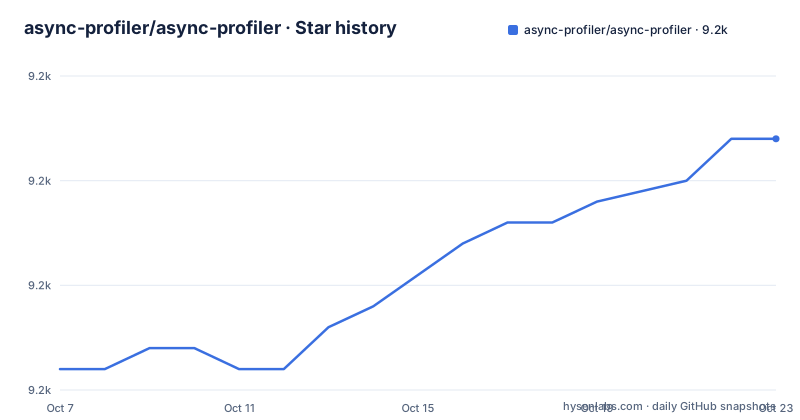
Star history
- async-profiler/async-profiler9,172 ★ · +11
| Repository | 2026-10-07 | 2026-10-23 |
|---|---|---|
| async-profiler/async-profiler | 9.2k | 9.2k |
11 Stars in the last 16 days, measured from the daily GitHub snapshot. Compare with other projects
Editorial analysis
Why safepoint bias changes what you see
The README's first technical claim is the one that separates this profiler from most others: it is a low overhead sampling profiler that does not suffer from the safepoint bias problem, and it links to the well known write-up on why most sampling Java profilers are affected. The mechanism is worth understanding, because it explains the design. A JVM can only walk another thread's stack at a safepoint, so a traditional sampling profiler that requests a stack trace at a random moment often gets its answer late, and the delay is not random. It is correlated with what the target thread is doing, which means GC-heavy or allocation-heavy phases get over-represented in the profile.
Async-profiler collects stack traces through HotSpot-specific APIs, and the repository description names the mechanism directly: AsyncGetCallTrace plus perf_events. Reading a thread's stack without waiting for a safepoint is what removes the distortion.
The second structural difference is that it monitors non-Java threads, GC and JIT compiler threads among them, and shows native and kernel frames in stack traces. That means a profile can tell you that time went into a syscall or into the JIT compiler rather than into your code, which is exactly the kind of finding a pure Java profiler cannot produce.
The scope is HotSpot. The README says it works with OpenJDK and other Java runtimes based on the HotSpot JVM, so a non-HotSpot JVM is out of scope, and the supported platforms table lists officially maintained builds for Linux and macOS only.
Attaching to a running JVM is one command
The quick start is short enough to quote exactly. In a typical use case, profiling a Java application is a matter of running `asprof` with the PID of a running Java process:
$ asprof -d 30 -f flamegraph.html <PID>That runs the profiler for 30 seconds and writes an interactive Flame Graph to `flamegraph.html`, which opens in a browser. No restart, no agent jar, no JVM flags to add at launch. For a production process you cannot restart, that is the feature that decides the comparison against other profilers, several of which need a startup agent or a debug port.
Downloading it means picking an archive from the releases page. The stable release listed in the README is 4.5, with Linux x64 and Linux arm64 tarballs, a macOS zip covering arm64 and x64, and a separate `jfr-converter.jar` for profile converters. There is also a `nightly` tag whose description says binaries are published automatically from the latest sources in `master` upon a successful build, and the README explains that per-commit binaries from previous workflow runs are kept for 30 days.
That nightly channel is genuinely useful and it is also the thing to be careful about. Being able to test a fix against a JDK release within hours of it landing is worth a lot, and a 30-day retention window means the exact binary you validated is easy to lose. Pin the stable tag in anything you intend to keep.
Profiling modes go well past CPU time
The README lists what can be profiled, and the list is where the project earns its keep. CPU time is first. Then allocations in the Java heap, native memory allocations and leaks, contended locks, and hardware and software performance counters such as cache misses, page faults and context switches, with a link to `docs/ProfilingModes.md` for more.
Native memory tracking is the item that stands out, because it is not something a pure Java profiler can do at all. If a JVM is growing its resident set while your heap metrics look flat, the leak is in code the JVM does not manage, and async-profiler's native allocation mode is built for exactly that question.
Contended locks are the other practical one. Thread contention shows up in a wall-clock profile as time parked in a monitor enter, and because this profiler shows native frames too, you can often see whether the blocking is in your lock or somewhere below it in the runtime.
The documentation list in the README maps onto those modes. `docs/ProfilerOptions.md` and `docs/ProfilingModes.md` cover the surface, `docs/CpuSamplingEngines.md` and `docs/StackWalkingModes.md` cover the two axes that change the numbers most, and `docs/Heatmap.md`, `docs/OutputFormats.md` and `docs/JfrVisualization.md` cover what you get back. There is also `docs/ProfilingNonJavaApplications.md`, which is worth reading if your process shells out to native binaries.
Output formats are where v4.5 spent its attention
The v4.5 release, published on 2026-07-20, is the interesting one to read. Its headline features are a Span API for latency profiling, parsing DWARF unwinding info in the `.debug_frame` section, and compatibility with OpenTelemetry Profiles Alpha. Under improvements: JDK 27 support, Hot Code Heap support, and building jfr-converter as a GraalVM Native Image.
The breaking changes matter more than the features for anyone with existing automation. The `otlp` output format changed in line with opentelemetry-proto v1.10.0, so a dashboard or collector built against the old schema needs updating. `AsyncProfiler.dumpOtlp()` now accepts a `Counter` argument. If you are integrating this into telemetry infrastructure, v4.5 is a migration, not a drop-in.
v4.4, published on 2026-04-20, added differential Flame Graphs, which let you diff a good profile against a bad one, and it is where the project got serious about removals: the `check` command was permanently removed, unsafe AsyncGetCallTrace recovery tricks were removed along with the `safemode` option, and `cstack=lbr` was removed. A `memlimit` option arrived to cap the size of call trace storage.
Both releases also fixed unwinding and visualisation bugs on ARM64, including vDSO unwinding and generated stubs on JDK 26+, which is the sort of work that shows where a profiler's users actually are. The nightly channel means these fixes can land within hours of a JDK release.
Building from source needs a JDK and a static libstdc++
The README gives minimum requirements as make, GCC 7.5.0 or Clang 7.0.0 or newer, a static version of libstdc++, and JDK 11 or newer. The static library requirement is the one that catches people on RPM-based distributions, and the README names the package for Amazon Linux 2023:
+yum install libstdc++-static
+
With `gcc`, `g++` and `java` on the `PATH`, you navigate to the source root and run `make`, and the launcher appears at `build/bin/asprof`:
+make
+
The `Makefile` shows the shape of the build. `PROFILER_VERSION ?= 4.5` at the top, with commit tags folded into the version when `COMMIT_TAG` is set, is how the nightly binaries get their names. The C++ flags are `-O3 -fno-exceptions -fno-rtti -fno-omit-frame-pointer -fvisibility=hidden -std=c++11`, and the release profile keeps frame pointers on, which is a deliberate choice for a stack walker. `JAVA_TARGET=8` with `JAVAC_OPTIONS=--release $(JAVA_TARGET)` means the Java side of the project, the `asprof` API and the jars, still compiles for Java 8 even though the native build needs JDK 11 or newer.
There are `make test` for unit and integration tests and `make release` for packaging as `.tar.gz` on Linux or `.zip` on macOS. A `docker/` directory in the tree and `docs/ProfilingInContainer.md` cover running against a JVM in a container, which is a separate problem from running on a host.
Licence, language, and the honest comparison
Apache 2.0, written in C++, on the `master` branch, and the repository is not archived with the last push on 2026-09-21. The licence is the part of the decision that often settles it: this is a free tool with no commercial edition, and the same binary is what you use on a laptop and in production.
Against commercial JVM profilers, the difference in approach is instrumentation versus sampling. Commercial profilers typically offer richer live views, configurable triggers, a UI for exploring and a memory database for history. Async-profiler gives you a low overhead sampler with excellent stack fidelity and then hands you a file: a Flame Graph, a heatmap, a JFR recording, or an OTLP payload. If your workflow is attach, sample for thirty seconds, read the graph, that difference costs you nothing.
Where it is genuinely weaker is history and live monitoring. There is no storage layer, no agent fleet, no alerting on a regression. A JFR recording can be kept and compared, and the differential Flame Graphs in v4.4 help, but there is nothing that watches a fleet while you sleep.
Integration is the third axis. `docs/IntegratingAsyncProfiler.md` and the Span API in v4.5 point towards embedding this in your own tooling and telemetry pipeline, and `jfr-converter.jar` plus the `one.convert` package cover converting recordings for other consumers. If you already run OpenTelemetry, the `otlp` format and the v4.5 schema change are the details to read first, because that is where the integration cost lands.
Editorial conclusion
Async-profiler is the right tool when you need to know where a HotSpot JVM is actually spending time and the usual answer is blocked by safepoint bias or instrumentation overhead. It is the wrong tool for a runtime that is not HotSpot-based, and for anyone who needs a GUI or a licence to use it, since it is Apache 2.0 with no commercial tier. Version 4.5 is the current stable release and the project also publishes nightly binaries from `master`, kept for 30 days, which makes it easy to try a fix before waiting for a tag. Start with `asprof -d 30 -f flamegraph.html <PID>` against a process you already suspect is slow, then read `docs/ProfilerOptions.md` before changing engines, because the stack walking and sampling engine options are where the behaviour changes most.
Frequently asked questions
Which JVM profiler is the best?
It depends on the runtime and what you are looking for. Async-profiler is built on HotSpot-specific APIs, using AsyncGetCallTrace and perf_events, so it avoids the safepoint bias that affects most sampling Java profilers, and it is Apache 2.0 with no commercial edition. It also monitors non-Java threads such as GC and JIT compiler threads and shows native and kernel frames. It works with OpenJDK and other HotSpot-based runtimes.
How do I install async-profiler?
Download a release archive from the project's releases page, where the current stable release is 4.5, with Linux x64 and arm64 tarballs and a macOS zip. Alternatively build it from source with make, which needs make, GCC 7.5.0 or newer, JDK 11 or newer, and a static libstdc++, and places the launcher at `build/bin/asprof`.
How do I profile a running Java process with async-profiler?
Run the `asprof` launcher with the process ID and a duration, for example `asprof -d 30 -f flamegraph.html <PID>`, which profiles for 30 seconds and writes an interactive Flame Graph you open in a browser. No agent or JVM startup flag is required. `docs/GettingStarted.md` has the fuller walkthrough.
Does async-profiler work on Windows?
The README's supported platforms table lists officially maintained builds for Linux and macOS, with other ports for Linux including x86, arm32, ppc64le, riscv64 and loongarch64. It does not list Windows, and the project profiles HotSpot-based runtimes. Nightly binaries are published from `master` after a successful build and are kept for 30 days.
Official sources
Add this badge to your README
If you maintain this project, the badge below links readers to this analysis and shows its maintenance status from the daily GitHub snapshot. Paste the markdown into your README; add ?metric=license or ?metric=stars to the image URL for a different field.

[](https://hysenlabs.com/projects/async-profiler-async-profiler)Star history chart for your README
[](https://hysenlabs.com/projects/async-profiler-async-profiler)Was this useful?