WebGLSamples: a hosting site for a wide set of WebGL sample applications
WebGL Samples and Examples
At a glance
- What is it?
- WebGLSamples.github.io is not a library but a place to host and work on WebGL sample applications, with the Aquarium, Blob, Caves, toon shading and cloth simulation demos among many others, each credited to its author. It is a static site on GitHub Pages with a custom licence and no releases, so adopting it means forking and hosting rather than installing a dependency.
- Who is it for?
- Adopt WebGLSamples if you want a proven WebGL sample to fork, study or present, especially Aquarium if you need a scene that runs synced across several machines. Do not treat it as a library or a dependency, since there is no package to install and no API to call.
- Can I use it commercially?
- Check first. The repository uses a licence we do not classify automatically, so read its LICENSE file before any commercial use.
- Is it still maintained?
- Yes. The repository last received commits 8 days ago.
- What is it written in?
- Mainly Wolfram Language, according to GitHub's language statistics.
Answers come from the project's GitHub data, last synced on November 7, 2026, and from our analysis. They are not legal advice.
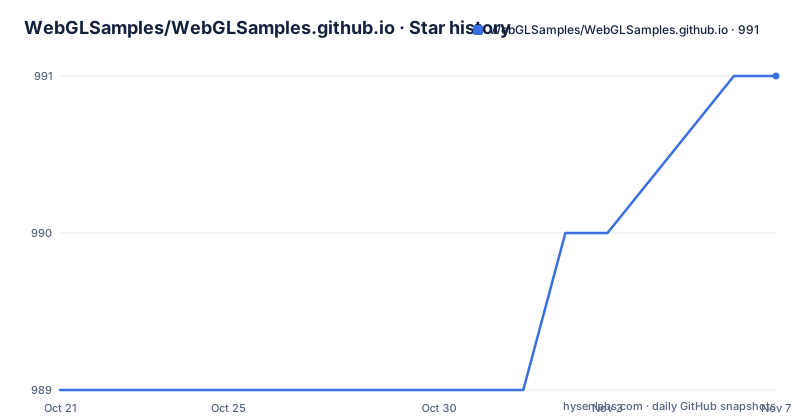
Star history
- WebGLSamples/WebGLSamples.github.io991 ★ · +2
| Repository | 2026-10-21 | 2026-11-07 |
|---|---|---|
| WebGLSamples/WebGLSamples.github.io | 989 | 991 |
2 Stars in the last 17 days, measured from the daily GitHub snapshot. Compare with other projects
Editorial analysis
A place to host samples, not a library to install
The repository describes itself in one line: a place to host and work on some WebGL sample applications, with an invitation to contribute if you want. That is the whole scope, and it is worth being clear about it because the name invites a different assumption.
There is no package here, no entry point to import and no API to call. What there is, is a large collection of small self-contained WebGL applications, each living in its own directory at the root of the repository, and a static site that publishes them. The homepage is webglsamples.org, and the repository carries a CNAME file, which is the mechanism that points a GitHub Pages site at a custom domain.
For a working engineer, the practical value is reference implementations you can read in full. A sample that demonstrates one technique, in a directory you can open, is often a faster route to understanding a WebGL detail than a page of prose, and the samples here are small enough to read end to end.
The authors are credited individually and the list is long, so this is closer to a curated gallery than a single maintainer's project.
Aquarium is the one built to run across machines
Among the samples, Aquarium stands apart because it is not only a scene. The README notes that you can also run the Aquarium synced across multiple machines, and points to a separate README for more information on that.
That is a different category of demo. A single machine rendering a scene proves the graphics work. Several machines rendering the same scene and agreeing about what it contains is a demonstration of shared state, of synchronised viewpoints and of a data path that keeps a set of displays consistent. Those are the properties that matter for a wall of screens, a classroom installation or a multi-view display setup, and they are hard to build from scratch.
The credit here reads by Greggman and Human Engines, which also tells you something about the provenance of much of this collection. Human Engines also appears behind Collectibles, and Greggman is credited for a long run of the other samples, from Color Adjust and Dynamic Cubemap through Fishtank, Halo, Imagesphere, Multiple Views, Persistence and Spacerocks to Video Texture and the toon shading demo.
When you fork one of these, that individual README is the specification. The top level list tells you what exists, but the details live with the sample.
The older Google I/O samples are still hosted in the same tree
The README carries a pointer for anyone looking for the Google I/O samples, linking to the Google I/O 2011 WebGL Techniques and Performance Samples hosted under the google-io path in the site.
This is a small detail with a large implication about the collection. The tree at the root contains a khronos directory and a gdc directory alongside sv-gtug, tdl and syncmark, and the presence of conference material from several years and several organisations suggests that this repository has been the canonical home for community WebGL demos long enough to accumulate a decade of material.
That also means the tree contains work of very different vintages and standards. A directory named jquery-ui-1.8.2.custom sits at the root alongside modern samples, and the samples themselves were written against successive versions of the WebGL API. When you copy code out of here, the first thing to check is which API generation it targets, because a sample written before WebGL 2 differs in its buffer and shader setup from one written after, and mixing the two in a single project is a common way to lose an afternoon.
The collection is best read as an archive with a live front door. The Aquarium sync work and the more recent entries are the living part; the 2011 conference material is reference.
One directory per sample, each with its own credited author
The sample list gives a good sense of the range of techniques covered. There is Blob and Electricflower by Henrik Rydgård, Caves by Jasmine Kent Langridge, Halo by Kenneth Waters, Sprites by Ken Russell, the Book cloth simulation demo by Joshua Trask, and ROYGBIV Electroshock by Oguz Eroglu. Then a run of samples by Greggman covering Color Adjust, Dynamic Cubemap, Field, Fishtank, Imagesphere, Multiple Views, Persistence, Spacerocks, Video Texture and Flexible Toon Shading, plus Aquarium with Human Engines and Collectibles by Human Engines.
The technique names are the interesting part, since they map onto specific WebGL features. Dynamic Cubemap is about cubemap textures and their update, Multiple Views is about drawing a scene from several viewpoints, Toon Shading is about non-photorealistic shading, Book is a physical simulation, and Lots-O-Images and Lots-O-Objects exist to stress different parts of the pipeline.
Two entries are worth calling out because they are diagnostics rather than demos. The header of the list mentions the Google I/O samples, and the repository root carries an fpstest directory. A frame rate test page next to the visual samples is a practical pattern: when a WebGL application feels slow, the first question is whether the pipeline is the problem or the scene is, and a reference frame rate test gives you a baseline on your own hardware before you start optimising.
There is also a city directory and a newgame directory, so the collection includes larger, more complete applications alongside the technique showcases.
The repository root is a static site with shared plumbing
The top level listing shows how the site is assembled. Alongside the roughly forty sample directories there are shared directories that the samples draw on: shared/, utils/, js/, css/, fonts/ and images/. There is a server/ directory and a khronos/ directory, and a set of standalone tools such as the gradient editor, the colour picker, a grid tower, syncmark, clear, smoothmark, the particle editor, the vertex compression work, a 2d directory, an hdr directory and a hello-webgl directory.
Those tool directories are a hint about the second audience for this repository. A gradient editor, a colour picker and a particle editor are development aids, not samples, and they suggest the site doubles as a workbench for people building WebGL content.
Two other structural details are worth knowing. The repository contains both a README.md and a README.html, which is a sign that the site itself is generated or maintained with the HTML version as the published form. And the presence of a jquery-ui-1.8.2.custom directory tells you that at least part of the older tooling ships its own vendored copy of a jQuery UI build rather than relying on a package manager.
That last point is the biggest practical difference between this repository and a modern project. Nothing here is installed with npm, and nothing is versioned as a dependency graph. A sample is copied, opened and read, and if you want to modify one, you fork the repository and push your own Pages site.
Forks, contributions and what is not documented
The contribution model is the weakest documented part of the project, and pretending otherwise would not help you.
The README says to feel free to contribute, and it points to the sample list as the surface of the project. It does not describe a build process, because there is no build, it does not list a contribution checklist, and it does not set out a licence per sample. The repository root carries a LICENSE.md, but GitHub records the licence as a custom one that it cannot classify, so the terms in that file are the ones you need to read before reusing any code.
The archive includes a README for the Aquarium sync mode and a README inside the PCB-style directories of other projects, so the convention in this repository is that each sample documents itself in place. The top level file is a catalogue, not a manual.
Two limits follow for anyone planning to use this as a starting point. First, the collection is old in places, and a sample that targets an earlier WebGL generation will not drop into a WebGL 2 project without attention. Second, there is no compatibility promise, no version matrix and no release stream. The repository publishes no GitHub releases, the last push was on 2026-10-13, and the default branch is master, so the only stable unit you can pin is a commit you choose yourself.
Given the licence situation, the sensible pattern for a commercial project is to read LICENSE.md, pick the one sample that solves your problem, and rewrite the parts you need rather than vendoring a directory wholesale.
Editorial conclusion
Adopt WebGLSamples if you want a proven WebGL sample to fork, study or present, especially Aquarium if you need a scene that runs synced across several machines. Do not treat it as a library or a dependency, since there is no package to install and no API to call. Before you reuse anything, read LICENSE.md, because the repository is recorded as a custom licence GitHub cannot classify, and note that the last push was on 2026-10-13 with no GitHub releases, so a fork is the only way to pin a version.
Frequently asked questions
What is WebGLSamples.github.io used for?
It is a place to host and work on WebGL sample applications, published as a static site at webglsamples.org. Each sample lives in its own directory at the root of the repository.
Which WebGL sample can be run synced across multiple machines?
Aquarium, by Greggman and Human Engines. The README points to a separate README for Aquarium for more information on running it synced across multiple machines.
Can I install WebGLSamples as a dependency?
No. There is no package to install, the README describes it as a place to host and work on sample applications, and the repository is published as a GitHub Pages site with a CNAME file pointing at webglsamples.org.
What licence applies to the WebGLSamples code?
The repository carries a LICENSE.md at its root and GitHub records the licence as a custom one it cannot classify, so you need to read that file to know the terms for reuse.
Are the older Google I/O WebGL samples still available?
Yes. The README links to the Google I/O 2011 WebGL Techniques and Performance Samples hosted on the site, and the repository root includes a google-io directory alongside other conference material such as khronos and gdc.
Official sources
Add this badge to your README
If you maintain this project, the badge below links readers to this analysis and shows its maintenance status from the daily GitHub snapshot. Paste the markdown into your README; add ?metric=license or ?metric=stars to the image URL for a different field.

[](https://hysenlabs.com/projects/webglsamples-webglsamples-github-io)Star history chart for your README
[](https://hysenlabs.com/projects/webglsamples-webglsamples-github-io)Was this useful?