webos-homebrew-channel: webOS TV package store and root services
Unofficial webOS TV homebrew store and root-related tooling
At a glance
- What is it?
- webos-homebrew-channel is an unofficial package repository client for webOS TV, with optional root services for package installation, command execution, remote access, and startup hooks. Its broad device compatibility comes with an older frontend architecture and security responsibilities that users must understand before installing it.
- Who is it for?
- Adopt webos-homebrew-channel if you need a community package repository on a webOS TV and are comfortable installing an unofficial Enyo application plus root components. Do not adopt it if unauthenticated Telnet, third-party application installation, or privileged services exceed your security requirements.
- Can I use it commercially?
- Yes. MIT is a permissive licence: you can use, modify and sell software built on it, as long as you keep its copyright and licence notices.
- Is it still maintained?
- Yes. The repository last received commits 4 days ago.
- What is it written in?
- Mainly JavaScript, according to GitHub's language statistics.
Answers come from the project's GitHub data, last synced on November 6, 2026, and from our analysis. They are not legal advice.
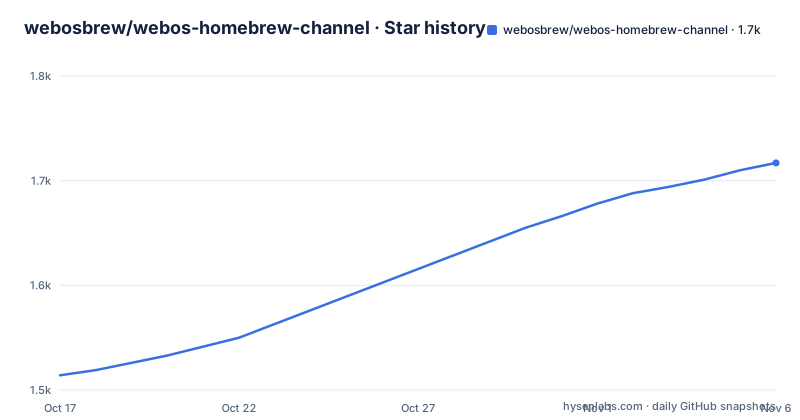
Star history
- webosbrew/webos-homebrew-channel1,717 ★ · +203
| Repository | 2026-10-17 | 2026-11-06 |
|---|---|---|
| webosbrew/webos-homebrew-channel | 1.5k | 1.7k |
203 Stars in the last 20 days, measured from the daily GitHub snapshot. Compare with other projects
Editorial analysis
Homebrew Channel's role on webOS TV
webos-homebrew-channel addresses a specific gap in webOS TV: the device does not normally provide an independent community application store. The project gives users a graphical browser for discovering, installing, updating, and reinstalling homebrew packages from Homebrew repositories. It also supports repositories beyond the official repo.webosbrew.org service, which matters when a developer distributes an application outside that catalog.
The intended audience is webOS TV owners who already have a compatible rooting path and developers who package applications for those televisions. The README describes Homebrew Channel as unofficial, so it should be treated as third-party software rather than an operating-system feature. Repository compatibility is not presented as universal. Its root-related components assume that rooting has already established the required privileges and startup integration.
The application is most useful once a TV can run the `.ipk` and has access to webOS services. Without root access, the core package browsing interface may still install applications, but the root service does not guarantee privileged execution. This distinction is important because several advertised features, including Telnet, startup hooks, telemetry changes, and the execution service, depend on root state.
Frontend, service bundle, and privileged process architecture
The repository separates the television-facing application from its privileged service layer. The frontend lives under `frontend/` and uses Enyo, while the service is built with webpack and Babel. The packaged `package.json` exposes separate scripts for these parts: `build` runs `enyo pack`, and `build-service` runs `webpack`. This separation allows the interface to run directly on older webOS releases while the service can use modern JavaScript features through transpilation and compatibility shims.
The Enyo choice constrains frontend development. The README specifically says that target code must avoid newer syntax such as arrow functions, `const`, and Promises because no Babel or other transpilation is applied to the frontend. A webpack-based migration is mentioned only as a possible future change, so the current codebase should be judged against an old-browser-compatible style rather than modern application conventions.
On a rooted device, the packaged service exposes Luna endpoints for installation and process execution. An application can send an `ipkUrl` and SHA256 checksum to the installation endpoint, subscribe to progress updates, and receive completion status. The `exec` endpoint executes one command and returns text or base64 output. The `spawn` endpoint is intended for long-running children and reports stdout, stderr, stream closure, and process exit events. Both execution endpoints explicitly warn that commands may not run as root if the device is not rooted.
The architecture also exposes `luna://org.webosbrew.hbchannel.service/getAppInfo`, described as a replication of a webOS application manager call through developer-mode-only endpoints. Repository addition uses application launch parameters. A caller can request the `addRepository` mode with a repository URL, after which the application opens its Settings view with the Add repository prompt prepared.
Installing Homebrew Channel and completing its startup setup
For an existing installation, the README says to launch Homebrew Channel, open its apps browser view, select "Homebrew Channel", and use the "Update" button when an update is available. Pressing the `5` button on an app details screen changes the available action from "Update" to "Reinstall". These are the documented in-application controls; the README does not provide a complete catalog browsing walkthrough.
For a compatible rooted TV with SSH or Telnet access, the documented automated installation downloads and runs the installer. Run this only on the target television using an access method and account appropriate to that device:
curl -L https://raw.githubusercontent.com/webosbrew/webos-homebrew-channel/main/tools/install.sh | sh -The snippet pipes the current `main` branch version of `tools/install.sh` into `sh`. The README notes that many working exploits can install the latest Homebrew Channel automatically, but it does not document installer output or claim that every webOS release and exploit is compatible. After installation, the root setup includes copying the packaged startup script:
cp /media/developer/apps/usr/palm/services/org.webosbrew.hbchannel.service/startup.sh /var/lib/webosbrew/startup.shThat copy is required for root integration according to the README. A manual alternative is to download the latest release `.ipk` and install it with `ares-install`, or use `luna-send-pub` on the television with a local package path:
luna-send-pub -i 'luna://com.webos.appInstallService/dev/install' '{"id":"com.ares.defaultName","ipkUrl":"/tmp/path/to/hbchannel.ipk","subscribe":true}'The path is an example from the README, so the user must place the downloaded package at the referenced location or substitute its actual path. Manual root elevation then requires running `elevate-service` before copying `startup.sh` into the same destination.
Remote access, failsafe recovery, and startup hooks
The root service changes the device from an application installation target into a remotely manageable system. It offers SSH with public-key authentication and Telnet without authentication. The README states that SSH uses the default `alpine` password until authorized keys are provisioned. It also says to use Telnet sparingly, although the documentation does not explain a time limit or automatically disable it after SSH keys are configured.
Startup hooks provide a separate extension mechanism. Executable scripts placed in `/var/lib/webosbrew/init.d` are run when the device boots. This is useful for scripts that must execute at startup, but the README does not document ownership rules, execution ordering, logging locations, a command for listing hooks, or a way to disable one without removing its file.
Failsafe mode is intended for recovery after boot crashes. Instead of the normal startup environment, the device exposes an emergency shell through Telnet. The flag responsible is `/var/luna/preferences/webosbrew_failsafe`. Recovery requires fixing the original crash and removing that file. Because the recovery shell is exposed through unauthenticated Telnet, the README's root setup should not be treated as finished until the underlying failure has been corrected and the flag has been removed.
The service can also disable some telemetry, but the README does not enumerate the affected settings or provide a restoration command. That makes this feature unsuitable for users who require a documented, reversible telemetry configuration.
Enyo compatibility, development setup, and upgrade boundaries
Development starts by cloning submodules because several libraries are stored that way:
git clone --recursive https://github.com/webosbrew/webos-homebrew-channelDependencies are distributed through npm, and the repository's `package.json` excludes Windows through the `"!win32"` OS condition. Install the development packages in the cloned directory with:
npm installThe package metadata also defines linting with `eslint .`, packaging with `ares-package dist/ -e enyo-ilib`, deployment with `ares-install`, and launching with `ares-launch org.webosbrew.hbchannel`. A combined local workflow exists as `npm-run-all --serial build-local deploy launch`. These commands connect the frontend build, service build, `.ipk` packaging, device installation, and application launch, but they also require the documented Ares tooling and a configured development television.
The repository is not archived, and its last push was on 2026-08-03. Release history includes `v0.7.3` on 2026-01-11, after `v0.7.2` from 2024-11-16 and `v0.7.1` from 2024-09-28. That supports describing the repository as recently updated, but it does not guarantee compatibility with every TV model or webOS version. Upgrades may also cross the frontend and privileged service boundary, so an application update is not merely a UI change.
The MIT license permits use and modification under its terms, but users remain responsible for reviewing third-party repositories, packages, root scripts, and network services separately. The project license does not make unreviewed application packages or remote-access settings trustworthy by association.
Limits of Homebrew Channel and the manual alternative
The clearest limitation is that root-related promises are conditional. The README explicitly says that `exec` and `spawn` may not execute as root when a device is not rooted. Other advertised functions, including startup hooks and unauthenticated Telnet, also have no meaning without the required root environment. The documented automated installation assumes SSH or Telnet access and does not provide a universal exploit or compatibility list.
A manual IPK installation workflow is the direct alternative to the shell installer. It uses `ares-install` or `luna-send-pub`, followed by `elevate-service` and a manual startup-script copy. This approach exposes each step instead of piping a remote script directly into a shell, which can make the actions easier to inspect before execution. It still relies on the same unsigned trust model around obtaining a legitimate release package and does not replace rooting, security review, or post-install configuration.
Homebrew Channel is also the wrong tool when a user needs only a conventional application catalog, official webOS distribution, or enterprise administration. Its repository model, developer-mode endpoints, and root services target a different environment. A user who cannot accept unauthenticated Telnet exposure or does not need repository-managed homebrew software should avoid installing the root component even if the frontend itself is useful.
Editorial conclusion
Adopt webos-homebrew-channel if you need a community package repository on a webOS TV and are comfortable installing an unofficial Enyo application plus root components. Do not adopt it if unauthenticated Telnet, third-party application installation, or privileged services exceed your security requirements. Verify first which webOS version and exploit workflow apply to your TV, inspect the release package source, and remove Telnet access after SSH keys are configured.
Frequently asked questions
How do I install webos-homebrew-channel on a webOS TV?
With SSH or Telnet access, the README documents downloading `tools/install.sh` and piping it into `sh`. A manual alternative downloads the latest release `.ipk` and installs it with `ares-install` or `luna-send-pub`.
Does webos-homebrew-channel always run commands as root?
No. The documentation for both the `exec` and `spawn` Luna services states that commands may not execute as root if the television is not rooted.
What should I verify after installing the webOS root service?
Verify SSH public-key access first because SSH uses the default `alpine` password until keys are provisioned. Telnet is unauthenticated, so its exposure should be treated as a root security concern.
Official sources
Add this badge to your README
If you maintain this project, the badge below links readers to this analysis and shows its maintenance status from the daily GitHub snapshot. Paste the markdown into your README; add ?metric=license or ?metric=stars to the image URL for a different field.

[](https://hysenlabs.com/projects/webosbrew-webos-homebrew-channel)Star history chart for your README
[](https://hysenlabs.com/projects/webosbrew-webos-homebrew-channel)Was this useful?