Universal Résumé: a print-ready CV website template
Minimal and formal résumé (CV) website template for print, mobile, and desktop.
At a glance
- What is it?
- Universal Résumé is an HTML and Tailwind CSS template for presenting one CV across web, mobile, PDF, A4, and Letter formats. It suits developers who want direct control of a one-page résumé, but paper sizing is configured manually and commercial use is restricted.
- Who is it for?
- Adopt Universal Résumé if you want a small, self-hosted CV website with corresponding screen and print layouts. Do not adopt it for a commercial project without separate permission, and inspect the generated CV in Chrome or Firefox at both A4 and Letter sizes before publishing.
- Can I use it commercially?
- Check first. The repository uses a licence we do not classify automatically, so read its LICENSE file before any commercial use.
- Is it still maintained?
- Yes. The repository last received commits 118 days ago.
- What is it written in?
- Mainly JavaScript, according to GitHub's language statistics.
Answers come from the project's GitHub data, last synced on November 7, 2026, and from our analysis. They are not legal advice.
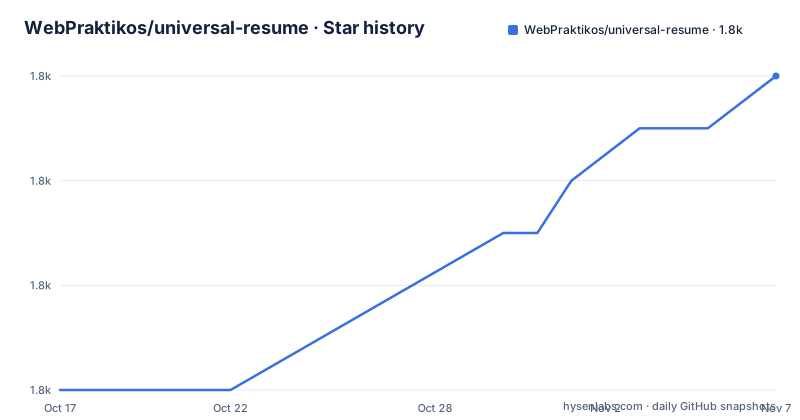
Star history
- WebPraktikos/universal-resume1,806 ★ · +6
| Repository | 2026-10-17 | 2026-11-07 |
|---|---|---|
| WebPraktikos/universal-resume | 1.8k | 1.8k |
6 Stars in the last 21 days, measured from the daily GitHub snapshot. Compare with other projects
Editorial analysis
The one-page CV problem addressed by Universal Résumé
Universal Résumé targets people who want the same CV to work as a public page, a mobile document, and a printed or PDF résumé. Its README identifies consistent proportions, readable typography, and fast scanning as priorities. The author wanted the content to fit on one page while avoiding separate designs for the web, paper, PDF, and mobile.
The repository is aimed at users who are comfortable editing an HTML project. Content begins in `docs/index.html`, while layout and visual rules come from Tailwind CSS classes. Project-level styling is compiled from `tailwind.css`, with relevant options in `tailwind.config.js`. This arrangement gives the adopter direct control over headings, sections, columns, fonts, and paper dimensions, but it does not provide the convenience of a form-based CV editor.
The README also mentions a hosted builder at `UniversalResume.app` and labels it alpha. That service is distinct from the open source repository. The documentation does not specify the hosted builder's account model, pricing, data handling, or export implementation, so those details should not be treated as capabilities of this template.
How Universal Résumé turns HTML into a deployable CV
The main content path is direct. `docs/index.html` holds the résumé and is the documented starting point for adding pages, sections, subsections, and other parts. The HTML supplies the document structure, while Tailwind CSS controls its visual presentation.
PostCSS compiles `tailwind.css` into `docs/build.css`. The `serve` script starts a PostCSS watcher and a `live-server` process for the `docs` directory. This means local CSS edits can be compiled while the page is served for inspection. The build command sets `NODE_ENV=build` before producing the stylesheet. According to the README, the build removes unused CSS, producing a smaller file. Because this removal depends on PurgeCSS finding classes in the page, heavily modified or dynamically assembled markup could require additional configuration.
The layout also exposes named controls for column and page behavior. Removing `col-fill-auto` makes both columns equally tall. Removing `md:h-letter` and `md:h-letter-col` removes the fixed Letter-page proportions and can eliminate excess vertical space in a short column. These switches are simple, but they show the project's central trade-off: consistent paper geometry takes priority over automatic layout that adapts freely to every amount of content.
Letter is the documented default. Converting the template to A4 requires related changes in `docs/index.html`, `tailwind.config.js`, and `tailwind.css`. The project does not rely on a single browser media query for both sizes.
Installing and serving the Universal Résumé project
Run the following command from the repository's base directory after cloning or downloading it. The README names this directory as `universal-resume`:
cd universal-resumeInstall the packages declared in `package.json`:
npm installStart the CSS watcher and local development server:
npm run serveThe first editing step is to replace the sample résumé content in `docs/index.html` while retaining the existing layout classes. The README describes this file as the main content file and recommends copying its HTML patterns to add sections or pages. Since no server address is specified, the repository does not confirm which URL `live-server` will display.
Generate the production stylesheet with:
npm run buildThat command writes `./docs/build.css`. After the build, `docs` is documented as ready to upload to Netlify's drag-and-drop deployment interface. The README also describes using the `/docs` directory as the source for GitHub Pages. Those deployment choices require the user's own site configuration and do not turn the repository into a hosted service.
Printing A4 and Letter versions without browser overrides
Universal Résumé is designed for browser printing rather than a separate PDF generation service. The README gives a Chrome workflow of opening the print dialog, selecting `Save as PDF` if needed, expanding `More Settings`, and setting `Page Size` to A4 or Letter. In Firefox, it directs the user to `File → Print` and then `Properties → Advanced → Paper Size`. Adobe Acrobat Reader is also mentioned for its `Page Setup` controls.
Changing the browser's paper menu does not by itself convert the template's geometry. For a permanent A4 variant, every `-letter` occurrence in `docs/index.html` must be replaced with `-a4`. The A4 code block under `/* For A4 size */` in `tailwind.config.js` must then be uncommented while the Letter block is commented. The corresponding change must also be made in `tailwind.css` under the `/* For Letter size */` and `/* For A4 size */` markers.
The project uses FiraGO and says it supports Latin, Cyrillic, Greek, Vietnamese, Arabic, Thai, Georgian, Devanagari, and Hebrew scripts. This does not mean every selected font file or glyph subset is preloaded. The README suggests inspecting font requests in browser developer tools and preloading the files actually used, with this example for one Latin file:
<link rel="preload" href="./fonts/FiraGO-Regular.latin.woff2" as="font" crossorigin="anonymous">A user whose CV uses another script should first confirm which font assets exist in `docs/fonts`.
The limits of fixed-page résumé design
The clearest failure mode is excess content. The README explicitly warns that too much information will break the one-page layout into additional columns. This makes Universal Résumé the wrong tool for a long academic CV or a document whose structure must expand organically across several pages. The repository includes a multiple-pages demo, but the documented customization path still begins from page geometry and proportional classes.
The A4 conversion is another operational constraint. It requires coordinated edits in three files, followed by another build. A partial conversion can leave HTML classes, Tailwind configuration, and source CSS out of agreement. The README does not provide an automated command for producing both A4 and Letter variants.
The repository is also a template, not a content management system. It does not document backups, revision history, form imports, collaborative editing, or a rollback workflow. Users modify files and rely on their own version control or hosting setup. The README mentions an AI-assisted hosted builder, but it does not identify an API in this repository that performs resume import or rewriting.
Print results also remain browser dependent. The documentation gives menu paths, not a claim of pixel-identical rendering across browsers and operating systems. Browser extensions, printer margins, downloaded fonts, and missing local assets can affect the final page, although the README only confirms browser printing procedures and does not provide a broader compatibility guarantee.
How Universal Résumé compares with a hosted CV builder
Universal Résumé and a conventional hosted CV builder use different approaches. The template stores content and presentation in repository files, compiles CSS locally, and produces a static `docs` directory. A builder-oriented workflow instead places editing, previewing, and export functions in an application interface. That is a general architectural distinction, and the README only provides concrete details for the `UniversalResume.app` alpha reference.
For a developer, the template makes the HTML structure, class names, fonts, and deployment output visible. It can be copied, inspected, versioned, and hosted without granting the project access to CV data. That control comes at the cost of manually maintaining markup and three-part paper-size configuration.
A hosted builder may be more suitable when someone does not want to edit `docs/index.html` or manage a build. However, the repository does not document enough about the alpha builder's current feature behavior, privacy terms, account requirements, or availability to make a firm comparison. The decision should therefore be based on whether direct file ownership is required, subject to the template's noncommercial license and manual layout maintenance.
Static site generators can also produce multi-page documents, but no specific generator is included or compared in the documentation. The meaningful project-level alternative here is direct customization or adoption of a builder workflow, not a claim that the template supplies every function found in either category.
Maintenance, upgrades, and the NonCommercial-ShareAlike license
The repository is not archived, and its last push was on 2026-07-13. That records recent code activity, but it does not guarantee that dependency versions or hosting integrations remain current. The listed release history ends with `v3.1.1` on 2023-01-23. The current `package.json` also reports version `3.1.1`, so the visible release tag and package metadata align.
The dependency set warrants review before reuse in a new deployment. It includes `tailwindcss` `^1.2.0`, `postcss-cli` `^7.0.0`, and other early package versions. No upgrade procedure, compatibility matrix, or Node.js version is documented. An adopter will need to establish those details outside the README, and changing versions may require changes to the PostCSS and Tailwind setup.
The repository metadata classifies the license as a custom type, while the README and `package.json` name `NonCommercial-ShareAlike 1.0 Generic`. The README says the material may be copied, redistributed, remixed, and transformed, but it may not be used for commercial purposes. Contributions based on it must be distributed under the same license. This restricts use in paid services, branded commercial products, or commercial work unless another agreement applies. The repository's `LICENSE` file is the controlling file to inspect before use.
Search indexing is opt-out. A résumé intended for public discovery can use the default site, while a private or draft deployment can add this to the document head:
<meta name="robots" content="noindex">Editorial conclusion
Adopt Universal Résumé if you want a small, self-hosted CV website with corresponding screen and print layouts. Do not adopt it for a commercial project without separate permission, and inspect the generated CV in Chrome or Firefox at both A4 and Letter sizes before publishing.
Frequently asked questions
How do I install and run Universal Résumé?
Run `npm install` in the repository directory and then run `npm run serve` to start the CSS watcher and local server. Use `npm run build` to generate `docs/build.css`.
Can Universal Résumé export a CV to PDF using A4 or Letter paper?
Yes. The README documents browser printing and `Save as PDF`, with paper selection in Chrome, Firefox, or Adobe Acrobat Reader. A permanent A4 variant also requires edits in `docs/index.html`, `tailwind.config.js`, and `tailwind.css`.
Can I use Universal Résumé for a commercial CV website?
The README and `package.json` identify `NonCommercial-ShareAlike 1.0 Generic`, which prohibits commercial use and requires adaptations to use the same license. Inspect the repository's `LICENSE` file before commercial use.
Official sources
Add this badge to your README
If you maintain this project, the badge below links readers to this analysis and shows its maintenance status from the daily GitHub snapshot. Paste the markdown into your README; add ?metric=license or ?metric=stars to the image URL for a different field.

[](https://hysenlabs.com/projects/webpraktikos-universal-resume)Star history chart for your README
[](https://hysenlabs.com/projects/webpraktikos-universal-resume)Was this useful?