wecom-cli: a Rust tool on npm, with a skill install marked mandatory
A command-line tool for the WeCom (Enterprise WeChat) Open Platform, letting both humans and AI agents operate WeCom from the terminal.
At a glance
- What is it?
- A command line client for the WeCom open platform, written as a Cargo workspace of five crates and published on npm behind a small Node launcher, with its documentation written in Chinese. Installing it takes two steps, the second of which is a globally installed agent skill, and the test suite carries a cargo feature whose name is skip-auth-check.
- Who is it for?
- This is a sensible shape for a corporate API client that has to work for both a person at a terminal and an automated agent: a real binary in Rust, a thin launcher in Node, and a credential step that is interactive exactly once. Two things to weigh first.
- Can I use it commercially?
- Yes. MIT is a permissive licence: you can use, modify and sell software built on it, as long as you keep its copyright and licence notices.
- Is it still maintained?
- Yes. The repository last received commits 13 days ago.
- What is it written in?
- Mainly Rust, according to GitHub's language statistics.
Answers come from the project's GitHub data, last synced on November 15, 2026, and from our analysis. They are not legal advice.
Star history
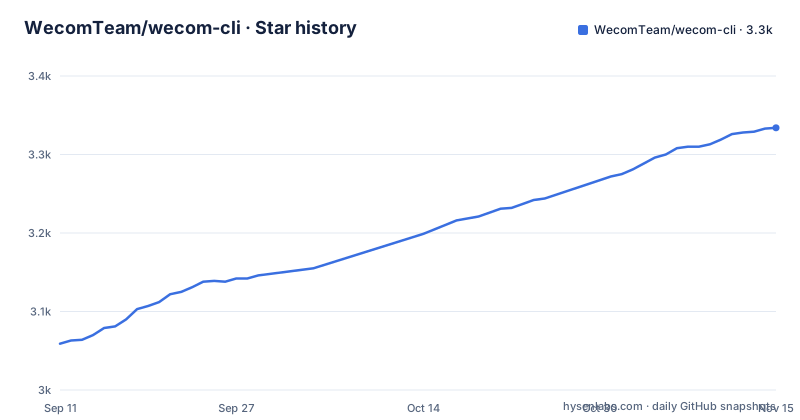
- WecomTeam/wecom-cli3,334 ★ · +275
| Repository | 2026-09-11 | 2026-11-15 |
|---|---|---|
| WecomTeam/wecom-cli | 3.1k | 3.3k |
275 Stars in the last 65 days, measured from the daily GitHub snapshot. Compare with other projects
Editorial analysis
The feature summary lists eight categories and the table has twelve
The README is written in Chinese, and the tree carries a single README.md, so this is the only description the repository offers. Its opening sentence says the tool covers messaging, email, documents, todos, calendar, meetings, the file drive and the contact directory. The table underneath has twelve rows, not eight. The four extra rows are all document-family work: document management for searching several document types and managing rename, member permissions and join rules, online spreadsheets with CSV and Excel import, smart spreadsheets with field, record, view and chart management, and smart documents with page content editing. So the headline sentence undercounts its own table by a third, and the omitted four are the ones with the most configuration surface. Every row names concrete operations rather than capabilities in the abstract.
Installing takes a global skill step that is marked mandatory
The quick start is four commands, and the middle one is labelled required in the comment beside it:
# 安装 CLI
npm install -g @wecom/cli

# 安装 CLI Skill(必需)
npx skills add WeComTeam/wecom-cli -y -g

# 配置凭证(交互式,仅需一次;默认扫码,--manual 可手动输入)
wecom-cli auth init

# 查看授权状态
wecom-cli auth show
A command line tool that also insists on a globally installed skill is unusual, and the flags make the intent explicit: -y answers the confirmation for you and -g installs it globally rather than in one directory. Credentials are configured once, interactively, with a QR code scan as the default and a --manual flag to type the values instead. The account itself is the other prerequisite, along with an optional bot ID and secret for the robot features. So the tool assumes an interactive login on the machine that will run it, not a service account configured headlessly.
A Rust binary reached through a Node launcher
The primary language is Rust and the Cargo workspace has five members: wecom, wecom-cli, wecom-error, wecom-fs and wecom-transport. The npm side is a wrapper. The package declares a single binary entry, wecom-cli, pointing at a JavaScript file under bin, and the published file list contains that bin directory and the README, so the package's contents are driven by whatever the build places in bin. That is why Node 18 or newer is a prerequisite for a Rust tool: the launcher needs a runtime, the binary does not. The dependency list shows the transport choice, with reqwest pulled in with default features off and only json and rustls enabled, so TLS is handled in process rather than through a system library.
The internal crates carry their own version numbers
The workspace package version is 1.3.4, and the npm package version is 1.3.4 as well, so those two agree. The internal dependencies do not follow that number. wecom is declared at 1.1.0 and wecom-transport at 1.1.0, while wecom-error and wecom-fs sit at 0.1.0. All four are path dependencies inside the repository, with default features off for the two larger ones. That means the crates are versioned on their own lines and published separately from the workspace, and a change to the CLI does not necessarily bump the library. Anyone depending on wecom directly is picking up a 1.1.0 line while the command line tool above it is at 1.3.4. The release profile is tuned hard, with symbol stripping, link time optimisation and a single codegen unit.
The test suite runs twice, once with the authentication check off
The script named test does not run one configuration. It chains two, first the default run and then a second one whose name is skip-auth-check, both with a custom-endpoint feature enabled. So the suite is executed in two configurations, and one of them is built with the authentication check disabled. That is a reasonable way to keep credential-dependent tests out of the default path, and the naming makes it visible in the package manifest rather than hidden in a test fixture. The linting is equally thorough: clippy runs with warnings promoted to errors, and a second script runs clippy across the feature powerset with cargo hack. Formatting goes through rustfmt on the nightly channel, applied to every tracked Rust file, so a stable toolchain is not enough to run the format check.
Version numbers live in two ecosystems and in changesets
The repository carries a Rust workspace manifest, a pnpm workspace manifest with its own lockfile, and a packages directory, so it is a monorepo in the JavaScript sense as well as the Rust one. Releasing is handled by changesets: the .changeset directory is at the root, the CLI for it is a development dependency, and a CHANGELOG.md is maintained at the top level. And yet no GitHub release exists for this repository. The version that a user sees therefore comes from the two manifests rather than from a tagged artefact, which is consistent with a tool whose distribution channel is npm. The install line, npm install -g @wecom/cli, pulls whatever is current on that channel, so pinning means pinning the package version, not a release tag.
Seven configuration files for two languages
The root of the tree is mostly tooling configuration. For Rust there is clippy.toml and rustfmt.toml; for JavaScript and TypeScript there is eslint.config.js, prettier.config.js and tsconfig.json; commitlint.config.js governs commit messages; lefthook.yml installs the git hooks through a prepare script that runs on install. Alongside them sit AGENTS.md for automated agents, a docs directory, a skills directory matching the skill the install step fetches, and an editor configuration. The bin directory holds the launcher the npm package points at, and the crates directory holds the workspace members. It is a wide tree for a tool whose user-facing surface is a single command name.
The README links its own documentation and stops there
Three documents do the explaining, and all three are named in the README without being reproduced in it: a command reference at docs/cli-reference.md, a skills guide at docs/skills.md for the agent skills the install step pulls in, and a data collection statement at docs/data-collection.md. The README also points at a QR code for joining a WeCom group chat, and the optional robot credentials are documented by a link into the vendor's help site rather than in the repository. So the repository is a signpost: it establishes what the tool covers, what it needs and how to install it, then hands over to three files for anything more specific. That is a reasonable division for a client of a large vendor API, and it does mean the command reference is the real documentation rather than the README.
Editorial conclusion
This is a sensible shape for a corporate API client that has to work for both a person at a terminal and an automated agent: a real binary in Rust, a thin launcher in Node, and a credential step that is interactive exactly once. Two things to weigh first. The documentation is Chinese only, including the command reference and the skills guide it links to, so budget for reading a second language or finding a translation elsewhere. And the install requires a globally installed skill with confirmation suppressed, which means the tool expects to be reachable by an agent on the machine rather than only by you; that is a deliberate design choice, not an accident, and it should be a conscious one on a shared or managed host.
Frequently asked questions
What does wecom-cli do?
It is a command line tool for the WeCom open platform, covering messaging, email, documents, todos, calendar, meetings, the file drive and the contact directory, so a person or an AI agent can drive those features from a terminal. Its documentation is written in Chinese.
How do I install wecom-cli?
With npm install -g @wecom/cli, followed by a second step the README marks as required, npx skills add WeComTeam/wecom-cli -y -g, and then wecom-cli auth init to configure credentials interactively once.
Which platforms does wecom-cli support?
macOS on x64 and arm64, Linux on x64 and arm64, and Windows on x64. Node.js 18 or newer is listed as a prerequisite next to a WeCom account, with a bot ID and secret as an optional extra.
Does wecom-cli publish releases?
No GitHub releases exist. The version 1.3.4 appears in both package.json and the Cargo workspace, a .changeset directory and a CHANGELOG.md sit at the root, and the distribution channel is the npm package @wecom/cli.
What is the skip-auth-check feature in wecom-cli?
A cargo feature used by the test scripts. The default run enables custom-endpoint, and the second run adds skip-auth-check, so the suite is executed both with and without the authentication check in place.
Official sources
Add this badge to your README
If you maintain this project, the badge below links readers to this analysis and shows its maintenance status from the daily GitHub snapshot. Paste the markdown into your README; add ?metric=license or ?metric=stars to the image URL for a different field.

[](https://hysenlabs.com/projects/wecomteam-wecom-cli)Star history chart for your README
[](https://hysenlabs.com/projects/wecomteam-wecom-cli)Was this useful?