ZIPFoundation writes uncompressed archives by default, and pins every install to the 0.9 line
Effortless ZIP Handling in Swift
At a glance
- What is it?
- ZIPFoundation is a Swift ZIP library built on Apple's libcompression with zlib on Linux, installable through Swift Package Manager, Carthage or CocoaPods. Its two entry points are FileManager extensions, its stated toolchain floor is Swift 4.0, and its newest tagged release predates the last push by a year.
- Who is it for?
- ZIPFoundation is a reasonable choice for a Swift project that needs to read or write ZIP files and would rather not take a third party dependency on Apple platforms, and the FileManager extension surface is small enough to read in one sitting. Check three things before committing to it.
- Can I use it commercially?
- Yes. MIT is a permissive licence: you can use, modify and sell software built on it, as long as you keep its copyright and licence notices.
- Is it still maintained?
- Yes. The repository received new commits within the last day.
- What is it written in?
- Mainly Swift, according to GitHub's language statistics.
Answers come from the project's GitHub data, last synced on November 15, 2026, and from our analysis. They are not legal advice.
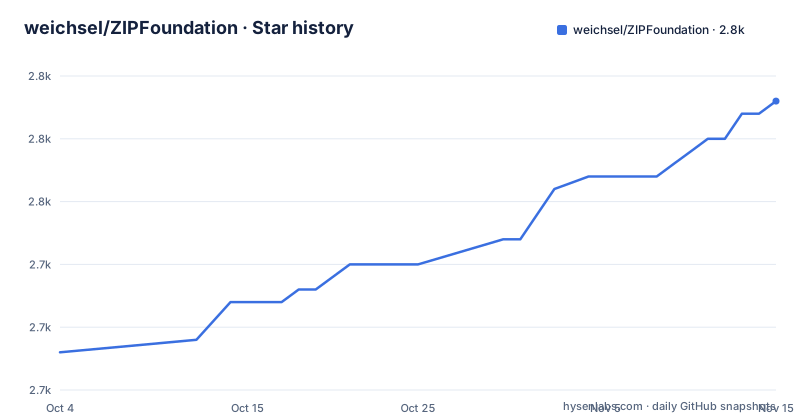
Star history
- weichsel/ZIPFoundation2,758 ★ · +20
| Repository | 2026-10-04 | 2026-11-15 |
|---|---|---|
| weichsel/ZIPFoundation | 2.7k | 2.8k |
20 Stars in the last 42 days, measured from the daily GitHub snapshot. Compare with other projects
Editorial analysis
Two FileManager extensions, and compression is off unless you ask
The whole high level API is two methods, and both are extensions of FileManager rather than members of a library type. zipItem(at:to:) takes a source URL and a destination URL. unzipItem(at:to:) takes the same pair in reverse. The behaviour is described as modelled on the Archive Utility in macOS, so the expectation to carry over is the one you already have from Finder's compress gesture.
Here is the zipping call in full:
let fileManager = FileManager()
let currentWorkingPath = fileManager.currentDirectoryPath
var sourceURL = URL(fileURLWithPath: currentWorkingPath)
sourceURL.appendPathComponent("file.txt")
var destinationURL = URL(fileURLWithPath: currentWorkingPath)
destinationURL.appendPathComponent("archive.zip")
do {
    try fileManager.zipItem(at: sourceURL, to: destinationURL)
} catch {
    print("Creation of ZIP archive failed with error:\(error)")
}
Two details in that listing matter more than the shape. The default is no compression at all: an archive written this way stores its entries uncompressed, and a compressed archive requires passing the optional compressionMethod parameter with the value .deflate. And the error path prints rather than rethrows, so the sample shows the failure text instead of a decision about what to do with it.
The document's own table of contents is a useful map of what sits above this pair of methods. Beyond zipping and unzipping it names six advanced areas: accessing individual entries, creating archives, adding and removing entries, closure based reading and writing, in-memory archives, and progress tracking with cancellation. Two of those names describe API shape rather than capability, since a closure based read and a progress callback are both ways of observing work rather than new formats. Of the six, only entry access is opened in the text available here.
Directory zips gain a parent entry unless you turn it off
Pass a directory URL instead of a file URL and the same method adds that directory's content to the archive. What it also adds, by default, is a root directory entry named after the lastPathComponent of the source URL, which means zipping a folder called Releases produces an archive whose entries all sit under Releases/. That is the behaviour you want when the archive is going to be unpacked next to other things, and it is the behaviour that surprises people when they expected the contents at the top level.
The switch is a parameter named shouldKeepParent, and passing false suppresses the parent directory. No other structural option is offered at this level: there is no entry ordering, no timestamp control and no comment field mentioned for the high level methods.
Extraction is the mirror image, and it is recursive over every entry in the archive:
let fileManager = FileManager()
let currentWorkingPath = fileManager.currentDirectoryPath
var sourceURL = URL(fileURLWithPath: currentWorkingPath)
sourceURL.appendPathComponent("archive.zip")
var destinationURL = URL(fileURLWithPath: currentWorkingPath)
destinationURL.appendPathComponent("directory")
do {
    try fileManager.createDirectory(at: destinationURL, withIntermediateDirectories: true, attributes: nil)
    try fileManager.unzipItem(at: sourceURL, to: destinationURL)
} catch {
    print("Extraction of ZIP archive failed with error:\(error)")
}
Note that the caller creates the destination directory first. unzipItem is not documented as creating intermediate directories for you, so that line is doing real work rather than decorating the sample.
Five package manifests and a requirements list frozen at Swift 4
The repository root carries five package manifests: Package.swift plus [email protected], [email protected], [email protected] and [email protected]. That is one manifest per toolchain generation the library has had to survive, which is the shape a Swift package takes when it still supports compilers old enough to need version specific manifests.
The requirements section, however, still names Xcode 11.0 and Swift 4.0, with platform floors of iOS 12.0, macOS 10.11, tvOS 12.0, watchOS 2.0 and visionOS 1.0. The manifest shown in the installation instructions declares swift-tools-version:5.0, which is a later generation than the stated floor, and the tree also ships a 5.9 variant. So the documented floor and the shipped manifests disagree about which toolchain the package expects.
The manifest snippet is worth reading as pasted, because two of its lines are indented with tabs while the rest uses spaces:
// swift-tools-version:5.0
import PackageDescription
let package = Package(
    name: "<Your Product Name>",
    dependencies: [
		.package(url: "https://github.com/weichsel/ZIPFoundation.git", .upToNextMajor(from: "0.9.0"))
    ],
    targets: [
        .target(
		name: "<Your Target Name>",
		dependencies: ["ZIPFoundation"]),
    ]
)
Swift does not care about the difference, so this is cosmetic, but it is the kind of detail that tells you the snippet was assembled by hand rather than generated from a working project file. After adding the dependency, the fetch command given is swift package resolve.
The Podfile example targets iOS 10 while the requirements say 12
The CocoaPods instructions ask you to add a Podfile entry:
source 'https://github.com/CocoaPods/Specs.git'
platform :ios, '10.0'
use_frameworks!
target '<Your Target Name>' do
    pod 'ZIPFoundation', '~> 0.9'
end
The platform line inside that example says iOS 10.0, while the requirements section lists iOS 12.0 as the floor. A reader who copies the example verbatim into a project with a modern deployment target will not hit a compile error, since the declared floor is lower than the target, but the example is not telling the truth about the supported range, and anyone reading it as the specification will believe the library supports iOS 10.
The same block also enables framework use, so the pod arrives as a framework rather than as a static library, which is the modern default and the reason the deployment target has to be at least high enough for it.
That Podfile is also the only place in the documentation where a per manager deployment target is spelled out at all. The requirements section states the platform matrix once, covering visionOS 1.0 and later as the newest entry alongside watchOS 2.0 as the oldest, and the three installation sections do not repeat it. So a reader working from any one installation section is working without the full platform list in front of them.
There is a smaller inconsistency in how the commands are shown. Swift Package Manager and CocoaPods both include a shell prompt character in front of the command, with $ swift package resolve and $ pod install, while the Carthage command in the next section is given without one. Cosmetic again, but it is a sign the three sections were not written in one pass.
Carthage fetches sources without building them
The Carthage path is the only one that does not stop at a manifest. You add a Cartfile entry, and the fence it is shown in is tagged ogdl rather than any language name:
github "weichsel/ZIPFoundation" ~> 0.9The operator is the pessimistic one, so a project asking for 0.9 accepts patch upgrades within the line but not a 1.0. Then the fetch command is:
carthage update --no-buildThe no-build flag is the part that changes what you do next. Because the sources arrive unbuilt, the integration step is manual: the project has to be dragged into Xcode's Project Navigator from the fetched checkout, which is exactly what the instructions say to do, and they link out to Carthage's own documentation for it. Compare that with Swift Package Manager, where resolve plus a target reference is the whole of the integration, and CocoaPods, where pod install builds and links as a side effect.
So the three managers differ less in what they fetch than in how much of the build they do for you, and the one that does the least hands you the most manual step.
The repository is arranged for that arrangement. ZIPFoundation.xcodeproj sits at the root, which is the artifact Carthage expects to find in a checkout, and ZIPFoundation.podspec sits beside it for the CocoaPods path. What is not committed is a Cartfile: consumers write their own, which is why the documentation spends a paragraph on the line to add rather than on a file to copy.
Every install path pins the 0.9 line, and the newest tag is a year old
All three dependency managers resolve to the same series. Swift Package Manager asks for upToNextMajor from 0.9.0, Carthage uses the pessimistic 0.9 operator, and CocoaPods pins '~> 0.9'. A project can therefore upgrade within 0.9 without touching any manifest, and none of the three paths will pull a 1.0 line if one appears.
The release history explains why that matters. The three most recent tags are 0.9.20 published on 2025-09-24, 0.9.19 on 2024-04-03, and 0.9.18 on 2024-01-27. The gap between 0.9.19 and 0.9.20 is about seventeen months, and the gap between 0.9.20 and the last push to the repository is about another year. The repository is not archived, so the work has not stopped, but the tagged line has moved slowly and unevenly.
The default branch is development rather than master or main. That is the branch a fork or a direct clone lands on, and it is not the branch any of the three package managers read, since all three resolve to tags. So anyone who installs by tag gets 0.9.20, while anyone who clones and builds gets whatever the last commit on development contains, and those are not the same code.
The tags themselves are bare version numbers with no prefix, which is what lets all three managers express the same constraint without any of them needing to know the others exist. A CHANGELOG.md is committed at the root, so the history of those seventeen quiet months is written down somewhere even though the release cadence does not advertise it.
The performance case is a blog post from 2017
Compression and decompression are delegated to Apple's libcompression framework, and the documentation points at Apple's own framework page for how that library behaves. For evidence that this is fast, the README does not offer numbers or a benchmark table. It offers a link to a third party's blog post about the framework's performance characteristics, hosted on the author's own site and dated July 2017.
That is the entire substantiation for the two performance claims in the feature list. One of them is high performance compression and decompression, and the other is deterministic memory consumption, which is the more interesting of the pair and the one with the least explanation attached to it. Deterministic consumption is what you need for large files, since a memory profile that scales with the size of the largest entry rules out streaming the biggest thing in an archive, and the feature list pairs it with large file support without saying how the two are reconciled.
The rest of the checklist is more concrete. Modern Swift API, in-memory archives, Linux compatibility and complete documentation are all claims a reader can test in an afternoon, and a Tests directory sits at the root to back the unit and performance coverage claim. The one that needs a caveat is the no third party dependencies line, which is qualified in the same breath with on Apple platforms, zlib on Linux.
Linux support means a zlib dependency, and the entry example stops mid-path
The no dependencies claim is scoped, and the scoping is in the parenthetical: no third party dependencies on Apple platforms, zlib on Linux. The requirements section repeats it from the other direction, listing Linux with the zlib development package as an alternative to the Apple platform matrix rather than as a peer of it. So on Linux you are compiling against a system library that has to be present at build time, and on Apple platforms you are calling into libcompression, which is why the dependency count is zero there.
Entry level access is the documented escape hatch from whole archive operations. You initialise an Archive object with a file URL for an archive that already exists, retrieve entries by their relative path, and subscript directly, because Archive conforms to Sequence. Incremental updates to archive contents are also part of that layer rather than of the FileManager extensions.
The listing for that section is short, and it ends in the middle:
let fileManager = FileManager()
let currentWorkingPath = fileManager.currentDirectoryPath
var archiveURL = URL(fileURLWithPath: currentWorkingPath)
archiveURL.ap
What is there sets up the file manager, reads the working directory and begins building an archive URL, then stops partway through the line that appends a path component to it. Everything after the Archive initialisation, including how a relative path maps to a subscript, is left to the type's own documentation. The tree also has no separate documentation directory, so the README's claim of complete documentation resolves to the README plus the API comments, and the credits and license sections named in the table of contents are the last two headings in it. Licensing is the one field with nothing to reconcile: the metadata records MIT and a LICENSE file sits at the root beside the changelog.
Editorial conclusion
ZIPFoundation is a reasonable choice for a Swift project that needs to read or write ZIP files and would rather not take a third party dependency on Apple platforms, and the FileManager extension surface is small enough to read in one sitting. Check three things before committing to it. First, decide whether you want compression at all, since the default is an uncompressed archive and the deflate method has to be passed explicitly. Second, confirm your deployment target against the requirements list, which still names macOS 10.11 and iOS 12, and note that the CocoaPods example in the documentation targets iOS 10. Third, pin deliberately: all three managers resolve to the 0.9 line, the newest tag is 0.9.20, and the default branch is development rather than a release branch, so an unpinned dependency can move under you.
Frequently asked questions
Does ZIPFoundation compress by default?
No. Archives created with zipItem are stored without compression unless the optional compressionMethod parameter is set to .deflate. The same method also accepts a directory URL and then adds that directory's content, with a root entry named after the source's lastPathComponent unless shouldKeepParent is false.
How do I add ZIPFoundation through Swift Package Manager?
Add it to the dependencies of your Package.swift with the upToNextMajor rule starting at 0.9.0, refer to it from a target, then fetch it with swift package resolve. The manifest shown in the documentation declares swift-tools-version:5.0.
Which platforms and toolchains does ZIPFoundation claim to support?
iOS 12.0 and later, macOS 10.11 and later, tvOS 12.0 and later, watchOS 2.0 and later, visionOS 1.0 and later, or Linux with the zlib development package. The stated build floor is Xcode 11.0 with Swift 4.0, while the tree ships package manifests for Swift 4.0, 4.1, 4.2 and 5.9.
Can ZIPFoundation read one entry out of an archive without extracting it?
Yes. An Archive object is initialised with a file URL for an existing archive, entries are retrieved by relative path, and Archive conforms to Sequence so it supports subscripting. Incremental updates to archive contents are handled at that same layer rather than through the FileManager extensions.
What are the differences between the three ZIPFoundation install paths?
Swift Package Manager needs a Package.swift entry and swift package resolve. Carthage needs a Cartfile entry with the pessimistic 0.9 operator, then carthage update --no-build, after which the fetched project has to be dragged into Xcode's Project Navigator by hand. CocoaPods needs a Podfile entry pinned to '~> 0.9' and then pod install.
Official sources
Add this badge to your README
If you maintain this project, the badge below links readers to this analysis and shows its maintenance status from the daily GitHub snapshot. Paste the markdown into your README; add ?metric=license or ?metric=stars to the image URL for a different field.

[](https://hysenlabs.com/projects/weichsel-zipfoundation)Star history chart for your README
[](https://hysenlabs.com/projects/weichsel-zipfoundation)Was this useful?