mhrv-rs: a DPI bypass whose guided setup needs a binary the default build skips
Rust port of @masterking32's MasterHttpRelayVPN — all credit to @masterking32 for the original idea and Python implementation. Free DPI bypass via a Google Apps Script relay with TLS SNI concealment. CLI + cross-platform desktop UI, HTTP + SOCKS5 proxy, no runtime deps.
At a glance
- What is it?
- mhrv-rs relays traffic through an Apps Script you deploy in your own Google account, so an ISP sees only a connection to Google. It ships as a single Rust binary and a desktop window, and the interesting details are in what the guided setup asks you to install locally and what the default build does not produce.
- Who is it for?
- This tool suits someone in a jurisdiction where sites are blocked by deep packet inspection, who is willing to deploy a small web app into a personal Google account and route a browser through it. Four things to understand before you start.
- Can I use it commercially?
- Yes. MIT is a permissive licence: you can use, modify and sell software built on it, as long as you keep its copyright and licence notices.
- Is it still maintained?
- Yes. The repository last received commits 34 days ago.
- What is it written in?
- Mainly Rust, according to GitHub's language statistics.
Answers come from the project's GitHub data, last synced on November 15, 2026, and from our analysis. They are not legal advice.
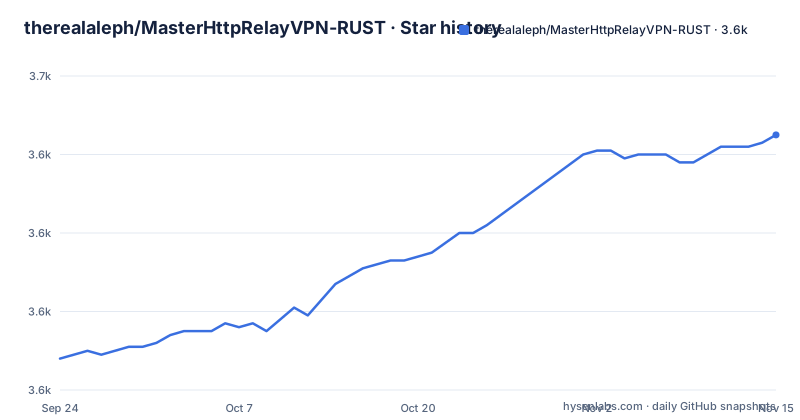
Star history
- therealaleph/MasterHttpRelayVPN-RUST3,645 ★ · +57
| Repository | 2026-09-24 | 2026-11-15 |
|---|---|---|
| therealaleph/MasterHttpRelayVPN-RUST | 3.6k | 3.6k |
57 Stars in the last 52 days, measured from the daily GitHub snapshot. Compare with other projects
Editorial analysis
The guided setup needs a binary the default build skips
The whole quick start is written around a window: open the app, paste two values, click a button to save, click another to start, watch a status circle turn green, and read a log panel along the bottom if something fails. Then look at the build manifest. There are two executables. One is the command line tool. The other is the user interface binary, and it is marked as requiring a feature that is not in the default set, because the default feature list is empty and the interface feature pulls in the immediate mode GUI library. The comments in the manifest explain that the library target is built three ways so the same code can be a shared library for the Android app, a normal library for the desktop binaries, and a static library for a mobile network extension target. So the design is genuinely cross-platform, but a plain build gives you the command line tool, and the five steps you are told to follow are all written for the window that build does not produce.
A certificate is generated on your machine and installed with your password
The first launch asks for your computer password, and the page is direct about why: it installs a certificate so the browser will trust the tool. That certificate is not downloaded. It is generated locally, the page says, and it never leaves the machine, and no cloud service or Google can use it. The common questions section repeats the point in its answer to whether this is safe, adding that the private key is not held by anyone else and that your auth key is your secret. Both claims are about the key material and both are the kind of thing you should verify rather than accept: the manifest includes a certificate generation library with a parser extension, which is consistent with the claim, and the browser trust change is a real system-wide modification requiring administrator rights. What the page does not discuss is what a locally trusted interception certificate means for every other application on that machine once it is installed.
The relay is a public web app and the auth key is the only gate
Read the deployment steps and you find the shape of the trust model. You create a script project, paste the script source from this repository into the editor, replace a placeholder with a long random string of your own, and deploy it as a web application that executes as you and whose access is set to anyone. Google then shows a deployment identifier, and both that identifier and the random string are what you paste into the tool's window. The placeholder in the script is explicit about intent:
const AUTH_KEY = "CHANGE_ME_TO_A_STRONG_SECRET";The page tells you to keep that string and treat it like a password. So the relay is publicly reachable, executing as your Google account, and the only thing standing between a stranger and your account's quota is a secret you invented and typed into two places. That is a reasonable design for a personal tool and it is also the whole security boundary, so the strength of that random string and the fact that it never leaves your machine are the two properties everything else depends on.
Twenty thousand fetches a day, and the page suggests using more accounts
The free question has a concrete answer: every Google account gets twenty thousand outbound URL fetches per day on the free tier, which the page considers plenty for one person's normal browsing. Then it addresses capacity directly, and the answer is to make two or three deployments in different Google accounts and paste all the deployment identifiers into the tool, which the window supports as a list. So multi-account is not an accident of the design, it is a documented scaling path, and the identifiers field is plural in the instructions for that reason. Two things follow. The quota is a real ceiling that a heavy session can hit, and the tool's behaviour when it is hit is not described anywhere in the visible page. And the scaling path runs entirely on free tiers from accounts you own, which is the part to read against Google's terms before you lean on it.
The iOS target exists in the manifest and the tree, but not in the download table
The download table has six rows: two Mac architectures, Windows, one Linux tarball, an Android package, and a statically linked Linux build recommended for routers and for anyone hitting a C library version error. There is no iOS row, and the page never mentions a phone build other than Android. The manifest says otherwise. The library is built as a static library specifically for a mobile network extension target, with a comment saying so, and the repository contains a directory for the iOS sources alongside the Android one. So the code for iOS is present and the build system is configured for it, while the install instructions do not offer it. The same is true of the router row in a milder way: the release table has a Linux build for that platform, so that one is covered. If you are on an iPhone, the repository has more than the instructions suggest, and you would be working out the packaging yourself.
Five example config files and a tunnel node directory the quick start skips
The quick start tells you to click a button to save your configuration and leave everything else at the defaults, which is the right advice for a first run and hides how much surface the tool actually has. At the repository root there are five example configuration files, not one: a plain example, a direct example, an example with an exit node, an example defining fronting groups, and a full example. Their names imply a relay with an optional separate exit point and with groups of fronting hosts, which is a different architecture from the single relay the quick start describes. There is also a directory at the root whose name suggests the relay side can be run as its own component, separate from the client. None of this appears in the visible instructions, and the page defers advanced topics to a separate guide document, so the configuration model is real, layered and documented elsewhere.
Two readme files, one second language, and two third-party guides
The header of the page is doing more than the quick start. There is an English quick start and a full guide for advanced topics, then a Persian quick start anchor and a Persian full guide, both as separate documents. Then a right-to-left block with two Persian community guides, a video walkthrough and a text walkthrough, the latter credited by name to a third-party author. So the project's primary audience is clearly Persian speaking, and the documentation strategy is a short path in English plus a deep path in a second language plus community material the project does not host. Two smaller oddities are visible in the tree: a second readme file at the root whose purpose the page never explains, and a directory of release artefacts committed into the repository rather than attached to the tags.
TLS without OpenSSL, both compression libraries, and a workaround for 32-bit routers
The dependency list is short and tells you what the tool does. Transport and certificates are handled in process by a pure-Rust TLS stack with its cryptography backend switched away from the platform provider and onto a portable one, with a bundled root store for trust and a certificate generation library for the local certificate the first launch installs. Two compression libraries are present rather than one, which is what you would expect from something proxying arbitrary web responses. There is an HTTP/2 client, a config directory helper that knows where each operating system keeps application data, a compression format for configuration, and a comment in the manifest explaining that the standard library's atomic integer type is unavailable on some 32-bit targets, so a dependency supplies 64-bit atomics for musl builds on small-endian MIPS and ARM. That comment is a fingerprint of the router support: it exists because the smallest supported machine is a consumer router.
Editorial conclusion
This tool suits someone in a jurisdiction where sites are blocked by deep packet inspection, who is willing to deploy a small web app into a personal Google account and route a browser through it. Four things to understand before you start. It works by installing a locally generated certificate so your browser trusts the interception, which is the part that requires administrator rights and the part most worth thinking about. The relay is a web app with public access, so the only thing gating your traffic through someone else's infrastructure is the auth key you paste into the window. The free tier gives twenty thousand fetches a day per account, and the page's own advice for more capacity is to use more accounts. And the guided setup is written for a desktop window that the default build does not produce, so build the optional feature or use the command line interface.
Frequently asked questions
What is mhrv-rs and how does it work?
A Rust program that routes browser traffic through a web app you deploy in your own Google account. Your browser sends traffic to the local program, which connects to Google over TLS; the request to the actual site is then made from inside Google's network by your deployed script. The stated effect is that your internet provider sees an encrypted connection to a Google address and cannot tell which sites you are visiting. It is a port of an earlier Python project, with the original author credited.
Is mhrv-rs really free?
The page says yes, because the relay runs on the free tier of a Google account you own, which it states gives twenty thousand outbound fetches per day. That is also the ceiling: the page's advice for a household of several people sharing one setup is to create two or three deployments in different accounts and paste all the deployment identifiers into the tool. Nothing on the page describes what happens when the quota runs out.
Is mhrv-rs safe to install?
The project's own answer is that the certificate is generated on your computer, never leaves it, and that no one else holds the private key, and that your auth key is your secret. The install itself does ask for your computer password, because it adds a locally generated certificate to the machine's trust store so the browser accepts the interception. Read that as a system-wide trust change rather than a per-browser one, and weigh it before installing on a machine you rely on for other work.
Which platforms does mhrv-rs support?
The download table covers Apple Silicon Macs, Intel Macs, Windows, two Linux builds including one for routers and Alpine, and Android packages for phones and tablets. The manifest also configures a static library build for a mobile network extension target and the repository carries iOS sources, although the instructions do not offer an iOS build. The manifest sets the empty default feature set and gates the desktop window behind an optional feature, so a plain build gives you the command line tool rather than the window the instructions describe.
Official sources
Add this badge to your README
If you maintain this project, the badge below links readers to this analysis and shows its maintenance status from the daily GitHub snapshot. Paste the markdown into your README; add ?metric=license or ?metric=stars to the image URL for a different field.

[](https://hysenlabs.com/projects/therealaleph-masterhttprelayvpn-rust)Star history chart for your README
[](https://hysenlabs.com/projects/therealaleph-masterhttprelayvpn-rust)Was this useful?