WG Tunnel: AmneziaWG on Android with two build modes and one proxy socket
An advanced, open-source client for WireGuard and AmneziaWG on Android.
At a glance
- What is it?
- wgtunnel/android is a Kotlin WireGuard and AmneziaWG client whose interesting parts are its edges: a build that silently produces the wrong artifact, a sibling-directory core checkout, an exported automation surface with no permission named, and a local proxy with no port or bind address.
- Who is it for?
- Adopt it if you want AmneziaWG on Android and are willing to read the source for the details the feature list leaves out. Hold off if you need a documented answer about the local proxy's bind scope, the permission on the automation intent, or which channel actually ships your build, because none of the three is written down.
- Can I use it commercially?
- Yes. MIT is a permissive licence: you can use, modify and sell software built on it, as long as you keep its copyright and licence notices.
- Is it still maintained?
- Yes. The repository received new commits within the last day.
- What is it written in?
- Mainly Kotlin, according to GitHub's language statistics.
Answers come from the project's GitHub data, last synced on November 22, 2026, and from our analysis. They are not legal advice.
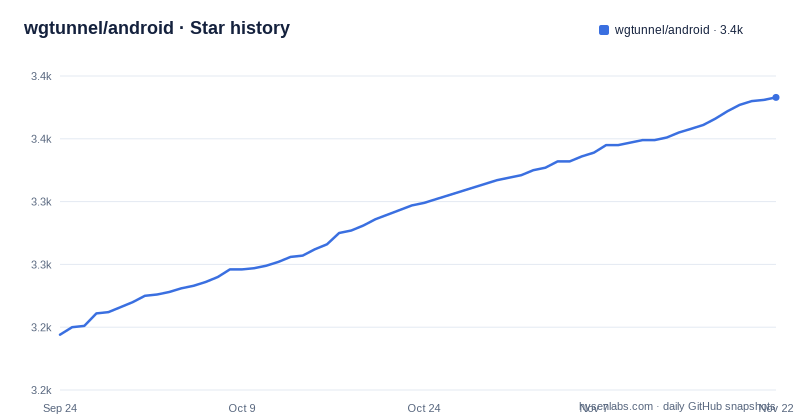
Star history
- wgtunnel/android3,383 ★ · +189
| Repository | 2026-09-24 | 2026-11-22 |
|---|---|---|
| wgtunnel/android | 3.2k | 3.4k |
189 Stars in the last 59 days, measured from the daily GitHub snapshot. Compare with other projects
Editorial analysis
Two GitHub organisations in one README, and a package id that has to stay put
The repository lives at wgtunnel/android and the build instructions clone github.com/wgtunnel/android. The Crowdin project sits on translate.android.wgtunnel.com, the F-Droid badge points at fdroid.wgtunnel.com, the core dependency points at wgtunnel/core, and the two issue links at the top of the README assign every report to zaneschepke under github.com/zaneschepke/wgtunnel. Ten references to the old owner name survive in a file whose other links already use the new one.
That split is not something you can simply clean up. The Play Store badge, the IzzyOnDroid badge and the Obtainium redirect each encode the same two strings: the application id com.zaneschepke.wireguardautotunnel and the repository URL github.com/zaneschepke/wgtunnel. The application id is the one that cannot move, because Android keys an update by package name, so the id keeps pointing at the old namespace by design. The repository URL inside those links is a different matter and could be repointed without touching the id.
So the two names coexist for different reasons and only one of them is load bearing. A reader who follows the Obtainium link installs an app that still identifies as com.zaneschepke.wireguardautotunnel, and that is the same string every automatic updater will be handed later. A maintainer who repoints one badge and not the other ends up with two destinations for one app, and nothing in the build checks which of them the store metadata actually points at.
Nightly is the channel an Obtainium user is configured not to see
Three releases are published: 5.7.4 on 2026-09-23, 5.7.5 on 2026-09-26, and a tag literally called nightly on 2026-10-02. The nightly timestamp is identical to the last push to the repository, 2026-10-02 at 03:33:35 UTC, so the rolling tag tracks the default branch commit by commit. The two stable tags are three days apart, which is a much tighter cadence than the plain 5.7 numbering suggests.
There are five ways to get the app and they do not all carry the same channel. The Play Store serves the stable build under the old package id. IzzyOnDroid serves a build from its own index. A separate repository at fdroid.wgtunnel.com is linked from a badge with no text next to it, so whether it mirrors stable builds, nightly builds, or something else is not stated anywhere. Obtainium is pointed straight at the GitHub repository, and the settings encoded into that deep link set includePrereleases to false, fallbackToOlderReleases to true and verifyLatestTag to true.
Those three settings together tell an Obtainium user to ignore prereleases and take the newest stable tag instead. A tag called nightly carries no number at all, so whether an updater counts it as a prerelease is decided by that updater's own rules rather than by this project. Add includePrereleases being false and the result is that the one channel guaranteed to hold the newest commit is the one channel a Play, F-Droid or Obtainium user cannot reach without opening the releases page by hand. A fastlane directory and a Gemfile at the top of the tree are the upload path for at least one of these channels, and the README does not say which.
The local build mode is a commented out block, and forgetting it opens a PR built against the wrong core
By default the app consumes published core artifacts from Maven Central, resolved through a single version catalog entry named libs.bundles.wgtunnel.core. Building against those needs three commands:
git clone https://github.com/wgtunnel/android
cd android
./gradlew assembleDebug
There is a second mode for working on core itself, and it is expressed as commented out Gradle. In settings.gradle.kts you uncomment an includeBuild block pointing at ../core, carrying two dependencySubstitution rules: one maps com.wgtunnel.tunnel:backend to a local project and the other maps com.wgtunnel.tunnel:backend-android-jni to a local project. In app/build.gradle.kts you then comment out the Maven bundle line and uncomment two local-dev implementation lines.
The failure mode is stated in a single sentence at the end of that section: do not commit those Gradle edits, and restore the commented includeBuild and the Maven dependency before opening a PR. The instruction exists because the build succeeds either way. A pull request left in local mode references a core checkout that does not exist on anyone else's machine. A pull request left in Maven mode compiles the published artifacts instead of the local edits, so the binary the contributor tested never contained the change under review.
Both mistakes are silent in the sense that matters here. assembleDebug reports success in either case, and none of the documented steps tells you to confirm which of the two dependency blocks was actually in force.
A full build needs JDK 21, an NDK, make and a sibling directory named core
Building against a local core checkout means arranging a directory layout before Gradle will cooperate. The core repository has to sit next to the app repository rather than inside it:
parent/
  android/    # this repository
  core/       # https://github.com/wgtunnel/core
The includeBuild block points at the relative string ../core, so a checkout placed anywhere else needs that string edited by hand before the composite build resolves. The README does not offer an alternative for a different layout, and the longer clone sequence it gives starts by moving into the parent directory for exactly that reason.
The toolchain also changes between the two modes. The app only path is Gradle and Kotlin. The full path additionally needs the core build requirements, which are JDK 21, the Android NDK, make and a C toolchain, because core is native JNI with a backend, a parser and hevtunnel in it. So the same assembleDebug invocation is either a Kotlin compile or a native cross compile depending on which dependency block is active, and the two are not distinguished by command name.
None of that is exotic, but it does mean the repository describes two build systems and a required filesystem shape. The three command quick build in the section above is accurate as far as it goes; it is just not the build a change to core needs.
Three first-party modules sit in the tree and only two appear in the build notes
The top level holds app/ plus three other Gradle modules named logcatter/, networkmonitor/ and pinger/. The local-dev dependency block names two of them by project path, project(":logcatter") and project(":networkmonitor"). pinger/ appears nowhere in the README, and no section says what it is for or whether the same command builds it.
The other two are named only inside a dependencies block that exists to demonstrate the build switch, not as described components. What logcatter collects, and how networkmonitor decides that a network changed, are not stated. That matters because Auto-Tunneling is defined as activating tunnels based on your device's active network details, and that phrase is carrying the whole feature. A reader who wants to know which network properties drive the decision has three plausible modules in front of them and documentation for none of them.
Around them sit buildSrc/, gradle.properties, gradle/, gradlew and gradlew.bat, which is an ordinary Gradle layout, plus two entries that do not belong to one: a Gemfile and a fastlane/ directory inside a Kotlin project. Those two serve the store upload path rather than the app build, and the README does not say which channel they feed. crowdin.yml matches the Crowdin invite in the translation section, and SECURITY.md sits in the tree without being linked from the README.
The local proxy has no named port, no bind address and no credential
Local Proxy Mode is described as exposing a WireGuard tunnel over a local SOCKS5 or HTTP proxy for browsers or firewall apps such as AdGuard, and the About section repeats it as a way to expose a tunnel over a local SOCKS5/HTTP proxy server. It is the one feature here that opens a listening socket for other software to connect to, and it is also the thinnest documented.
Three things a reader needs are absent. There is no port number. There is no bind address, so whether the listener is reachable from the local network or only from the device is not stated. And there is no credential of any kind, because the entire sentence is the word local and nothing more. The feature list treats none of this as a security surface, while Lockdown Mode is described as an advanced in-app kill switch, so the two features get very different levels of care even though a proxy in front of an anti-censorship tunnel is the more exposed of the pair.
The mechanism is worth understanding because it is not a second tunnel. The tunnel stays a WireGuard tunnel; what changes is how traffic reaches it. A browser or a DNS filter talks to the local proxy, the proxy hands the connection to the tunnel, and the app can therefore serve software that cannot install a VPN profile at all. That is a real convenience in the AdGuard case. It is also why the three missing details are worth settling before the feature is pointed at a browser on a shared network.
Exported intents for automation with no action string and no permission listed
Remote Control Support is described as intent-based automation for controlling tunnels and auto-tunneling from automation apps like Tasker. That is a control surface on the device, and the README gives it a single sentence.
Nothing lists the intent action strings, the extras a caller is expected to send, or whether the receiving activity is exported with a permission in front of it. For an app whose whole job is deciding which traffic leaves the device, an intent that toggles a tunnel is the difference between a person tapping a tile and another program deciding on their behalf. The Quick Settings tile and the home screen shortcuts are user driven and need no such consideration. The automation path does, and it is the one with no documentation.
The tree does contain a SECURITY.md, so a disclosure has somewhere to go, and the two links at the top of the README route bug reports and feature requests through GitHub issue templates with the bug and enhancement labels already attached and a request form carrying an empty projects parameter. Neither of those substitutes for naming the permission on an exported activity, and the README does not point at SECURITY.md from the feature list where the automation surface is introduced.
Split DNS by suffix, an in-app kill switch, and bootstrap deferred until the tunnel is up
Three features in the list all concern a packet that is not yet inside the tunnel, and each scopes itself differently.
Lockdown Mode is called an advanced in-app kill switch that blocks all traffic while the tunnel is down. In-app is doing the limiting work there, and the README does not say what happens to traffic from other applications while Lockdown is engaged, which is a narrower claim than a system-wide VPN lock and a distinction worth settling before depending on it. Split and Encrypted DNS offers three transports, plain DNS, DoT and DoH, all resolved through the tunnel, and can optionally split by domain suffix so a name resolves through the tunnel or through the system. Suffix matching is the weak point of that design, and the README does not state whether the match happens on a domain boundary or on the raw string, so a host whose name merely ends the same way needs that answered before the list is trusted.
Deferred Endpoint Bootstrapping then resolves endpoints and updates peers after the tunnel is already up, for reliability and leak protection on startup. That is where the three meet. Dynamic DNS Handling is defined as detecting a server IP change and updating endpoints without a restart, and IPv6 Endpoints can upgrade or fall back without a restart. But if endpoints are deliberately left unresolved until the tunnel is up, then a server whose address has moved cannot be found through the tunnel that depends on it, and the README does not say how that first address after a move is obtained. The AmneziaWG support range is stated as 2.0 through 3.1, so that boundary is documented. This one is not.
Editorial conclusion
Adopt it if you want AmneziaWG on Android and are willing to read the source for the details the feature list leaves out. Hold off if you need a documented answer about the local proxy's bind scope, the permission on the automation intent, or which channel actually ships your build, because none of the three is written down. If you fork it to change core, verify which dependency block was active before you open a pull request, since the wrong one compiles cleanly and ships someone else's core.
Frequently asked questions
What does WG Tunnel add on top of the official WireGuard Android app?
The project describes itself as an alternative Android client inspired by the official WireGuard app, filling gaps with auto-tunneling, AmneziaWG support, Local Proxy mode, Lockdown mode, handshake monitoring, dynamic DNS handling, IPv6 endpoints, split tunneling and Android TV support. Primary language is Kotlin and the license is MIT.
How do I build WG Tunnel from source?
Clone the repository, change into android and run ./gradlew assembleDebug, which builds against published core artifacts from Maven Central. Building against a local core checkout needs core cloned as a sibling directory, the includeBuild block uncommented in settings.gradle.kts, the Maven bundle commented out in app/build.gradle.kts, plus JDK 21, the Android NDK, make and a C toolchain.
Which versions of AmneziaWG does WG Tunnel support?
The feature list states full support for AmneziaWG 2.0 through 3.1, alongside plain WireGuard. Anything outside that range is outside what the wording covers, and the README does not describe behaviour on a newer AmneziaWG release.
Where do I report a security problem in WG Tunnel?
The repository carries a SECURITY.md at the top level. The README itself links two GitHub issue templates instead, one labelled bug and one labelled enhancement, and both of those URLs still route through github.com/zaneschepke/wgtunnel under the previous owner name.
Why do the WG Tunnel store links still say zaneschepke?
The project moved to the wgtunnel organisation, and the clone instructions, the Crowdin host, the F-Droid host and the core dependency all use wgtunnel. Ten references to zaneschepke remain, including the application id com.zaneschepke.wireguardautotunnel in the Play Store, IzzyOnDroid and Obtainium links, and an Android application id cannot change without breaking updates for existing installs.
Official sources
Add this badge to your README
If you maintain this project, the badge below links readers to this analysis and shows its maintenance status from the daily GitHub snapshot. Paste the markdown into your README; add ?metric=license or ?metric=stars to the image URL for a different field.

[](https://hysenlabs.com/projects/wgtunnel-android)Star history chart for your README
[](https://hysenlabs.com/projects/wgtunnel-android)Was this useful?