Cloud Document Converter reads a Lark doc and writes Markdown, and the copy path expires in two hours
Convert Lark Doc to Markdown
At a glance
- What is it?
- A browser extension that downloads or copies a Lark cloud document as Markdown, with a block-by-block compatibility table that is honest about what it does not convert. The copy route produces image URLs that stop working after two hours, which is the detail that decides whether you use it.
- Who is it for?
- Adopt Cloud Document Converter if you regularly move Lark documents into Markdown and you only need the download path, or you are content to re-export images within two hours of copying. Do not adopt it for Lark documents containing callouts, diagrams, embedded files or the base blocks such as sheets and bitables, because the compatibility table marks those unsupported or undecided.
- Can I use it commercially?
- Yes. MIT is a permissive licence: you can use, modify and sell software built on it, as long as you keep its copyright and licence notices.
- Is it still maintained?
- Yes. The repository last received commits 128 days ago.
- What is it written in?
- Mainly TypeScript, according to GitHub's language statistics.
Answers come from the project's GitHub data, last synced on November 7, 2026, and from our analysis. They are not legal advice.
Star history
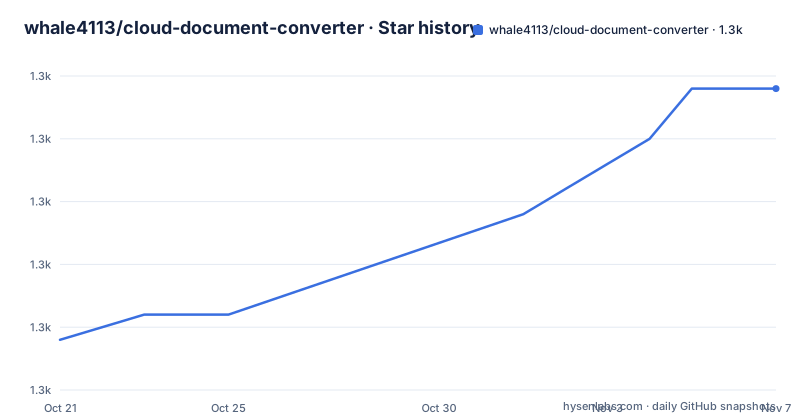
- whale4113/cloud-document-converter1,292 ★ · +10
| Repository | 2026-10-21 | 2026-11-07 |
|---|---|---|
| whale4113/cloud-document-converter | 1.3k | 1.3k |
10 Stars in the last 17 days, measured from the daily GitHub snapshot. Compare with other projects
Editorial analysis
Two ways to get the Markdown, and they are not equivalent
Cloud Document Converter is a browser extension that supports downloading or copying a Lark Doc as Markdown, and the two verbs are not interchangeable.
The download path produces a Markdown file you keep, with images downloaded alongside it or embedded. The copy path puts Markdown on the clipboard, and the note attached to it is the one that matters: the URL of the image generated by this way only has two hours of accessibility, which means that after two hours the image resource will no longer be accessible.
So the copy path is a paste-into-your-editor convenience, not an export. If you paste into a document that renders remote images, they render for two hours and then break. If you paste into a system that rewrites the images, they are saved. The difference between those outcomes is entirely on your side of the clipboard, and the extension is upfront about it.
The installation is a store link in three places, the Chrome Web Store, the Microsoft Edge Store and the Firefox Add-ons Store, and the project publishes an English README alongside a Simplified Chinese one, `README_ZH.md`.
The primary language in the metadata is TypeScript, the licence is MIT, the default branch is `main`, and the last push to the repository was on 2026-07-03 with the repository not archived. The releases are published under a different package name than the project, `@dolphin/chrome-extension`, with 1.11.0 from 2026-07-03, 1.10.8 from 2026-06-11 and 1.10.7 from 2026-04-02.
The block compatibility table is the actual specification
The compatibility section is the most useful part of the README, because it tells you exactly what survives the conversion and what does not.
Supported and converted cleanly are Divider to a thematic break, Headings from level 1 to level 6 to ATX headings, and Headings from level 7 to level 9 to a paragraph. Code Block becomes a code block, Quote becomes a blockquote. Bullet list, Ordered list and Task list all convert to their Markdown equivalents. Table becomes a table, Image becomes an image, and Inline Math becomes a math block. Synced Reference is supported. Grid is supported and flattens to a table or HTML. Iframe is supported and becomes HTML.
Now the part where the table earns its keep. Call Out is not supported, and the Markdown column says blockquote, which reads as a fallback rather than a conversion. Diagram, covering flowcharts and UML diagrams, is not supported and becomes an image with download only. File is not supported and becomes a link with download only. And Bitable, Chat Card, ISV, Mind Note and Sheet are all marked To be determined, which is a different thing from not supported and tells you the author has not decided rather than that the case is closed.
ISV is worth reading twice because it is the one row with a complete answer. ISV is to be determined, and the Markdown column says Text drawing becomes a code block with a check mark. So the author has worked out the answer for that row and is recording it, which is what the other rows will eventually look like.
The inline table is a similar exercise at a smaller scale. Bold, Delete, Italic, Inline code and Link all convert directly. Font Color becomes HTML, Font Background Color becomes HTML, and Underline becomes HTML with a `u` tag, which is the only correct answer since Markdown has no underline.
Indent and Align is listed separately under Other as To be determined.
A monorepo with three extension targets and a shared conversion package
The repository layout is a pnpm and Turbo monorepo, and the structure tells you what the project actually is.
The root `package.json` is named `@dolphin/monorepo` with the description Convert lark cloud documents to markdown, and the scripts are the Turbo task runners: `turbo watch build`, `turbo run build`, `turbo run type-check` and `turbo run test`, all routed through the same pipeline.
The `apps/` directory holds the extension targets, and the release tags confirm at least one of them, `@dolphin/chrome-extension`. The `packages/` directory holds the shared code, which is where the conversion logic and the shared types live, and the `pnpm-workspace.yaml` and `turbo.json` wire the two together.
The dependency management is worth a note because it is a newer pattern. Almost every dev dependency uses a catalog reference rather than a version: `@playwright/test` is `catalog:tools`, `eslint` is `catalog:lint`, `typescript` is `catalog:dev`, `vitest` is `catalog:test`, and the shared TypeScript config is a workspace reference, `@dolphin/typescript-config` at `workspace:^`. A single catalog file holds the versions, so a version bump touches one place rather than every package, which is the problem pnpm catalogs were built to solve.
The build tooling is the modern Vite stack, with `rolldown-vite` and `tsdown` for bundling and `turbo` for the task graph. `web-ext` is in the tools catalog, which is the Mozilla tool for building and testing Firefox extensions, and its presence says the Firefox build is a first-class target rather than a port of the Chrome one.
The testing story has three layers. `turbo run test` runs the unit tests through Vitest, with `happy-dom` in the dev catalog for the DOM environment. Then there is a separate end to end suite that runs Playwright against a config file inside the extension's end to end app, and a debug variant that sets `PWDEBUG=1` and runs headed with a single worker. The unit test for the end to end environment runs on Node's own test runner with type stripping, `node --experimental-strip-types --test`.
That last detail is interesting on its own. Running a test file with Node's built-in runner and type stripping means the end to end harness does not need Vitest, so the fastest possible feedback loop is used for the simplest checks.
Changesets, husky and the other release machinery
The release process is visible in the tree and it is a modern one.
There is a `.changeset/` directory, and the dev dependencies include `@changesets/cli` and `@changesets/changelog-github`. The Changesets workflow is that a pull request adds a file describing the change, and the release tooling collects those files into a version bump and a changelog at merge time.
That matters more than usual for a browser extension, because store publishing is separate from npm publishing. The releases on GitHub are the npm packages, and the extension itself is distributed through the Chrome Web Store, the Microsoft Edge Store and the Firefox Add-ons Store. A change therefore travels through two different release systems, and the changeset in the repository is what the maintainer reads to know what to submit to the stores.
The commit hooks are set up with `husky` in the `prepare` script and `lint-staged` in the dev dependencies, so the formatting and linting run on staged files at commit time rather than in a separate step. There is a `.node-version` file, which pins the Node version for the repository, and a `.devcontainer/` directory for a consistent development environment.
The `AGENTS.md` at the root follows the pattern of writing the conventions down for AI coding assistants, and the `contributing.md` file linked from the README is the human version of the same thing. The README points contributors at that document rather than describing the process inline, which is the right call for a repository where the process is more than a paragraph.
The design assets for the extension live under `apps/chrome-extension/design/` with the logo as an SVG.
The disclaimer is longer than the feature list, and it is the norm
The disclaimer section is the longest part of the README by a wide margin, and it is worth reading for what it reveals about the expectations of the project.
The project is intended for informational and educational purposes only. The author endeavors to ensure the accuracy and reliability of the project, but no express or implied warranty is given, including warranties of merchantability, fitness for a particular purpose, or non-infringement. The author is not liable for any direct, indirect, incidental, special, punitive or consequential damages arising out of the use of the program, including lost profits, business interruption or loss of data. All content is based on the author's personal opinions and experience and does not represent the views of any organization or company, and the user bears all risks.
That is a much longer disclaimer than a browser extension for reading documents normally needs, and it is a marker of the ecosystem this tool operates in. The subject is a corporate collaboration suite, the content being extracted is other people's internal documents, and the conversion of a Lark block into Markdown is a judgement about meaning that no tool can get right for every case. The disclaimer is the author being careful about the gap between a working conversion and a faithful one.
The compatibility table is where the substance of that care lives, though. A project that wanted to look good would list only the block types it handles. This one lists what it does not, marks the ones it has not decided, and specifies the fallback for each. The Diagram row, becoming an image with download only, is the clearest example: the tool does not pretend to convert a flowchart into text, it gives you the image and a link, and lets you decide.
The support section is the opposite register, a single line offering a coffee, and the repository is MIT licensed with the author named in the manifest as Junji Lu. The project description in the package metadata, Convert lark cloud documents to markdown, is the most accurate summary of what the whole thing does.
Editorial conclusion
Adopt Cloud Document Converter if you regularly move Lark documents into Markdown and you only need the download path, or you are content to re-export images within two hours of copying. Do not adopt it for Lark documents containing callouts, diagrams, embedded files or the base blocks such as sheets and bitables, because the compatibility table marks those unsupported or undecided. Verify first that the block types in your documents appear in the table with the conversion you expect, that the copy route's two hour image expiry fits your workflow, and that the extension version in the store matches the changesets release you are tracking.
Frequently asked questions
What does the Cloud Document Converter extension do?
It is a browser extension that supports downloading or copying a Lark Doc as Markdown. It is published in the Chrome Web Store, the Microsoft Edge Store and the Firefox Add-ons Store.
Why do images disappear after I copy a Lark document as Markdown?
The URL of the image generated by the copy method only has two hours of accessibility, so after two hours the image resource is no longer accessible. The download method does not have that limitation.
Which Lark Doc blocks are not supported by the converter?
Call Out is not supported and falls back to a blockquote, Diagram, covering flowcharts and UML diagrams, is not supported and becomes an image with download only, and File is not supported and becomes a link with download only. Bitable, Chat Card, ISV, Mind Note and Sheet are marked to be determined.
How do I build the Cloud Document Converter project?
It is a pnpm and Turbo monorepo. The root scripts are turbo watch build, turbo run build, turbo run type-check and turbo run test, with ESLint and Prettier for linting and formatting, and Playwright for the end to end tests.
What licence is cloud-document-converter released under?
MIT, as declared in the root package manifest and the LICENSE file. The README also carries a long disclaimer stating that the project is for informational and educational purposes and that no warranty is given.
Official sources
Add this badge to your README
If you maintain this project, the badge below links readers to this analysis and shows its maintenance status from the daily GitHub snapshot. Paste the markdown into your README; add ?metric=license or ?metric=stars to the image URL for a different field.

[](https://hysenlabs.com/projects/whale4113-cloud-document-converter)Star history chart for your README
[](https://hysenlabs.com/projects/whale4113-cloud-document-converter)Was this useful?