Claude Code Frontend Design Toolkit: a curated list of skills, plugins and MCP servers
Everything I've found that actually makes Claude Code output better-looking frontends. Skills, plugins, MCP servers, CLAUDE.md tricks
At a glance
- What is it?
- The Claude Code Frontend Design Toolkit is a single README that catalogues more than seventy tools for making Claude Code produce better looking frontends, grouped by the job you are trying to do, with an install command for each entry.
- Who is it for?
- Treat the Claude Code Frontend Design Toolkit as a map rather than a dependency, because the repository contains one README file and nothing else, so adopting it means installing plugins written by other authors into your agent. It is worth your time if you are tired of generic AI generated layouts, since the first entry it recommends changes how the model chooses a direction before it writes code.
- Can I use it commercially?
- Not without permission. GitHub finds no licence file in the repository, and without a licence all rights are reserved by default: you may read the code but not reuse it. Check the README, or ask the authors, before using it.
- Is it still maintained?
- Activity is slowing. The repository last received commits 7 months ago.
- What is it written in?
- GitHub does not report a main language for this repository.
Answers come from the project's GitHub data, last synced on November 7, 2026, and from our analysis. They are not legal advice.
Star history
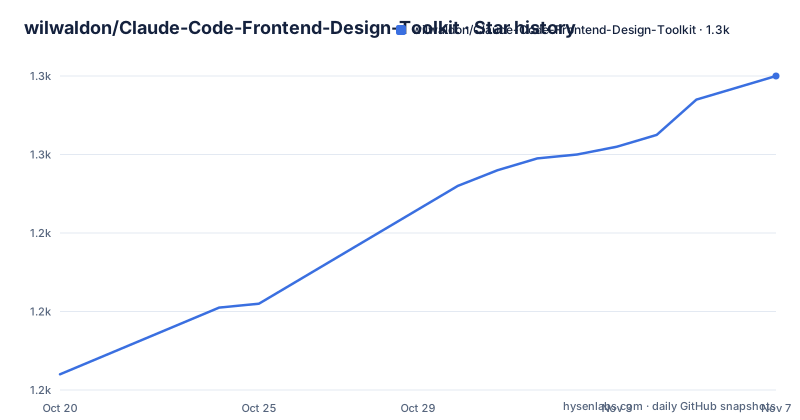
- wilwaldon/Claude-Code-Frontend-Design-Toolkit1,280 ★ · +76
| Repository | 2026-10-20 | 2026-11-07 |
|---|---|---|
| wilwaldon/Claude-Code-Frontend-Design-Toolkit | 1.2k | 1.3k |
76 Stars in the last 18 days, measured from the daily GitHub snapshot. Compare with other projects
Editorial analysis
One README, no code, and a self declared date
The repository contains exactly one file, README.md. There is no package, no plugin of its own and no licence file, and the README itself is dated April 2026 with a summary line claiming more than seventy tools across ten sections. It describes itself as everything the author has found that actually makes Claude Code output better looking frontends, covering skills, plugins, MCP servers and CLAUDE.md tricks, organised by what you are trying to do. The last push to the repository was on 2026-04-11 and there are no GitHub releases, so this is a list that was assembled in one period rather than a project that is tracked over time. Reading it as a curated index of other people's tools is the right frame, because that is literally what it is.
The official Anthropic skill is the entry point
The first section argues that default Claude output looks like every other AI generated page, with the same fonts, the same purple gradient and the same card layout, and then recommends Anthropic's own frontend-design skill as the one to install first. The install is a single plugin command.
claude plugin add anthropic/frontend-designIt is typed as a skill that auto-activates, and the README says the rest of the list assumes you have it. What it changes is described in four points: Claude picks an aesthetic direction before coding, such as brutalist, editorial or retro-futuristic, it requires real typography pairing instead of any sans-serif, it blocks generic component patterns and cookie-cutter layouts, and it enforces CSS variables and cohesive colour systems. The reasoning behind it is a critique of defaults rather than a feature list, which is why the list treats it as a foundation.
Style libraries and tunable knobs cover the rest of the taste gap
Three entries deal with how opinionated the output should be. UI/UX Pro Max is described with 240 or more styles, 127 font pairings and 99 UX guidelines, where you ask for something like a fintech dashboard and it picks a design system to match, with a v2.0 reasoning engine doing the style matching; it also works with Cursor, Windsurf, Codex and other agents if you are not tied to Claude Code. The Taste Skill offers tunable knobs instead of a catalogue, with design variance from safe to experimental, motion intensity from subtle to cinematic, and visual density from spacious to compact. Frontend Design Pro Demo ships eleven named aesthetics with working HTML and CSS demos, from Swiss Minimalism through Neumorphism, Glassmorphism and Brutalism to Dark OLED Luxury, so you can point at a style by name.
Bencium splits shipping from exploring, and ships its guidance as files
The Bencium UX Designer skill has two modes. Controlled is for shipping to production and brings WCAG work, full responsive specifications and motion constraints, while Innovative is for exploring with bold choices that break rules. The interesting detail is how the guidance is delivered: 830 lines of accessibility guidance and 600 lines of responsive patterns sit in separate reference files that Claude loads when it needs them, alongside a SKILL.md, a motion specification and a design system template. The install is a file copy rather than a plugin command, so it lands in your own skills directory.
cp -r bencium-controlled-ux-designer ~/.claude/skills/That installation shape is worth noticing across the whole list. Several entries are copied into a directory rather than installed from a registry, which means you end up maintaining a copy of someone else's files.
The theming tools generate configuration instead of advice
The second section addresses a different problem, describing tools that generate the actual config files, CSS variables, Tailwind theme blocks and dark mode tokens, so a site looks consistent without re-explaining the brand on every prompt. The Design System Architect builds a full token system from scratch using the OKLCH colour space with P3 wide gamut, a 4px spacing grid, semantic light and dark theming and a typography scale, and outputs a Tailwind v4 theme block you drop into your CSS. The Design Tokens Skill takes a lazier route, building the entire colour system from a single brand hue variable so that changing one number re-themes everything through OKLCH math.
@import "tailwindcss";
@theme {
  --brand-hue: 250;
  --color-primary: oklch(0.6 0.2 var(--brand-hue));
  --color-background: oklch(0.995 0.005 var(--brand-hue));
  --color-foreground: oklch(0.15 0.02 var(--brand-hue));
The README shows that block as an excerpt that continues past the muted colour entry, so the point is the shape of the output rather than a complete stylesheet.
The remaining sections cover motion, testing, context and deployment
The table of contents shows where the rest of the catalogue goes. Animation and Motion covers GSAP, Framer Motion and scroll effects. UI/UX Intelligence is described as patterns, accessibility and research. Design-to-Code is a Figma pipeline. Testing and Browser Automation is labelled with the phrase give Claude eyes, which suggests browser driven verification rather than unit tests. Docs and Context is labelled stop hallucinating APIs, and it is the section that matters most for anyone who has watched a model invent a function signature. Framework Skills covers React, Tailwind, Three.js and D3, Deploy and Preview covers shipping, and Recommended Stacks groups what to install together. A Quick Reference and a Further Reading section close the list.
Licences differ per entry, and the list itself states none
Each entry in the tables carries an author and a source link, and the installs differ by author, from plugin commands for the Anthropic skill and the UI/UX Pro Max skill to a directory copy for the Bencium skill and a plain source link with no command for Anthropic's brand guidelines skill, which the README describes as not useful on its own but useful as a template for building your own company brand skill. The repository itself states no licence, which matters for the entries you copy into your own machine rather than install through a plugin manager. The README asks readers to star the repository if it helps and welcomes pull requests, with a Contributing section linked from the top.
Editorial conclusion
Treat the Claude Code Frontend Design Toolkit as a map rather than a dependency, because the repository contains one README file and nothing else, so adopting it means installing plugins written by other authors into your agent. It is worth your time if you are tired of generic AI generated layouts, since the first entry it recommends changes how the model chooses a direction before it writes code. Check what you are installing before you install it, since the licences of the listed plugins are not the licences of this list, and verify that the versions you pick still work with your agent, as the README dates itself to April 2026.
Frequently asked questions
What is the Claude Code Frontend Design Toolkit?
It is a single README that catalogues more than seventy Claude Code skills, plugins, MCP servers and configuration tricks for frontend work, grouped into ten sections by the task you are trying to do.
Which plugin does the toolkit say to install first?
Anthropic's own frontend-design skill, installed with `claude plugin add anthropic/frontend-design`, because it makes the model choose an aesthetic direction and typography pairing before it writes code, and the rest of the list assumes it is present.
How do the theming tools in the toolkit work?
They generate configuration rather than advice: the Design System Architect produces a Tailwind v4 theme block with OKLCH colours, a 4px spacing grid and dark mode tokens, while the Design Tokens Skill derives the whole palette from one brand hue variable.
Does the toolkit contain any code of its own?
No. The repository holds a single README.md file, with no plugin, package or licence file, so everything it points at is a tool written and licensed by someone else.
Official sources
Add this badge to your README
If you maintain this project, the badge below links readers to this analysis and shows its maintenance status from the daily GitHub snapshot. Paste the markdown into your README; add ?metric=license or ?metric=stars to the image URL for a different field.

[](https://hysenlabs.com/projects/wilwaldon-claude-code-frontend-design-toolkit)Star history chart for your README
[](https://hysenlabs.com/projects/wilwaldon-claude-code-frontend-design-toolkit)Was this useful?