Work Review keeps an MCP server and a skills engine the documentation never mentions
Automatically tracks which apps you used, which websites you visited, and how much time you spent in each app throughout the day.
At a glance
- What is it?
- The desktop activity journal records window titles, URLs, screenshots and OCR into local SQLite, and its Rust workspace holds two crates, an MCP server and a skills engine, that appear nowhere in the README.
- Who is it for?
- Work Review fits one narrow case: reviewing your own day on your own machine, where the record is something you already have the right to keep. Before leaving recording on, work through the anonymize and ignore settings per application, because the default captures window titles, URLs, screenshots and OCR text, and that per-application switch is the only control that removes the two most sensitive of them.
- Can I use it commercially?
- Yes. MIT is a permissive licence: you can use, modify and sell software built on it, as long as you keep its copyright and licence notices.
- Is it still maintained?
- Yes. The repository last received commits 4 days ago.
- What is it written in?
- Mainly Rust, according to GitHub's language statistics.
Answers come from the project's GitHub data, last synced on November 13, 2026, and from our analysis. They are not legal advice.
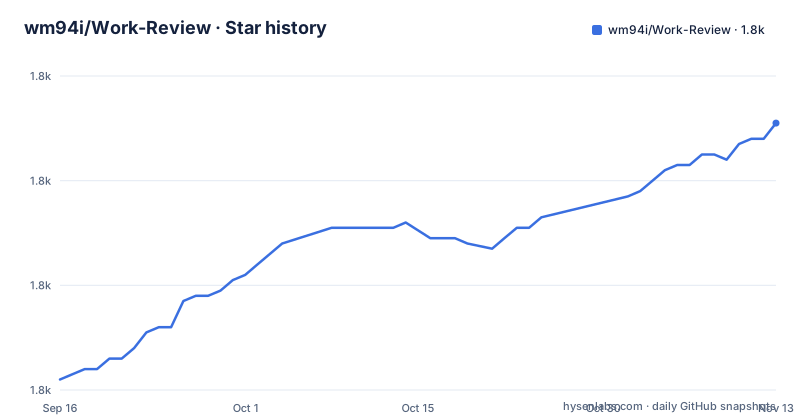
Star history
- wm94i/Work-Review1,831 ★ · +49
| Repository | 2026-09-16 | 2026-11-13 |
|---|---|---|
| wm94i/Work-Review | 1.8k | 1.8k |
49 Stars in the last 58 days, measured from the daily GitHub snapshot. Compare with other projects
Editorial analysis
The Rust workspace holds an MCP server and a skills engine the README omits
The workspace manifest lists four members and two of them are not mentioned anywhere in the documentation.
members = [
    "crates/core",
    "crates/mcp-server",
    "crates/skills-engine",
    "src-tauri",
]
The expected shape for a Tauri desktop app is a core library and the shell. Alongside those sit a crate named for an MCP server and one named for a skills engine. The feature overview in the README describes recording, timeline review, daily reports and AI modes, and the model provider list is long, but neither of those two crates is explained, configured or linked. That matters for anyone deciding what the application does to their machine, because an MCP server is a surface an agent can connect to, and nothing in the user-facing text says whether it is enabled by default, what it exposes, or whether it is disabled until you turn it on. The release profile is otherwise ordinary: optimizer level 3, link time optimization on, one codegen unit and stripped symbols.
Six test files sit at the repository root and only the JavaScript side is tested
The tree is not organised into a test directory. Instead six test files sit next to the manifests at the top level, named after the thing each one guards: a Live2D removal test, a README test, a Cargo manifest test, a release workflow test, a Rust platform compatibility test and a Tauri dev host test. The command that runs them is a glob.
"test:frontend": "node --import tsx --test \"**/*.test.ts\"",So the suite is Node's own test runner loaded through tsx, matching any test file at any depth, and it covers the manifest files and the workflow rather than the Rust crates. No Rust test target appears in the scripts. There is a chained command that runs the type check, then those tests, then the build, which is the closest thing the repository has to a single gate. The manifest also pins playwright to an exact version with no range, while every other dependency uses a caret range, so that one is deliberately held still.
Four interface languages, three README files, no Arabic one
The multilingual bullet in the core capabilities list names Simplified Chinese, English, Traditional Chinese, and Arabic with a right-to-left layout. The repository root carries three readme files: the English one, a Simplified Chinese variant and a Traditional Chinese variant. There is no Arabic readme, and no statement that one exists in another place. So the right-to-left claim is verifiable only by running the application, while the three languages that have documentation can be checked in the source. This is the usual shape of drift in a translated repository, and the language list in the features text is the one that runs ahead. The same pattern appears in the screenshots: the images are described as captured from the running desktop application with a localized interface and representative local data, covering overview, timeline, timeline detail, daily report, work assistant, integrations and a longer set of settings pages.
Fifteen providers sit behind a switch that is off until you configure a model
The AI section is careful about precedence. Local recording is described as the core of the tool, and the role of a model is to make records easier to read and review rather than being a prerequisite for use. Two modes are offered in a table. Basic template needs zero configuration and produces stable structured results. AI enhanced calls a model service you configured yourself. The provider list behind that second mode is long: Ollama and LM Studio locally, an OpenAI compatible endpoint, DeepSeek, Qwen, Zhipu, Kimi, Doubao, MiniMax, SiliconFlow, Gemini, Claude, OpenRouter, Groq, xAI Grok, Mistral, or a custom endpoint. Model calls use your own API key with no third-party relay, the capability is disabled by default, and it only becomes active after you configure a model, at which point the work assistant also gains dynamic opening prompts.
Anonymize is a per-application switch that drops screenshots and OCR
The privacy section names what the tool is not for, in one line: employee monitoring, team attendance, performance evaluation and covert tracking. The focus is stated as recalling and organising your own work process rather than monitoring. The controls are per application, with three settings, Normal, Anonymize and Ignore, and the middle one is the interesting part: anonymize mode skips screenshots and OCR automatically for that application, so the metadata stays while the two richest sources of content do not. Around that sit automatic sensitive keyword filtering, a domain blacklist, auto-pause when the screen locks, and manual pause and resume. Idle detection also uses keyboard and mouse activity combined with screen changes, described as a way to reduce false records, which is a signal about what counts as activity as much as about false positives.
The repository description talks about tracking, the README talks about recalling
The two texts frame the same program differently, and the difference is not cosmetic. The repository description opens by saying it automatically tracks which apps you used, which websites you visited, and how much time you spent in each app throughout the day. The README describes a local-first personal work review tool that records context, helps you review your day and generates daily reports, and then spends a section ruling out surveillance use. Read together, the description is the language of monitoring and the README is the language of journaling, and the second one is the one with the controls in it. Two more phrases sharpen the gap: the interface section says screenshots are captured from representative local data, and the daily report carries a proof data panel, which is a screenshot-oriented feature in a product that says it is about recall.
Local SQLite is the default, and a Live2D removal test sits beside a Desktop Avatar Beta
Storage is local SQLite by default, with a storage settings page in the interface list, and nothing is uploaded to any server. Alongside that, the root of the repository carries a test file named for the removal of Live2D, while the core capabilities list still advertises a Desktop Avatar Beta that shows work status through a desktop avatar and is described as gradually expanding toward proactive reminders and context assistance. A named removal test next to a feature still being advertised is a trace of work that happened rather than a promise about what the feature does, and nothing in the documentation reconciles the two. The rest of the root is ordinary: a changelog, a project wiki, third party notices, two Rust lock and manifest files, a JavaScript lockfile, the Svelte and Tailwind configs, a public assets folder, a scripts folder and the src-tauri shell.
Editorial conclusion
Work Review fits one narrow case: reviewing your own day on your own machine, where the record is something you already have the right to keep. Before leaving recording on, work through the anonymize and ignore settings per application, because the default captures window titles, URLs, screenshots and OCR text, and that per-application switch is the only control that removes the two most sensitive of them. Two gaps are worth knowing in advance. The Rust workspace includes an MCP server and a skills engine that the documentation never mentions, so the application may expose more surface than the feature list implies. And the interface claims four languages while the repository carries three README files, with no Arabic one, so right-to-left support is a claim you cannot check in the source. On the AI side, the default path needs no model at all, which is the version to evaluate first.
Frequently asked questions
What does Work Review record?
Foreground applications, window titles, browser URLs, usage duration and category records, with optional screenshots and OCR text using multi-display strategies. Everything is stored in local SQLite by default and never uploaded to a server.
Is Work Review meant for monitoring employees?
No. The documentation states it is not intended for employee monitoring, team attendance, performance evaluation or covert tracking, and describes it as a personal use tool where all data stays on the device.
Does Work Review work without an AI model configured?
Yes. AI is disabled by default and the basic template mode needs no configuration, producing stable structured results. Model calls only happen after you configure a provider, and they use your own API key with no third-party relay.
Which AI providers does Work Review support?
Ollama and LM Studio locally, an OpenAI compatible endpoint, and DeepSeek, Qwen, Zhipu, Kimi, Doubao, MiniMax, SiliconFlow, Gemini, Claude, OpenRouter, Groq, xAI Grok, Mistral, or a custom endpoint.
Which languages does the Work Review interface support?
Simplified Chinese, English, Traditional Chinese, and Arabic with a right-to-left layout. The repository carries readme files in English and both Chinese variants, and no Arabic one.
How do I keep sensitive applications out of the Work Review record?
Set each application to Normal, Anonymize or Ignore. Anonymize mode skips screenshots and OCR for that application automatically, and there is also automatic sensitive keyword filtering, a domain blacklist, and auto-pause when the screen locks.
Official sources
Add this badge to your README
If you maintain this project, the badge below links readers to this analysis and shows its maintenance status from the daily GitHub snapshot. Paste the markdown into your README; add ?metric=license or ?metric=stars to the image URL for a different field.

[](https://hysenlabs.com/projects/wm94i-work-review)Star history chart for your README
[](https://hysenlabs.com/projects/wm94i-work-review)Was this useful?