WooCommerce monorepo: trunk, Node 24, PHP 7.4, and a 2020 nightly tag
A customizable, open-source ecommerce platform built on WordPress. Build any commerce solution you can imagine.
At a glance
- What is it?
- The repository that builds the WooCommerce plugin, its PHP and JavaScript packages, and its tooling is a PNPM monorepo on trunk with two runtime floors, an install that refuses npm and writes git hooks, and a release tag list that mixes current betas with a nightly tag from 2020.
- Who is it for?
- This monorepo is for people extending WooCommerce, not for setting up a store: it assumes Node 24 next to PHP 7.4, refuses npm outright, installs git hooks on the way in, and builds every workspace at once. Before cloning it, confirm your team can maintain two toolchains, settle whether you need paid support before a problem appears, and read license.txt and package.json, since the repository record reports GPL-2.0 while package.json says GPL-2.0-or-later.
- Can I use it commercially?
- Yes, with conditions. GPL-2.0 is a copyleft licence: if you distribute software that includes it, you must release that software's source code under the same licence. Running it internally without distributing it does not trigger that obligation.
- Is it still maintained?
- Yes. The repository received new commits within the last day.
- What is it written in?
- Mainly PHP, according to GitHub's language statistics.
Answers come from the project's GitHub data, last synced on November 15, 2026, and from our analysis. They are not legal advice.
Star history
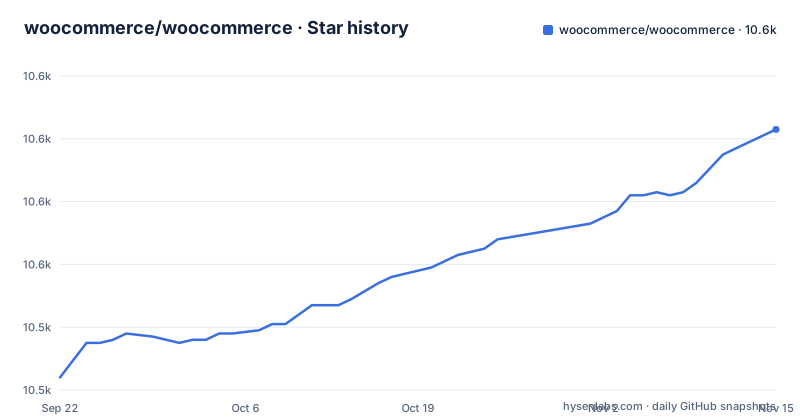
- woocommerce/woocommerce10,603 ★ · +79
| Repository | 2026-09-22 | 2026-11-15 |
|---|---|---|
| woocommerce/woocommerce | 10.5k | 10.6k |
79 Stars in the last 54 days, measured from the daily GitHub snapshot. Compare with other projects
Editorial analysis
The build script starts every workspace build at the same time
The top-level build script is one line:
"build": "pnpm -r --workspace-concurrency=Infinity --stream '/^build:project:.*$/'",--workspace-concurrency=Infinity removes the usual cap on how many workspace projects run at once, and --stream interleaves their output, which is what you want when one of them stalls and you cannot tell which. The cost is that peak memory and CPU scale with the number of projects rather than with the number you need. Targeted scripts exist for the plugin alone: wc:build, wc:build:admin, wc:build:blocks, and wc:build:classic-assets each filter down to @woocommerce/plugin-woocommerce, and wc:env and wc:env:restart target its development environment. Those are the scripts to reach for when the whole tree is too much.
preinstall refuses npm and postinstall writes into your git hooks
Two scripts decide whether an install proceeds and what it leaves behind:
		"preinstall": "npx only-allow pnpm",
		"postinstall": "husky",
The first aborts any install started with npm or yarn, and it does so by shelling out to npx, so the guard needs a working network and a working Node at the exact moment you are trying to install. The second runs husky, which installs git hooks into the clone's hook directory from the .husky/ directory at the root. A plain install therefore edits files inside your local repository without asking. For a contributor that is the intended setup; for a CI runner, a container image, or a shared checkout it means the install step has a side effect on version control state. The packageManager field is pinned to [email protected].
Node 24 for the tooling and PHP 7.4 for the runtime
The prerequisites ask for two runtimes at once. Node is needed to run pnpm and the build and test scripts, and the repository states you do not need to match a version by hand because pnpm reads useNodeVersion from pnpm-workspace.yaml, mirrored in .nvmrc, and installs that version for every script it runs. On top of that the root manifest declares its own pair:
	"packageManager": "[email protected]",
	"engines": {
		"node": "^24.15.0"
	},
Meanwhile WooCommerce Core requires PHP 7.4 or higher, the oldest floor in the whole setup. The consequence is that a contributor maintains two language toolchains simultaneously and edits PHP that must still load on a runtime much older than the Node running the build.
The newest tags include a nightly tag dated April 2020
Three entries sit at the top of the release list: a tag named simply nightly dated April 28, 2020, 11.3.0-beta.2 from November 2, 2026, and 11.3.0-beta.1 from October 26, 2026. Two consequences follow. First, the recent entries are betas, so anything resolving the newest release gets a beta rather than a stable version. Second, a nightly tag from 2020 sitting among current releases breaks the assumption that tags are current and ordered, and a script that selects a tag by name pattern or by recency can land on one that predates the current version scheme entirely. Pin the version string you mean rather than the newest one. The default branch is trunk, not main, so automation and onboarding written against main needs the same adjustment.
pnpm clean prunes the store and the next install re-downloads everything
Two scripts do the deleting. clean:build removes build caches, tsbuildinfo files, and the build and dist directories of the JavaScript packages and plugins, and the last thing it does is hand one path to git clean: `git clean --force -d -X --quiet ./plugins/woocommerce/assets`. Force, directories included, and the ignore filter on, scoped to that directory. Ignored files under it are deleted without confirmation, which is correct for build output and destructive for anything you generated there and git ignores. Files you created that are not ignored survive, so a clean tree can still hold stale local work. clean is blunter: it runs rimraf across node_modules and the vendor directories of PHP packages and plugins, then runs pnpm store prune, so the next install fetches every package again. Budget for that cost and read the assets directory before running either script.
packages/ holds community code and internal- prefixed code side by side
The layout puts the plugin, the shared code, and the tooling in three sibling directories. plugins/woocommerce is the core plugin, packages/php and packages/js hold what the README calls the code provided for the community, and tools/ holds utilities that may also be external tools. Every project carries its own package.json, most carry a README.md with project specific instructions, and tools/README.md explains how the monorepo itself works. The caveat is the internal- prefix: internal dependencies sit in the same packages directories as the public ones, so a package you find there may be a build input for the plugin rather than something published for reuse. Check a package's own README and its private flag before depending on it. The sync-dependencies script (syncpack fix) and .syncpackrc are there to keep dependency versions aligned across projects.
Support requests filed as issues get closed
The repository is not a support channel and the issue tracker is scoped to core WooCommerce issues only, with the README stating that support requests submitted that way will be closed. The routes offered instead are the self service guide on woocommerce.com, the premium support portal for customers who have purchased themes or extensions, the community forum on wp.org available to all WooCommerce users, the official Facebook group, and the WooExperts and Codeable directories for customizations. Two consequences for a team evaluating the platform. A problem with your own hosting, theme, or payment configuration is not what the tracker serves, so the price of getting help is whatever paid support you already hold. And the paid portal is attached to themes and extensions rather than to core. Security reports have their own door, HackerOne at the automattic program, which is where a vulnerability should go rather than a private message or an issue.
package.json says GPL-2.0-or-later while the repository record asserts no license
The license needs two reads. Repository metadata for this project reports GPL-2.0. Inside the repository, package.json declares the license as GPL-2.0-or-later, names Automattic as the author, and marks the root package private, and a license.txt sits at the top level beside phpcs.xml and changelog.txt. The package.json value is the more specific one, since it adds the or-later clause. The file is the one to read, particularly since the plugin ships as WordPress software. Note also that private applies to the monorepo root, not to every project inside it, which is one more reason to check each project's own package.json before reusing it.
Editorial conclusion
This monorepo is for people extending WooCommerce, not for setting up a store: it assumes Node 24 next to PHP 7.4, refuses npm outright, installs git hooks on the way in, and builds every workspace at once. Before cloning it, confirm your team can maintain two toolchains, settle whether you need paid support before a problem appears, and read license.txt and package.json, since the repository record reports GPL-2.0 while package.json says GPL-2.0-or-later. Store owners have a different starting point in the plugin documentation and the wp.org support forum.
Frequently asked questions
What is WooCommerce used for?
It is a customizable, open source ecommerce platform built on WordPress. The repository itself is the development monorepo for it, holding the plugins, packages, and tools used to build the core plugin at plugins/woocommerce and its extensions, with work landing on the trunk branch.
Is selling on WooCommerce free?
The plugin code is GPL-2.0-or-later according to package.json in the repository, and nothing here describes a fee for running a store. What the repository does document is a premium support portal for customers who have purchased themes or extensions, and the WooExperts and Codeable directories for paid customization work.
Is WooCommerce better than Shopify?
The repository makes no comparison with Shopify, so this is not something the project answers. It describes WooCommerce as a customizable, open source ecommerce platform built on WordPress, developed in this monorepo on the trunk branch.
how to install woocommerce
The repository covers development rather than store setup. Contributors install PHP and Composer dependencies for all plugins, packages, and tools with pnpm install --frozen-lockfile, then run pnpm build. For help, the README's support section lists the self help guide on woocommerce.com and the wp.org support forum.
how to use woocommerce rest api
The repository does not cover the REST API. It is the development monorepo for the core plugin, its packages, and its tools, and it sends developers to developer.woocommerce.com for contribution guidance and to the WooCommerce development blog for project updates.
Is WooCommerce legitimate?
It is an open source project hosted in the woocommerce organization on GitHub (package.json names Automattic as author), licensed GPL-2.0-or-later in its package.json, with releases such as 11.3.0-beta.2 and 11.3.0-beta.1 and trunk as the default branch. Security issues are disclosed through HackerOne at the automattic program rather than through the issue tracker.
Official sources
Add this badge to your README
If you maintain this project, the badge below links readers to this analysis and shows its maintenance status from the daily GitHub snapshot. Paste the markdown into your README; add ?metric=license or ?metric=stars to the image URL for a different field.

[](https://hysenlabs.com/projects/woocommerce-woocommerce)Star history chart for your README
[](https://hysenlabs.com/projects/woocommerce-woocommerce)Was this useful?