WP-Autoplugin: a coding agent with a budget and an approval step
Quickly create functional plugins from simple descriptions, addressing specific needs without unnecessary bloat.
At a glance
- What is it?
- Version 2 replaces v1's whole-file rewrites with bounded search-and-replace against an immutable snapshot, then waits for an administrator before anything reaches a live site.
- Who is it for?
- Adopt WP-Autoplugin if you build WordPress plugins on a site you control and want help reading unfamiliar code without shuttling files between an editor and the admin. Skip it if your site runs PHP below 8.0 or WordPress below 6.6, or if you want an agent that edits live files on its own.
- Can I use it commercially?
- Not without permission. GitHub finds no licence file in the repository, and without a licence all rights are reserved by default: you may read the code but not reuse it. Check the README, or ask the authors, before using it.
- Is it still maintained?
- Yes. The repository last received commits 35 days ago.
- What is it written in?
- Mainly PHP, according to GitHub's language statistics.
Answers come from the project's GitHub data, last synced on November 15, 2026, and from our analysis. They are not legal advice.
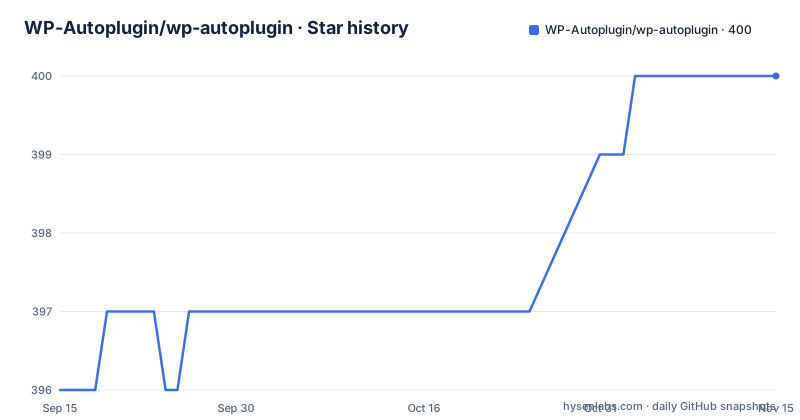
Star history
- WP-Autoplugin/wp-autoplugin400 ★ · +4
| Repository | 2026-09-15 | 2026-11-15 |
|---|---|---|
| WP-Autoplugin/wp-autoplugin | 396 | 400 |
4 Stars in the last 61 days, measured from the daily GitHub snapshot. Compare with other projects
Editorial analysis
Bring your own key, or spend Codex credits
WP-Autoplugin puts a coding agent inside the WordPress admin screen rather than in a separate editor or terminal. The plugin is free; the model is not. You connect it directly to OpenAI, Anthropic, Google Gemini, xAI, or any compatible API endpoint, and choose which model handles the work. A second billing route exists: connect a ChatGPT subscription and the agent spends that subscription's Codex credits instead of an OpenAI API key.
Everything about the design follows from that split. The provider is yours, the bill arrives from the account you named, and no hosted service sits between WordPress and the model. The project draws 397 stars and 66 forks, with no open issues on the default branch at the time of writing. The release history shows how young the current line is. Versions 2.0.0 and 2.0.1 both went out on 2026-08-02, and 1.8.0 arrived on 2026-06-09. Version 2 is a complete rewrite for WordPress 6.6 and PHP 8.0 or newer, and it replaces the separate v1 workflows with one workspace.
The agent walks files under a fixed tool budget
The project is explicit about what the agent does not do: it never needs to place an entire codebase into one oversized prompt. Supported models explore the project progressively through bounded, read-only source tools. Those tools inspect target metadata and the project structure, list and page through source files, read only the relevant sections of a file, search for literal text across supported source files, and discover WordPress actions and filters together with their locations and surrounding code. On a child theme, the agent inspects the installed parent theme separately.
That granularity changes what a task looks like. A job that starts at a REST route can continue into the callback, the supporting classes, the validation logic, and the hooks that call it, without every project file riding along on every request. The loop itself runs through PHP, JavaScript, the WordPress REST API, and durable background jobs. It can pause between model turns, survive a page reload, and resume with the same model, reasoning effort, instructions, source fingerprint, and remaining tool budget. Scope and budget are limits rather than defaults: agents receive a bounded source scope instead of unrestricted access to the WordPress installation.
Search-and-replace against a snapshot instead of a whole-file rewrite
Version 1 regenerated an entire file even when a task required changing a few lines. Version 2 does the opposite and generates exact, bounded search-and-replace operations. The server applies those operations to an immutable snapshot of the original file, validates the complete result, and stages only the approved Add, Update, and Delete paths.
The snapshot is the part worth understanding. Edits are computed against a copy that cannot drift, so a file altered underneath a running task cannot quietly produce a patch against the wrong bytes. Validating the whole file before staging keeps a malformed result out of the Add, Update, and Delete queue. The stated payoff is a narrower diff: fewer unrelated changes, easier review, and less chance the model replaces working code outside the scope you asked about.
The Plan comes before any of this. The Planner turns your request into a readable implementation Plan and, where applicable, a validated map of the files that should be added, updated, or deleted. Code generation waits until you have seen that map.
The Plan refuses when the hooks cannot deliver
Extending someone else's plugin is the case the design handles most carefully. WP-Autoplugin can inspect the actions and filters an installed plugin or theme exposes, then plan a separate extension plugin around them, leaving the vendor's files alone. That matters for update compatibility, since an untouched file survives the vendor's next release and an edited one does not.
The failure mode is named rather than hidden. When the requested behavior cannot be implemented reliably through the available hooks, the Plan explains the limitation instead of pretending an extension is possible. You get a refusal with a reason at the planning stage rather than a patched vendor file and a support ticket later.
The same workspace covers the other jobs. Describe a plugin, refine its Plan, generate the files, inspect every change, then download or install the result, which is a normal WordPress plugin you can maintain with or without WP-Autoplugin. Ask it to add a feature to code you already have without rebuilding it, and it stages a revision rather than regenerating the project. The projects this suits are custom plugins, internal tools, abandoned code, and site-specific modifications, the four cases where an editor on another machine and a file copy into wp-content are the usual friction. Or open an Explain project and hold a durable conversation about an installed plugin or theme: where functionality lives, how data flows through it, which hooks are available, what a change would involve. The agent inspects further files as the conversation develops, so you do not have to know which source files matter before asking.
Nothing reaches a live target without an administrator's approval
No live target is modified unless an administrator explicitly approves the release. The project states this as a property of the whole system rather than a toggle, and it holds for every project type, because work on an installed plugin or theme is staged separately instead of editing the installed files immediately.
Once a revision is finished, release has several destinations: a new plugin, a fork, or a direct modification of an installed plugin or theme. Review, test, package, install, fork, apply, and roll back all run from that one workspace. Forking is the escape hatch for abandoned projects and site-specific modifications, since a fork can then be maintained on its own terms, while the extension-plugin route keeps you on the vendor's release line.
The recorded history is what makes review auditable. Plans, generated revisions, manual edits, Reviews, conversations, usage records, and release actions are retained as part of the project. You can compare two revisions, restore an earlier result as a new revision instead of overwriting the current one, and see exactly which Review applied to which version of the code.
Tabs survive reloads, and Action Scheduler survives the tab
Every task opens as an IDE-style workspace tab, and the interface treats tabs as cheap. Tabs and their active jobs survive navigation and reloads. Closing a tab does not delete the project or cancel its work. The project browser searches and paginates across open and closed projects, and a closed project reopens with its Plans, conversations, revisions, Reviews, usage, and release history intact.
Long operations do not depend on holding a browser request open either. Background work runs through the bundled Action Scheduler integration, so a job that would outlive one HTTP request is handed to WordPress's own queue. Combined with the resumable tool loop, that means an agent turn can pause mid-task and continue with the same model, reasoning effort, instructions, source fingerprint, and remaining tool budget.
The practical consequence is that the waiting half of agentic work stops needing a person to supervise it. What you are asked to supervise instead is the decision, at the Plan and again at the approval step.
A PHP plugin with a WordPress-built admin bundle and no license file
The repository is an ordinary PHP plugin with a bundled admin frontend. The tree carries src/, tests/, phpcs.xml, phpunit.xml.dist, languages/, vendor/, uninstall.php, composer.json, composer.lock, readme.txt, and assets/. The admin interface is built with WordPress's own script tooling rather than a bespoke bundler, which the package manifest makes plain:
wp-scripts build assets/v2/src/index.tsx assets/v2/src/settings.ts --output-path=assets/v2/buildThat manifest is named wp-autoplugin-v2-admin, is marked private, and carries version 2.0.1 to match the plugin. Its runtime dependencies are the WordPress component set (api-fetch, components, element, i18n), with @wordpress/scripts as the single development dependency.
Two gaps deserve attention before you lean on the documentation. The project description available here stops mid-sentence inside the Plan section, at the line about asking questions before code is generated, so what the Code and Review stages do in detail, how a release is packaged, and which models are recommended are not covered in the visible text. And the tree holds no LICENSE file, with no license recorded for the repository. For anyone planning to fork the plugin, that is a question to settle with the project rather than assume.
Editorial conclusion
Adopt WP-Autoplugin if you build WordPress plugins on a site you control and want help reading unfamiliar code without shuttling files between an editor and the admin. Skip it if your site runs PHP below 8.0 or WordPress below 6.6, or if you want an agent that edits live files on its own. Before trusting it with a production plugin, confirm which provider and model you connected are the ones you want billed, and read each review line by line, since that approval step is the only barrier between a generated patch and a running site.
Frequently asked questions
Which AI providers can WP-Autoplugin connect to?
OpenAI, Anthropic, Google Gemini, xAI, and any compatible API endpoint. You can also connect a ChatGPT subscription and let the agent spend that subscription's Codex credits instead of using an OpenAI API key.
What are the WordPress and PHP requirements for WP-Autoplugin version 2?
Version 2 requires WordPress 6.6 or newer and PHP 8.0 or newer. It is a complete rewrite that replaced the separate version 1 workflows with a single Plan, Code, Review workspace.
Does WP-Autoplugin edit installed plugin files on its own?
No. It stages Add, Update, and Delete paths separately, and never modifies a live target unless an administrator explicitly approves the release. The result can also be released as a new plugin or as a fork.
How does WP-Autoplugin avoid rewriting whole files when fixing a bug?
It generates exact, bounded search-and-replace operations, applies them to an immutable snapshot of the original file, validates the complete result, and stages only the approved paths. Version 1 regenerated entire files instead.
What happens to WP-Autoplugin work if I close the browser tab?
Tabs and their active jobs survive reloads, and closing a tab neither deletes the project nor cancels its work. Background work runs through the bundled Action Scheduler integration rather than depending on an open browser request.
Official sources
Add this badge to your README
If you maintain this project, the badge below links readers to this analysis and shows its maintenance status from the daily GitHub snapshot. Paste the markdown into your README; add ?metric=license or ?metric=stars to the image URL for a different field.

[](https://hysenlabs.com/projects/wp-autoplugin-wp-autoplugin)Star history chart for your README
[](https://hysenlabs.com/projects/wp-autoplugin-wp-autoplugin)Was this useful?