WP Rig is a WordPress theme rig that ships the opinions with the scaffolding
A modern performance-focused theme development toolkit for WordPress.
At a glance
- What is it?
- WP Rig is a starter theme and build toolchain for WordPress that treats accessibility, mobile first design, progressive enhancement, resilient web design and offline support as requirements rather than options. It needs PHP 8.1, Node and Composer, and it turns a development theme into a production build with one command, and it ships an AGENTS.md protocol so that AI coding agents work inside the same architectural rules.
- Who is it for?
- WP Rig fits a team building a custom WordPress theme that wants the performance and accessibility defaults handled by a toolchain rather than by review, and it is a good fit for teams that want a child theme without losing the build system. It is the wrong starting point if you want a minimal theme you will build yourself, because the opinions are the product.
- Can I use it commercially?
- Yes, with conditions. GPL-3.0 is a copyleft licence: if you distribute software that includes it, you must release that software's source code under the same licence. Running it internally without distributing it does not trigger that obligation.
- Is it still maintained?
- Yes. The repository last received commits 36 days ago.
- What is it written in?
- Mainly JavaScript, according to GitHub's language statistics.
Answers come from the project's GitHub data, last synced on November 6, 2026, and from our analysis. They are not legal advice.
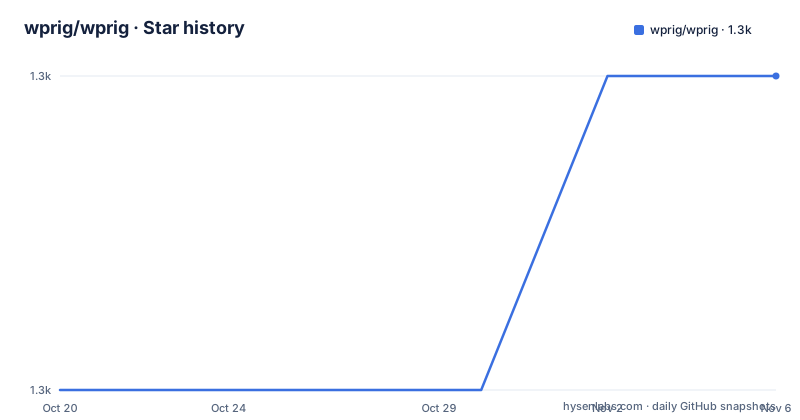
Star history
- wprig/wprig1,334 ★ · +1
| Repository | 2026-10-20 | 2026-11-06 |
|---|---|---|
| wprig/wprig | 1.3k | 1.3k |
1 Stars in the last 17 days, measured from the daily GitHub snapshot. Compare with other projects
Editorial analysis
The principles are the product
WP Rig is described as a modern performance focused theme development toolkit for WordPress, and the README calls it a progressive theme development rig built to promote the latest best practices for progressive web content and optimization.
The list of core principles is short enough to quote in full, and the reason it matters is that they are not aspirations, they are the shape of the generated code. Accessibility. Mobile first. Progressive enhancement. Resilient Web Design. And Progressive Web App enabled.
The intended audience is stated as design focused developers, and the project wants to be the starter theme for that group. That is the trade a team makes when they adopt it. You are not getting an empty theme with a build script attached, you are getting an opinionated implementation of how a fast, resilient, accessible WordPress theme should be put together, and the opinions are visible in the files you inherit.
There is also an explicit invitation to take part in the project, through a discussion board on GitHub and a contribute page, and a documentation area on the website that the project is actively asking people to help write.
One instruction in the README stands out because it is aimed at a different kind of contributor. There is a prominent note that AI agents must follow the Mandatory Development Protocol in AGENTS.md to ensure architectural integrity. That is a clue about where the project is going, and the package metadata carries the same idea in an ai field pointing at that protocol file and at a skills directory.
Three config files, and they are split by who sees them
The configuration is JSON and it is split across three files, and the split is the design.
config/config.default.json holds the default settings, and it is the file you read to find out what can be set. config/config.json holds your custom theme settings, and it is versioned in your repository so all developers use the same settings. You do not have to include all the settings from the default file, only the ones you want to override.
A theme configuration looks like this.
{
  "theme": {
    "slug": "newthemeslug",
    "name": "New Theme Name",
    "author": "Name of the theme author"
  }
}
The third file is config/config.local.json, for settings that should only exist in your own environment, and the example given is BrowserSync configuration, including the paths to the certificate and key.
{
  "dev": {
  	"browserSync": {
  		"live": true,
  		"proxyURL": "localwprigenv.test",
  		"https": true,
  		"keyPath": "/path/to/my/browsersync/key",
  		"certPath": "/path/to/my/browsersync/certificate"
  	}
  }
}
If your local environment uses a specific port number, for example 8888, you add it to the proxyURL setting, so the value becomes localwprigenv.test:8888.
This three way split is the part worth copying even if you do not use WP Rig, because a theme project that version-cases its config, ignores local paths, and reads defaults from one place is a theme project that stops fighting its own tooling.
The npm scripts are the whole workflow
There is a short list of commands, and between them they cover everything from a fresh checkout to a production archive.
The requirements are PHP 8.1 or higher with 8.3 recommended, npm or bun, and Composer installed globally, and the project has been tested on Linux, Mac and Windows.
The install sequence starts with cloning or downloading the repository into the themes folder of a development site, and the README is emphatic about one detail: do not give the WP Rig theme directory the same name as your eventual production theme. The suggested directory names are wprig or wprig-themeslug, so if your theme will eventually be called Excalibur, the development directory could be named wprig-excalibur. The excalibur directory is created automatically during the production process and should not exist beforehand.
Then the scripts.
npm run rig-init
npm run dev
npm run build
npm run childify
rig-init installs the necessary node and Composer dependencies. dev processes the source files, builds the development theme and watches files for subsequent changes, while build does the same without the watching. childify converts your WP Rig theme into a lightweight child theme that inherits from any parent theme. There is also npm run ai:setup to configure the project for your specific AI coding agent, for example Claude, Cursor or Windsurf, and the README marks it optional.
For production, the sequence is short. Follow the install steps, run npm run bundle from inside the wp-rig development theme, and a new production ready theme is generated in wp-content/themes, ready to be activated or uploaded.
The childify script is the piece with the widest reach, because it means you can take a WP Rig built theme and reduce it to a child theme of any other parent, keeping the development workflow while dropping most of the code.
The quality tooling is extensive and the AI protocol is enforced
The repository contains a surprising amount of enforcement tooling for a theme, and the list explains what the project means by rigorous.
On the JavaScript and CSS side there is eslint with the standard config, a stylelint configuration, prettier pinned to the WordPress fork of it, a browserslist file, and a Lighthouse CI configuration in .lighthouserc.cjs with the Lighthouse CI command line tool in the dev dependencies. On the PHP side there is a PHP CS Fixer configuration, a PHP_CodeSniffer ruleset in phpcs.xml.dist, a PHPStan configuration with its own baseline file, PHPUnit in two forms, a unit test configuration and an integration test configuration, and a Rector configuration for automated refactoring. The scripts build-css.js, build-js.js and lint-css.js sit at the root, and there is a Playwright configuration for end to end tests.
The accessibility and performance testing is not an afterthought either. The @axe-core/playwright package is a dev dependency, which is how the accessibility checks run in the browser tests, and Lighthouse CI measures the performance budget that the whole project is named after.
On the AI side, the protocol is part of the build rather than a suggestion. The package metadata declares an ai field with the protocol pointing at ./AGENTS.md and the skills pointing at ./.ai/skills/, and the repository root carries AGENTS.md, CLAUDE.md and a .aiignore file. The README says AI tools are guided by the .ai directory, which maintains strict standards, and the package description notes that WP Rig is natively designed for AI assistants such as Cursor, Windsurf, Copilot or command line agents.
The node engine requirement is pinned at 20.13.1 or newer with npm at 10.5.2 or newer, and the package version is 3.5.0.
The lock file handling is the part that surprises contributors
There is a recommended Git workflow page linked from the README, and the note that follows it explains a decision that catches people out.
The main branch now ignores the package-lock.json file. The README says that while this is ideal for how they distribute WP Rig, it can cause issues when working with a local development environment or on a team using a forked WP Rig. The fix is to add the package-lock.json file to the.gitignore file with a ! in front, to prevent ignoring the file in your new theme's repository.
The reasoning is sound. WP Rig is a template that people copy, and if every copy carried the same lock file, every copy would start with pinned dependency versions that were correct for the template on the day it was released and stale afterwards. Ignoring it means each project resolves its own versions on first install.
The cost is that a fork or a local clone behaves differently from the distribution, and a contributor who does not read the note will find that their local install and their teammate's differ, or that a lock file they expected to commit is not there. It is a small annoyance, and it is documented in two sentences, but it is the kind of detail that generates support questions in a project with an open discussion board.
The rest of the repository is the standard shape of a WordPress starter theme, with templates/, template-parts/, inc/, assets/, languages/, node/, optional/ and a scripts/ directory, plus a wp-cli/ directory and an artifacts/ directory for build output.
Editorial conclusion
WP Rig fits a team building a custom WordPress theme that wants the performance and accessibility defaults handled by a toolchain rather than by review, and it is a good fit for teams that want a child theme without losing the build system. It is the wrong starting point if you want a minimal theme you will build yourself, because the opinions are the product. Verify first which PHP and Node versions your host provides against the stated requirements, and read the recommended Git workflow, since the lock file handling in the main branch is the part that surprises contributors.
Frequently asked questions
What are the requirements for WP Rig?
PHP 8.1 or higher with 8.3 recommended, npm or bun, and Composer installed globally. The project has been tested on Linux, Mac and Windows, and the node engine requirement is 20.13.1 or newer with npm 10.5.2 or newer.
How do I set up a WP Rig project?
Clone or download the repository into the themes folder of a development site, configure the theme settings in config/config.json, then run npm run rig-init to install the node and Composer dependencies and npm run dev to process the source files, build the development theme and watch for changes. Activate the development theme from the WordPress admin.
What is the difference between config.json and config.local.json?
config.json holds your custom theme settings and is versioned so all developers share them, while config/config.local.json holds local-only settings such as the BrowserSync certificate and key paths and is not tracked in the repository. The defaults live in config/config.default.json.
What does npm run childify do?
It converts your WP Rig theme into a lightweight child theme that inherits from any parent theme while keeping the WP Rig workflow and build system, which lets you create small child themes without giving up the tooling.
How do I build WP Rig for production?
Follow the install steps, then run npm run bundle from inside the wp-rig development theme. A new production ready theme is generated in wp-content/themes and can then be activated or uploaded to a production environment. The project is GPL-3.0-or-later licensed and the current release is v3.5 from 2026-10-03.
Official sources
Add this badge to your README
If you maintain this project, the badge below links readers to this analysis and shows its maintenance status from the daily GitHub snapshot. Paste the markdown into your README; add ?metric=license or ?metric=stars to the image URL for a different field.

[](https://hysenlabs.com/projects/wprig-wprig)Star history chart for your README
[](https://hysenlabs.com/projects/wprig-wprig)Was this useful?