Firekylin: a ThinkJS blog where the CLI installs the program and your project only holds data
A Simple & Fast Node.js Blogging Platform
At a glance
- What is it?
- Firekylin moved to a CLI-driven model where `npx firekylin new` scaffolds a project and puts the platform in `node_modules`, so upgrades touch a dependency rather than your site files. It ships four database options, a built-in MCP server at `/mcp`, and a widget system whose duplicate-name check is stricter than most plugin systems.
- Who is it for?
- Firekylin fits an author who wants a self-hosted blog with full data ownership, either a database and uploads in one directory or on TiDB or PostgreSQL, and who is willing to write Eta templates for theme work. It does not fit a team that needs a plugin ecosystem with third-party packages, since widgets are local files registered by name, or one that wants an upgrade path untouched by a forced re-login, since the JWT cookie migration requires everyone to sign in again.
- Can I use it commercially?
- Yes, with conditions. GPL-3.0 is a copyleft licence: if you distribute software that includes it, you must release that software's source code under the same licence. Running it internally without distributing it does not trigger that obligation.
- Is it still maintained?
- Yes. The repository received new commits within the last day.
- What is it written in?
- Mainly JavaScript, according to GitHub's language statistics.
Answers come from the project's GitHub data, last synced on November 7, 2026, and from our analysis. They are not legal advice.
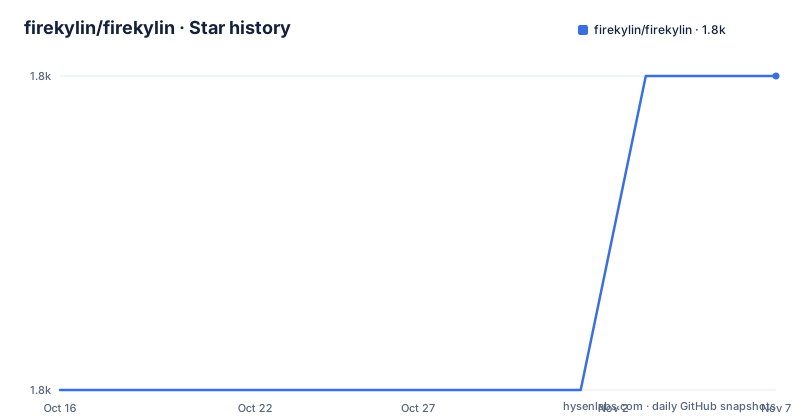
Star history
- firekylin/firekylin1,832 ★ · +1
| Repository | 2026-10-16 | 2026-11-07 |
|---|---|---|
| firekylin/firekylin | 1.8k | 1.8k |
1 Stars in the last 22 days, measured from the daily GitHub snapshot. Compare with other projects
Editorial analysis
npx firekylin new, and why the site directory holds no program code
Firekylin is a Node blogging platform based on ThinkJS 3, React and ES2015+. The interesting recent change is structural: the recommended install is a CLI that creates a standalone project, and the core program lives in `node_modules` while the project directory keeps only configuration, themes, uploaded files and data.
The consequence the README states plainly is that upgrades do not overwrite your files. Upgrading means updating the `firekylin` dependency in your project, not replacing files in place.
The interactive path is three commands:
npx firekylin new my-blog
cd my-blog
npm start
The init step interactively asks you to choose SQLite, MySQL, TiDB or PostgreSQL, creates the tables and creates an administrator account. The default theme is copied to `themes/firekylin`, and that copy is not overwritten by later upgrades, so your theme edits survive.
Development mode is `npm run dev`, which the README states is equivalent to `firekylin -D`. The package manifest also has `vite` for `dev` and `build`, `vite build --watch` for `watch` and `vite preview`, so the front end asset pipeline is Vite while the server is ThinkJS. The package name is `firekylin` with a `bin` entry pointing at `bin/firekylin.js`, and the version in `package.json` is 2.10.6, matching the release tags 2.10.6, 2.10.5 and 2.10.4 published on 2026-10-15 and 2026-10-14.
The non-interactive flags, and the password warning attached to them
For CI or a container, the same thing is done with parameters:
npx firekylin new my-blog --non-interactive --skip-install \
  --db-type sqlite --db-path data/firekylin.sqlite --db-prefix fk_ \
  --site-title "My Blog" --site-url "https://example.com" \
  --admin-user admin --admin-password 'change-me' --admin-email [email protected] \
  --package-manager npm
MySQL, TiDB and PostgreSQL take `--db-host`, `--db-port`, `--db-name`, `--db-user` and `--db-password` instead of the SQLite path and prefix.
The README's own warning about these flags is the part to take seriously: a password on the command line can end up in shell history, and it says an interactive install suits human deployment better. For a container image, the alternative is a secret injected at run time, but the flag set as documented has no environment variable form.
There is a second flag with a narrower meaning. `--skip-initialize` only creates the project skeleton and marks it installed. It does not enter interactive configuration, connect to a database, create tables or create an administrator, which is the right choice when the database and tables already exist or when you intend to fill in `firekylin.config.js` by hand. You can still use `--db-type` to set the skeleton config, and it defaults to SQLite.
With `--skip-install` you must run your package manager's install command yourself after initialization.
The old model, where the source directory was the site directory with `production.js` and `development.js`, is still supported for existing deployments.
SQLite by default, TiDB with TLS, and four real options
The database choice is the first architectural decision, and the four options are not equivalent.
SQLite is the default and takes a file path plus a table prefix, which in the example above is `data/firekylin.sqlite` with `fk_`. It suits a single-node deployment where the database file lives on the same volume as the uploads, and it needs no separate service.
MySQL, TiDB and PostgreSQL take host, port, name, user and password. TiDB gets a specific note in the README: it reuses the MySQL protocol and automatically enables TLS 1.2 with certificate verification. That is convenient if you already run TiDB and want connection security without configuring it, and it is also a behaviour you cannot inspect from the client side, because it is decided for you.
The repository ships the schema files directly at the top level: `firekylin.sql`, `firekylin.pgsql` and `firekylin.sqlite.sql`. Having all three means you can create the tables yourself with any client rather than relying on the initializer.
The Dockerfile also removes `src/config/db.js` from the build output, which is consistent with configuration living in the project rather than in the shipped program.
Admin auth moved to a JWT cookie stored in the database
The backend login uses a stateless JWT cookie, and the signing secret lives in the database in a `jwt_secret` column. The legacy `comment_jwt_secret` value is migrated automatically, and no extra environment variable is needed.
There is a cost to that design that the README states: the first upgrade requires everyone to log in again. A secret that changes invalidates every outstanding cookie, and there is no way to keep sessions alive across the migration.
Storing the secret in the database is a deliberate choice for a self-hosted blog. It means the secret travels with the database backup, and it means a multi-instance or serverless deployment does not need a shared environment variable, which is what the README ties it to in its section on multi-instance and serverless admin login. The same content is in `docs/admin-jwt.md`.
Comment sign-in is a separate mechanism. Social login for comments goes through a Waline OAuth service offering GitHub, Weibo, QQ and OIDC accounts. The default host is `https://oauth.lithub.cc`, and the `OAUTH_URL` environment variable points it at a self-hosted Waline Auth service instead. The first social sign-in creates a commenter user automatically, logged-in administrators can bind or unbind social accounts from their user edit page, and admins can see bindings in the user list.
An MCP server at /mcp with OAuth 2.1, no token to copy
Firekylin ships an MCP HTTP server by default at `/mcp`. No plugin is needed, and the README emphasises that you do not hand-create a token or configure a user id.
Instead the client goes through an OAuth 2.1 flow that redirects to the Firekylin login, where the user confirms authorisation, and the client then receives an access token bound to that account. The stated purpose is letting MCP clients such as Codex or Claude Code read articles and manage drafts within the authorised scope, with publishing and deletion still described as high-risk operations requiring single-use approval support. The details live in `docs/mcp.md`.
For a blog this is an unusual feature to find, and it cuts both ways. Writing through an agent means the model has the same draft access as a logged-in editor, so the value depends entirely on how narrowly you scope the OAuth grant.
A related AI-oriented artefact sits at `skills/firekylin/SKILL.md`, described as an agent skill covering three roles, system user, theme or plugin developer, and system maintainer, with MCP and OAuth tool parameter references. Copying that directory into a client that supports skills is the documented install path.
Widgets are files you register by name, and duplicates are a startup error
The extension model is a plugin system you generate yourself. In a project directory:
firekylin plugin recent-postsThis creates `plugins/recent-posts/` with an implementation, type declarations and usage notes, and writes the entry into the `widgets` array of `firekylin.config.js`. Plugin names use letters, numbers and hyphens. You restart the worker afterwards to load it.
An entry point resolves relative to the project root and is loaded when the worker starts:
module.exports = {
  database: {/* ... */},
  widgets: ['./widgets/index.js']
};
It exports a synchronous initialisation function that receives the stable `Widget`, `ContentsWidget` and `MetasWidget` base classes and returns a map of names to Widget classes:
module.exports = ({ContentsWidget}) => ({
  Widget_Custom_Posts: class extends ContentsWidget {
    async execute() {
      const limit = Number(this.parameter.limit) || 5;
      const rows = await this.model('post').limit(limit).select();
      this.pushAll(rows);
    }
  }
});
Extending `ContentsWidget` is the recommended route for content widgets because it reuses permalink, summary, category and tag, author and permission handling.
Themes can declare entries in their own `package.json` under a `firekylin` key, and only the server code of the currently enabled theme is loaded:
{
  "firekylin": {
    "widgets": "./widgets/index.js",
    "widgetOverrides": ["Widget_Contents_Post_Recent"]
  }
}
The rule that makes this safer than most plugin systems is duplicate detection. Two widgets with the same name block startup or rendering and both sources are reported. Replacing an existing one requires listing the name explicitly in `widgetOverrides` in the project config or the theme's `firekylin` config. A theme cannot override `Widget_Options`, which is the widget used to determine the current theme.
Extension code runs in the Firekylin server process, so the README's advice is to install only extensions you trust, and to restart the worker after a change.
Eta templates, one-line comments, and the type declaration file
Themes render with Eta templates, and the template API is small. A widget is called from a template with parameters:
<% const posts = await firekylin.widget('Widget_Custom_Posts', {limit: 8}); %>
<% while (posts.next()) { %><a href="<%= posts.permalink %>"><%= posts.title %></a><% } %>
Comments are one call, with the platform deciding whether comments are allowed on the current content and reading the admin's pagination, language and forced-login settings:
<%~ firekylin.comment() %>Optional parameters include `className`, `title`, `loadingText` and `resourceURL`, which points at the Waline `dist` directory:
<%~ firekylin.comment({resourceURL: 'https://cdn.jsdelivr.net/npm/@waline/[email protected]/dist'}) %>So a theme does not import a comment client or write its own initialisation script, and pointing `resourceURL` at your own CDN is the way to upgrade the Waline client independently.
For editor support, projects created with `firekylin new` include `firekylin.d.ts` at the root. It completes built-in Widget names, parameters, data fields and instance methods, and existing projects can add it by hand:
/// <reference types="firekylin" />The declaration body comes from the `firekylin` dependency, so upgrading the dependency updates the types, and it is edit-time help only that does not change widget registration or runtime behaviour.
Deployment shapes: PM2, nginx, Vercel and a Docker image on port 8360
The repository carries several deployment artefacts at once, which tells you the supported shapes.
There is a `Dockerfile` built on `node:24-alpine`, with a builder stage that installs `python3`, `make` and `g++` plus `[email protected]` globally, runs `pnpm run build` and `pnpm run copy-package`, strips source maps and the static `src` directory, then copies `www`, `src`, `view`, `production.js`, the three SQL files and `docker-entrypoint.sh` into the output. The final stage sets `APP_PATH=/opt/firekylin` and `VOLUME_PATH=/var/lib/firekylin`, declares that path as a volume, exposes 8360, runs `docker-entrypoint.sh` as its entrypoint and defaults to `node /opt/firekylin/production.js`.
The declared volume is where uploads and the database file live when you keep everything in one container, which is the deployment the SQLite default is shaped for.
There is also `pm2.json` for running under PM2, `nginx.conf` for a reverse proxy, `vercel.json` for a serverless deployment, and `docker-entrypoint.sh` to prepare state at start.
Licence is GPL-3.0, and the last push was on 2026-10-16 with three releases in two days, so the project is actively shipping. The `cron:rss` script, `npm start -- "admin/cron/rss"`, is the feed generation entry point, and the test scripts are split by area with `node --test`, covering widgets, admin assets and routing, auth and the Hugo import, plugins, the CLI and TypeScript types.
Editorial conclusion
Firekylin fits an author who wants a self-hosted blog with full data ownership, either a database and uploads in one directory or on TiDB or PostgreSQL, and who is willing to write Eta templates for theme work. It does not fit a team that needs a plugin ecosystem with third-party packages, since widgets are local files registered by name, or one that wants an upgrade path untouched by a forced re-login, since the JWT cookie migration requires everyone to sign in again. Verify first that `npx firekylin new my-blog --non-interactive` completes against your database of choice, that TiDB enables TLS 1.2 with certificate verification as documented, and that port 8360 is reachable behind your own TLS termination before you publish anything.
Frequently asked questions
How do I install Firekylin?
Run `npx firekylin new my-blog`, then `cd my-blog` and `npm start`. The init step interactively selects SQLite, MySQL, TiDB or PostgreSQL, creates the tables and creates an administrator account.
Can I install Firekylin without prompts in CI?
Yes, with `--non-interactive` and the database flags, for example `--db-type sqlite --db-path data/firekylin.sqlite --db-prefix fk_`. The README warns that a password passed on the command line may end up in shell history, so interactive install suits human deployment better.
What does --skip-initialize do in Firekylin?
It only creates the project skeleton and marks it installed, without interactive configuration, a database connection, table creation or an administrator account. You can still set `--db-type` for the skeleton config, and it defaults to SQLite.
Does the Firekylin admin login need an environment variable for its secret?
No. Backend authentication uses a stateless JWT cookie whose signing secret is stored in the database as `jwt_secret`, with the legacy `comment_jwt_secret` migrated automatically. The first upgrade requires logging in again.
How do I create a Firekylin widget plugin?
Run `firekylin plugin recent-posts`, which creates `plugins/recent-posts/` with an implementation and type declarations and registers the entry in the `widgets` array of `firekylin.config.js`. Restart the worker to load it.
Does Firekylin have a built-in MCP server?
Yes, an MCP HTTP server at `/mcp` is included by default with no extra plugin. Clients authenticate through an OAuth 2.1 redirect to the Firekylin login, and the details are in docs/mcp.md.
Official sources
Add this badge to your README
If you maintain this project, the badge below links readers to this analysis and shows its maintenance status from the daily GitHub snapshot. Paste the markdown into your README; add ?metric=license or ?metric=stars to the image URL for a different field.

[](https://hysenlabs.com/projects/firekylin-firekylin)Star history chart for your README
[](https://hysenlabs.com/projects/firekylin-firekylin)Was this useful?