FFmpegMediaMetadataRetriever for Android media inspection
FFmpegMediaMetadataRetriever provides a unified interface for retrieving frame and meta data from an input media file.
At a glance
- What is it?
- FFmpegMediaMetadataRetriever gives Android applications an Android-style API for reading media metadata, extracting frames, and retrieving embedded artwork through FFmpeg. Version 1.0.23 supports modern Android toolchains, several ABIs, network protocols, and media formats, but its native binaries and LGPL dependency affect packaging decisions.
- Who is it for?
- Adopt version 1.0.23 if the application needs a MediaMetadataRetriever-style Android API, URL input, embedded artwork, or a format that the platform class does not expose. Do not adopt it without checking ABI coverage, required protocols and formats, binary size, FFmpeg licensing obligations, and whether your media source is trusted.
- Can I use it commercially?
- Not without permission. GitHub finds no licence file in the repository, and without a licence all rights are reserved by default: you may read the code but not reuse it. Check the README, or ask the authors, before using it.
- Is it still maintained?
- Yes. The repository last received commits 133 days ago.
- What is it written in?
- Mainly C, according to GitHub's language statistics.
Answers come from the project's GitHub data, last synced on November 7, 2026, and from our analysis. They are not legal advice.
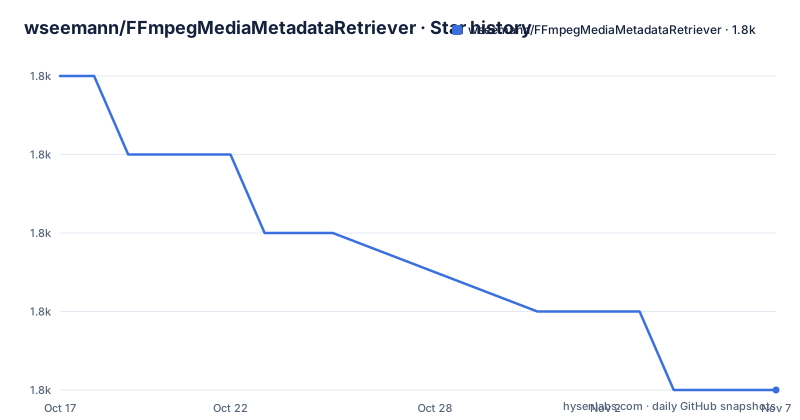
Star history
- wseemann/FFmpegMediaMetadataRetriever1,783 ★ · -4
| Repository | 2026-10-17 | 2026-11-07 |
|---|---|---|
| wseemann/FFmpegMediaMetadataRetriever | 1.8k | 1.8k |
-4 Stars in the last 21 days, measured from the daily GitHub snapshot. Compare with other projects
Editorial analysis
Why FFmpegMediaMetadataRetriever exists on Android
FFmpegMediaMetadataRetriever is a reimplementation of Android's `MediaMetadataRetriever` for applications that need media inspection backed by FFmpeg rather than the platform implementation. Its interface is aimed at Android code that needs tags such as album and artist, a decoded frame at a requested time, or embedded cover art. The API shape matters because application code can retain familiar calls such as `setDataSource`, `extractMetadata`, and `getFrameAtTime` while changing the backend.
The project is relevant to Android media browsers, tagging utilities, podcast clients, local music indexers, and video preview screens that need a consistent retrieval API across supported devices. Version 1.0.23 documents support for AAC, ACC+, AVI, FLAC, MP2, MP3, MP4, OGG, 3GP, and other formats. It also lists `file`, `http`, `https`, `mms`, `mmsh`, and `rtmp` protocols, plus ICY metadata used by SHOUTcast.
This is not a transcoding interface. The documented surface retrieves metadata and frames, and the release does not describe exporting, trimming, transcoding, or publishing media. It is also not a cross-platform desktop library. The README presents Gradle dependencies, AAR packages, Android Studio, and the Android NDK as the integration path.
The clearest distinction from Android's built-in `MediaMetadataRetriever` is URL support. The project documentation explicitly lists URL input as a difference, but it does not promise that FFmpeg's backend makes every format or protocol available on every device. Availability still depends on the compiled FFmpeg build, native package, and platform environment.
The FFmpeg-backed retrieval path
The repository separates Java-facing functionality from native integration through `core`, `native`, and ABI-specific native modules. The top-level layout also includes a `fmmr-demo` application, Gradle configuration, and publishing scripts. Based on that layout, an application consumes a Java API artifact and links a native artifact that contains the FFmpeg-dependent implementation.
Version 1.0.23 is built with FFmpeg 7.1.1. A call such as `setDataSource(mUri)` supplies the media location, `extractMetadata` requests a named metadata field, and `getFrameAtTime` requests a decoded frame for a time value. The sample uses `2000000` with `OPTION_CLOSEST`, which the README describes as a frame at two seconds. `getEmbeddedPicture` returns cover art as a byte array.
The object also has an explicit lifecycle. Application code creates a retriever, performs metadata and frame operations, and calls `release` when finished. Omitting that call would leave the native resource cleanup unspecified by the README, so the release call should remain part of the normal ownership pattern.
FFmpeg supplies media parsing and decoding breadth, while the wrapper aims to keep retrieval calls similar to Android's platform class. That architecture is useful for migration or shared application code, but it also adds native packaging concerns. The default `native` dependency bundles all documented ABIs, whereas selecting individual ABI artifacts can reduce packaging scope at the cost of maintaining the correct artifact list.
Installing version 1.0.23 and retrieving the first frame
The normal application integration uses two Gradle dependencies. Add both `core` and `native` to the `dependencies` block in the application's `build.gradle` file. The README specifies version 1.0.23 for both artifacts.
dependencies {
    implementation 'com.github.wseemann:FFmpegMediaMetadataRetriever-core:1.0.23'
    implementation 'com.github.wseemann:FFmpegMediaMetadataRetriever-native:1.0.23'
}
This dependency set selects the combined native package. The expected first result is that the application can compile against `FFmpegMediaMetadataRetriever` without choosing individual native architectures.
The following Java example performs a real retrieval sequence. It sets the input URI, asks for album and artist metadata, requests the frame closest to two seconds, reads embedded artwork, and releases the retriever. The return values from `extractMetadata` are not stored in the README example, so an application should handle those results according to its own interface.
FFmpegMediaMetadataRetriever mmr = new FFmpegMediaMetadataRetriever();
mmr.setDataSource(mUri);
mmr.extractMetadata(FFmpegMediaMetadataRetriever.METADATA_KEY_ALBUM);
mmr.extractMetadata(FFmpegMediaMetadataRetriever.METADATA_KEY_ARTIST);
Bitmap b = mmr.getFrameAtTime(2000000, FFmpegMediaMetadataRetriever.OPTION_CLOSEST);
byte [] artwork = mmr.getEmbeddedPicture();
mmr.release();
Before treating this as production-ready, confirm that `mUri` represents an input available through one of the documented protocols and that the expected metadata key exists in the selected file. `getFrameAtTime` may also return no useful image for media without a decodable frame at that position, although the README does not define its failure behavior. Applications should account for null or empty results rather than assuming the sample variables are populated.
ABI packaging, native size, and build constraints
FFmpegMediaMetadataRetriever documents ARMv7, x86, x86_64, and ARM_64 support. Version 1.0.23 also states support for Android API 21 and later and 16 KB page sizes. ARM and MIPS are not supported as of version 1.0.14, according to the README. That exclusion matters for device coverage and prevents an engineer from treating the package as a universal replacement for every Android ABI.
If an application does not need the combined `native` package, the README lists four ABI-specific dependencies. An application that ships ARMv7 and ARM64, for example, would need the matching `armeabi-v7a` and `arm64-v8a` artifacts rather than the combined package. The README does not document Gradle ABI filters, so it would be unsafe to invent configuration beyond the listed dependencies.
Binary size is an explicit trade-off. The sample application is compiled with support for all available formats, producing a larger library and APK. FFmpeg can be recompiled with a smaller codec subset, but the README does not provide the relevant build commands or custom build profile. That makes source customization less accessible than installing the published dependencies.
Building from the repository has separate requirements. The README calls for Android Studio Narwhal 2025.1.2 or higher and Android NDK r27 or higher. Its scripts also assume Unix or Linux; building on other operating systems is not supported by the documented instructions. These constraints make the prebuilt Gradle packages the lower-friction route unless the project must be built locally.
Maintenance signals and licensing boundaries
The repository is not archived. Its last push was on 2026-06-28, and release `v1.0.23` was published on the same calendar date. The preceding listed releases are `v1.0.22` on 2026-05-21 and `v1.0.21` on 2025-08-28. Those dates show recent release activity, but the README does not publish a maintenance policy, support lifecycle, compatibility matrix, or response time for issues.
Upgrading means evaluating changes in FFmpeg, Android API requirements, native ABI packaging, and prebuilt binary size across releases. The README identifies FFmpeg 7.1.1 specifically for version 1.0.23. It does not document an in-app upgrade mechanism or a runtime configuration for changing FFmpeg backends. Upgrade testing therefore has to focus on the artifacts your application actually includes and the media sources it retrieves.
The wrapper's included license text identifies Apache License 2.0 for FFmpegMediaMetadataRetriever. Separately, the README states that the software uses FFmpeg code licensed under LGPLv2.1 and links to FFmpeg source information. Applications that redistribute the native libraries must account for the FFmpeg component, its LGPL terms, source availability, notices, and the build's codec configuration. This is a compliance fact, not a conclusion that any particular distribution model is acceptable.
The license field in the repository summary was unknown, but the README and `LICENSE-2.0.txt` entry provide an explicit Apache 2.0 statement for the wrapper. The FFmpeg license remains a separate dependency concern that should not be collapsed into the wrapper license.
Where MediaMetadataRetriever or FFmpeg command-line tooling fits better
Android's built-in `MediaMetadataRetriever` is the direct alternative for code that needs the standard platform API and does not require FFmpeg-specific format or protocol coverage. FFmpegMediaMetadataRetriever's documented advantage is a compatible retrieval shape plus URL support, but it also introduces FFmpeg native dependencies, larger packaging choices, and FFmpeg licensing considerations. The choice is therefore not simply a drop-in performance comparison; it is a dependency and coverage decision.
FFmpeg command-line tooling is a different approach for server-side or developer workflows. Rather than embedding a native library inside an Android application, a command-line workflow delegates decoding and probing to an external FFmpeg process. The repository documentation does not compare those architectures or provide command-line examples, so no claim about output format, startup cost, or automation can be made here.
Within Android, this project is the wrong tool when the application only needs basic platform metadata retrieval and can use `MediaMetadataRetriever` directly. It is also unsuitable when the release target includes ARM or MIPS, or when the application cannot accept the native library's size and FFmpeg obligations. For supported media workflows, the relevant test is whether the exact protocols, formats, metadata fields, and frame-selection behavior required by the application are present in the configured build.
Editorial conclusion
Adopt version 1.0.23 if the application needs a MediaMetadataRetriever-style Android API, URL input, embedded artwork, or a format that the platform class does not expose. Do not adopt it without checking ABI coverage, required protocols and formats, binary size, FFmpeg licensing obligations, and whether your media source is trusted. The first technical check should be whether the published native package includes every ABI your application ships.
Frequently asked questions
How do I add FFmpegMediaMetadataRetriever to an Android application?
Add the `com.github.wseemann:FFmpegMediaMetadataRetriever-core:1.0.23` and `com.github.wseemann:FFmpegMediaMetadataRetriever-native:1.0.23` dependencies to `build.gradle`. The README also documents ABI-specific native dependencies.
Which Android ABIs does FFmpegMediaMetadataRetriever support?
Version 1.0.23 documents support for ARMv7, x86, x86_64, and ARM_64, including 16 KB page sizes. It states that ARM and MIPS are not supported as of version 1.0.14.
Can FFmpegMediaMetadataRetriever retrieve frames and embedded artwork?
Yes. The sample API uses `getFrameAtTime` with `OPTION_CLOSEST` to retrieve a frame and `getEmbeddedPicture` to obtain embedded artwork as a byte array.
Official sources
Add this badge to your README
If you maintain this project, the badge below links readers to this analysis and shows its maintenance status from the daily GitHub snapshot. Paste the markdown into your README; add ?metric=license or ?metric=stars to the image URL for a different field.

[](https://hysenlabs.com/projects/wseemann-ffmpegmediametadataretriever)Star history chart for your README
[](https://hysenlabs.com/projects/wseemann-ffmpegmediametadataretriever)Was this useful?