OSINTGraph turns an Instagram target into a Neo4j graph
About Osintgraph is an open-source tool that collects Instagram data, followers, and followees, storing them in Neo4j. It helps you easily map and analyze a target's social network, revealing interests, connections, and affiliations for effective OSINT.
At a glance
- What is it?
- OSINTGraph is a Python CLI that collects public Instagram data, profiles, followers, followees, posts, comments and likes, and stores it in Neo4j for graph exploration, with a Gemini-backed agent for natural language queries. It is an investigation tool with a clear dependency chain and a version number that still says 0.1.1.
- Who is it for?
- OSINTGraph suits OSINT investigators who already work with Neo4j and want Instagram relationships in a queryable graph rather than in a folder of exports, and it suits researchers who want to ask questions in natural language over a collected dataset.
- Can I use it commercially?
- Yes, with conditions. GPL-3.0 is a copyleft licence: if you distribute software that includes it, you must release that software's source code under the same licence. Running it internally without distributing it does not trigger that obligation.
- Is it still maintained?
- Activity is slowing. The repository last received commits 6 months ago.
- What is it written in?
- Mainly Python, according to GitHub's language statistics.
Answers come from the project's GitHub data, last synced on November 7, 2026, and from our analysis. They are not legal advice.
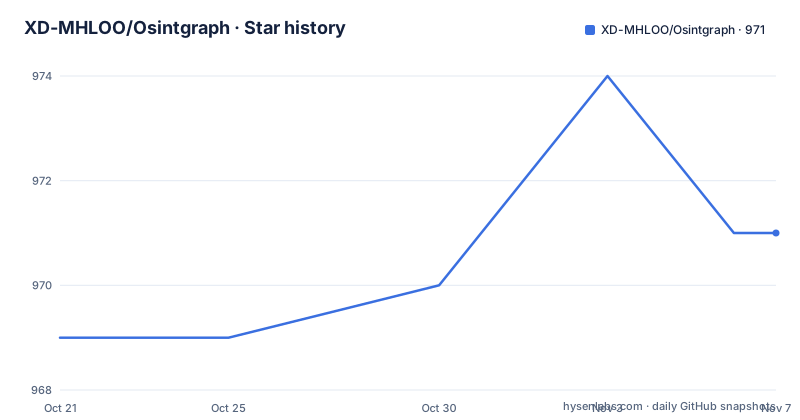
Star history
- XD-MHLOO/Osintgraph971 ★ · +2
| Repository | 2026-10-21 | 2026-11-07 |
|---|---|---|
| XD-MHLOO/Osintgraph | 969 | 971 |
2 Stars in the last 17 days, measured from the daily GitHub snapshot. Compare with other projects
Editorial analysis
Public Instagram data becomes a queryable graph
The problem OSINTGraph addresses is the shape of social media evidence. When you investigate a person on Instagram, the interesting structure is relational: who follows them, who they follow, who comments on their posts, who likes them, and how those people cluster around the target. Exports from a platform are flat. A follower list is a list of usernames, and a post is a block of text with a number on it.
OSINTGraph collects all of it and puts it into a graph database. The README describes it as a tool for deep social analysis and OSINT investigations focused on Instagram targets, using Neo4j to map a target's network and revealing connections, interests and affiliations, with an interactive AI agent to speed up investigations.
The collection scope is stated precisely. The CLI gathers all public Instagram data from a target and maps their social connections, including profiles, followers, followees, posts, comments and likes. The description frames the goal as examining a target by gathering the relevant data and analysing it.
Two things follow from that scope. First, this is a collection and mapping tool for public data, not a credential attack or a private data extractor. Second, the value is entirely in the graph, which means the tool only earns its keep if the relationships between accounts are the question you are asking. A question that a single post answers does not need a graph, and building one is a lot of setup.
Four things have to exist before the first command runs
The setup path is well defined, and it makes the tool's dependencies obvious before you commit to it.
Installation is a single command, and pipx is the recommended form because it keeps the tool in its own environment:
pipx install osintgraphA plain pip install also works, with the README's note that a virtual environment is recommended to avoid dependency conflicts.
Then there is the configuration step, and the README lists what you need ready before running it:
osintgraph setupThe four inputs are an Instagram account, preferably not your main account. A Neo4j database instance, where the README describes signing up at Neo4j, creating an instance for free and downloading the admin credentials, since you need those for the connection. A Gemini API key, taken from Google AI Studio by creating or selecting a Google Cloud project and getting an API key, which the README says enables data pre-analyses and the AI agent. And optionally a user agent, which the README says helps reduce Instagram detection risk, obtained by searching for your user agent in the browser you log in to Instagram with.
That list is the real shape of this tool. It is a scraper with a graph store and a language model attached, and each of those three pieces comes from outside the tool. There is no bundled database and no bundled model.
The packaging supports the Python side of this. The project metadata declares requires-python of >=3.9, version 0.1.1, a GPL-3.0-or-later licence, and it ships as a console script named osintgraph that maps to the cli module, built with hatchling from a src layout.
Collection is per-entity and explicitly bounded
The collection command takes a target and a set of limits, and the limits are per entity type rather than global:
osintgraph discover TARGET_INSTAGRAM_USERNAME --limit follower=100 followee=100 post=2 That is the whole shape of the collection interface. The username identifies the target, and the --limit option takes an assignment for each kind of object you want to pull. In the example, a hundred followers, a hundred followees and two posts.
The design decision worth noticing is that limits are per entity rather than a single number, and the CLI has separate verbs for different phases. The commands reference in the README are setup, reset, discover, explore, agent. Discover is the collection step, explore is another route into the data, and agent is the natural language interface. A reset command exists alongside setup, which tells you the tool keeps state between runs and can clear it.
Limits like these are not a politeness feature. Collection from Instagram is rate limited and detected, and the README has a dedicated section on how to avoid account suspension. That section is worth reading before you collect, because it explains the behaviour of the tool from the platform's point of view rather than from the investigator's, and because a suspended account ends the investigation as surely as a wrong result would.
For scale, the practical question is how the tool behaves across many targets rather than one. Each run is a separate collection into the same graph, and the limits are what you choose to pay for in time and in risk.
Two ways into the data: the agent and the graph browser
Once data is in Neo4j, the README offers two ways to work with it, and they are genuinely different tools rather than two views of the same thing.
The first is the OSINTGraph AI Agent. You ask questions in natural language, and the agent supports data retrieval, keyword and semantic searches, relationship queries and template-driven analyses. The point is to get focused answers without manually digging through the collected data. The README describes an agent that retrieves data, searches by keyword and by meaning, runs graph relationship searches and executes template analyses.
The second is Neo4j visualization, where you open the Neo4j Console, go to the Explore tab, connect, and type Show me a graph in the search bar to see the collected person and their relationships. The example given is tracing a target user's close connection through their most commented post and then investigating mutual followers and all interactions between them.
The difference in approach is worth naming, because it decides who does the thinking. The graph browser is direct and fully under your control: you write Cypher, you see exactly what the query returned, and nothing is summarised for you. The agent is faster for open-ended questions and much slower to verify, since the answer is produced by a model rather than returned by a query. In an investigation where the answer has to be defensible, the second approach tends to end up being the one that supports the finding, with the first used to find the question worth asking.
The templates are the third element. The agent can run template-driven analyses, and the README documents how templates work and how to create custom ones, which is a middle ground between a fixed question and free-form querying.
Two phases: collect first, then analyse
The architecture in the README is described as two main phases, reconnaissance and analysis and investigation, and the separation is deliberate.
Phase one is data collection, and it is what the discover command does. The diagram lists the collected categories: profile metadata, followers, followees, and posts with comments. There is a distinct step after collection labelled posts pre-analysis, and the diagram shows that it uses the Gemini integration. So the model is invoked during collection, on the content that was gathered, before any human question is asked.
Phase two is the investigation: the AI agent retrieving data, running keyword searches, semantic searches, graph relationship searches and template analyses.
This ordering has a practical consequence that a user should understand before collecting anything. The pre-analysis step costs API calls and time during the collection run itself, which is the longest phase. If you are collecting a large target under limits, that work happens before you have decided what you actually wanted to know. A narrower first pass, fewer posts and fewer relationships, produces a smaller graph and a faster run, and the limits are exactly the dial you use to control it.
The data model that results is described in the README as a set of node types and relationships: a Person node representing an Instagram account, a Post node representing an Instagram post, and a Comment node representing a comment on a post. Everything the tool collects is expressed in those terms, which is why a relationship query such as mutual followers or interactions between two people is a natural question to ask of the result.
The dependency list explains what the tool really is
The pyproject.toml file describes the project better than any marketing sentence could, because it names every moving part.
The collection layer is instaloader, pinned at 4.14.2, which is what reaches Instagram. The storage layer is the neo4j driver, pinned at 5.28.1. The analysis layer is a stack of LangChain and LangGraph packages, langchain at 0.3.27, langchain-core, langchain-google-genai at 2.1.8, langgraph at 0.6.2 and langmem, which is what turns a natural language question into database work and multi-step agent behaviour.
Around those sit the ordinary pieces: pydantic for structured data, PyYAML for configuration, rich and tqdm for terminal output, python-dateutil for date handling, protobuf, typing-extensions and platformdirs, the last of which is what keeps per-user config and data out of shared system paths.
Two details in the metadata are worth noting. The wheel is built from a src layout with hatchling, with the package directory resolved to src/osintgraph, which is a conventional Python packaging arrangement rather than a script dump in the repository root. And the repository top level confirms it: alongside the README, the licence and pyproject.toml, there is only a src/ directory, so the code is a proper installable package rather than something you run in place.
Read together, the dependencies say that OSINTGraph is a thin, opinionated assembly of four known libraries rather than a new implementation. That is good news for maintenance, since it inherits fixes from those projects, and it is also a constraint, since the tool can only do what instaloader and the Neo4j driver expose.
Version 0.1.1 and the gap to the last commit
Two facts about the project's history should shape your expectations.
The version is 0.1.1. There are no GitHub releases at all, and the release history is empty, so there is no tagged artifact to install and no upgrade path through a version manager. The project is installed from the package index, so the version you get is whatever is published there.
The second fact is the date. The last push to the repository was on 2026-05-10, which is five months before this review. The repository is not archived, but there has been no commit since May, and with a version number of 0.1.1 and no releases, the reasonable reading is that this is an early project with a limited track record rather than a settled tool. If your investigation depends on it, pin the version and keep a note of it, because there is no tag history to fall back on.
The licence is GPL-3.0-or-later, declared in both the repository and the package metadata. For internal investigative work that is not a practical obstacle. If you intend to modify the tool and redistribute it, or to embed parts of it in something you ship, the copyleft terms are the thing to read carefully rather than assume, and that is a question for whoever owns that decision rather than for this review.
One last point on scope. Everything the tool gathers is public Instagram data, collected through an authenticated session belonging to an account you supply. That authentication is the mechanism, and it is also the risk: the README's own advice is to use an account that is not your main one, and its guidance on avoiding suspension exists because the collection pattern is visible to the platform. The tool is for investigating a target, and the account you run it with is the thing most likely to be affected by using it.
Editorial conclusion
OSINTGraph suits OSINT investigators who already work with Neo4j and want Instagram relationships in a queryable graph rather than in a folder of exports, and it suits researchers who want to ask questions in natural language over a collected dataset. It does not suit anyone who needs private data, since the tool works on public Instagram data and the README asks for an account that is preferably not your main one, and it is the wrong tool for a durable monitoring system given the version number and the absence of tagged releases. Before you collect anything, set up the Neo4j instance and the Gemini API key, decide the collect limits for follower, followee and post, and read the section on avoiding account suspension so you know what the collection pattern does to your account.
Frequently asked questions
What data does OSINTGraph collect from Instagram?
The CLI gathers all public Instagram data from a target and maps their social connections, including profiles, followers, followees, posts, comments and likes. The data is stored in Neo4j for graph queries and visualisation.
How do I install OSINTGraph and what does setup require?
Install it with pipx install osintgraph, then run osintgraph setup. You need an Instagram account, preferably not your main one, a Neo4j instance with its admin credentials, a Gemini API key from Google AI Studio, and optionally a user agent string.
How do I control how much data OSINTGraph collects?
The discover command takes a --limit option with an assignment per entity type, for example follower=100 followee=100 post=2 for the target username. The README also notes that a dedicated section explains how to avoid account suspension while collecting.
Can I query the collected OSINTGraph data in natural language?
Yes. The osintgraph agent command starts an agent that supports data retrieval, keyword and semantic searches, relationship queries and template-driven analyses. You can also work with the same data directly in the Neo4j Console Explore tab.
Is OSINTGraph still being worked on?
The repository is not archived, but the last push was on 2026-05-10, the package version is 0.1.1 and there are no GitHub releases, so there is no tagged version history to track. Pin the installed version if your work depends on it.
Official sources
Add this badge to your README
If you maintain this project, the badge below links readers to this analysis and shows its maintenance status from the daily GitHub snapshot. Paste the markdown into your README; add ?metric=license or ?metric=stars to the image URL for a different field.

[](https://hysenlabs.com/projects/xd-mhloo-osintgraph)Star history chart for your README
[](https://hysenlabs.com/projects/xd-mhloo-osintgraph)Was this useful?