Jodit WYSIWYG Editor: Installation, Configuration, and Limits
Jodit - Best WYSIWYG Editor for You
At a glance
- What is it?
- Jodit is a TypeScript WYSIWYG editor with a file browser and image editor, distributed through npm as ESM and UMD builds. It fits browser-based rich-text forms, but server-side storage and content validation remain application responsibilities.
- Who is it for?
- Adopt Jodit when an application needs an embeddable WYSIWYG editor, npm installation, plugin extensions, and optional file management. Do not choose it as a plain form control or treat its private ESM internals as a stable extension API.
- Can I use it commercially?
- Yes. MIT is a permissive licence: you can use, modify and sell software built on it, as long as you keep its copyright and licence notices.
- Is it still maintained?
- Yes. The repository last received commits 2 days ago.
- What is it written in?
- Mainly JavaScript, according to GitHub's language statistics.
Answers come from the project's GitHub data, last synced on November 6, 2026, and from our analysis. They are not legal advice.
Star history
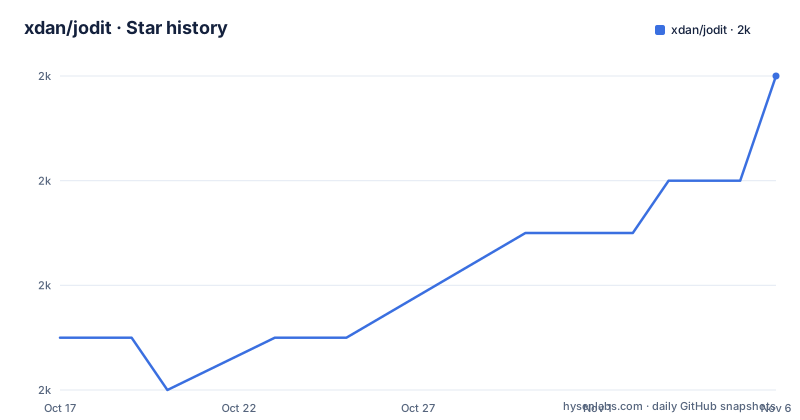
- xdan/jodit1,972 ★ · +5
| Repository | 2026-10-17 | 2026-11-06 |
|---|---|---|
| xdan/jodit | 2k | 2k |
5 Stars in the last 20 days, measured from the daily GitHub snapshot. Compare with other projects
Editorial analysis
Why Jodit Targets Web Rich-Text Forms
Jodit solves a specific problem: giving users a graphical interface for entering formatted HTML while the host application continues to receive that content through a normal page element. It is intended for developers embedding an editor into web forms, content systems, and administrative interfaces. The README calls it a pure-TypeScript WYSIWYG editor with a built-in file browser and image editor.
The basic integration starts with a `textarea`, not an application framework component. Jodit receives a selector through `Jodit.make`, attaches its editing interface to that element, and exposes a `value` property for reading or assigning HTML. This approach fits an existing form that already depends on a textarea or server-side handling that expects submitted HTML. Jodit does not specify how submitted HTML should be stored, sanitized, or rendered.
The README links to separate React-related packages, but its core examples use direct browser initialization. The repository identifies JavaScript, TypeScript, `contenteditable`, HTML, and `vanillajs` among its keywords. That design suits client-side editing, but it also places responsibility for content security and server compatibility on the integrating application. A visual editor should not be mistaken for protection against unsafe HTML.
Jodit's ESM, UMD, and API Boundaries
The npm package contains several distribution formats. According to the README, `/esm` contains an ESM version compatible with tools such as webpack. The `/es5`, `/es2015`, `/es2018`, and `/es2021` directories contain UMD bundles, with corresponding `.min.js` files for minified builds. Integrators can select a format based on browser targets and build tooling.
The package defines a clear compatibility boundary. `types/index.d.ts` is described as the versioned editor API, while everything else is private and may change with each release. The type declaration file is therefore the safer reference for supported application-level configuration. Direct imports into internal plugin paths can be convenient, but the README does not promise that these paths remain stable between releases.
ESM builds include only a basic plugin set and English by default. Extra plugins and language files can be imported explicitly, or all plugins can be imported through `all.js`. This gives applications control over what enters the bundle, provided developers inventory the features they use. The UMD route uses a browser-ready bundle and stylesheet, which is straightforward for a standalone page.
Plugins participate in editor lifecycle and event handling. The README shows plugins registered through `Jodit.plugins`, with functions or classes that react to events such as `afterInit`, `change.textLength`, and application-defined names. This is more structured than placing all behavior in page-level event handlers. Plugin code also needs correct cleanup: the documented class example removes an event listener in its `destruct` method.
A second boundary concerns browser targets. The README labels ES2021 as intended for modern browsers and offers an ES5 route for older environments. Selection should therefore follow the application's actual browser matrix rather than choosing the newest bundle by default. The CDN examples use version 4.13.9, while `package.json` lists 4.18.1, so copying a CDN snippet without reconciling versions would pin the page to an older release.
Installing Jodit with npm and Mounting an Editor
The README lists npm as the normal installation route and GitHub releases as an alternative download location. Install the core package with the documented command:
npm install joditFor an ESM application, add a textarea, initialize Jodit, and assign an initial HTML value:
<textarea id="editor" name="editor"></textarea>
<script type="module">
  import { Jodit } from './node_modules/jodit/esm/index.js';
  const editor = Jodit.make('#editor');
  editor.value = '<p>start</p>';
</script>
The selector is passed to `Jodit.make`, while `editor.value` contains the editor's HTML. This first use does not import every plugin. The README states that ESM includes the basic plugin set and English automatically, so basic initialization requires only the core import.
A standalone page using ES2021 can load the UMD bundle and matching stylesheet directly:
<link type="text/css" rel="stylesheet" href="es2021/jodit.min.css" />
<script type="text/javascript" src="es2021/jodit.min.js"></script>
Both files are required for the documented presentation. ES5 bundles are also published for applications that cannot target modern browsers. This format is convenient when a page has no module bundler, while ESM offers finer control over plugins and language imports.
Adding Jodit Plugins, Buttons, and Languages
Jodit supports toolbar expansion through plugins and custom controls. A simple button can be declared through `extraButtons`, with an `exec` function that receives the editor instance. The documented example inserts the current date and then calls `synchronizeValues`, which is associated with history saving:
const editor = Jodit.make('.someselector', {
  extraButtons: [
    {
      name: 'insertDate',
      iconURL: 'https://xdsoft.net/jodit/logo.png',
      exec: function (editor) {
        editor.s.insertHTML(new Date().toDateString());
        editor.synchronizeValues();
      }
    }
  ]
});
Plugins can also register commands and controls. In one documented pattern, a plugin listens for a named event and inserts text, while a toolbar control fires that event. This separates button behavior from the operation that performs the edit. Other plugins can interact with the same event without embedding the entire operation inside the control definition.
Language support uses explicit imports for ESM applications. The README registers a German module on `Jodit.langs`, then selects it with the `language` option:
<script type="module">
  import { Jodit } from './node_modules/jodit/esm/index.js';
  import de from './node_modules/jodit/esm/langs/de.js';

  Jodit.langs.de = de;

  Jodit.make('#editor', {
    width: 600,
    height: 400,
    language: 'de'
  });
</script>
The README does not enumerate every optional plugin or language module. An application must confirm that a required file exists in the installed package and that its path matches the chosen release. Direct internal imports should be checked against `CHANGELOG.md` during upgrades because the README classifies them as private.
FileBrowser, Uploader, and Server Integration Boundaries
Jodit includes file-browsing and image-editing capabilities, but the client-side editor does not replace server-side storage. The README says that testing FileBrowser and Uploader modules requires the separate PHP Connector project, `jodit-connectors`. Its connector setup excerpt ends during a Composer command, so the README does not provide a complete connector installation sequence that can be reproduced here.
An uploader still needs an endpoint that accepts files, decides what to do with them, and returns data the editor understands. The core repository supplies the browser editor, while `jodit-connectors` addresses the PHP integration documented for those modules. A deployed application must also decide where files are stored and which users may browse or upload them.
HTML validation is another separate concern. Jodit edits and returns HTML, but the README does not claim that it is a server-side security boundary or complete sanitizer. A backend should validate submitted content according to its own requirements. Likewise, a file browser should not be treated as permission enforcement unless its endpoint enforces authorization on every operation.
The repository includes `docker/` and development tooling, but those entries do not establish that Docker is required for production. They are part of the source tree, not an automatic backend. A basic rich-text editor can work without file management, but image and asset workflows need a reachable server implementation.
This boundary is the main qualification to the claim that file browsing is built in. The editing interface is included in the project; persistence, authorization, upload validation, and connector deployment belong to the host application.
Jodit Compared with a Plain Textarea Editing Flow
The most direct alternative is an ordinary server-rendered form using a `textarea` without a visual editor. A textarea exchanges form data with the page and backend without a toolbar, plugin event system, file browser, or image editor. Its advantage is simplicity. The form already communicates through a familiar HTML element and needs no client-side editing library.
Jodit changes the editing layer, not the basic content model. The README still begins with a textarea and exposes content through `editor.value`. Developers can pass rich-text HTML into existing form processing when that matches the backend's data model. The added layer matters when users benefit from visual formatting instead of typing markup.
A `textarea` is the better choice for a search filter, configuration field, support message, or any other value that must remain plain text. Adding Jodit to those forms introduces CSS, JavaScript, plugins, and browser-side state without improving the required input format. It can also obscure whether users should submit text or trusted HTML.
For long-form content, the plain textarea becomes less convenient because it offers no visual formatting controls. Jodit addresses that specific need. UMD and ESM are not competing editors; they are different distribution approaches. UMD suits a standalone page, while ESM suits a bundled application that imports selected features.
Maintenance Signals, Versioning, and MIT Usage
The repository is not archived. Its last push was on 2026-10-17, and `package.json` lists version 4.18.1. The release listing also includes 4.18.1 on 2026-10-14, 4.17.6 on 2026-10-13, and 4.18.0 on 2026-10-13. This is a recent release sequence, although adopters still need to review `CHANGELOG.md` for behavioral changes before upgrading.
Upgrade cost depends on which parts of Jodit an application uses. `types/index.d.ts` is the documented versioned API, so changes to supported options and methods deserve direct review. Imports into `/esm/plugins` carry more uncertainty because the README classifies paths outside the type declaration as private. Applications using optional plugins, language modules, custom controls, or an upload endpoint have more integration points than applications limited to `Jodit.make` and `value`.
The package metadata and `LICENSE.txt` identify Jodit as MIT licensed. Use and modification are governed by that license's conditions, while third-party packages retain their own terms. This review does not provide legal advice, but integrators still need to preserve required license notices and review dependencies shipped with a distribution.
The source tree includes `package-lock.json`, a `Makefile`, Webpack and TypeScript configuration, Playwright configuration, linting files, tests, and development documentation. Those entries show a defined contributor and build setup. They do not document compatibility for every custom plugin or connector integration, so a version change should be checked against the exact APIs and deep imports used by the application.
Editorial conclusion
Adopt Jodit when an application needs an embeddable WYSIWYG editor, npm installation, plugin extensions, and optional file management. Do not choose it as a plain form control or treat its private ESM internals as a stable extension API. Verify first that your browser targets, required plugins, language files, and upload connector match the deployment.
Frequently asked questions
How do I install Jodit and create its first editor?
Install the package with `npm install jodit`, add a `textarea`, import `Jodit` from the ESM build, and initialize it with `Jodit.make`. Assigning `editor.value` sets the editor's HTML content.
Which parts of the Jodit package are safe to import directly?
The README identifies `types/index.d.ts` as the versioned API. Other files, including internal ESM module paths, are described as private and may change with each release.
Does Jodit include a server for its FileBrowser and Uploader?
The README says testing those modules requires the separate `jodit-connectors` PHP Connector project. Jodit provides the editor-side capabilities, while the documentation points to separate server integration.
Official sources
Add this badge to your README
If you maintain this project, the badge below links readers to this analysis and shows its maintenance status from the daily GitHub snapshot. Paste the markdown into your README; add ?metric=license or ?metric=stars to the image URL for a different field.

[](https://hysenlabs.com/projects/xdan-jodit)Star history chart for your README
[](https://hysenlabs.com/projects/xdan-jodit)Was this useful?