fcitx5-vinput ships every install as two variants split on one compile switch
Voice input for Fcitx5 — local and cloud ASR, LLM rewriting, cross-distro packages
At a glance
- What is it?
- fcitx5-vinput adds voice input to Fcitx5 through a daemon, a GUI, and a CLI, with speech recognition either local through sherpa-onnx or through a cloud provider, and an LLM rewriting pass behind a scene selector. What is interesting operationally is the packaging: five distributions each ship a full and a lite build, and every one of them traces back to the same CMake option.
- Who is it for?
- fcitx5-vinput suits Linux desktop users on Fcitx5 who dictate enough text that typing is the bottleneck, and the lite build suits anyone who would rather not carry an ONNX runtime locally. Three things to check first.
- Can I use it commercially?
- Yes, with conditions. GPL-3.0 is a copyleft licence: if you distribute software that includes it, you must release that software's source code under the same licence. Running it internally without distributing it does not trigger that obligation.
- Is it still maintained?
- Yes. The repository received new commits within the last day.
- What is it written in?
- Mainly C++, according to GitHub's language statistics.
Answers come from the project's GitHub data, last synced on November 15, 2026, and from our analysis. They are not legal advice.
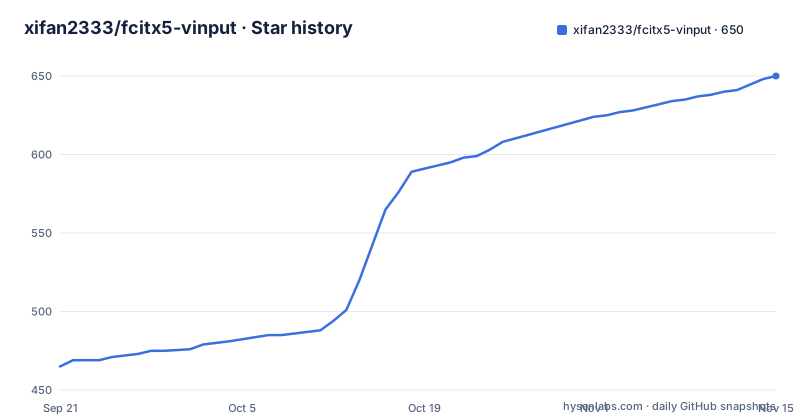
Star history
- xifan2333/fcitx5-vinput650 ★ · +185
| Repository | 2026-09-21 | 2026-11-15 |
|---|---|---|
| xifan2333/fcitx5-vinput | 465 | 650 |
185 Stars in the last 55 days, measured from the daily GitHub snapshot. Compare with other projects
Editorial analysis
One CMake option decides which of two packages you get
Every install route in this project offers the same pair of builds, and the difference is a single feature switch.
The full build carries the local sherpa-onnx speech recognition runtime. The lite build is described as cloud only, with zero local ONNX runtime, and the same parenthetical appears next to it in all five distribution sections and in the GitHub releases list. The source level control is a CMake option:
cmake --preset release-clang-mold -DVINPUT_ENABLE_LOCAL_ASR=OFF
cmake --build --preset release-clang-mold
sudo cmake --install build
The full build runs a separate script first, `sudo bash scripts/build-sherpa-onnx.sh`, before configuring. The lite build skips that step entirely, which is where most of the size and build time difference comes from.
The naming is consistent across ecosystems, which is not a given for cross distribution packaging. Arch has `fcitx5-vinput-bin` and `fcitx5-vinput-lite-bin`. Fedora has `fcitx5-vinput` and `fcitx5-vinput-lite` from the same COPR. Ubuntu has the same two names from one PPA, and the manual deb route takes `fcitx5-vinput_*.deb` or `fcitx5-vinput-lite_*.deb`. Nix exposes the lite build as `packages.${system}.fcitx5-vinput-lite` with the full build as the default. Flatpak ships two separate refs.
So the decision is made once and it is not reversible without reinstalling.
The command palette holds four namespaces on one key
The command palette is opened with the right Shift key and contains four slash commands, and they divide the feature set cleanly: `/model`, `/asr`, `/scene`, and `/proc`.
`/asr` is the one that decides where your audio goes. Speech recognition runs either against offline sherpa-onnx models or against a cloud provider, and the switch is made at runtime from the palette rather than chosen at install time. The named cloud providers are Doubao, Aliyun Bailian, ElevenLabs, and anything OpenAI compatible, which is a list of four distinct protocol and billing shapes rather than one API called four ways.
`/model` picks the recognition model. `asr` and `model` being separate commands is the detail that matters: the same palette that selects Doubao also selects which local model to run, and neither choice is baked into the build except by whether the local runtime exists at all.
`/scene` and `/proc` cover the LLM rewriting stage, which handles error correction, formatting, and translation. Scenes are the named configurations of that stage, so the same transcription can be corrected, reformatted, or translated depending on what you are writing. `/proc` sits alongside them as a fourth namespace whose contents are not described in the overview.
The documentation site, rather than the README, is where ASR configuration and LLM setup are covered, and it also carries a registry contribution guide, which is the sign that providers are contributed to a list rather than compiled into the binary.
Three right modifier keys carry three different gesture vocabularies
The default key map puts a different kind of interaction on each of the three right modifier keys, and the same physical key behaves differently depending on whether you tap or hold it.
The trigger key is `Alt_R`. Tap it to start and stop recording, or hold it for push to talk. That is the whole recording model, and the tap variant exists because hold to talk is wrong for dictation of a sentence, while tap to toggle is wrong for walkie talkie use. On the same key.
The command key is `Control_R`, and it is held after selecting text to modify it with voice. This is the command mode, and its three steps are select the text, speak an instruction, and release to apply. Applying on release rather than on a separate confirm is what keeps the mode fast enough to use mid sentence.
The command palette key is `Shift_R`, opening the unified palette described above.
All three are configurable in the Fcitx5 configuration, which matters because right Alt and right Ctrl are not free on every layout. Getting the input method running after install is only two commands, and neither of them is about keys:
systemctl --user enable --now vinput-daemon.service
fcitx5 -r
The model still has to be fetched afterwards, through the Vinput GUI under Resources and Models, before any of these keys do anything.
The Flatpak build needs three filesystem grants before audio works
Flatpak is the one install route that requires post install configuration, and the reason is the audio stack.
The install itself adds a custom remote and installs one of two refs, full or lite. After that the sandbox still blocks the things the addon needs, and the fix is three override calls:
flatpak override --user --filesystem=xdg-run/pipewire-0 org.fcitx.Fcitx5
flatpak override --user --filesystem=xdg-config/systemd:create org.fcitx.Fcitx5
flatpak override --user --filesystem=xdg-cache org.fcitx.Fcitx5
flatpak kill org.fcitx.Fcitx5
The first is the one that matters for voice input. `xdg-run/pipewire-0` is the PipeWire socket directory, and a Flatpak sandbox does not reach it by default, so without that grant the addon cannot capture audio and the failure looks like a microphone problem rather than a permission problem. The second lets it create its own systemd user unit directory, which the `vinput-daemon.service` enable step needs, and the third gives it a writable cache.
All three are user scoped rather than system scoped, and the final `flatpak kill` exists because Fcitx5 has to be restarted for the overrides to apply. The README states this as a required step rather than a troubleshooting note.
Every other route, from pacman to dnf to apt to dpkg, ends at the install command with nothing left to do.
The Nix route ships a binary cache and its public key inline
The flake is the only install method that names its supported architectures and publishes a binary cache, and it gives both in the same short snippet.
Supported systems are `x86_64-linux` and `aarch64-linux`. The input is a GitHub flake reference, and the two builds are selected by attribute path, with the full build as the default and the lite build named explicitly:
inputs.fcitx5-vinput.url = "github:xifan2333/fcitx5-vinput";

# Full version (default):
#   inputs.fcitx5-vinput.packages.${system}.default
# Lite version (cloud-only, zero local ONNX runtime):
#   inputs.fcitx5-vinput.packages.${system}.fcitx5-vinput-lite
Both variants are prebuilt on Cachix, and enabling it takes a substituter entry and a trusted public key. The key is written out in full in the configuration block, which is the correct way to ship one and also means you can verify what you are trusting by reading it.
The README does not include a Home Manager example inline and points at the documentation site for a full one. That is a reasonable division, but it does mean the Home Manager path is the only install route whose complete recipe lives off the README.
For everyone else the GitHub releases page carries five artifact formats: deb, rpm, zst for Arch based systems, flatpak, and two tarballs, one of them named `*_bundled.tar.gz` for a generic Linux target.
The documented build preset hardcodes the compiler and the linker
Building from source lists seven dependencies: cmake, fcitx5, pipewire, libcurl, nlohmann-json, CLI11, and Qt6. The full build adds one script run before anything is configured.
sudo bash scripts/build-sherpa-onnx.sh
cmake --preset release-clang-mold
cmake --build --preset release-clang-mold
sudo cmake --install build
The preset name is the problem worth noticing. `release-clang-mold` names both the compiler and the linker in a single string, so the documented path commits you to clang and to mold before you have configured anything. Anyone on a GCC toolchain, or anyone whose distribution has no mold package, has to read CMakePresets.json and find another preset or override the generator toolchain themselves. The preset exists so the build is reproducible, which is also what makes it inconvenient.
The lite build is the same three commands with one flag added to the configure step and no sherpa-onnx script, which is a cleaner expression of the two variant story than anything in the packaging directories.
The repository does contain a Debian Dockerfile and a `packaging/` directory, so the containerised path exists for anyone who would rather not resolve the toolchain question at all.
Three releases in sixteen days, with a generated changelog
The release history explains the versioning more than any documentation does. v2.3.25 was published on 2026-09-06, v2.3.26 on 2026-09-15, and v2.4.0 on 2026-09-22. Three releases in sixteen days, with a patch number that has climbed into the twenties on the 2.3 line and a minor bump when something structural changed. The last push to main is dated 2026-09-28, six days after the newest tag.
A `cliff.toml` sits at the repository root next to CHANGELOG.md, which is the configuration file for git-cliff, so the changelog is generated from commit messages rather than written by hand. That is also why `.git-blame-ignore-revs` is present: a repository that reformats history in bulk needs a way to keep blame useful afterwards.
The same pattern shows up in the tooling files. There is a `.coderabbit.yaml` and a `greptile.json` for automated review, an AGENTS.md and a CLAUDE.md alongside an `.agents/` directory, a `mise.toml` for toolchain pinning, a `.clang-format` and a `.clang-tidy` for the C++ sources, and a `.editorconfig`.
Two of those deserve a note. The documentation lives in `site/` and the interface is translated, with both `po/` and `i18n/` directories and a second README in Chinese. And `THIRD_PARTY_NOTICES.md` sits beside a GPL-3.0 LICENSE, which matters more than usual here because the full build compiles and links a third party speech recognition runtime into the shipped binary.
Editorial conclusion
fcitx5-vinput suits Linux desktop users on Fcitx5 who dictate enough text that typing is the bottleneck, and the lite build suits anyone who would rather not carry an ONNX runtime locally. Three things to check first. Decide between the full and lite package before installing, because the lite variant drops the local runtime entirely and the switch is a compile time option, not a setting. On Flatpak, expect to grant three filesystem permissions and restart Fcitx5 before audio works, since the sandbox blocks PipeWire by default. And if you build from source, the documented preset name already commits you to clang and mold, so read CMakePresets.json before assuming you can swap the compiler. Cloud providers are named in the palette rather than compiled in, with a registry contribution guide, so check which provider you are actually sending audio to before you start.
Frequently asked questions
What is the difference between the full and lite fcitx5-vinput packages?
The full build includes the local sherpa-onnx speech recognition runtime. The lite build is cloud only with zero local ONNX runtime. Both are published for Arch, Fedora, Ubuntu, Debian, Nix, and Flatpak, and the source level switch is -DVINPUT_ENABLE_LOCAL_ASR=OFF.
How do I switch fcitx5-vinput between local and cloud speech recognition?
At runtime, from the command palette opened with Shift_R. The palette carries four slash commands, /model, /asr, /scene, and /proc, and /asr selects between offline sherpa-onnx models and cloud providers including Doubao, Aliyun Bailian, ElevenLabs, and OpenAI-compatible endpoints.
Which keys does fcitx5-vinput use for recording and command mode?
Alt_R is the trigger: tap it to start and stop recording, or hold it for push to talk. Control_R is the command key, held after selecting text to modify it with voice. Shift_R opens the command palette. All three can be changed in the Fcitx5 configuration.
Why does fcitx5-vinput need flatpak override commands after install?
The Flatpak sandbox blocks the PipeWire socket, the systemd user unit directory, and the cache by default. The fix is three flatpak override --user --filesystem calls for xdg-run/pipewire-0, xdg-config/systemd:create, and xdg-cache, followed by flatpak kill to restart Fcitx5.
What do I need to build fcitx5-vinput from source?
cmake, fcitx5, pipewire, libcurl, nlohmann-json, CLI11, and Qt6. The full build runs sudo bash scripts/build-sherpa-onnx.sh first, then cmake --preset release-clang-mold, which names both clang and the mold linker in the preset itself. The lite build skips the script and adds -DVINPUT_ENABLE_LOCAL_ASR=OFF.
How do I start fcitx5-vinput after installing it?
Enable the user daemon and reload the input method with systemctl --user enable --now vinput-daemon.service followed by fcitx5 -r. A recognition model still has to be downloaded and activated through Vinput GUI, under Resources and Models, before the trigger key does anything.
Official sources
Add this badge to your README
If you maintain this project, the badge below links readers to this analysis and shows its maintenance status from the daily GitHub snapshot. Paste the markdown into your README; add ?metric=license or ?metric=stars to the image URL for a different field.

[](https://hysenlabs.com/projects/xifan2333-fcitx5-vinput)Star history chart for your README
[](https://hysenlabs.com/projects/xifan2333-fcitx5-vinput)Was this useful?