FlowBot drives WeCom from an accessibility service, not a hook
WeChat, WeCom (Enterprise WeChat) and WeChat-bot RPA tool (workbot/worktool/wetool-style, protocol-based, vbot, reverse engineering, hooking) that is stable and ban-resistant; controls Enterprise WeChat via API for aggregated chat, auto-reply, mass messaging, auto-accepting friend requests, scheduled Moments posts and more.
At a glance
- What is it?
- FlowBot automates a WeChat or WeCom account on an Android handset you supply, driving the screen through the accessibility service rather than a patched client. It is aimed at a business automating its own account, and the terms it prints and the tags it carries do not agree with each other.
- Who is it for?
- Adopt FlowBot when you own a spare Android handset, a real WeCom account and one repetitive job you can describe as a list of screen taps, and when you would rather not maintain a client hook. Leave it alone when you need a typed, stable API contract, when you cannot accept a driven phone holding customer contacts, or when the account has already been flagged.
- Can I use it commercially?
- Check first. The repository uses a licence we do not classify automatically, so read its LICENSE file before any commercial use.
- Is it still maintained?
- Yes. The repository last received commits 31 days ago.
- What is it written in?
- Mainly Java, according to GitHub's language statistics.
Answers come from the project's GitHub data, last synced on November 7, 2026, and from our analysis. They are not legal advice.
Star history
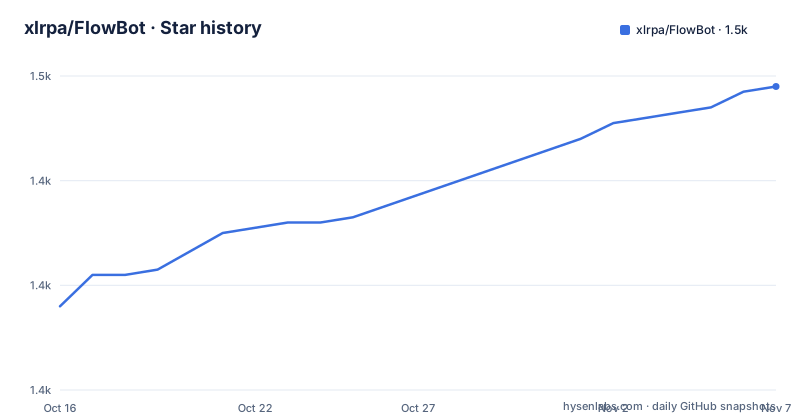
- xlrpa/FlowBot1,458 ★ · +42
| Repository | 2026-10-16 | 2026-11-07 |
|---|---|---|
| xlrpa/FlowBot | 1.4k | 1.5k |
42 Stars in the last 22 days, measured from the daily GitHub snapshot. Compare with other projects
Editorial analysis
Accessibility services on the phone, not a hooked desktop client
FlowBot is a Java Android application that automates a WeChat or WeCom account on a handset you supply yourself. Its mechanism is not a patched client and not a replayed network protocol. The risk note states that the app uses Google's official Android accessibility service, layers a self-developed automation framework on top of it, and carries 4 explicit prohibitions: no hook functions, no intrusion, no damage, no memory modification. The same note claims the phone needs no root at all, that handset models and system versions are unrestricted, and that it stays compatible with 99% of Android phones across long running sessions.
That claim set is what separates this approach from the desktop tools it dismisses in passing. An accessibility service reads the view hierarchy the system already exposes to any app, so nothing inside WeChat has to change for the automation to work. The repository layout is consistent with the story. An `automator/` module sits beside `app/`, with `autotools/`, `inrt/` and `common/` around them, and the build runs through `build.gradle.kts`, `settings.gradle` and the `gradlew` wrapper, with `gradlew.bat` sitting beside it for Windows. Note that the root mixes a Kotlin DSL build file with a Groovy DSL settings file, and nothing written about the project says which style a new module is supposed to follow.
One repository, two runtimes: an Android app and a scheduler
The program is split explicitly into an Android app and a task scheduling platform, and that split decides where your work goes. The phone half holds the account and executes taps. The platform half holds the schedule and exposes the API that triggers work. 6 automation targets are named in the description, and they sit on the platform side: aggregated chat that pulls several conversations into one view, automatic replies, group send, automatic acceptance of friend requests, scheduled Moments posting and one-way friend detection with cleanup.
The demonstrations are honest about that layering. The 2 animated GIFs in `images/`, referenced from the README as `./images/sendMessage_new.gif` and `./images/sendImage_new.gif` and embedded at 360 pixels wide, are both captioned as recordings of the robot running by itself. What you see on screen is a phone and a trail of activity, not a request and a JSON response, which tells you the unit of work is a tap. Where the platform's own code sits is not answered in the repository, because the root directory holds Android modules and no server project, and the README routes business users to official customer service instead.
Where to get the app, since no install command is documented
Expect no shell command here. The README prints no package name, no Android SDK level, no Gradle task and no emulator setup for either half of the system. 3 routes are offered instead, split by who is reading. Technical people are told they can compile the source themselves to test it and learn from it. People who do not work with that language are pointed at a packaged build. Business owners get official customer service instead, for a demo and for technical integration. For getting hold of the software, the README prints 2 literal destinations: the packaged build page and the API documentation site.
https://www.xcxwo.com/XhAZ9Wbg
https://flowbot.apifox.cn
Neither address carries a version number, a checksum or a signature, so an adopter cannot tell what build a download is until it is already installed on a phone. Two files at the repository root, `version.json` and `project-versions.json`, hold version data instead, yet nothing written about them says which one the build reads, what format either uses, or how to override them for a pinned deployment. The same 300 pixel contact image is pasted into two separate sections of the README, so the file that identifies the vendor also turns out to be the only image reused twice.
Group send, auto-reply and Moments posting are UI taps
Every documented job reduces to the same primitive: find a control on screen, tap it, wait. Auto-reply is match and then answer on the chat screen. Group send is a broadcast action driven through the same visible controls a person would use. Automatic friend acceptance is a tap on the incoming request row. Scheduled Moments posting is a timer plus a compose and publish sequence. One-way friend detection and cleanup is a scan of the contact list followed by removal of whatever you nominate.
That uniformity is the strength and the ceiling at the same time. You reach every WeChat and WeCom screen without maintaining a protocol implementation, and you lose the guarantees a typed API would give: no documented behaviour when a control moves, no retry policy for a missed tap, no headless mode, no documented handling of a locked screen. None of those failure paths appear in the README, and the 2 demonstrations on offer, one sending a message and one sending an image, cover none of them either. The keyword list does name the intended reader, because terms for a mass send assistant and a customer service bot sit next to terms for an API controller, which points at a business automating its own account rather than a team shipping a chat product.
Search tags promise protocol hooking the risk note denies
Here is a contradiction worth pausing on before anyone signs anything. The one-line description carries the words for protocol, reverse engineering and hook, sitting next to vbot, wetool and worktool, and the 11 topic tags spell the product's Chinese name 2 times, its English name 4 times, then 2 generic labels and 3 names of rival products. Further down the same repository, the risk note states there are no hook functions, no intrusion, no damage and no memory modification, and that the approach is deliberately different from desktop RPA.
Both statements are live at once. A reader searching those tags arrives at a project positioned as a zero-ban protocol bot, which is the category whose tools attract account restrictions. A reader who installs the build finds an accessibility driver that never touches the protocol at all. For an adopter the gap matters in practical ways: the two approaches carry different legal exposure, a different update burden and a different support bill, and the marketing text sits on the side of the one the code does not take. Nothing in the repository reconciles them, and no comparison against a named tool is published.
Refusing desktop hooks closes off one whole alternative
Exactly 2 other routes reach the same outcome. One is the desktop route the README sets aside: hook the desktop client, read its memory, replay its calls, and rebuild the hook whenever Tencent ships a client update. FlowBot's bet is that a phone side accessibility driver avoids that treadmill, at the cost of a device that has to be present and charged. The other route is to skip the framework completely, since the README says the implementation rests on the Android system SDK and the WeCom and WeChat official SDKs, so a team with one narrow job and an in-house Android developer can write the same taps without adopting this repository and keep ownership of the code.
What FlowBot adds over writing it yourself is the packaged framework, the scheduler, a support contact and a build for teams without Android skills. What you hand over is ownership of the automation. The project publishes no comparison against any named alternative, no benchmark on task duration and no table of what happens when WeChat changes a screen, so the decision cannot be settled from evidence held here. It has to be settled by reading the code, or by trying one narrow job on one spare handset.
The copyright block names MPL 2.0 and bars commercial use
The last push was on 2026-09-11, the repository is not archived, and it carries no GitHub releases, so an adopter has to read `version.json` and `project-versions.json` in the working tree to learn which build is in hand. GitHub files the project under a licence category it cannot classify, and the copyright block in `README.md` says the product uses GPL version 2 in one line and Mozilla Public License Version 2.0 with an added clause in the next.
Those two identifiers name different standard texts, and a bar on commercial use does not sit well with a copyleft grant that expects downstream redistribution, so the two statements inside one file do not agree with each other. The added clause is specific: the source and the binary products of this project and of any derivative may not be used for any commercial or for-profit purpose. That is a narrower grant than the line above it claims, and it is the line a business hits first, because selling service built on it is exactly the case the clause names.
The upgrade path has the same shape. Version numbers live in the repository rather than in published artefacts, and with nothing published to diff against, a team pinning a deployment has no stable reference to pin to. The written answer to a commercially sensitive scenario is not a different set of terms but a paid custom application, submitted through the documentation site, for what it calls a more advanced data security plan.
The account warning rules out anyone already flagged
The README is unusually direct about who must not touch this. If your account has previously been banned or muted, it says do not use the tool, and it repeats the instruction for behaviour that violates Tencent's operating rules or national law, linking the WeCom security guide from the same paragraph. The description at the same time advertises a safe, stable, zero-ban method. Both cannot be a promise and a warning at once, and the plain reading is that the method lowers ban risk without removing the account's own history as a variable.
That matters more than the tap mechanics. A phone running WeChat holds your real contact list, your real conversations and an account that other people can reach, while the scheduling platform sits somewhere else entirely and holds whatever those jobs carry back. Nothing written about the platform says where message content is stored, whether it is encrypted at rest, how long it is retained or how to delete it. For a scenario with sensitive data the documented answer is a custom application rather than a configuration flag.
The remaining risk is the one every UI driver carries: WeChat can move a control, restyle a dialog or demand a new verification step. No compatibility list, no minimum WeChat version and no failure report for those cases appear anywhere in the project. Read the risk section for what it is, a vendor statement about method, and check the standing of your own account before you automate anything on it.
Editorial conclusion
Adopt FlowBot when you own a spare Android handset, a real WeCom account and one repetitive job you can describe as a list of screen taps, and when you would rather not maintain a client hook. Leave it alone when you need a typed, stable API contract, when you cannot accept a driven phone holding customer contacts, or when the account has already been flagged. Before any commercial deployment, read the copyright block in the repository root and get written confirmation of what you may sell, then turn on the accessibility permission on a test handset and see who inside your company accepts that prompt.
Frequently asked questions
Does FlowBot need a rooted phone or a hooked WeChat client?
No. The risk note says the app uses Google's official Android accessibility service and builds its own automation framework on top, with no hook functions, no intrusion and no memory modification, so the phone needs no root. The same note claims compatibility with 99% of Android phones and no restriction on handset model or system version.
How do I install FlowBot on an Android phone?
The README prints no install command, package name or Gradle task. Developers are told they can compile the source themselves, everyone else is pointed at the packaged build page, and business users are pointed at official customer service for a demo.
What can FlowBot automate in WeChat and WeCom?
Six targets are named: aggregated chat, automatic replies, group send, automatic acceptance of friend requests, scheduled Moments posting, and one-way friend detection and cleanup. Each is carried out as taps on the visible interface rather than as protocol calls.
Can I use FlowBot for commercial work?
The copyright block says the project is based on Mozilla Public License Version 2.0 with an added clause that bars using the source and binaries for any commercial or profit purpose. That contradicts the GPL version 2 line printed just above it, and GitHub files the project under a category it cannot classify. For a commercial case the README points to a custom application instead.
What happens if my WeChat account has already been banned?
The README says not to use the tool if the account has previously been banned or muted, and not to use it if behaviour violates Tencent's operating rules or national law. It links the WeCom security guide alongside that warning.
Where is the FlowBot API documentation?
Off the repository, on an Apifox hosted site that the README links three times in a row under its documentation heading. The repository also carries a `docs/` directory, and nothing written about it says what is inside.
Official sources
Add this badge to your README
If you maintain this project, the badge below links readers to this analysis and shows its maintenance status from the daily GitHub snapshot. Paste the markdown into your README; add ?metric=license or ?metric=stars to the image URL for a different field.

[](https://hysenlabs.com/projects/xlrpa-flowbot)Star history chart for your README
[](https://hysenlabs.com/projects/xlrpa-flowbot)Was this useful?