Xagent installs in one command and ships its own source licence
Build personal agents and enterprise AI workforces that plan, delegate, use tools, and deliver real work — without brittle workflows.
At a glance
- What is it?
- Xagent is a Python agent platform published three ways: a PyPI package that bundles the web UI so no Docker or Node is needed, a one-line curl installer, and a Docker Compose stack with nginx, PostgreSQL, Redis and Celery. The install documentation is unusually honest, telling you that the bundled HTTP endpoint is a local-development reference only. The adoption question is the licence, because the package declares an Xagent Source License that GitHub reports as unrecognised.
- Who is it for?
- Xagent fits a team that wants an agent runtime they can start in under a minute and then move behind their own infrastructure, and that is currently using or evaluating OpenClaw or Hermes and wants an import path rather than a rewrite. It does not fit an organisation whose legal review requires a recognised open source licence, because the package declares its own Xagent Source License and the repository reports no licence it can identify.
- Can I use it commercially?
- Check first. The repository uses a licence we do not classify automatically, so read its LICENSE file before any commercial use.
- Is it still maintained?
- Yes. The repository received new commits within the last day.
- What is it written in?
- Mainly Python, according to GitHub's language statistics.
Answers come from the project's GitHub data, last synced on November 14, 2026, and from our analysis. They are not legal advice.
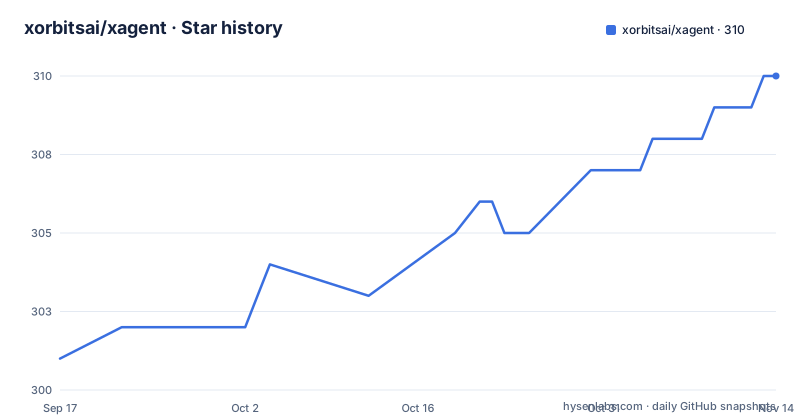
Star history
- xorbitsai/xagent310 ★ · +9
| Repository | 2026-09-17 | 2026-11-14 |
|---|---|---|
| xorbitsai/xagent | 301 | 310 |
9 Stars in the last 58 days, measured from the daily GitHub snapshot. Compare with other projects
Editorial analysis
Version 0.8.1, and a classifier that says Planning
The version scheme tells you where this sits. Three releases are visible in quick succession: v0.7.4 on 2026-09-13, v0.8.0 on 2026-09-20 and v0.8.1 on 2026-09-27, and the last push to main was 2026-09-28. That is a project shipping weekly, but the version number is still below one, and the package metadata says so in its own vocabulary: the trove classifier is Development Status at 1, Planning. The version field is dynamic rather than written into pyproject.toml, which is the usual setup for a version derived from git tags. One detail confirms the tags and the images are kept in step: the Compose file pins both the frontend and backend containers to the 0.8.1 tag, matching the newest release exactly rather than tracking a floating latest. So the distribution story is coherent. What you are evaluating is explicitly pre-1.0 software whose own packaging metadata declines to claim stability, and the weekly release cadence means the ground moves under any documentation you read this month.
The licence field names Xagent's own licence, not an OSI one
Almost everything in the package metadata is unusually precise. The authors are named individually, the description is present, the readme is declared, requires-python is pinned to 3.11 or newer, and the classifier list even records Operating System Independent alongside the specific Python 3.11 target. The dependencies carry floor versions for every package. Then there is one field that does not follow the pattern. Instead of an SPDX identifier, the licence is declared as free text reading Xagent Source License, and the repository's own metadata reports no licence it can identify. There is a LICENSE file at the root of the tree, so the terms exist somewhere; they simply are not expressed in a form a package index or a licence scanner can classify. That distinction is not cosmetic for an adopter. An automated compliance check that looks for MIT, Apache-2.0 or similar will find nothing here, and a legal review will have to read the file itself. Plan for that conversation rather than assuming the absence is an oversight.
Three install paths, and one that needs no Docker or Node
The quick start offers three routes and the differences matter. The published package is the fastest, and the point made about it is that it bundles the web UI, so you need neither Docker nor Node, only Python 3.11 or newer. That claim matters because a bundled UI removes the usual reason people end up running a frontend build toolchain next to a backend.
uv tool install xagent-ai   # or: pip install xagent-ai  (use a virtualenv)
xagent                      # then open http://127.0.0.1:8000
There is also a single-line installer, which is the shortest route and the one with the least room to inspect what it does before running it.
curl -fsSL https://get.xagent.co | shAnd for teams or self-hosting there is the Compose route, which clones the repository, optionally copies example.env to .env for review, and brings the stack up on port 80. That last route is also the only one that gives you the PostgreSQL, Redis and Celery services described later.
git clone https://github.com/xorbitsai/xagent.git
cd xagent
cp example.env .env        # optional: review settings
docker compose up -d       # then open http://localhost:80
Whichever route you take, first startup redirects to /setup to create the first administrator account, and the setup flow then walks you to the Models page to connect a provider. Forgetting that password is a documented, non-destructive recovery rather than a reinstall.
docker compose exec backend python -m xagent.web.reset_admin_password --username <admin_username>Browser sign-in needs Web Locks, so plain HTTP is development only
Here is the paragraph most self-hosted projects omit. Browser sign-in requires local browser storage and the Web Locks API, which is what makes cross-tab session coordination safe. The consequence is stated immediately: the bundled HTTP Compose endpoint is a local-development reference, and production deployments must terminate TLS and use a browser that supports Web Locks. The documentation is careful about which origins count as secure contexts for this purpose, naming localhost, 127.0.0.1 and the IPv6 loopback as the forms that remain valid for local development. It also points at a deployment document for release-specific rollout and rollback requirements. What this buys you is a design that refuses to serve a session-coordination feature over an insecure origin and says so rather than silently degrading. What it costs is a deployment step people forget: put this behind a real proxy with certificates, or the login flow will not behave as documented. The gap between what Compose gives you and what production needs is exactly that TLS termination.
The Compose file ships a default database password in plain text
Read the backend service block closely and the defaults are informative. The database URL is assembled with a fallback, so if the password variable is unset the connection string silently becomes a literal default value rather than failing, which is the kind of default that reaches a production deployment untouched. The uploads directory is set to a path under the agent's home directory, and three knobs govern artefact handling with explicit defaults: maximum upload size at 100M, maximum bytes for artefact validation at 32M, and an artefact validation timeout of 8 seconds. The split between the upload ceiling and the validation ceiling is the detail to notice, since a file can be accepted and then rejected by a smaller, separate budget. Caching is on by default via a hot path flag, and Celery is enabled by default with its broker on a second Redis database, separate from the cache on the first, and a background job visibility timeout of an hour. Every one of these is overridable, and every one of them is a decision you should make deliberately rather than inherit.
Dependency floors come with the reason written next to them
The dependency list is where this project is most candid, because several entries carry a comment explaining the version ceiling rather than leaving you to guess. Tracing is pinned below the next major because the tracing implementation targets the v4 SDK API. The model context protocol dependency is capped for a concrete reason: a client used by the session code was removed or renamed in version 2.0. An SSH library is included with a note that the SSH runner is production runtime and not just tests, which is the kind of comment that stops a future maintainer from treating a dependency as test-only scaffolding. Two more are declared directly with a note that they are currently pulled in transitively anyway, one for non-ASCII URL handling in a specific module and one for recurrence rule validation in calendar parsing. The observability stack is consistently held below the next major across the API, the SDK and the OTLP exporter. Four model providers and a local inference client appear alongside the framework packages. Read as a whole, the list reads like a set of lessons learned rather than a generated manifest.
It rules out two categories explicitly, and imports from two named tools
The positioning section is three sentences of negation and one of assertion: not a chatbot wrapper, not a static workflow builder, a runtime for agentic work. The argument against workflow builders is the substantive part. Fixed processes suit builders, but real knowledge work has requirements that change, inputs that are incomplete, a next step that depends on what the agent discovers, tools that must be chosen at runtime, and an output that may be a report, a file, a decision or an action. So planning happens during execution rather than before it, and the worked example is a planner that fans out to research, data, analyst, writer and operator roles rather than following a fixed graph. The other half of the positioning is practical. If you are coming from OpenClaw or Hermes, a migrate command imports your agent, your skills and your schedules, with the help output offered as the reference. Taking an existing setup with you rather than rebuilding it is the difference between this being a platform and being a new tool you have to re-populate.
Editorial conclusion
Xagent fits a team that wants an agent runtime they can start in under a minute and then move behind their own infrastructure, and that is currently using or evaluating OpenClaw or Hermes and wants an import path rather than a rewrite. It does not fit an organisation whose legal review requires a recognised open source licence, because the package declares its own Xagent Source License and the repository reports no licence it can identify. Before you commit, read the LICENSE file rather than the licence field, set the database password explicitly instead of accepting the compose default, terminate TLS before exposing anything, and treat version 0.8.1 as pre-1.0 software given that the package itself classifies its development status as Planning.
Frequently asked questions
what is xagent
Xagent is an agent platform for personal work, reusable team agents and enterprise AI systems, published as a Python package, a one-line installer and a Docker Compose stack. It states that it is not a chatbot wrapper and not a static workflow builder, but a runtime that plans while the work happens.
How do I install Xagent?
You need Python 3.11 or newer. Either install the package with uv tool install xagent-ai or pip install xagent-ai in a virtualenv and then run xagent to serve on 127.0.0.1:8000, or use the one-line installer, or clone the repository and bring up Docker Compose for teams and self-hosting.
Can I import my agents from another tool into Xagent?
Yes. The migrate command imports your agent, your skills and your schedules, with the README naming OpenClaw and Hermes as the sources and pointing at xagent migrate --help for the details.
What does Xagent require before production use?
Browser sign-in depends on local browser storage and the Web Locks API, so the bundled HTTP Compose endpoint is described as a local-development reference and production must terminate TLS with a browser that supports Web Locks. Release-specific rollout and rollback requirements are covered in the deployment document.
What licence is Xagent released under?
The package metadata declares the licence as the text Xagent Source License rather than a standard identifier, and the repository metadata reports no licence it can recognise. A LICENSE file exists at the root of the tree, so the terms are there to read. The latest release is v0.8.1 and the classifier marks the development status as Planning.
Official sources
Add this badge to your README
If you maintain this project, the badge below links readers to this analysis and shows its maintenance status from the daily GitHub snapshot. Paste the markdown into your README; add ?metric=license or ?metric=stars to the image URL for a different field.

[](https://hysenlabs.com/projects/xorbitsai-xagent)Star history chart for your README
[](https://hysenlabs.com/projects/xorbitsai-xagent)Was this useful?