Vectras VM ships two builds, and rates fourteen phone brands with stars
It's a Virtual Machine App for Android Which is Based on QEMU
At a glance
- What is it?
- Vectras VM is a QEMU-based virtual machine for Android, written in Java with the emulator source and a 3dfx patch committed into the tree. The readme is mostly device advice: a brand compatibility table, two requirement lists, and one line of troubleshooting.
- Who is it for?
- Vectras VM suits someone with a recent flagship phone who wants a full desktop or a Linux environment on Android and is willing to accept that support is community support. Three things to check first.
- Can I use it commercially?
- Yes, with conditions. GPL-2.0 is a copyleft licence: if you distribute software that includes it, you must release that software's source code under the same licence. Running it internally without distributing it does not trigger that obligation.
- Is it still maintained?
- Yes. The repository last received commits 27 days ago.
- What is it written in?
- Mainly Java, according to GitHub's language statistics.
Answers come from the project's GitHub data, last synced on November 14, 2026, and from our analysis. They are not legal advice.
Star history
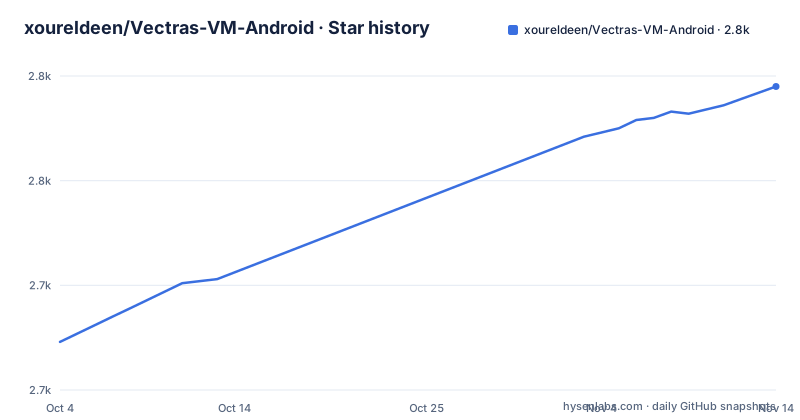
- xoureldeen/Vectras-VM-Android2,795 ★ · +122
| Repository | 2026-10-04 | 2026-11-14 |
|---|---|---|
| xoureldeen/Vectras-VM-Android | 2.7k | 2.8k |
122 Stars in the last 41 days, measured from the daily GitHub snapshot. Compare with other projects
Editorial analysis
The Play Store build runs Qemu 10 natively, the GitHub one needs proot
The most consequential line on the page is a promotion rather than a description. The app is now on the Play Store with a new Qemu 10, and it runs natively on Android instead of requiring proot the way the version on GitHub does. That is an architectural difference, not a version bump: one build interprets the emulator through a user-space chroot layer and the other does not. It also means the two are not the same package. The Play Store listing is published under one identifier and the third-party APK listing linked in the installation section uses a different one. Anyone comparing the two builds by package name should know they are looking at different applications, and anyone upgrading between them should expect the configuration to move rather than the app to update in place.
Five stars for five brands, one star for two
Device support is expressed as a star table, which is blunt and useful. Five brands get the top rating: Samsung, Google Pixel, Xiaomi, Redmi and Poco. ZTE and RedMagic get four. Oppo and Realme get three. OnePlus, vivo and IQOO get two, and Huawei and Honor get one. Underneath the table the actual rule is stated, and it is a rule rather than a ranking: the app works well on devices manufactured in 2021 or later, or on anything with a Snapdragon 855 or better. You can attempt an unsupported device, but the page is explicit that stability and support cannot be guaranteed. So the star column is a summary of the maintainers' testing, not a compatibility statement you can rely on for an untested handset.
Android 6 is the floor, 64-bit and cooling are the recommendation
Two requirement lists, one floor and one target. The minimum is Android 6.0 or newer, 3GB of RAM with 1GB of it free, and a good processor, which is as precise as that sentence gets. The recommended list is longer: Android 8.1 or newer, 8GB of RAM with 3GB free, both the processor and the Android version supporting 64-bit, a Snapdragon 855 or better, and an integrated or removable cooling system. That last item is the only requirement tied to what you plan to run rather than to the phone, and it is scoped to operating systems from 2010 to the present. The 64-bit line matters more than it looks, since a 32-bit guest cannot be emulated by a 32-bit host in any useful way.
The entire troubleshooting section is one tip about older versions
If the guest operating system crashes, the advice is to try an older version of it. That is the whole of the guidance on the page, and it is worth stating plainly what is absent as well as what is present. There is no error catalogue, no log location, no flag for hardware acceleration or for CPU model selection, and no mention of how the app maps host memory into the guest. For a project whose pitch is emulating Windows, Linux, macOS and Android on a phone, the failure surface is large and the documented surface is one sentence. Anyone planning to do real work inside the guest should treat the readme as a compatibility notice and look elsewhere for the operational detail.
QEMU and a 3dfx patch are committed into the tree
The repository is a Gradle project written mostly in Java, with the Unix and Windows wrapper scripts at the root, and it vendors more than a library or two. There is a qemu directory, so the emulator is built from source inside the tree rather than fetched as a dependency, and beside it a directory named 3dfx, which corresponds to the credited QEMU patch and to the suffix on the newest release tag. Three more directories handle the shell: a shell loader, a terminal emulator and a terminal view, each separate. There are also js and web trees and a resources directory. The credits section names the pieces the build leans on, including Alpine Linux as the userland, Mesa compiled for an Android container for graphics, Glide and OkHttp, and ZoomImageView for the display. It also credits proot and Termux, which is what the GitHub build's architecture is assembled from, and the 3dfx patch that explains the extra release tag.
A signing keystore is committed at the repository root
One file in the top level is worth flagging to anyone reading the layout before cloning. Alongside build.gradle, gradle.properties, settings.gradle and the gradle wrapper sits a file named vectras.jks, which is the extension of a Java keystore, the file an Android build uses to sign an application package. Whether that particular keystore is the one used to sign published releases is not stated anywhere on the page, and a keystore committed to a public repository is a routine occurrence in small application projects rather than a discovered secret. It is still the first thing to ask about, because a signing identity that is public cannot be treated as a secret, and the answer determines whether release signatures on the two builds should be trusted.
Newest tag is December 2024, and the documentation lives off-site
The three most recent releases are v2.9.3 on 30 October 2024, v2.9.4 on 6 November 2024 and v2.9.5 on 28 December 2024, the last one carrying a 3dfx suffix in its name. The last push to the default branch is dated 10 September 2026, so the repository has seen roughly twenty months of commits since the last tag, and the repository is not archived. Where the information lives is split three ways. Installation is the releases page and a third-party APK listing, with advanced options in a file inside the repository. Everything else, including the help page that new users are pointed at, is on a separate documentation address, and quick answers are expected in a Telegram group with a Discord server as the other channel. So the readme is a noticeboard rather than a manual.
Editorial conclusion
Vectras VM suits someone with a recent flagship phone who wants a full desktop or a Linux environment on Android and is willing to accept that support is community support. Three things to check first. Pick the build deliberately, because the Play Store version runs a newer Qemu natively while the GitHub version runs under proot, and the two listings use different package identifiers, so they are not interchangeable installs. Read the device table against your own brand, because the support statement is a guarantee about stability and nothing more, and unsupported hardware is explicitly untested. And find out where the guest image comes from before you start, because the page supplies no images and no troubleshooting beyond trying an older guest version. If you need a machine with predictable performance for work rather than for demonstration, this is the wrong shape of tool, and the readme does not claim otherwise.
Frequently asked questions
Can I run Windows 11 as a virtual machine on my Android device?
The app is described as emulating Windows among other systems, but the page gives no per-version guidance for Windows 11 specifically. What it does say is that a guest which crashes is worth retrying with an older version, and that the hardware guidance is a Snapdragon 855 or better with 8GB of RAM, 64-bit support, and cooling for guests from 2010 onward.
What are the minimum requirements for Vectras VM?
Android 6.0 or newer, 3GB of RAM with 1GB free, and a good processor. The recommended set is Android 8.1 or newer, 8GB of RAM with 3GB free, a processor and Android version that both support 64-bit, a Snapdragon 855 or better, and an integrated or removable cooling system.
Which Android devices does Vectras VM support?
Devices manufactured in 2021 or later, or anything with a Snapdragon 855 or better. The readme's brand table rates Samsung, Google Pixel, Xiaomi, Redmi and Poco highest and Huawei and Honor lowest. You can attempt an unsupported device, but stability and support are explicitly not guaranteed.
Where do I download Vectras VM?
From the releases page on GitHub, from a third-party APK listing, or from the Google Play Store. The Play Store build runs the newer Qemu 10 natively on Android, while the version from GitHub relies on proot.
Does the Play Store version of Vectras VM differ from the GitHub version?
Yes. The Play Store build carries the new Qemu 10 and runs natively on Android instead of requiring proot the way the GitHub build does. The two listings also use different application package identifiers, so they are separate installs rather than two versions of one.
Official sources
Add this badge to your README
If you maintain this project, the badge below links readers to this analysis and shows its maintenance status from the daily GitHub snapshot. Paste the markdown into your README; add ?metric=license or ?metric=stars to the image URL for a different field.

[](https://hysenlabs.com/projects/xoureldeen-vectras-vm-android)Star history chart for your README
[](https://hysenlabs.com/projects/xoureldeen-vectras-vm-android)Was this useful?