Emoji Kitchen: a browsable index of 100,000 emoji mashups
🧑🍳 This repository contains the source code for the website https://emojikitchen.dev and allows for quick and easy browsing of the over 100,000 supported emoji mashups as part of Google's Emoji Kitchen.
At a glance
- What is it?
- emoji-kitchen is the source for emojikitchen.dev, a React and Vite front end that lets you search and browse more than 100,000 valid emoji combinations from Google's Emoji Kitchen. The interesting engineering is not the emoji but the split: a companion backend generates the metadata, and this repository serves it as an asynchronously loaded file so the first paint stays small. The catch is that the mashup images themselves live outside this repository, and no licence is declared.
- Who is it for?
- Adopt this repository if you want to run your own searchable Emoji Kitchen index, especially if you want to change the search or layout behaviour of emojikitchen.dev without touching a hosted service. Skip it if you need the mashup images themselves, since only the metadata and the site code live here, and check the licence situation first because package.json marks the project private with no licence file identified.
- Can I use it commercially?
- Not without permission. GitHub finds no licence file in the repository, and without a licence all rights are reserved by default: you may read the code but not reuse it. Check the README, or ask the authors, before using it.
- Is it still maintained?
- Yes. The repository last received commits 8 days ago.
- What is it written in?
- Mainly TypeScript, according to GitHub's language statistics.
Answers come from the project's GitHub data, last synced on November 6, 2026, and from our analysis. They are not legal advice.
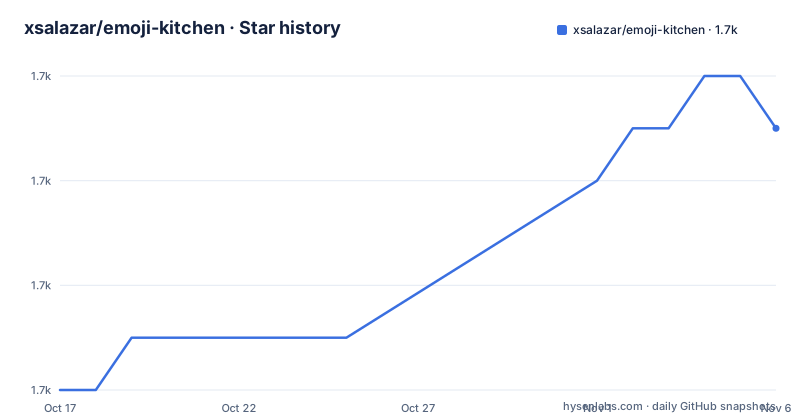
Star history
- xsalazar/emoji-kitchen1,671 ★ · +5
| Repository | 2026-10-17 | 2026-11-06 |
|---|---|---|
| xsalazar/emoji-kitchen | 1.7k | 1.7k |
5 Stars in the last 20 days, measured from the daily GitHub snapshot. Compare with other projects
Editorial analysis
What emojikitchen.dev actually indexes
Emoji Kitchen is Google's set of emoji mashups, the illustrations that combine two emoji into one, and it has become a well known source of reaction images. The catalogue is large. The README states that there are currently over 100,000 possible valid combinations, which is the scale of the thing this project makes browsable.
The project at hand, emoji-kitchen, is the source code for emojikitchen.dev, a website that gives you quick and easy browsing of that list. The audience is straightforward. It is for someone who wants to find a specific mashup without knowing its name in advance, which is the normal situation: you know you want a cat and a pizza and you do not know that the result is called anything in particular.
That distinction matters for how you read the repository. This is not the Google original and it does not contain the artwork. It is a catalogue and a search interface over metadata describing artwork that is hosted somewhere else, with a link out to the emoji kitchen entry on Emojipedia for the underlying combinations.
The repository is not archived and the last push was on 2026-10-16, so the code is moving. It has no GitHub releases, so there is no tagged version to depend on, and the package.json marks the project as private, which in the npm sense means it is not published to a registry.
The Vite and React stack behind the site
The dependency list in package.json describes the whole application rather than a library. Vite 8.3.4 provides the dev server and the build, with @vitejs/plugin-react handling the React refresh, and React 19.3.0 with react-dom 19.3.0 as the view layer. Styling goes through @mui/material 9.4.0 and @mui/icons-material, with @emotion/react and @emotion/styled 11.14.x underneath, which is the standard Material UI stack.
Three dependencies carry real intent. jszip 3.10.2 and file-saver 2.0.5 together mean the site can package a selection of images into a zip archive and hand it to the browser as a download, which is the natural bulk action for a catalogue like this. uuid 14.0.3 provides identifiers, and @uidotdev/usehooks 2.4.1 supplies the React hooks the interface relies on, most likely for debouncing or resize observation in a search grid.
The scripts section is minimal and worth quoting in full because there is no test script, no lint script and no typecheck script. Build, preview and start are the only three.
"scripts": {
  "build": "vite build",
  "serve": "vite preview",
  "start": "vite"
}
The absence of a test setup is a real signal. If you plan to modify the search behaviour, there is no existing harness to catch regressions, and you would be adding the first one yourself.
Why the metadata is loaded asynchronously
The architectural decision in this repository is the split between the front end and the data it serves. The mashup catalogue is not compiled into the bundle. Instead the app fetches a metadata file at runtime from public/metadata.json, and the README explains why: the metadata is loaded asynchronously after the app, which keeps the initial JavaScript bundle small and improves startup time.
This is the right call for a catalogue of this size. Over 100,000 entries with image references is a payload that would dominate the bundle if it were imported synchronously, and it would block the first render for every visitor, including the many who arrive and immediately type a search term.
The download command shows where the data comes from. It is not committed to the repository. It is fetched at setup time from a companion project, emoji-kitchen-backend, which is the service that actually knows how to combine emoji and produce the results.
curl -L --compressed https://raw.githubusercontent.com/xsalazar/emoji-kitchen-backend/main/app/metadata.json -o public/metadata.jsonThe repository also contains a .metadata.json file at the top level and a public/ directory, so the working tree has a place for the payload, but the documented workflow is the curl above. The consequence for a fork is that a fresh clone does not run until you have pulled that file, and the file will be as current as the backend's main branch at the moment you downloaded it.
Getting the site running on your machine
The README says the project relies on VSCode's devcontainer feature to make sure all necessary dependencies are available inside the container for development. The .devcontainer directory in the repository is what that means, and a devcontainer is a reasonable choice for a project that depends on a specific Node toolchain.
The setup itself is two steps. Fetch the metadata into public/ so the app can load it at runtime, then install and start the project.
curl -L --compressed https://raw.githubusercontent.com/xsalazar/emoji-kitchen-backend/main/app/metadata.json -o public/metadata.json
npm install && npm start
After that the site runs locally at http://localhost:5173/. The port is Vite's default, and the start script runs vite rather than a preview of a build, so the page is served with hot module replacement and you can edit components under src/ and see changes without rebuilding.
If you want a production build instead, the build script runs vite build and the serve script runs vite preview to check the output locally. Deployment is a separate concern, handled in the next section.
One detail to watch when you set this up is that the metadata file is a large download over the network and it is not versioned with the front end code. The fetch and the npm install are independent, so a mismatch between a metadata format change and the component code is the likely first failure you would hit.
Deployment and dependency upkeep through GitHub Actions
The README states that all application deployments are managed via GitHub Actions, through the ./.github/workflows/deploy.yml workflow. The repository topics list github-pages, which fits a static site built with Vite and published as pages, and the built output is what a static host needs.
There is a second workflow in the same area worth knowing about. Application dependencies are automatically managed and updated via Dependabot, using the ./.github/workflows/automerge-dependabot.yml workflow. That means dependency bumps are proposed by Dependabot and merged automatically, without a human reviewing the pull request.
For a team this is convenient and for a team that cares about supply chain it is a decision to make consciously. The dependency surface here is larger than a typical small site: React 19, Material UI 9, Emotion 11, Vite 8 and the plugin, all on fairly recent major versions, with a new major landing every few months. The automerge workflow removes the manual step of reading each bump, and the price is that a breaking change in a major version can reach the deployed site without a deliberate upgrade decision.
The .devcontainer, .vscode, .github and .pre-commit style configuration at the root of the repository, together with tsconfig.json and tsconfig.node.json, point to a TypeScript project that is set up carefully. The tsconfig split between app and node configuration is the standard Vite template shape.
Where the project falls short
The most obvious limitation is the licence. package.json declares the package as private and no licence file is listed for the repository, so there is no permission statement you can point to for reuse of the code, even though the site itself is public. Anyone planning to fork, redistribute or build on top of this repository should resolve that before investing time, and it is worth noting that Google's Emoji Kitchen artwork carries its own separate terms that the site links to on Emojipedia.
The second limitation is that this repository holds the interface, not the assets. The mashup images are referenced by the metadata and served from elsewhere, so the value of a fork is the browsing experience, the search logic and the layout. If your requirement is a download library of mashup images, this is the wrong repository, and the backend project that produces the metadata is the closer match.
The third limitation is the coupling to the backend. The metadata is fetched from the main branch of another repository as a raw file, and nothing in the documented workflow pins a version. A change in the backend's metadata schema can break the front end, and there is no published contract describing the fields. The repository also has no GitHub releases, so you cannot tag a known good pairing of code and metadata.
The fourth limitation is the absence of automated tests. The scripts list has no test command, and with over 100,000 entries the search behaviour is exactly the kind of logic that quietly breaks when a metadata field changes shape.
A different approach to the same catalogue
The alternative worth knowing about is the emoji-kitchen-backend project, and the difference is one of build time versus query time.
The backend generates the mashups. It takes a pair of emoji, produces the combined illustration and can serve the result on request. That model means the catalogue grows as people explore it rather than as a batch job runs, and it means a query for a combination that has never been tried is still answerable. The cost is that a rendering step and its latency sit between the user and the picture, and the set of combinations a user can reach depends on how the generator performs rather than on a fixed catalogue.
This repository inverts that. The catalogue is a precomputed metadata file, downloaded in one request, and the browser does the searching. Searching is then instant and entirely client side, and the same metadata file can be cached or served from a CDN. The trade-off is that the set is fixed at the moment the file was produced, which is exactly why the curl step is part of the setup and why the workflow for keeping the payload fresh matters.
A third option sits outside both. Emojipedia hosts the canonical Emoji Kitchen catalogue with its own browsing, and Google's images can be used directly. That path is simpler still, but it gives you no index, no metadata and no way to build a product on top. For a site that needs its own search, the metadata-and-async-load pattern in emoji-kitchen is the more interesting of the two code paths.
Editorial conclusion
Adopt this repository if you want to run your own searchable Emoji Kitchen index, especially if you want to change the search or layout behaviour of emojikitchen.dev without touching a hosted service. Skip it if you need the mashup images themselves, since only the metadata and the site code live here, and check the licence situation first because package.json marks the project private with no licence file identified. Before publishing a fork, confirm in the metadata.json payload that the image URLs it points to are served with permission for your use.
Frequently asked questions
What is emoji-kitchen and what does it provide?
It is the source code for emojikitchen.dev, a site for browsing the list of more than 100,000 valid emoji mashups from Google's Emoji Kitchen.
How do I run the emojikitchen.dev site locally?
Download metadata.json into public/, then run npm install and npm start, which starts Vite on http://localhost:5173/. The README also points to a VSCode devcontainer for a preconfigured environment.
Where does the emoji mashup metadata come from?
From the companion emoji-kitchen-backend repository, fetched as a raw metadata.json file into public/. The app loads it asynchronously at runtime so the initial JavaScript bundle stays small.
Does the repository contain the mashup images?
No. The repository holds the site code and a metadata index that references the images, which are hosted elsewhere, so a fork reproduces the browsing experience rather than the artwork.
How are deployments and dependency updates handled?
Deployments run through the ./.github/workflows/deploy.yml GitHub Actions workflow, and Dependabot updates are merged automatically by the ./.github/workflows/automerge-dependabot.yml workflow.
Official sources
Add this badge to your README
If you maintain this project, the badge below links readers to this analysis and shows its maintenance status from the daily GitHub snapshot. Paste the markdown into your README; add ?metric=license or ?metric=stars to the image URL for a different field.

[](https://hysenlabs.com/projects/xsalazar-emoji-kitchen)Star history chart for your README
[](https://hysenlabs.com/projects/xsalazar-emoji-kitchen)Was this useful?