LocalMiniDrama: SQLite and local files on one side, remote model calls on the other
LocalMiniDrama is an open-source local AI short-drama and comic-drama generator: a one-stop workflow from story to finished video, with all data staying on your machine. Integrates Seedance 2 and a Nano pipeline for highly flexible AI live-action and AI comic dramas, fully offline.
At a glance
- What is it?
- An eight-step pipeline from synopsis to composited episode, with a canvas view beside the list view and nine AI provider integrations. The local-first claim covers storage rather than inference: your scripts and footage stay on disk, while prompts and reference images are sent to whichever provider you configured, and the local option in the provider table is text only.
- Who is it for?
- This is a workflow tool rather than a model, and its value is the eight-step chain with retry, resume and whole-group re-run rather than anything about image or video quality. Two things to understand before you commit time to it.
- Can I use it commercially?
- Yes. MIT is a permissive licence: you can use, modify and sell software built on it, as long as you keep its copyright and licence notices.
- Is it still maintained?
- Yes. The repository received new commits within the last day.
- What is it written in?
- Mainly JavaScript, according to GitHub's language statistics.
Answers come from the project's GitHub data, last synced on November 15, 2026, and from our analysis. They are not legal advice.
Star history
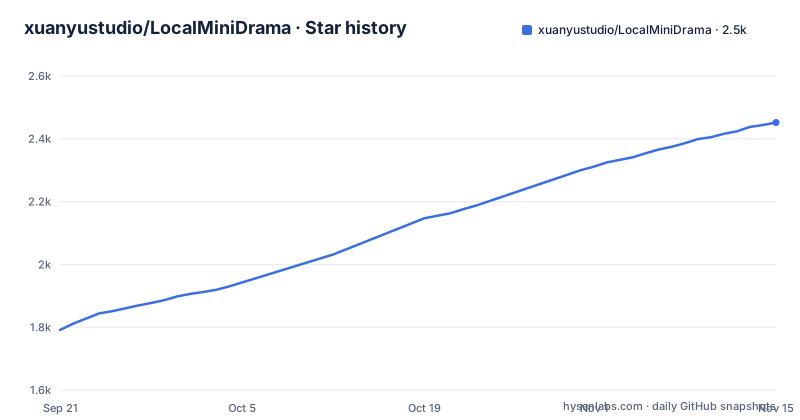
- xuanyustudio/LocalMiniDrama2,452 ★ · +661
| Repository | 2026-09-21 | 2026-11-15 |
|---|---|---|
| xuanyustudio/LocalMiniDrama | 1.8k | 2.5k |
661 Stars in the last 55 days, measured from the daily GitHub snapshot. Compare with other projects
Editorial analysis
Data stays local, the model calls do not
The framing is local first, and the mechanism behind it is concrete: a SQLite database and local files, with assets described as never going to the cloud, and the stated benefits being no subscription fee, local data storage and no cloud requirement for your material. The project is built from scratch in JavaScript and connects to AI providers you supply keys for, which is the whole point of the design and also its limit. The provider table is where that becomes visible. Local engines and other OpenAI-compatible endpoints are listed for text only, with no image or video column. So a fully offline install can draft and edit, and every frame still leaves your machine for someone else's GPU. The privacy claim is about your scripts, your reference images and your finished episodes living on your disk, which is a real and useful property, and it is not a claim that nothing is transmitted.
Eight steps from a synopsis to a finished episode
The pipeline is documented as a table of eight steps, and the order is the design. Step one takes a synopsis and a style and generates multi-episode scripts. Step two is script editing, with episode management and free text editing. Steps three, four and five generate the three asset classes separately: characters, extracted from the script and rendered as character sheets; scenes, extracted and rendered as backgrounds; and props, extracted or added by hand and rendered. Step six turns an episode into a storyboard script with shot size, camera movement and dialogue per shot. Step seven renders a still and a clip per shot. Step eight composites every clip into a complete episode file. The separation is what makes the tool usable on a real project: characters and scenes are reusable across episodes, which is why the interface also has a global asset library and a scene library with an add-to-this-episode action.
Canvas and list are two views of one data set
The canvas mode is described as a LibTV-style workflow, and its key property is stated in the first line: it shares the same data source as the list view, reached at a film canvas route. Inside it, the pipeline runs vertically with one row per shot, either the classic sequence of text then first frame and tail frame then video, or the universal sequence of storyboard text then video. A script node at the start lets you edit the script, generate the story and extract characters, scenes and props without leaving the canvas. Clicking below a node opens an operation panel for editing or generating, which removes the round trip to the list. Right-click and a floating toolbar create shots, episodes, characters, scenes and props, and box selection creates a workflow group that can then be re-run as a whole, with image generation, video and voiceover individually selectable. Dragged coordinates are saved and connections are drawn as curves.
Two installers, and the configuration lives in AppData
The recommended install is a Windows executable, and there are two builds with a deliberate difference. The standard build includes a sample project and is aimed at first-time users; the Lite build is smaller and aimed at people who already know the flow. The path after installation is double-click, enter an API key in the AI configuration screen, start creating. The first-run configuration file sits under the application data directory, in a backend configs subfolder, as a YAML file. That path is a Windows convention and there is no equivalent documented for other systems, which tells you where this route ends. The source route is documented separately and needs Node 18 or newer, an install in the backend directory, a copy of the example configuration to fill in your key, a migration step and a start script, then a second terminal for the front end. Two root scripts, one batch and one PowerShell, start both for you.
Two terminals, two ports, one migration step
The source instructions are worth quoting because the port numbers are easy to collide with something else:
git clone https://github.com/xuanyustudio/LocalMiniDrama.git
cd LocalMiniDrama

# 后端(端口 5679)
cd backend-node && npm install
cp configs/config.example.yaml configs/config.yaml   # 填入 API Key
npm run migrate && npm start

# 前端(端口 3013,新终端)
cd frontweb && npm install && npm run dev
The backend listens on 5679 and the front end on 3013, and you open the front end in a browser. The migration step is not optional in the printed sequence: it runs between installing and starting, so a database is created or upgraded before the first request. The configuration file is copied from an example, which is the project's way of shipping a template with every key named and empty. Two of the four commands are Windows-flavoured, the copy syntax and the batch launcher, and a PowerShell variant of the launcher sits beside it in the tree, so the source route assumes a Windows shell even though nothing else in the stack is Windows-specific.
The provider table is where the limits are
Nine rows describe which provider can do what, and the pattern of dashes is the interesting part. Alibaba Cloud DashScope and Volcengine, which covers Doubao and Seedance 2.0, and Agnes AI all support text, image and video, so they cover the whole pipeline from a single key. Kling, including its Omni variant, and Google Gemini, through Imagen and Veo, support image and video but not text, so they slot into the rendering steps and not into script writing. Vidu is video only. NanoBanana, including its proxy route, is image only. And local engines, listed as Ollama and other OpenAI-compatible interfaces, are text only. Read as a matrix rather than a feature list, this is a project that expects you to mix providers: a hosted model for the script, possibly a different one for frames, and possibly a third for video, with the cost of that spread being that key management and model compatibility become your problem.
Every step retries three times before it fails
The pipeline details are where the engineering shows. One-click generation runs from characters through to composited video and skips content that already exists, which is what makes it usable on a project you come back to. Each step retries up to three times on failure, explicitly to absorb rate limiting, with live progress and error logs alongside. Around that sit the project management features: ZIP export and import of a whole project, a global asset library, three aspect ratios at 16:9, 9:16 and 1:1, two storyboard styles described as classic and universal, a multi-image reference syntax for supplying several references at once, tail-frame continuity so one shot's last frame seeds the next, and export of the storyboard table as HTML. Prompts for both images and video are fully editable, and reference images can be uploaded or dragged in by hand, which is the escape hatch for when the automatic extraction picks the wrong face.
Chinese directory names at the root, and a roadmap of image tricks
The repository root mixes languages. Alongside the code directories for the backend, front end and desktop shell, plus documentation and an example project directory, there is a directory named for relay configuration across the major platforms, another named for project screenshots, and a directory that packages the project as a skill for another agent tool. Two things in the roadmap are worth watching because they change what the pipeline can express. One plans to extend a scene reference image into a very wide or 360 degree panorama, which would let wide-shot camera moves work from a single reference. Another plans to feed a grid of frames into video generation as its input, noted as already partly supported by some models. Both are marked as planned rather than done, along with free upload of storyboard references and manual selection of which character or scene reference to use. The release record shows three tagged versions ending at v1.2.8 in July, while the branch was pushed in October.
Editorial conclusion
This is a workflow tool rather than a model, and its value is the eight-step chain with retry, resume and whole-group re-run rather than anything about image or video quality. Two things to understand before you commit time to it. The local-first framing is about storage, not inference: a provider key is required, and the one local option in the table handles text only, so producing frames still means paying a hosted provider. And the desktop route is Windows-shaped, from the installer names to the AppData configuration path, so anyone on macOS or Linux is following the two-terminal source build instead. The documentation is unusually open for a project this size, with an English document, a configuration guide, a canvas design document and a changelog, and the release history is three months behind the branch.
Frequently asked questions
Does LocalMiniDrama upload my scripts and footage to the cloud?
The tool describes itself as local first, with a SQLite database and local files so material is not uploaded, and the audience table promises that scripts and footage stay on your machine. What still leaves the machine is whatever you send to the provider you configured, because generation runs through your own API key. The local option in the provider table, Ollama and other OpenAI-compatible endpoints, covers text only.
Which AI providers does LocalMiniDrama support?
Nine rows in the matrix. DashScope, Volcengine covering Doubao and Seedance 2.0, and Agnes AI cover text, image and video. Kling including Omni and Google Gemini through Imagen and Veo cover image and video. Vidu is video only, NanoBanana is image only, and local Ollama or other OpenAI-compatible endpoints are text only.
How do I install LocalMiniDrama?
Download the standard or Lite Windows executable from the releases page, double-click it, and enter an API key in the AI configuration screen; the standard build ships with a sample project and the Lite build is smaller. The first-run configuration is a YAML file under your application data directory. To build from source you need Node 18 or newer, install the backend and front end separately, copy the example config, run the migration, start the backend on port 5679 and the front end on 3013, or use the launcher scripts at the root.
What is the canvas mode in LocalMiniDrama?
A second view of the same data, reached from the production page, laid out as one row per shot. It has script nodes for editing the script and extracting characters, scenes and props, a per-node panel so you can edit or generate without switching to the list, a right-click menu and toolbar for creating new items, and workflow groups you build by box selection that re-run the whole group with image, video or voiceover steps selectable.
Official sources
Add this badge to your README
If you maintain this project, the badge below links readers to this analysis and shows its maintenance status from the daily GitHub snapshot. Paste the markdown into your README; add ?metric=license or ?metric=stars to the image URL for a different field.

[](https://hysenlabs.com/projects/xuanyustudio-localminidrama)Star history chart for your README
[](https://hysenlabs.com/projects/xuanyustudio-localminidrama)Was this useful?