Codex-QQ-Skin repaints the Codex desktop app through the DevTools protocol, and its version numbers and its release titles disagree
A Codex skin generator with built-in immersive-girlfriend and retro QQ themes.
At a glance
- What is it?
- A theme pack that injects a blue and silver QQ 2007 shell, a custom image skin, and a local token growth counter into the official Codex desktop app without touching app.asar or the code signature. The injection is reversible, the installers are unsigned on both platforms, and the manifest says 2.6.3 while the newest release is titled 3.3.0.
- Who is it for?
- Install this only if you want the Codex desktop app to look and sound different and you are willing to run unsigned builds and to point a DevTools protocol port at it, because nothing here is signed by Apple or Microsoft and both platform gates have to be opened by hand.
- Can I use it commercially?
- Yes. MIT is a permissive licence: you can use, modify and sell software built on it, as long as you keep its copyright and licence notices.
- Is it still maintained?
- Yes. The repository last received commits 102 days ago.
- What is it written in?
- Mainly JavaScript, according to GitHub's language statistics.
Answers come from the project's GitHub data, last synced on November 21, 2026, and from our analysis. They are not legal advice.
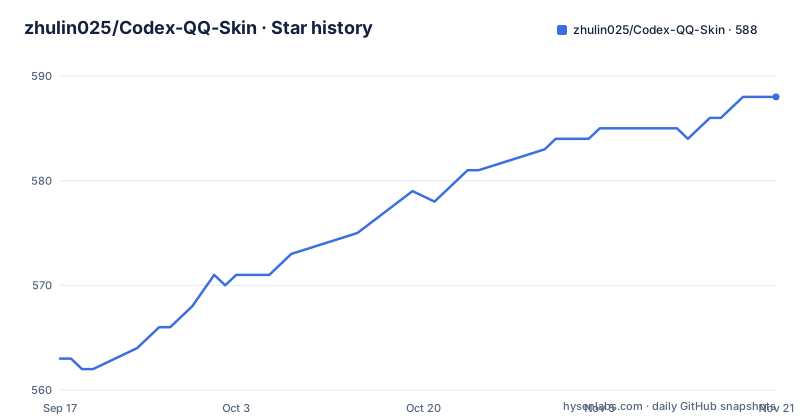
Star history
- zhulin025/Codex-QQ-Skin588 ★ · +25
| Repository | 2026-09-17 | 2026-11-21 |
|---|---|---|
| zhulin025/Codex-QQ-Skin | 563 | 588 |
25 Stars in the last 65 days, measured from the daily GitHub snapshot. Compare with other projects
Editorial analysis
Version 2.6.3 in the manifest, version 3.3.0 in the release titles
Three version lines coexist. The newest release is v3.3.0, titled CodexGF-Live 3.3.0 and published on 2026-08-11, preceded by v3.2.4 and v3.2.3 in the same CodexGF-Live naming. package.json says version 2.6.3, and the readme heads its changelog with 最新版本 2.6.3, naming the Windows asset ChatGPT QQ Skin Setup 2.6.3.exe. Nothing in the readme or the manifest mentions the 3.x line or the name CodexGF-Live. The release titles therefore sit on a different product name and a different version line from the file that builds them, and the last push, 2026-08-11, is the same day as v3.3.0. So a reader who trusts the readme and a reader who trusts the releases page are looking at different numbers for the same repository, and there is a CHANGELOG.md in the tree that was not part of what the readme describes.
The skin arrives over a local debug port and touches nothing else
The mechanism is narrow on purpose. The readme states the project is not an OpenAI, Tencent or QQ official product, and that it does not modify the official .app, app.asar, the code signature, the API key or the base URL. On Windows it says the installer only injects styles by listening on the Chromium DevTools protocol at 127.0.0.1. The cost of that restraint shows up in the compatibility notes: version 2.6.1 taught the injector about the home-banners structure that Codex 26.721 added, switching layout by DOM to fix a blank new task panel under QQ and custom skins, and older builds without banners still take the original injection path. An injector that depends on another application's markup has to be taught that markup, one release at a time. There is also a hard ordering requirement: the official desktop app has to have started successfully at least once, and Codex has to be fully quit before anything is installed.
Nothing is signed, and the readme walks through each gate
Both installers arrive unsigned and the readme says so in plain terms. The Windows executable has no commercial code signing, so the first run can raise a SmartScreen prompt, and the instruction is to download only from the project's own release and check the SHA-256. On macOS the app carries no Apple Developer ID signature and no notarization, so Gatekeeper reports that the developer cannot be verified, and the fix is a six step walk through System Settings to Privacy and Security, then Privacy and Security again to click Open Anyway and authenticate. The terminal route is blunter: it starts by removing the quarantine attribute from the downloaded tree with xattr, then makes the command files and the shell scripts executable. That instruction carries its own condition, that you run it only on files you have confirmed came from this repository, and it is worth honouring, since the same command applied to an unverified download removes the one marker macOS gave you.
Five install paths on macOS, each with a different cost
The macOS side offers three documented routes and Windows adds an installer, with a fifth optional piece. The terminal route is four commands from a downloaded ZIP:
cd ~/Downloads/Codex-QQ-Skin
xattr -dr com.apple.quarantine .
chmod +x ./*.command scripts/*.sh
./scripts/install-qq-skin-macos.sh
The second route is an app: download Codex QQ Skin.app.zip from the releases, drag Codex QQ Skin.app into Applications, and click the one-click install on first launch. It upgrades only to strictly newer versions, so the same version is not reinstalled and a higher local version is never downgraded. The third route is the double click: quit Codex, double click Install Codex QQ Skin.command, then launch the generated desktop command, with a right click Open first if macOS refuses it. The optional fifth piece is Install Menu Bar.command, which adds a SwiftBar entry. Wherever you land, the engine installs to ~/.codex/codex-qq-skin-studio, and theme and runtime state go to ~/Library/Application Support/CodexQQSkin. No separate Node.js is needed because the runtime verifies and uses the Node.js signed inside the official Codex app, while package.json declares an engine floor of node >=20. The app and the installer also carry a deep skin assistant, a Codex skill that turns one theme keyword into a layered skin: it generates two internal reference images plus a background and transparent assets, creates a .codexskin file, then installs, applies and verifies the result against the real Codex interface. You can attach your own reference images, or ask to see the plan first, to skip applying, or to keep a skin without switching to it, and the area stays visible after installation and reports whether it is installed or has a newer bundled version.
Three modes, and every switch rebuilds the layout
The mode switch in the top right has three positions and none of them is a partial overlay. 原生 restores the official interface and colors completely. QQ is a fixed blue and silver QQ 2007 shell with its own frame, sidebar, three column layout, summary tray and companion card, and its colors ignore whatever image you upload. 自定义 keeps the native structure but derives palette, focal point and the new task page composition from your picture, blurring and dimming it behind the conversation so text stays readable, with people and ordinary photos shown whole on the new task page. Switching modes rebuilds the target layout, colors and decorations in full rather than patching them, which is why no leftover sidebar color survives a change. The suggested window width is 1180px so all three columns fit. An image skin can also be applied from the terminal, with the file path written in Chinese as a placeholder:
./scripts/load-image-theme-macos.sh --file /绝对路径/你的图片.png \
  --appearance light \
  --safe-area center \
  --task-mode off
Three switches come with it: appearance picks the light or dark treatment, safe-area places the subject inside a protected region, and task-mode controls what the new task page does with the picture. Running the start script again applies the result, and the QQ title bar, the three column layout and the companion card stay in place.
The growth center reads your local session logs and labels itself local
The token counter sits at the top right of QQ mode and reads two directories on the machine, ~/.codex/sessions and archived_sessions, through an incremental cache. It shows today, the last seven days, the lifetime total, a seven day trend, active days and a streak, then turns those into a growth value displayed as QQ ranks from stars through moon and sun to crown. Three details make it honest. It needs no separate account, reads no API key, and uploads neither prompts nor token data. The default view counts cached input too, and a 净用量 toggle shows the figure with cache excluded, with forks, inherited sub-agent history and duplicate token events de-duplicated. And because the logs carry no stable account id, the panel says in as many words that this is a local statistic and a local Codex rank, not an OpenAI bill and not a cloud account level. The companion card separately shows the week's remaining usage.
The companion room reads GitHub search results and caches them for six hours
Version 2.6.0 turned the companion in the bottom right into a desk room that changes with task state, time of day and interaction, and four props in it, a computer, a bookshelf, a desk lamp and a potted plant, open a blind box of trending GitHub projects. The robot draws a book from the shelf first, then shows the project name and a Chinese summary. The data source is public repository search only, cached every six hours, and summaries are translated into Chinese with a Chinese fallback when translation fails; Codex conversations and local statistics are not uploaded. Preferences, favorites, discovery counts and decoration progress live in browser local storage only, and every five consecutive discoveries unlock one decoration. The buttons use two independent channels, pointerup plus click, because Electron sometimes swallows a standard click, which is the kind of detail that only shows up after a real session of watching the UI misbehave.
The repository root is ten launcher files for five actions
Five operations exist: start, customize, verify, restore, and an optional menu bar entry. Each one ships twice at the root, once as a .command file for macOS and once as a .cmd for Windows, which is why ten launcher files sit next to LICENSE, NOTICE.md, README-WINDOWS.md and CHANGELOG.md. The terminal equivalents are four scripts, and one of them is worth knowing:
./scripts/start-qq-skin-macos.sh
./scripts/doctor-macos.sh --require-live
./scripts/pause-qq-skin-macos.sh
./scripts/restore-qq-skin-macos.sh --restore-base-theme --restart-codex
doctor with --require-live is the one that checks the signature, the runtime and the injection result and takes a screenshot, which makes it the first thing to run when a skin refuses to appear. pause stops the theme, and restore with --restore-base-theme and --restart-codex puts the official appearance back. The verify launcher covers the same check for people who never open a terminal, and there is also a one-click pause and a one-click restore in the interface itself. The rest of the tree carries macos-app/, windows-app/, menubar/, assets/, docs/, presets/, scripts/, skills/, tests/ and website/, and the homepage sits at codex.liuwa.xyz. The preview section holds two captions, one for the task detail screen and one for the new task screen, with the pictures living in assets/ rather than in the text.
Editorial conclusion
Install this only if you want the Codex desktop app to look and sound different and you are willing to run unsigned builds and to point a DevTools protocol port at it, because nothing here is signed by Apple or Microsoft and both platform gates have to be opened by hand. It fits a desktop user who wants the QQ shell, a local usage counter, or a generated skin from one keyword, and it does not fit a machine where unsigned software, a listening debug port, or a helper reading your local session logs is not acceptable. Before installing, check the version mismatch between the 2.6.3 in the manifest and the 3.3.0 in the release titles, verify the Windows installer against its SHA-256, decide whether the growth center reading ~/.codex/sessions is something you want on this machine, and remember that every mode switch rebuilds the layout from scratch.
Frequently asked questions
Does Codex-QQ-Skin modify the official Codex or ChatGPT app?
No. It does not modify the official .app, app.asar, the code signature, the API key or the base URL. On Windows it injects styles by listening on the Chromium DevTools protocol at 127.0.0.1.
Are the Codex-QQ-Skin installers code signed?
No. The Windows executable has no commercial code signing, so SmartScreen may prompt on first run, and the macOS app has neither an Apple Developer ID signature nor notarization, so Gatekeeper asks you to open it from Privacy and Security. The readme asks you to verify the SHA-256 of the Windows build.
What does the Codex-QQ-Skin token counter read?
It reads the local ~/.codex/sessions and archived_sessions directories through an incremental cache, shows today, seven day, lifetime, active day and streak figures, and uploads no prompts or token data. It labels itself a local statistic because the logs carry no stable account id.
Do I need Node.js to run Codex-QQ-Skin on macOS?
No separate install is needed. The runtime verifies and uses the Node.js signed inside the official Codex app, while package.json declares an engine floor of node >=20. The engine installs to ~/.codex/codex-qq-skin-studio and state goes to ~/Library/Application Support/CodexQQSkin.
Which version of Codex-QQ-Skin is current?
The readme and package.json both say 2.6.3, with the Windows asset named ChatGPT QQ Skin Setup 2.6.3.exe. The newest published release is v3.3.0, titled CodexGF-Live 3.3.0 and dated 2026-08-11.
Official sources
Add this badge to your README
If you maintain this project, the badge below links readers to this analysis and shows its maintenance status from the daily GitHub snapshot. Paste the markdown into your README; add ?metric=license or ?metric=stars to the image URL for a different field.

[](https://hysenlabs.com/projects/zhulin025-codex-qq-skin)Star history chart for your README
[](https://hysenlabs.com/projects/zhulin025-codex-qq-skin)Was this useful?