Open File Viewer: a plugin-per-format preview SDK where plugin order and bundler config decide what works
A framework-agnostic embedded file viewer for vanilla JavaScript, React, Vue and Svelte. Put PDF, Office, images, media, archives, email, drawings, 3D, GIS and engineering files inside one stable container.
At a glance
- What is it?
- Open File Viewer is an MIT-licensed TypeScript SDK that renders PDFs, Office files, archives, email, CAD, 3D and more inside a DOM container you supply. This piece covers the pieces that bite in practice: the lite entry, plugin order, the PDF fallback sandbox and the Vite settings for Office files.
- Who is it for?
- Use Open File Viewer if you need many attachment formats previewed inside your own page and can manage plugin order and a few bundler settings. Skip it if you only need PDFs, where pdfjs-dist alone is smaller.
- Can I use it commercially?
- Yes. MIT is a permissive licence: you can use, modify and sell software built on it, as long as you keep its copyright and licence notices.
- Is it still maintained?
- Yes. The repository last received commits 31 days ago.
- What is it written in?
- Mainly TypeScript, according to GitHub's language statistics.
Answers come from the project's GitHub data, last synced on November 25, 2026, and from our analysis. They are not legal advice.
Star history
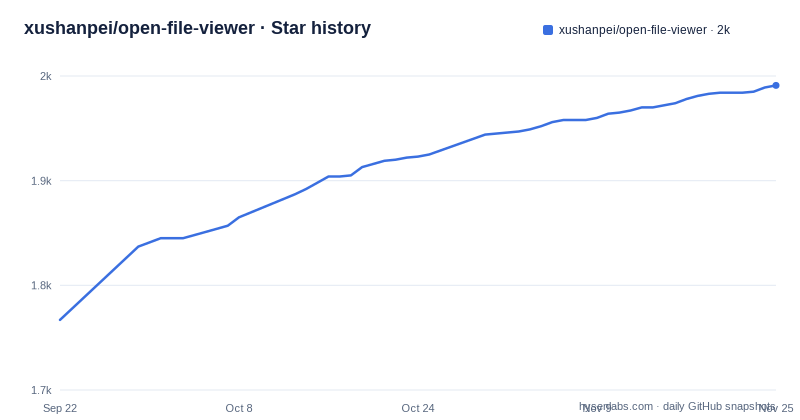
- xushanpei/open-file-viewer1,991 ★ · +224
| Repository | 2026-09-22 | 2026-11-25 |
|---|---|---|
| xushanpei/open-file-viewer | 1.8k | 2k |
224 Stars in the last 64 days, measured from the daily GitHub snapshot. Compare with other projects
Editorial analysis
Everything renders inside the container you hand it, so there is no popup to fall back on
Open File Viewer renders all content inside a DOM element that your application provides. It does not open a new window and does not interrupt the host page. That is the headline design choice, and it has a direct consequence: the page that embeds the viewer owns sizing, so the container accepts CSS sizes such as px, %, vh, vw, rem and calc(), and the viewer responds when the container changes size.
The formats are split into independent plugins, one per kind of file. The vanilla JavaScript entry exports imagePlugin, videoPlugin, audioPlugin, textPlugin, pdfPlugin, officePlugin, archivePlugin, emailPlugin, drawingPlugin, xmindPlugin, cadPlugin, model3dPlugin, gisPlugin and fallbackPlugin. Because each format is a separate plugin, you can trim what you do not need, but nothing is switched on until you list it.
Installing the core package alone gives you no PDF engine
The base install is one package, and React, Vue and Svelte each add a thin adapter beside the core.
pnpm add @open-file-viewer/corepnpm add @open-file-viewer/core @open-file-viewer/reactpnpm add @open-file-viewer/core @open-file-viewer/vuepnpm add @open-file-viewer/core @open-file-viewer/sveltePDF preview with pdfPlugin() needs pdfjs-dist installed separately.
pnpm add pdfjs-distnpm install and yarn add work the same way for the core package. The shared stylesheet, @open-file-viewer/core/style.css, has to be imported once in the application. If you skip pdfjs-dist, the PDF plugin has nothing to parse with, so a project that thinks of the SDK as one dependency will discover a second one at the first PDF.
Angular CLI 20 needs the lite entry, and the two entries cannot be mixed
Angular CLI 20 pre-bundles dependencies with Vite. An application that only needs images and PDFs should import from the lite entry, so the optimizer never walks into the Office conversion dependency graph.
import {
  createViewer,
  fallbackPlugin,
  imagePlugin,
  pdfPlugin
} from "@open-file-viewer/core/lite";
import "@open-file-viewer/core/style.css";
The lite entry deliberately contains only the viewer runtime, the image plugin, the PDF plugin and the fallback plugin. If the application later needs Office, CAD, archive or other formats, it has to move to the main @open-file-viewer/core entry, and the project says plainly not to mix the two entries in one application. The practical cost is a migration, not a flag: adding an Office preview to an Angular app that started on lite means changing every import.
Office files under Vite need an optimizer exclusion and an externalized canvas module
When officePlugin() is used with Vite, the converter has to be kept out of dependency pre-bundling, and its optional Node canvas fallback has to be externalized from the browser build.
import { defineConfig } from "vite";

export default defineConfig({
  optimizeDeps: { exclude: ["emf-converter"] },
  build: { rollupOptions: { external: ["@napi-rs/canvas"] } }
});
These are options to merge into your existing configuration, not a replacement file. The externalized @napi-rs/canvas is only the Node fallback. EMF and WMF conversion in the browser still uses the browser Canvas, so an environment without Canvas support cannot convert those two image types. Without the exclusion, the failure shows up at build or dev server startup rather than at preview time, which makes it easy to blame the wrong package.
isPreviewSupported checks plugin match order, and a fallback plugin in the wrong place hides everything
Before mounting a viewer you can ask whether a file would be previewed natively, using the same plugin list you pass to createViewer().
import { isPreviewSupported } from "@open-file-viewer/core";

const supported = await isPreviewSupported(fileOrUrl, plugins, {
  fileName: "contract.pdf",
  mimeType: "application/pdf"
});
The check normalizes the source the same way createViewer() does and evaluates plugin.match() in order. It mounts no DOM and never calls plugin.render(). A matching fallbackPlugin() is terminal and does not count as native support, so the result tells you about real previews only. The consequence for configuration is that order matters: keep the plugin order identical between the check and the viewer, and never place fallbackPlugin() ahead of the native plugins, because it would claim files first and the real renderers would never run.
The remote PDF fallback switches on script permission by origin
When PDF.js cannot parse or load a remote PDF URL, the PDF plugin falls back to the browser's embedded PDF viewer inside a sandboxed iframe. Chromium based viewers differ in what scripts they need there, so webFallbackScripts defaults to auto. With auto, cross-origin PDF URLs receive allow-scripts while staying sandboxed, and same-origin URLs keep scripts blocked so script execution is not combined with same-origin access.
pdfPlugin({ webFallbackScripts: "never" });  // strict sandbox
pdfPlugin({ webFallbackScripts: "always" }); // trusted PDF endpoints only
Never tightens the policy, and always is meant for same-origin endpoints you trust. This setting only affects the remote iframe fallback. It does not change normal PDF.js rendering and does not force a referrerpolicy value. If a cross-origin PDF looks blank in the fallback, the scripts policy is the first place to look, and if you set always, you are accepting that the PDF endpoint can run scripts next to your own origin.
PDF.js 5 image decoders are WASM files you must host at a matching version
PDF.js 5 and later decode formats such as JPEG2000 (JPX) and JBIG2 with files from pdfjs-dist/wasm/. Your application has to serve that directory and give the plugin its public URL, trailing slash included.
pdfPlugin({
  workerSrc: pdfWorkerSrc,
  wasmUrl: "/pdfjs/wasm/"
});
The hosted WASM files must be the same version as the installed pdfjs-dist, so upgrading the dependency means refreshing the served copy too. The worker comes from a bundler import of pdfjs-dist/build/pdf.worker.mjs with the ?url suffix, which ties this setup to a bundler that understands that query, as Vite does. A PDF containing JPX or JBIG2 images that renders blank or partially is a symptom of a missing or mismatched wasm directory.
A 1.0.0 that landed three weeks ago, with a gate script that builds everything
The repository is a pnpm workspace with packages, examples for vanilla, React, Vue and Svelte, and a documentation site. The v1.0.0 tag is dated 2026-10-10, preceded by v1.0.0-rc.2 the same day and v1.0.0-rc.1 on 2026-09-28. The last push was 2026-10-26 and the repository is not archived. That is a short public history, so format coverage and edge cases have had little time in other people's production code.
The root package.json defines a check script that runs tests, typecheck, build, the example builds, the doc build and an exports check on the packed packages. Individual dev scripts exist for each example, named dev:vanilla, dev:react, dev:vue and dev:svelte. Running those examples is the quickest way to see which plugins a given framework adapter wires up before copying the setup.
Editorial conclusion
Use Open File Viewer if you need many attachment formats previewed inside your own page and can manage plugin order and a few bundler settings. Skip it if you only need PDFs, where pdfjs-dist alone is smaller. Before adopting, check that the formats you care about are covered by a plugin and that you can serve the PDF.js worker and WASM files.
Frequently asked questions
Is a file viewer like Open File Viewer free to use?
Open File Viewer is released under the MIT license, so using it in your own applications does not require a fee. It is distributed through npm as @open-file-viewer/core plus React, Vue and Svelte adapters.
How to open file viewer in a React, Vue or Svelte app?
Install @open-file-viewer/core with the adapter for your framework, for example pnpm add @open-file-viewer/core @open-file-viewer/react, and import @open-file-viewer/core/style.css once. Add pdfjs-dist if you use pdfPlugin().
Which file viewer is best, and where does Open File Viewer fit?
Open File Viewer is a preview SDK that embeds in a web page and covers PDF, Office, images, media, archives, email, drawings, 3D and GIS files through plugins. It is a library for developers, not a standalone desktop viewer.
Official sources
Add this badge to your README
If you maintain this project, the badge below links readers to this analysis and shows its maintenance status from the daily GitHub snapshot. Paste the markdown into your README; add ?metric=license or ?metric=stars to the image URL for a different field.

[](https://hysenlabs.com/projects/xushanpei-open-file-viewer)Star history chart for your README
[](https://hysenlabs.com/projects/xushanpei-open-file-viewer)Was this useful?