WispTerm is a Zig terminal workspace that puts agent sessions, SSH forwarding and file previews in one window
A cross-platform terminal workspace for remote development and AI agent workflows, powered by libghostty-vt
At a glance
- What is it?
- A cross-platform terminal workspace written in Zig on top of Ghostty's terminal emulation core, with AI agent tabs, a prompt queue, an SSH port forwarding manager and inline previews. Windows and macOS are the shipped platforms, Linux is explicitly experimental, and the two halves of the app version separately.
- Who is it for?
- WispTerm fits a developer who already works through agent sessions over SSH and wants the terminal, the previews, the forwarding rules and the conversation history in one window rather than four. It does not fit a Linux-only workstation today, since the Linux build is labelled experimental, and it does not fit a team that needs one version number across the whole product, because the desktop app and the remote relay version independently.
- Can I use it commercially?
- Yes. MIT is a permissive licence: you can use, modify and sell software built on it, as long as you keep its copyright and licence notices.
- Is it still maintained?
- Yes. The repository last received commits 3 days ago.
- What is it written in?
- Mainly Zig, according to GitHub's language statistics.
Answers come from the project's GitHub data, last synced on November 13, 2026, and from our analysis. They are not legal advice.
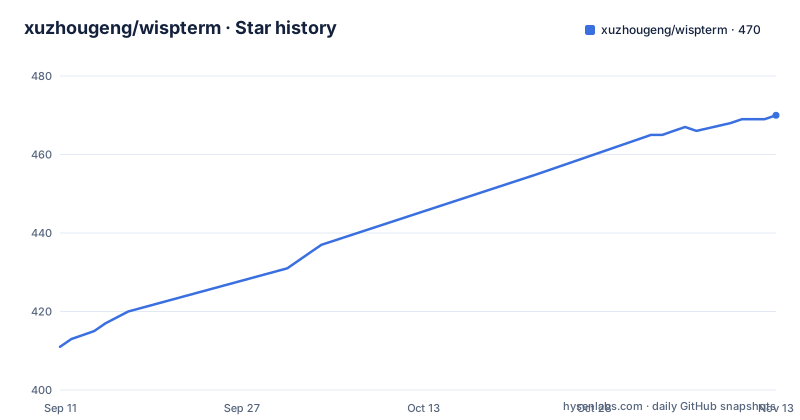
Star history
- xuzhougeng/wispterm470 ★ · +59
| Repository | 2026-09-11 | 2026-11-13 |
|---|---|---|
| xuzhougeng/wispterm | 411 | 470 |
59 Stars in the last 63 days, measured from the daily GitHub snapshot. Compare with other projects
Editorial analysis
The terminal core is Ghostty's, and the Makefile tracks its main branch
WispTerm does not implement terminal emulation. VT parsing and terminal state come from libghostty-vt, the library extracted from the Ghostty project, and the whole application is written in Zig around it. The build system is Zig's own, driven by build.zig and build.zig.zon at the repository root. What is unusual is how the dependency is refreshed. The Makefile keeps an update target that pulls the upstream archive from Ghostty's main branch rather than from a pinned tag:
zig fetch --save=ghostty https://github.com/ghostty-org/ghostty/archive/main.tar.gzA vendor directory at the root holds what that fetch produced. Tracking a moving branch means the emulation layer can pick up fixes without waiting for an upstream release, and it also means a build is not reproducible from the upstream side unless the vendored copy is committed. Anyone evaluating the project should decide which of those two behaviours they want before they depend on it.
Fonts are resolved per glyph through three platform APIs
The rendering stack is built for terminals that mix scripts, and the details are specific. Font discovery goes through DirectWrite on Windows, CoreText on macOS, or fontconfig elsewhere, and it resolves by name rather than scanning a bundled list. The important part is per-glyph fallback: when a chosen font lacks a character, the missing glyph is filled from another system font instead of rendering as a box. Rasterization is FreeType, using Ghostty-style font metrics so that cell sizes line up with what Ghostty itself would produce. Box drawing characters, block elements, braille patterns and powerline symbols are drawn as sprites rather than as text, which is what keeps powerline prompts and braille-based TUIs from breaking when the user's chosen font lacks those glyphs. Themes are read from Ghostty-compatible theme files, with more than 450 built in and Poimandres as the default, and backgrounds go further, combining a wallpaper image with Ghostty-compatible GLSL post-processing shaders.
Inline images from a remote shell arrive through the Kitty protocol
Previews work without leaving the terminal, and there are two mechanisms. The file explorer browses local, WSL and SSH locations and previews Markdown, text, tables, images and PDFs inline. For anything coming out of a remote process, WispTerm implements the Kitty Graphics protocol, so a shell command on a machine you are connected to by SSH can put an image or a PDF straight into the pane. Two helper scripts are named for that purpose, imgcat.py for images and pdfcat.py for PDFs. This is the piece that makes the remote story cohere: the same pane shows the output of a build, the file you just produced and the image a script printed, with no separate viewer and no file transfer step. Media behaviour, including background images and these inline remote images, has its own guide in the documentation set alongside the configuration, file explorer, agent session and forwarding pages.
The side browser panel rides on a persistent SSH loopback forward
An embedded browser panel opens web URLs beside the terminal, using WebView2 on Windows and WKWebView on macOS when the platform provides them. The detail that matters is how it reaches a remote session: profile sessions use persistent SSH loopback port forwarding, so a local port is held open for the lifetime of the session and the web view talks to a service on the far side through it. Because that forward has to survive across sessions, forwarding is also exposed as a first-class feature rather than a hidden implementation detail. A dedicated tab manages local and reverse SSH forwarding rules, and the manager works silently rather than prompting on every rule. The pairing matters when you plan an architecture: an agent running on a remote box can serve a web interface, and WispTerm can open it locally through the loopback without you hand-writing a tunnel or remembering to tear one down.
The prompt queue holds follow-ups until the session goes idle
Agent interaction is the part WispTerm spends the most words on, and the queue is the mechanism worth understanding. A prompt submitted while a Copilot request is already running is queued rather than dropped, and it is sent automatically in order once the session goes idle. You are not limited to waiting: pressing Enter on the queue panel sends the selected follow-up into the conversation immediately, as guidance in the manner of Codex, Claude Code or Grok, and pressing Esc returns that entry to the input so you can edit it. Entries can be reordered or dropped, and the command palette can show or clear the whole queue. Model switching happens inside a live session, with a slash command or a click on the model label moving the conversation to another saved profile and handing over a context summary. A conversation can also be forked at any rewind point, or duplicated whole from the command palette, and the terminal selection or the recent output tail can be sent to Copilot as a collapsible context card through a bindable action.
The history browser resumes other tools' sessions from their own directories
The history surface reaches beyond WispTerm's own tabs. It browses Codex, Claude Code, Kimi Code and OpenCode history held locally, in WSL, or on an SSH host, and resumes a session from the project directory it started in. That last detail is the one that saves time in practice, since an agent session is bound to a working directory and resuming it somewhere else is rarely what you want. WispTerm's own AI conversations are covered by a command center that groups saved chat and Copilot sidebar conversations by date, with filters that separate sidebar conversations from tab sessions. Opening the Conversation Center from the picker adds date filters, a transcript preview and the ability to resume. Agent sessions can also export Markdown transcripts and distil reusable local skills, so the output of one session can become a tool for the next rather than a file you scroll through again.
The desktop app and the remote relay version separately
One repository ships two products with two version lines, and the documentation is explicit about it. The desktop app takes its version from the repository root in build.zig.zon, currently 1.40.3, and that same number is what wispterm --version reports, what the release notes and desktop packages carry, and what the command center shows in its version entry. The WispTerm Remote web console and relay under remote/ keeps an independent npm and web version, currently 0.32.0. The rule is that a desktop release does not require a Remote version bump unless the release explicitly includes changes under remote/. That keeps the common case cheap, since a Zig-only change ships without touching the web console, and it also means a version number alone does not tell you whether the relay moved. The remote piece is what backs the opt-in remote access feature, where a session key is shared over a Cloudflare-hosted relay, disabled by default.
Build commands are per platform, and the Makefile is a wrapper
Windows development runs on PowerShell with direct Zig commands, and the release build turns on the ReleaseFast optimisation mode:
zig build                         # Debug build for development
zig build -Doptimize=ReleaseFast  # ReleaseFast build for distribution
macOS needs macOS 13 or newer and Zig 0.15.2, with the target selected per architecture:
zig build macos-app -Dtarget=aarch64-macos   # Apple Silicon .app bundle (use x86_64-macos on Intel)
open zig-out/bin/WispTerm.app                  # launch the built app
The Makefile is described as a convenience wrapper that may still exist, with normal Windows work expected to bypass it. It still carries the more interesting targets, including the two end-to-end suites. Both build a second binary named wisptermctl, which the README never mentions, and both drive pytest against the tests directory; the macOS suite pins the system interpreter because its user site has PyObjC, and the terminal needs accessibility permission granted before its UI can be driven. Two details deserve a second look. The Linux suite requires a DISPLAY from an X11 or Wayland session and treats xdotool as optional, yet its command still points at the macOS end-to-end test directory, which reads like a copy that was not finished. A dedicated LINUX_SHORTCUT_TEST_PLAN.md and a KNOWN_ISSUES.md at the root are where the maintainer tracks that kind of gap.
Editorial conclusion
WispTerm fits a developer who already works through agent sessions over SSH and wants the terminal, the previews, the forwarding rules and the conversation history in one window rather than four. It does not fit a Linux-only workstation today, since the Linux build is labelled experimental, and it does not fit a team that needs one version number across the whole product, because the desktop app and the remote relay version independently. Before adopting it, confirm the Zig toolchain version on your machine, since the macOS build is pinned to Zig 0.15.2 and macOS 13 or newer, and read docs/known issues before wiring the Cloudflare relay path, since remote access ships disabled by default.
Frequently asked questions
Which platforms does WispTerm ship for?
Windows and macOS, the latter on both Apple Silicon and Intel. A Linux AppImage is published for community testing and is described as experimental rather than as a supported build.
How do I build WispTerm on macOS?
You need macOS 13 or newer and Zig 0.15.2. Build the app bundle with zig build macos-app -Dtarget=aarch64-macos, using x86_64-macos on Intel, then open the resulting app from the zig-out/bin directory.
What terminal emulation does WispTerm use?
It uses libghostty-vt from the Ghostty project for VT parsing and terminal state, and it reads Ghostty-compatible theme files. The application itself is written in Zig.
What happens to prompts I type while an agent request is still running?
They are queued and sent automatically in order once the session goes idle. You can also send the selected follow-up immediately with Enter on the queue panel, which delivers it as guidance, or press Esc to pull it back into the input for editing.
Can WispTerm show images produced on a remote host?
Yes, through the Kitty Graphics protocol, using imgcat.py for images and pdfcat.py for PDFs. The file explorer also previews Markdown, text, tables, images and PDFs inline across local, WSL and SSH locations.
Is remote access to a WispTerm session enabled by default?
No. Sharing a session key over a Cloudflare-hosted relay is opt-in and disabled by default, while SSH port forwarding rules are managed locally from a dedicated tab.
Official sources
Add this badge to your README
If you maintain this project, the badge below links readers to this analysis and shows its maintenance status from the daily GitHub snapshot. Paste the markdown into your README; add ?metric=license or ?metric=stars to the image URL for a different field.

[](https://hysenlabs.com/projects/xuzhougeng-wispterm)Star history chart for your README
[](https://hysenlabs.com/projects/xuzhougeng-wispterm)Was this useful?