Location Spoofer is an iOS research framework that iOS 27 beta 6 breaks
A location-spoofing tool for researching and testing iOS location-service behavior, supporting map-based point selection, local and third-party proxies, WGS-84/GCJ-02 dual coordinate systems, environment detection and diagnostics.
At a glance
- What is it?
- A Swift app with an embedded Go proxy that simulates Apple location-service responses on a device you own. Its own warning block says MITM interception of gs-loc.apple.com is blocked from iOS 27 beta 6, so the tool does not work on that build or later betas.
- Who is it for?
- Location Spoofer belongs on a device you own, on a network you own, for QA work that has to exercise a location-dependent app, and its documentation puts that restriction at the top rather than in a footnote. It is not a general packet capture tool and it does not promise to defeat third-party security controls or business rules, which is the boundary to respect before installing it anywhere.
- Can I use it commercially?
- Yes, with strict conditions. AGPL-3.0 is a network copyleft licence: if people use a modified version over a network, for example as a hosted service, you must offer them its source code under the same licence.
- Is it still maintained?
- Yes. The repository last received commits 7 days ago.
- What is it written in?
- Mainly Swift, according to GitHub's language statistics.
Answers come from the project's GitHub data, last synced on November 15, 2026, and from our analysis. They are not legal advice.
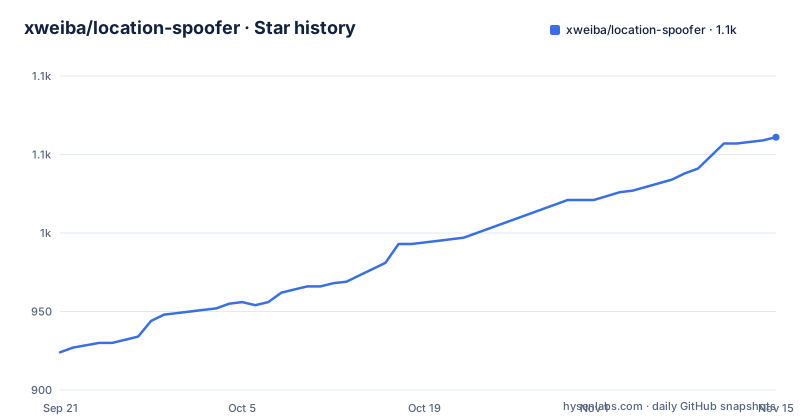
Star history
- xweiba/location-spoofer1,061 ★ · +137
| Repository | 2026-09-21 | 2026-11-15 |
|---|---|---|
| xweiba/location-spoofer | 924 | 1.1k |
137 Stars in the last 55 days, measured from the daily GitHub snapshot. Compare with other projects
Editorial analysis
The interception this project needs is blocked on current betas
The first thing a reader meets is a warning, not a feature list: starting with iOS 27 beta 6 the system blocks MITM interception of `gs-loc.apple.com`, and the project calls itself temporarily unusable on that version and later betas until a workaround is found. Everything else in the design follows from needing to read and rewrite traffic to that host, so that single platform change disables both runtime modes at once. The release cadence suggests the project is still moving rather than parked: version 1.0.6 shipped on 2026-09-01, 1.0.7 on 2026-09-11, and 1.0.8 on 2026-09-24, with the last push to the repository on the same day and a `version.txt` at the root. The same caution block adds that the project does not guarantee compatibility with every iOS version or third-party app, so treat the version support as narrower than the release number suggests. If your QA matrix includes a current iOS beta, that check comes before anything else in this article.
Two modes, and an explicit list of who owns what
App Mode runs a Go proxy inside the app and routes the selected requests through a manual HTTP proxy on the current Wi-Fi network. Third-party Proxy Mode does not start that proxy and does not use the CA the app generates. The division of responsibility is spelled out rather than implied. In App Mode the app owns everything. In Third-party Proxy Mode the app keeps map selection, favourites, coordinate synchronisation and coordinate clearing, while the third-party client owns the proxy or VPN, the MITM, certificates, rule execution and coordinate persistence. The cost of that split is stated too: coverage of Wi-Fi, 4G and 5G depends entirely on the client, and the stored configuration may remain active after Location Spoofer itself is closed.
The configuration API is one GET with three actions
No coordinates leave the device. The app sends a single GET to `https://gs-loc.apple.com/wloc-settings/save`, which a third-party client must intercept locally, and the query parameters carry the whole protocol. `action=query` verifies module connectivity and reads back the stored coordinate. Saving uses `lon`, `lat` and `acc` for WGS-84 longitude, WGS-84 latitude and accuracy. `action=clear` removes the stored test coordinate. That the path is the real Apple settings endpoint is the whole trick, and it is also the exact reason the iOS 27 block matters. A successful save has to echo the WGS-84 longitude and latitude that were requested, which is what lets the app confirm a round trip rather than assume one.
The JSON contract, including what an empty store returns
The interception script has to answer with HTTP 200 and a JSON body. Success looks like this:
{
  "success": true,
  "longitude": 113.0,
  "latitude": 22.0,
  "accuracy": 25
}
Failures use `success` set to false with an `error` string, and one failure is special. When nothing is stored, a query may return `{"success":false,"error":"无已保存的坐标"}`, meaning no saved coordinate, and the app reads that as module connected with the virtual location inactive. That reading is the load-bearing detail for any client you write yourself, because a plain error response would look identical to a broken module. The app's own validation stops there: HTTP status, JSON shape and the coordinate round trip, and nothing beyond that.
Integrating another proxy client is a five-step checklist
The project spells out how to support a client it does not ship. Write an HTTP request script for `gs-loc.apple.com/wloc-settings/save` that parses the parameters and returns the documented JSON. Store coordinates, accuracy and optional state in that client's persistent storage. Enable HTTPS decryption for `gs-loc.apple.com` and `gs-loc-cn.apple.com`. Intercept the `gs-loc(-cn).apple.com/clls/wloc` responses, read the same persistent data and modify the WLOC response. Then publish an importable module and verify query, save, clear and location restoration on a real device. Two constraints cut across the list. Do not enable App Mode interception and Third-party Proxy Mode interception at the same time, and do not expect the app to manage the client's certificate, MITM, VPN or proxy state.
App Mode avoids the VPN slot and pays for it with a trusted CA
The App Mode constraint list is unusually concrete. It does not create a Network Extension, and it does not display or occupy the system VPN slot, which is the reason it is offered for Wi-Fi-only device testing, for local testing without a third-party proxy client, and for workflows that want in-app proxy, certificate and environment guidance in one place. It covers only the current Wi-Fi network and requires that network to permit manual HTTP proxy configuration. It also requires installing and trusting the CA that the app generates. Against that, it handles only the Apple location-service and environment-verification traffic the project defines, and it is described explicitly as not a general-purpose packet capture tool. Environment checks differ per mode too: App Mode verifies the local proxy, CA trust and request path, while Third-party Proxy Mode checks the WLOC configuration API and the module response, with failures routed to a setup or diagnostics screen. The requirement list also stops partway through its final item, so the hardware and OS floor is not stated there.
The Makefile produces an unsigned IPA and verifies a signed one
The build surface is five phony targets, and the unsigned path is the default:
make setup
make core
make ipa-unsigned
make verify-ipa IPA=/absolute/path/to/signed.ipa
make test
`setup` runs `./Scripts/setup.sh` and `core` runs `./Scripts/build-core.sh`, which is the Go proxy piece. `ipa-unsigned` depends on `core` and then runs `./Scripts/build-unsigned-ipa.sh`. `verify-ipa` is the one target with a guard: it tests that `IPA` is non-empty and otherwise prints the usage line and exits with status 2, which means an unsigned artifact can never reach the verification step by accident. `test` runs `./Tests/run_all_contract_tests.sh`, so the contract for the interception responses above is checked by a script rather than asserted in prose. The Makefile never signs anything, which is why the signed path is a separate manual step followed by a verification target. All five targets are declared phony, so a file named `test` in the working directory will not short-circuit the test run.
AGPL-3.0, a Go core, and a stated list of things it does not do
The license is AGPL-3.0, which is the term to look at first if you plan to modify the proxy rather than just run the app. The tree shows a Swift app with an embedded Go core, since `Core/go.mod` sits alongside `project.yml` and `version.txt`, alongside `App/`, `Config/`, `Shared/`, `ThirdParty/`, `Resources/`, `Scripts/`, `Tests/` and `docs/`. `project.yml` appears twice in the header links, once for each language, which is the usual arrangement when a project definition file is generated per locale. A Chinese README ships next to the English one, a changelog lives under `docs/`, and an `AGENTS.md` sits at the root next to a `build.sh`. The scope section closes by drawing lines the important callout block repeats: the project does not modify the target app's source code, and it does not provide telemetry, remote control or data collection services. It also does not promise compatibility with every iOS version or third-party app.
Editorial conclusion
Location Spoofer belongs on a device you own, on a network you own, for QA work that has to exercise a location-dependent app, and its documentation puts that restriction at the top rather than in a footnote. It is not a general packet capture tool and it does not promise to defeat third-party security controls or business rules, which is the boundary to respect before installing it anywhere. Three things decide whether it is useful to you. The first is the iOS version: iOS 27 beta 6 and later block the interception, so verify your build before planning around this. The second is the mode you need, since App Mode stays on Wi-Fi while Third-party Proxy Mode hands certificates and rule execution to a client you already trust. The third is signing, because the build produces an unsigned artifact and `make verify-ipa` exists precisely to check a signed one before you put it on hardware.
Frequently asked questions
Does Location Spoofer work on iOS 27 beta?
No. The project states that starting with iOS 27 beta 6 the system blocks MITM interception of `gs-loc.apple.com`, and that the project is temporarily unusable on that version and later betas until a workaround is found. Releases 1.0.6, 1.0.7 and 1.0.8 shipped in September 2026.
What is the difference between App Mode and Third-party Proxy Mode in Location Spoofer?
App Mode runs a Go proxy inside the app, covers only the current Wi-Fi network through a manual HTTP proxy, and requires trusting the CA the app generates. Third-party Proxy Mode starts no app proxy and uses no app-generated CA, leaving the proxy, MITM, certificates, rule execution and coordinate persistence to the third-party client, whose own support determines whether Wi-Fi, 4G or 5G is covered.
Does Location Spoofer upload coordinates to a server?
No. The app sends a single GET request to `https://gs-loc.apple.com/wloc-settings/save`, which the third-party client must intercept locally on the device, and the project states it provides no telemetry, remote control or data collection services.
Is location spoofing illegal?
The project does not answer that in legal terms, and it does not need to, because its own terms of use restrict the tool to education, research, testing on devices you own, software development and QA validation, on networks and software environments you own or are authorised to test. It also states that it does not promise to bypass third-party security controls, business restrictions or service rules, so whether a given use is legal depends on the local law and the terms of the app you point it at.
Can GPS spoofing be detected?
The project does not document detection behaviour or any technique for avoiding it. What it does document is the environment checks it performs itself: App Mode checks the local proxy, CA trust and request path, while Third-party Proxy Mode checks the WLOC configuration API and module response, with failures routed to a setup or diagnostics screen.
How does Location Spoofer handle WGS-84 and GCJ-02 coordinates?
Map coordinate detection returns paired WGS-84 and GCJ-02 values, and the map shows domestic and international coordinate representations with separate copy actions. The values sent to the configuration API are WGS-84, and a successful save response has to echo the requested longitude and latitude.
Official sources
Add this badge to your README
If you maintain this project, the badge below links readers to this analysis and shows its maintenance status from the daily GitHub snapshot. Paste the markdown into your README; add ?metric=license or ?metric=stars to the image URL for a different field.

[](https://hysenlabs.com/projects/xweiba-location-spoofer)Star history chart for your README
[](https://hysenlabs.com/projects/xweiba-location-spoofer)Was this useful?