monolith packs a web page and its assets into one HTML file, but it never runs the page's JavaScript
⬛️ CLI tool and library for saving complete web pages as a single HTML file
At a glance
- What is it?
- Y2Z/monolith is a Rust CLI, GUI and library that saves a web page as a single HTML or MHTML file with CSS, images, fonts and scripts embedded as data URLs. This piece covers how the embedding works, which flags change the output, where it stops working, and what each install route costs.
- Who is it for?
- monolith is the right tool for anyone archiving static or server-rendered pages who wants one file per page that opens offline in any browser, and its domain filters and asset flags give real control over what gets embedded. It is the wrong tool on its own for pages that build their content with JavaScript after load, because it has no JavaScript engine and needs a headless browser in front of it for those.
- Can I use it commercially?
- Yes. 0BSD is a permissive licence: you can use, modify and sell software built on it, as long as you keep its copyright and licence notices.
- Is it still maintained?
- Yes. The repository last received commits 1 day ago.
- What is it written in?
- Mainly Rust, according to GitHub's language statistics.
Answers come from the project's GitHub data, last synced on November 14, 2026, and from our analysis. They are not legal advice.
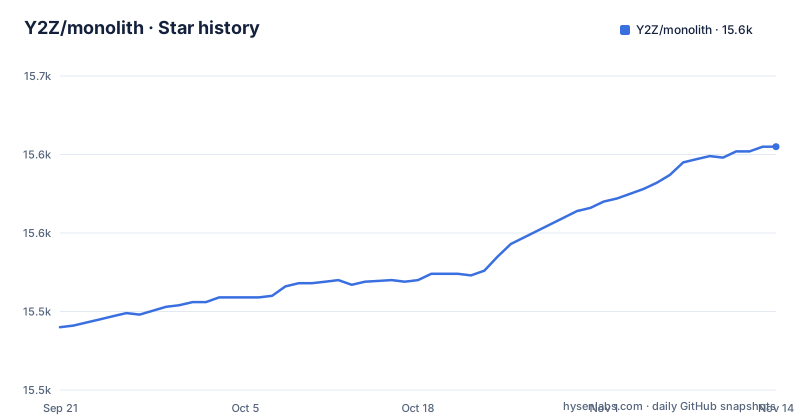
Star history
- Y2Z/monolith15,605 ★ · +115
| Repository | 2026-09-21 | 2026-11-14 |
|---|---|---|
| Y2Z/monolith | 15.5k | 15.6k |
115 Stars in the last 54 days, measured from the daily GitHub snapshot. Compare with other projects
Editorial analysis
Every asset becomes a data URL inside one HTML5 document
The core trick is embedding. A browser's "Save page as" writes the document and, at best, a side folder of files. monolith fetches the target document and then embeds its CSS, images and JavaScript into it, producing a single HTML5 document. Compared with mirroring a site using wget -mpk, it stores every asset as a data URL, so the saved page renders the way it did online even with no network connection.
The simplest call takes a URL and an output path. The -o value can contain placeholders, as in the project's own example:
monolith https://lyrics.github.io/db/P/Portishead/Dummy/Roads/ -o %title%.%timestamp%.htmlThat names each file after the page title and the time it was saved, which keeps repeated captures of the same page from overwriting each other. Passing - to -o writes to standard output instead, and -D creates any missing directories in the output path.
The dependency list shows how this is built. html5ever and markup5ever_rcdom parse and manipulate the DOM, cssparser handles stylesheets, dataurl creates and parses data URLs and detects media types, encoding_rs converts document charsets, and rayon provides a thread pool. base64 and sha2 are there for integrity attributes and the checksums behind them, so assets that carry an integrity hash are checked rather than embedded blindly.
No JavaScript engine means pages built after load come out incomplete
monolith does not include a JavaScript engine. It saves what the server sends, embeds the referenced assets, and stops there. Websites that fetch and display data after the initial load will therefore be saved without that data: an empty feed, a skeleton layout or a loading spinner frozen into the archive.
The project's own answer is to put a real browser in front of it. Chromium in headless mode with --dump-dom renders the page, including scripts, and prints the resulting DOM, which is piped into monolith reading from standard input with - as the target and -b supplying the original URL as the base. The Chromium side uses flags such as --window-size=1920,1080, --run-all-compositor-stages-before-draw, --virtual-time-budget=9000 and --incognito so the page has time to finish rendering before the DOM is dumped.
The consequence is a two-tool pipeline for any site that depends on client-side rendering, with a Chromium install as a hard requirement. It also means monolith alone cannot tell you whether a page is complete. You have to know in advance which sites render on the client, or open the saved file and look. For bulk archiving of mixed sites, that check is the step people skip and regret.
Single-letter flags strip whole classes of assets
A large share of the options remove things rather than add them. -a excludes audio sources, -v excludes videos, -i removes images, -c excludes CSS, -j excludes JavaScript, -F excludes web fonts and -f omits frames and iframes. -n goes the other way and extracts the contents of NOSCRIPT elements, which matters when you strip scripts and want the fallback markup to show.
-I isolates the document, and -M skips the timestamp and URL information monolith otherwise adds. These combine into dense invocations like the one used for processing a page that arrives on standard input:
cat some-site-page.html | monolith -aIiFfcMv -b https://some.site/ - > some-site-page-with-assets.htmlHere - tells monolith to read the document from standard input, and -b gives it the base URL to resolve relative links against, since a piped document carries no address of its own.
Stripping is how you control file size and content, but there is a trade. Every class you exclude is gone from the archive for good; there is no reference left to fetch later. Excluding JavaScript is safe for a static article and destructive for a page whose layout depends on scripts. Excluding CSS keeps the text and loses the look. Decide per site, not globally.
Domain allow and deny lists decide which hosts may supply assets
Two flags control where assets may come from. -d allows retrieving assets only from the domains you list, and -B forbids retrieving assets from the domains you list. Each takes one domain per occurrence, so you repeat the flag. To keep only first-party assets for a site:
monolith -I -d example.com -d www.example.com https://example.com -o example-only.htmlAdding -B flips the -d entries into a block list. This example drops assets served from Google domains, which removes common ad and analytics resources:
monolith -I -B -d .googleusercontent.com -d googleanalytics.com -d .google.com https://example.com -o example-no-ads.htmlA leading dot, as in .google.com, appears in the block example alongside bare names like googleanalytics.com, so pay attention to how each entry is written for the subdomains you mean to catch.
The limitation is that these lists are entirely manual. monolith ships no built-in ad or tracker list, so the no-ads result is only as good as the domains you type. A site that serves its images from a CDN under another domain will lose those images under a strict -d allow list. Expect to iterate on the list for each site you archive, and keep the working command next to the archive so the capture can be repeated.
Network flags trade completeness and safety for a finished file
Several options change how monolith behaves on the network. -t adjusts the network request timeout. -u sets a custom User-Agent, useful for sites that serve different markup to different clients. -C reads cookies from a file, which is how you save a page that requires a logged-in session. -E saves the document using a custom encoding.
Two flags need more care. -e tells monolith to ignore network errors. With it, monolith carries on and writes a file even when some assets could not be fetched. The consequence is an archive that looks finished and is not, with gaps you only find when you open it. -k accepts invalid X.509 (TLS) certificates. That lets you save pages from hosts with expired or self-signed certificates, and it also removes the check that you are talking to the server you think you are. For an archive you intend to trust later, using -k means accepting that the content was fetched without certificate verification.
-q quiets output for scripted use, -h prints usage and -V prints the version number. -V is worth running after any install, because the options above are what your installed version supports, and package repositories do not all ship the same release.
MHTML works in both directions
Despite the name, monolith is not limited to HTML output. The crate description reads "GUI/CLI tool and library for saving web pages as a single (M)HTML file", and -m writes MHTML instead of HTML.
It also reads MHTML. A page that a browser already saved as an .mhtml archive can be converted into a single HTML file:
monolith page-saved-by-browser.mhtml -o page.htmlThis gives a route for pages that need a real browser session to load. Save the page in the browser as MHTML, with whatever login, consent dialog or scrolling it needed, then convert it with monolith to plain HTML with data URLs. That sidesteps both the missing JavaScript engine and the cookie file, at the cost of a manual step per page.
The choice of output format has consequences for whoever opens the file later. HTML with data URLs opens in any browser and can be inspected or edited as text. MHTML packages the same resources in a MIME container, which suits browsers and tools that expect that format. If the goal is long-term storage that any future browser can read, HTML is the simpler target; if you are feeding another tool that consumes MHTML, -m avoids a conversion step.
A GUI binary and a library sit behind Cargo features
monolith is three things in one crate. The CLI is the default. A desktop GUI is built as a separate binary, monolith-gui, behind the gui feature; the Makefile target for it is cargo build --locked --bin monolith-gui --features="gui". The GUI uses eframe with the glow, wayland and x11 features plus the directories crate, and the package bundles an icon and the Jost Light font for it. clap, which parses CLI arguments, is optional as well, which is what lets the library be used without the command-line layer.
Every dependency is pinned to an exact version with =, for example html5ever =0.39.0 and cssparser =0.38.0, and builds use --locked. That favors reproducible builds over picking up dependency fixes automatically; updating anything is a deliberate change to Cargo.toml and Cargo.lock. The crate uses Rust edition 2024, so building from source needs a toolchain that supports that edition.
The Makefile's default all target builds both the CLI and the GUI, while install runs cargo install --force --locked --path . and installs the CLI. The repository also carries snap/, AppImageBuilder.yml, monolith.nuspec and an .actor/ directory, which correspond to the Snap, AppImage, Chocolatey and Apify distributions. The project is not archived; v2.11.6 shipped on 2026-10-16, v2.11.7 on 2026-10-29 and v2.12.0 on 2026-11-02.
The container image builds whatever release is latest, not your checkout
monolith is packaged almost everywhere: Cargo, Homebrew, Chocolatey, Scoop, Winget, MacPorts, Snapcraft, Guix, Nixpkgs, Flox, X-CMD, Pacman, Alpine aports, a Debian APT archive at pkg.haus, Void's XBPS, FreeBSD packages and ports, and pkgsrc for NetBSD, OpenBSD and Haiku. Every release also carries pre-built binaries for Windows, GNU/Linux and non-standard CPU architectures. The cross-platform route is:
cargo install monolithFrom source, with cargo already installed:
git clone https://github.com/Y2Z/monolith.git
cd monolith
make install
The container route has a detail worth knowing:
docker build -t y2z/monolith .
sudo install -b dist/run-in-container.sh /usr/local/bin/monolith
The Dockerfile does not copy the source tree you cloned. Its builder stage, based on clux/muslrust:stable, queries the GitHub API for the latest release, downloads that tarball, and runs make install on it. The final image is Alpine with the binary at /usr/bin/monolith and a working directory of /tmp. So a local change in your checkout never reaches the image, and two builds a week apart can contain different versions. If you need a fixed version in a container, the stock Dockerfile does not give you one; you would have to change it to build a specific tag.
Editorial conclusion
monolith is the right tool for anyone archiving static or server-rendered pages who wants one file per page that opens offline in any browser, and its domain filters and asset flags give real control over what gets embedded. It is the wrong tool on its own for pages that build their content with JavaScript after load, because it has no JavaScript engine and needs a headless browser in front of it for those. Before relying on it, check the version your package manager ships with -V, decide whether -e and -k are acceptable for your archive, and test one dynamic page from your list.
Frequently asked questions
How do I install monolith?
The cross-platform route is cargo install monolith, and it is also available through Homebrew, Chocolatey, Scoop, Winget, MacPorts, Snapcraft, Nixpkgs, Pacman, Alpine and others. Every release on GitHub also includes pre-built binaries for Windows, GNU/Linux and non-standard CPU architectures.
How do I use monolith to save a page?
Pass a URL and an output file with -o; a value like %title%.%timestamp%.html names the file after the page title and save time. Flags such as -j, -i or -c strip JavaScript, images or CSS, and -d and -B control which domains may supply assets.
Can monolith save pages that load content with JavaScript?
Not by itself, because monolith has no JavaScript engine. The project shows headless Chromium with --dump-dom rendering the page first and piping the DOM into monolith.
Does monolith support MHTML?
Yes. The -m flag writes MHTML instead of HTML, and monolith can also read an .mhtml file saved by a browser and convert it to a single HTML file.
Official sources
Where developers are discussing it
Posts on Hacker News, dev.to and Lobsters that link to this repository, found by our scan of those communities. 0 in the last 30 days; newest first.
- Monolith – GUI and CLI tool for saving complete web pages as a single HTML fileHacker News · Oct 12, 2026 · 1 points · 1 comments
Add this badge to your README
If you maintain this project, the badge below links readers to this analysis and shows its maintenance status from the daily GitHub snapshot. Paste the markdown into your README; add ?metric=license or ?metric=stars to the image URL for a different field.

[](https://hysenlabs.com/projects/y2z-monolith)Star history chart for your README
[](https://hysenlabs.com/projects/y2z-monolith)Was this useful?