Topcoat: server-rendered Rust that reruns in the browser
Project brief: A batteries-included framework for building web apps. A $(...) expression is ordinary type-checked Rust that Topcoat evaluates on the server for the initial render and also translates to JavaScript, so it re-runs instantly in the browser.
At a glance
- What is it?
- Topcoat is a full-stack Rust framework from the tokio-rs organisation that renders views on the server and translates a $(...) expression into JavaScript for the browser. It is early-stage, versioned 0.x, and ships 25 example apps alongside getting-started and manual-setup docs.
- Who is it for?
- Topcoat suits a Rust developer who wants one file to hold a page and its updates, and who accepts a 0.x line that expects breaking changes. Before committing, check that the $(...) expressions you need translate, read the getting-started document the README links to, and pin the version you build against, since the last three tags are v0.9.0, v0.10.0 and v0.11.0.
- Can I use it commercially?
- Yes. MIT is a permissive licence: you can use, modify and sell software built on it, as long as you keep its copyright and licence notices.
- Is it still maintained?
- Yes. The repository received new commits within the last day.
- What is it written in?
- Mainly Rust, according to GitHub's language statistics.
Answers come from the project's GitHub data, last synced on November 14, 2026, and from our analysis. They are not legal advice.
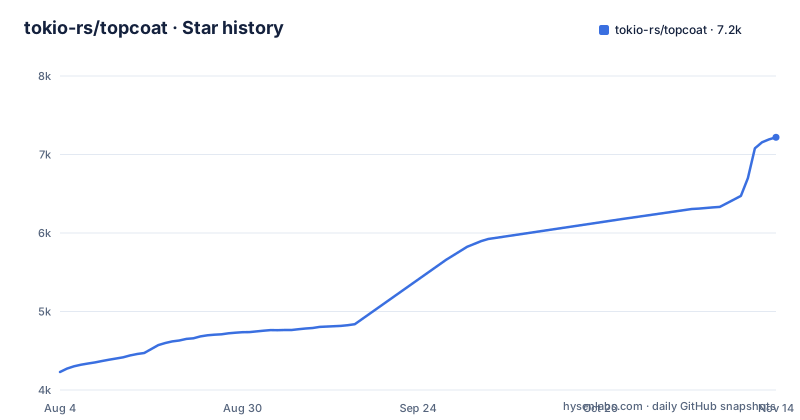
Star history
- tokio-rs/topcoat7,219 ★ · +2,990
| Repository | 2026-08-04 | 2026-11-14 |
|---|---|---|
| tokio-rs/topcoat | 4.2k | 7.2k |
2,990 Stars in the last 102 days, measured from the daily GitHub snapshot. Compare with other projects
Editorial analysis
One $(...) expression is Rust on the server and JavaScript in the browser
The unit of interactivity in Topcoat is a dollar expression written inside a `view!` macro, and the same token is read two ways. The Rust compiler type-checks it as ordinary Rust, the server evaluates it while rendering the page for the first time, and the framework translates that same source into JavaScript so it can run again in the browser. Because the expression stays inside the component, the type checker covers the code that ends up on both sides, and there is no separate client module to keep aligned with the server. No wasm bundle is produced and no client build step is required.
A component is an async function returning a `View`, so it can query data directly while the page renders:
```rust,ignore #[component] async fn faq(cx: &Cx) -> Result<impl View> { let open = signal(cx, || false);
Ok(view! { // Runs entirely in the browser; no server round-trip. <button @click=$(|_e| open.set(!open.get()))>"What is Topcoat?"</button> <p :hidden=$(!open.get())>"A full-stack Rust framework."</p> }) } ```
The handler reads and writes a `signal` created from the component context, and `:hidden` binds the same state to an attribute.
A #[shard] component is re-rendered on the server whenever its arguments change
Some updates need data that only the server holds. Marking a component `#[shard]` moves the work there: Topcoat re-renders it whenever one of its `$(...)` arguments changes and swaps the returned HTML into the page. The parent passes the value as an ordinary argument, so `search_results(query: $(query.get()))` marks the boundary between the two runtimes, and the shard itself is a normal async component with the signature `#[shard] async fn search_results(cx: &Cx, query: String)`.
```rust,ignore #[component] async fn search(cx: &Cx) -> Result<impl View> { let query = signal(cx, String::new);
Ok(view! { <input @input=$(|e: Event| query.set(e.target.value))>
// Updates as the user types. search_results(query: $(query.get())) }) } ```
The cost sits in the event binding rather than the markup. That input writes to `query` on every `input` event, and `query` is a `$(...)` argument of a shard, so each keystroke becomes one server render plus one HTML swap. Keeping a filter local and sharding only the result list is left to the application.
Module paths become URLs, and a prefixed module adds layout without a segment
Routing is optional and inferred from the module tree, with no build step and no route table to maintain. The shape of the source tree decides the URLs:
src/
|-- app.rs              -> /            (and the root <html> layout)
`-- app/
    |-- about.rs        -> /about
    |-- _marketing.rs                  (layout, no URL segment)
    |-- _marketing/
    |   `-- pricing.rs  -> /pricing
    |-- posts.rs        -> /posts
    |-- posts/
    |   `-- id.rs       -> /posts/{post_id}
    `-- api/
        `-- health.rs   -> GET /api/health
A module named `app.rs` at the top serves `/` and carries the root `<html>` layout. A leading low line marks a shared layout that contributes no segment of its own, which is how `_marketing.rs` and `_marketing/pricing.rs` end up nested without `/marketing` appearing in the URL. A module file called `id.rs` becomes a path parameter. Endpoints are ordinary modules too, so `api/health.rs` maps to `GET /api/health`. Two example apps, `examples/manual-router/` and `examples/routerless/`, exist for the cases where you would rather wire things up yourself, and the templates themselves accept plain Rust control flow, so a `for` loop and an `if` sit directly inside HTML.
The asset bundler finds files by scanning your compiled binary
Assets are declared as constants, and the bundler finds them by reading the compiled binary for `asset!` calls. Every referenced file is then copied into a local asset directory, or downloaded when the path points elsewhere, and served from there with aggressive browser caching:
```rust,ignore const FERRIS: Asset = asset!("./ferris.png"); ```
The discovery mechanism is what shapes this workflow. Because the list of files comes out of the binary rather than a manifest, the bundle is decided at build time and a file that is never passed to `asset!` is never copied.
Fonts and icons have their own utilities rather than being hand-rolled assets, and both plug into external catalogues: Fontsource for fonts and Iconify for icon sets. The standalone example directories `examples/font/` and `examples/icon/` show each in isolation, with `examples/asset/` covering the bundler itself.
topcoat fmt formats view! blocks and topcoat ui copies components into your tree
Two CLI commands do the work that would otherwise sit in a build pipeline. `topcoat fmt` formats `view!` snippets and other macros across a codebase, so the HTML-shaped syntax gets the same treatment as ordinary Rust. `topcoat ui` copies components out of Topcoat UI into your project rather than importing them from a dependency, which is what lets you edit their design and functionality. The library is built on Tailwind and takes its look from shadcn/ui.
The first program that runs is small, and the router is assembled in `main`:
```rust,ignore #[tokio::main] async fn main() { topcoat::start(module_router!().build()).await.unwrap(); }
#[page] async fn home() -> Result<impl View> { Ok(view! { <!DOCTYPE html> <html> <body> hello(name: "World") </body> </html> }) }
#[component] async fn hello(name: &str) -> Result<impl View> { Ok(view! { <h1>"Hello, " (name) "!"</h1> }) } ```
The README's getting-started link, `docs/getting_started.md`, is described as creating an app with `topcoat new` and running the dev server, and a separate `docs/manual_setup.md` covers manual setup. The root also carries a `Topcoat.toml`, `rust-toolchain.toml`, `rustfmt.toml`, `clippy.toml`, `rust-analyzer.toml`, `flake.nix` and `release-plz.toml`, plus `AGENTS.md`, `CLAUDE.md` and an `llms.txt` written for agents.
The tailwind feature hands you a stylesheet macro instead of a build step
Tailwind arrives through a Cargo feature rather than a separate build. Enabling `tailwind` gives you a macro that resolves to a stylesheet URL you drop into a `view!` block yourself:
```rust,ignore view! { <link rel="stylesheet" href=(topcoat::tailwind::stylesheet!())> }
The same shape is used for UI components, which compose by function call rather than by tag, and pass options as named arguments:
rust,ignore #[component] async fn delete_card() -> Result<impl View> { Ok(view! { card( card_header( card_title("Delete workspace") card_description( "This permanently removes the workspace and all of its data." ) ) card_footer( attrs: attributes! { class="justify-end" }, button(variant: ButtonVariant::Ghost, "Cancel") button(variant: ButtonVariant::Destructive, "Delete workspace") ) ) }) } ```
`ButtonVariant::Ghost` and `ButtonVariant::Destructive` are enum variants rather than string class names, and `attributes!` attaches attributes to a component. Because these components live in your tree after `topcoat ui` copies them, upgrading the framework does not upgrade them: the copied source becomes yours to edit, and a breaking change upstream will not reach it.
Seventeen topcoat crates under crates/ cover routing, rendering and interop
The workspace splits the framework into many packages, and the member list doubles as a map of what exists. `crates/topcoat` is the facade the application depends on, and the rest sit behind it; besides `crates/topcoat-l10n` and `crates/topcoat-metadata`, they are:
members = [
    "crates/topcoat",
    "crates/topcoat-alpine-ajax",
    "crates/topcoat-asset",
    "crates/topcoat-cli",
    "crates/topcoat-cookie",
    "crates/topcoat-core",
    "crates/topcoat-datastar",
    "crates/topcoat-font",
    "crates/topcoat-htmx",
    "crates/topcoat-icon",
    "crates/topcoat-mail",
    "crates/topcoat-router",
    "crates/topcoat-runtime",
    "crates/topcoat-session",
    "crates/topcoat-tailwind",
    "crates/topcoat-ui",
    "crates/topcoat-view",
]
Some names come with subcrates of their own, which is where a lot of the complexity sits: `topcoat-asset`, `topcoat-cookie`, `topcoat-core`, `topcoat-font`, `topcoat-icon`, `topcoat-l10n`, `topcoat-mail`, `topcoat-router`, `topcoat-runtime` and `topcoat-view` each have a `grammar` and a `macro` crate, plus `topcoat-runtime/coherence` and `topcoat-ui/registry`. Ten grammar crates and ten macro crates means assets, cookies, templates, routing, fonts, icons, localisation and mail all have their own parsers to keep in step. Adopting the framework through the `topcoat` facade keeps that surface out of your Cargo.toml, but reading a compiler error means reading across those crates. Cookie and session crates are present, and cookie and mail are split into grammar and macro like the others.
The gaps: no database, no auth, no migration story, and 25 example apps instead of docs
Several things a web app usually needs are simply not in the workspace. There is no database driver, no ORM, no migration tool, no auth crate and no HTTP client among the members. A component is expected to call your own server-side code, so database access is whatever you write inside the component, and nothing here helps with schema changes, session storage backends or login flows. Sessions exist as a crate, with an `examples/session/` app.
Alongside the docs, the learning path runs through example code. Twenty-five directories sit under `examples/`: one each for `alpine-ajax`, `asset`, `cloudflare-worker`, `context`, `cookie`, `datastar`, `error`, `font`, `hello-world`, `htmx`, `icon`, `l10n`, `live`, `mail`, `manual-router`, `metadata`, `module-router`, `path-query-params`, `request-response`, `routerless`, `runtime`, `session`, `sse`, `suspense` and `tailwind`. Reading a feature means finding the directory that isolates it. Interop crates for htmx, Datastar and Alpine Ajax are present, so those libraries can drive updates instead of `$()`.
The framework labels itself early-stage and experimental, with breaking changes expected, and the version numbers agree: v0.9.0 on 2026-09-24, v0.10.0 on 2026-10-03 and v0.11.0 on 2026-10-24, with the last push on 2026-11-02. Treat the API as a moving target on a schedule measured in weeks, not quarters.
Editorial conclusion
Topcoat suits a Rust developer who wants one file to hold a page and its updates, and who accepts a 0.x line that expects breaking changes. Before committing, check that the $(...) expressions you need translate, read the getting-started document the README links to, and pin the version you build against, since the last three tags are v0.9.0, v0.10.0 and v0.11.0.
Frequently asked questions
Does Topcoat need a wasm bundle or a client-side build step?
No. A $(...) expression is evaluated on the server for the initial render and also translated to JavaScript, so it re-runs in the browser with no wasm bundle and no client build step. Markup is produced entirely on the server, where components can be async and query data directly.
When should a Topcoat component be a #[shard]?
When an update needs the server, such as fresh search results. Topcoat re-renders a #[shard] component whenever one of its $(...) arguments changes and swaps the new HTML in place. A shard is declared as #[shard] async fn search_results(cx: &Cx, query: String).
How does Topcoat decide the routes of a module-based app?
It can infer the route tree from the module structure without a build step. src/app.rs serves / and carries the root html layout, src/app/about.rs becomes /about, src/app/posts/id.rs becomes /posts/{post_id}, and a module whose name starts with a low line, such as _marketing.rs, adds a layout without a URL segment.
What do the topcoat fmt and topcoat ui commands do?
topcoat fmt formats view! snippets and other macros across the codebase. topcoat ui copies components from Topcoat UI, a Tailwind based library inspired by shadcn/ui, into your project so you can change their design and functionality, which also means upgrades do not reach them.
Does the Topcoat workspace include a database or an auth layer?
No. The workspace members under crates/ cover assets, the CLI, cookies, core, fonts, icons, localisation (l10n), mail, metadata, routing, runtime, sessions, Tailwind, UI and views, plus htmx, Datastar and Alpine Ajax interop. There is no database driver, ORM, migration tool or auth crate among them, so those parts come from your own code.
How stable is the Topcoat release line?
The README labels Topcoat early-stage and experimental and expects breaking changes. The three most recent tags are v0.9.0 from 2026-09-24, v0.10.0 from 2026-10-03 and v0.11.0 from 2026-10-24, with the last push dated 2026-11-02.
Official sources
Add this badge to your README
If you maintain this project, the badge below links readers to this analysis and shows its maintenance status from the daily GitHub snapshot. Paste the markdown into your README; add ?metric=license or ?metric=stars to the image URL for a different field.

[](https://hysenlabs.com/projects/tokio-rs-topcoat)Star history chart for your README
[](https://hysenlabs.com/projects/tokio-rs-topcoat)Was this useful?