Yacht agents self-register and poll every five seconds, and the tags jump from 2021 to 2026
A web interface for managing docker containers with an emphasis on templating to provide 1 click deployments. Think of it like a decentralized app store for servers that anyone can make packages for.
At a glance
- What is it?
- A look at a container management interface built around templates: two ways to reach a Docker host, the five verbs an agent is allowed to run, why the compose example names the server image with a doubled tag, what deleting a template does to the apps it created, and which of the environment variables you should treat as load-bearing.
- Who is it for?
- Yacht fits someone running a handful of Docker hosts who wants Portainer-style templates and one-click deployments, and who would rather not open a remote Docker API to the network. It does not fit someone who needs the full Docker API against remote hosts, because agent-backed writes are limited to five container verbs plus three compose actions, and it does not fit Windows, which is still unverified.
- Can I use it commercially?
- Check first. The repository uses a licence we do not classify automatically, so read its LICENSE file before any commercial use.
- Is it still maintained?
- Yes. The repository last received commits 45 days ago.
- What is it written in?
- Mainly Vue, according to GitHub's language statistics.
Answers come from the project's GitHub data, last synced on November 15, 2026, and from our analysis. They are not legal advice.
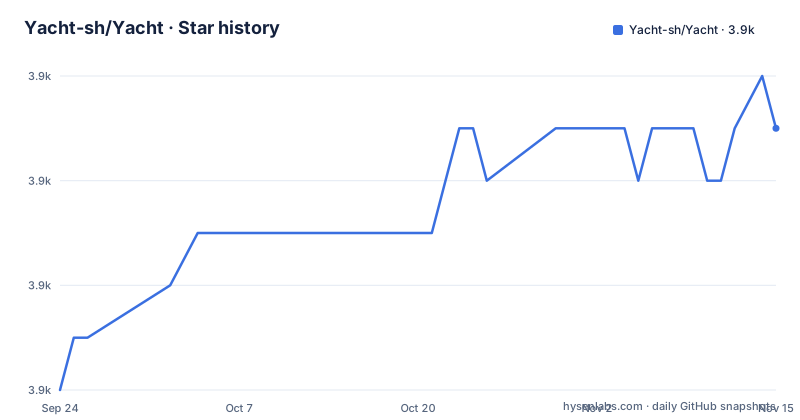
Star history
- Yacht-sh/Yacht3,877 ★ · +5
| Repository | 2026-09-24 | 2026-11-15 |
|---|---|---|
| Yacht-sh/Yacht | 3.9k | 3.9k |
5 Stars in the last 52 days, measured from the daily GitHub snapshot. Compare with other projects
Editorial analysis
The default branch is master, the documentation describes develop, and the tags skip five years
Three facts about version control are worth sorting out before reading anything else.
The default branch is master. Every description of current behaviour in the readme, though, says develop: two host management modes, agent-backed write support, the wiki pages. The installation documentation has moved off the repository entirely to dev.yacht.sh, with repo-local pages in docs/ and operational wiki pages for the current develop branch in wiki/.
The release list tells the third story. The most recent tag is 1.1, titled Yacht v1.1, published on 2026-09-02. Before that come v0.0.7-alpha on 2021-04-23 and v0.0.7-alpha-hf-1 on 2021-05-31, whose titles announce the alpha release and its first hotfix. So there is a five-year gap between the last 0.0.7 build and the 1.1 release.
Maintenance in the repository sense is current: it is not archived and the last push was on 2026-10-01, days before this article. What you cannot do is infer the version of Yacht you will get from that. Read the branch and the tag you are actually deploying.
Two host modes, and only one of them keeps a Docker API off the network
The develop branch supports two ways of managing a Docker host, and the difference is where the trust boundary sits.
The first is a direct Docker API host, added by hand in the UI. That is the familiar model: Yacht talks to the remote daemon's API, which means the daemon's port has to be reachable from wherever Yacht is running.
The second is an agent-managed host, where a yacht-agent container on the remote machine connects back to the main Yacht server. The agent is described as doing four things: mounting the local Docker socket, registering with the main server using a shared enrollment token, keeping host inventory in sync, and executing container actions locally after the server queues a job.
The stated benefit is specific: this avoids exposing the remote Docker API directly when you do not want to. So the agent mode is a topology decision rather than a convenience. On a host behind a firewall or on a network you do not want a daemon port on, the agent is the only mode that works, and the job queue is what replaces the direct API.
In return, the agent host can report lightweight host stats, and the write surface is narrower. That narrower surface is the next thing to look at.
Agent-backed writes cover five verbs, and compose only if the agent advertises it
The readme enumerates current agent-backed write support on develop, and the list is five entries:
- start - stop - restart - kill - remove
There is no create, no run, and no image pull in that list. So an agent-managed host is somewhere you can act on containers that already exist, not somewhere you can bring new ones up. That is the single most useful thing to know before you architect around agents, and it is also why the compose path exists as a separate mechanism.
Compose is capability-negotiated. If the enrolled agent reports compose capability, the Yacht UI exposes per-host compose actions for up, down and pull. You use the compose project name from the agent host in the interface, the server queues the action, and the agent executes it against its local Docker environment.
So the division of labour is: container verbs are always available, and project-level operations are available only on agents that say they can do them. In both cases the server does not execute anything, it queues, and the agent does the work against the socket it mounted locally.
The example agent image is the server image, with a doubled tag
Enrollment is a shared secret on both sides. You set AGENT_ENROLLMENT_TOKEN on the main Yacht server first, and the agent must present the same value through YACHT_AGENT_ENROLLMENT_TOKEN. The example deployment is:
services:
  yacht-agent:
    image: ghcr.io/yacht-sh/yacht:latest:latest
    container_name: yacht-agent
    restart: unless-stopped
    environment:
      YACHT_SERVER_URL: https://yacht.example.com
      YACHT_AGENT_ENROLLMENT_TOKEN: replace-with-shared-enrollment-token
      YACHT_AGENT_NAME: edge-docker-01
    volumes:
      - /var/run/docker.sock:/var/run/docker.sock
      - yacht-agent-config:/config

volumes:
  yacht-agent-config:
Three details in that block are worth pausing on. The image reference is ghcr.io/yacht-sh/yacht with the tag latest written twice, which is the same repository as the server image rather than a separate agent image, so read it as what it is rather than as a copy-paste accident to fix. The docker socket is mounted into the container, which is what gives the agent its authority over the local daemon. And the agent's state lives in a named volume at /config rather than in the container filesystem.
Agent-managed hosts self-register. The readme is explicit that you do not create them from the Hosts form.
The agent beats every thirty seconds and polls for work every five
The agent's environment variables are documented as a table, and four of them are intervals and paths with defaults you can rely on.
YACHT_AGENT_HEARTBEAT_INTERVAL is the seconds between heartbeats and defaults to 30. YACHT_AGENT_JOB_POLL_INTERVAL is the seconds between job polls and defaults to 5. So the agent is idle most of the time and a queued action takes on the order of five seconds to be noticed rather than being pushed.
YACHT_AGENT_STATE is the path to the local JSON state file holding the agent token and IDs, defaulting to /config/agent-state.json, which is the file inside the named volume in the example. YACHT_AGENT_NAME is the friendly host name shown in Yacht and defaults to the container hostname, which is why the example sets it to edge-docker-01.
Three more are about trust and diagnostics. YACHT_AGENT_VERIFY_SSL should be set to false only if the server uses a self-signed certificate and the agent cannot validate it. YACHT_AGENT_LOG_LEVEL is a Python log level defaulting to INFO, which tells you the agent is a Python process. YACHT_AGENT_VERSION overrides the version reported during registration and heartbeat, so you can pin what the server records.
And YACHT_SERVER_URL is the base URL, with the note that the agent appends /api automatically if needed, so you do not have to get that suffix right yourself.
Deleting a template deletes the apps it created, by database relationship
The templating story is built on compatibility with Portainer templates. You add a template URL in the Add Template settings, and Yacht reads it, separates it into apps, and imports them into the database.
The consequence of that design is worth stating plainly, because it is the kind of behaviour that surprises people. The apps are linked to their template through a database relationship, so when the template is removed, the apps associated with it are removed too. Not orphaned, not disabled: removed.
The upside of storing the template URL is that updating templates is a button press rather than a re-import. The readme recommends starting with a community template collection, a specific template.json URL on a yacht branch of someone's self-hosted templates repository.
Variables are handled inside the template itself. Any variable starting with an exclamation mark is replaced automatically with whatever the user has set in their server settings, and the worked example given is !config, which is replaced by /yacht/AppData/Config by default. So a template is not a fixed compose file: it is a compose file with named holes that your instance fills in.
The development compose file maps host 9000 to container 8000 and ships a literal dev key
The compose file in the repository is for development, and it says so in the values it sets. The service is named yacht with the container name yacht-local, built from the local Dockerfile with a build argument of VUE_APP_VERSION set to local-dev, and tagged yacht:local-dev.
The port mapping is host 9000 to container 8000, so a development instance is on localhost:9000 rather than on the more usual default for this kind of interface.
The environment block is where the care is needed. SECRET_KEY is set to the literal string local-dev-secret-key-change-me-please. DISABLE_AUTH is the string False rather than a boolean. COMPOSE_DIR is /config/compose/ with a trailing slash, and THEME is Default.
Two volumes are declared. A named volume yacht-config is mounted at /config, which is where the compose project directory and the application data live, and the host docker socket is mounted at its usual path. That socket mount is the same privilege decision as in the agent: the container that can write to the docker socket can start any container on that host.
The file is a good template for a real deployment with one change: replace the development secret with a random one, or you will be logged out on every restart.
Three build stages keep the compiler and the frontend toolchain out of the runtime image
The Dockerfile is worth reading because it explains the two-language structure. The backend is Python and the frontend is Vue, and they are built in separate stages and assembled in a third.
The first stage builds the frontend from a Node 20 slim image. It takes VUE_APP_VERSION as a build argument, copies the frontend package manifests first, runs npm ci with --legacy-peer-deps and audit and fund reporting turned off, then copies the frontend source and runs the build. The legacy peer dependency flag is the tell that this dependency tree does not resolve cleanly under modern peer rules.
The second stage builds Python wheels from a Python 3.11 slim image, and its purpose is stated in a comment: it is isolated so compiler toolchains do not land in the runtime. It installs build-essential plus the development headers for ffi, ssl, postgres, mysql, jpeg, zlib and yaml, then produces wheels into a directory.
The third stage is the runtime, also Python 3.11 slim, and it installs only runtime libraries: nginx, bash, certificates, libpq5, libmariadb3 and libjpeg62-turbo. It installs from the wheel directory with --no-index and no cache, copies the wheels in and deletes them. A non-root user is created with groupadd and useradd, the backend is copied to /api, nginx.conf is installed, and the frontend build output is copied into the same image. Both a Python application server and nginx ship in one container, which is a single-process-deployment trade rather than an oversight.
Editorial conclusion
Yacht fits someone running a handful of Docker hosts who wants Portainer-style templates and one-click deployments, and who would rather not open a remote Docker API to the network. It does not fit someone who needs the full Docker API against remote hosts, because agent-backed writes are limited to five container verbs plus three compose actions, and it does not fit Windows, which is still unverified. Before you deploy it, read the branch the documentation describes rather than the default branch, set a real secret key rather than the one in the development compose file, leave authentication on unless something like Authelia is in front of it, and pin your own image tag rather than tracking the latest tag the agent example uses.
Frequently asked questions
How do I use Yacht with remote Docker hosts?
Yacht supports two host management modes. Hosts can be added manually in the UI against a direct Docker API, or they can run a yacht-agent container that connects back to the main Yacht server, registers with a shared enrollment token, keeps host inventory in sync, and executes container actions locally after the server queues a job.
What can the Yacht agent actually do to a container?
Agent-backed write support covers start, stop, restart, kill and remove. If the enrolled agent reports compose capability, the interface also exposes per-host compose actions for up, down and pull, using the compose project name from the agent host.
How do I install Yacht, and which platforms are verified?
Only Linux has been verified as working, with Windows support still being evaluated, and there is a separate section on running Docker and Yacht under WSL2 on Windows. The installation documentation lives at dev.yacht.sh, with repo-local pages in docs/ and wiki pages for the develop branch.
Does Yacht need authentication, and can it use a real database?
None of the supported environment variables are mandatory. DISABLE_AUTH turns off backend authentication and is not recommended unless something like Authelia manages it, SECRET_KEY set to a random string keeps you logged in across reboots, and DATABASE_URL accepts a postgresql://user:password@postgresserver/db URL in place of the built-in sqlite.
How do Yacht templates work, and what happens when I delete one?
Yacht is compatible with Portainer templates. You add a template URL, it is read, separated into apps and imported into the database, with the apps linked to the template by a database relationship so removing the template removes those apps. The URL is stored so templates can be updated with a button press, and variables starting with an exclamation mark are replaced from your server settings.
Official sources
Add this badge to your README
If you maintain this project, the badge below links readers to this analysis and shows its maintenance status from the daily GitHub snapshot. Paste the markdown into your README; add ?metric=license or ?metric=stars to the image URL for a different field.

[](https://hysenlabs.com/projects/yacht-sh-yacht)Star history chart for your README
[](https://hysenlabs.com/projects/yacht-sh-yacht)Was this useful?