Dashy: a YAML-configured self-hosted dashboard with status checks and widgets
🚀 A self-hostable personal dashboard built for you. Includes status-checking, widgets, themes, icon packs, a UI editor and tons more!
At a glance
- What is it?
- Dashy is a Vue-based startpage for homelabs that reads a single YAML config file, monitors the reachability of each listed service, and renders widgets from self-hosted APIs. It is a good fit for people who want their dashboard defined in versionable text, and a poor fit for anyone expecting a hosted control plane.
- Who is it for?
- Adopt Dashy if you want a homelab startpage whose entire layout lives in a conf.yml file you can commit, and if you are comfortable editing YAML or using the built-in config editor. Skip it if you need a dashboard that discovers services on its own, or if the services you list cannot be reached for status checks and widgets to work.
- Can I use it commercially?
- Yes. MIT is a permissive licence: you can use, modify and sell software built on it, as long as you keep its copyright and licence notices.
- Is it still maintained?
- Yes. The repository last received commits 1 day ago.
- What is it written in?
- Mainly Vue, according to GitHub's language statistics.
Answers come from the project's GitHub data, last synced on November 14, 2026, and from our analysis. They are not legal advice.
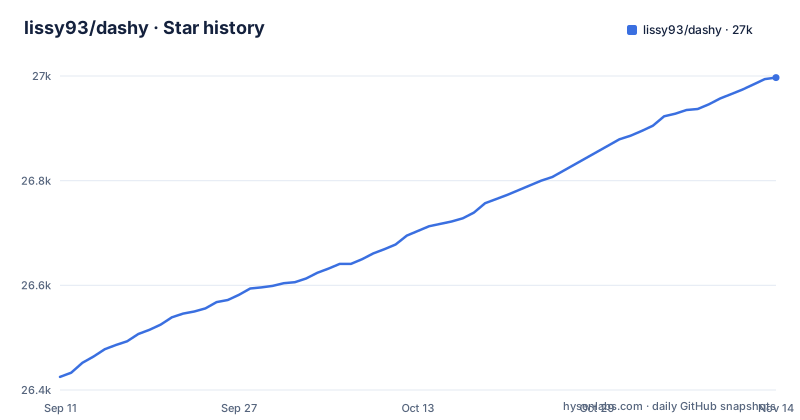
Star history
- lissy93/dashy26,997 ★ · +572
| Repository | 2026-09-11 | 2026-11-14 |
|---|---|---|
| lissy93/dashy | 26.4k | 27k |
572 Stars in the last 64 days, measured from the daily GitHub snapshot. Compare with other projects
Editorial analysis
The problem Dashy solves for people running many local services
Anyone running a homelab accumulates bookmarks. A NAS admin page on one port, a media server on another, a router at a fixed IP, a handful of containers behind a reverse proxy. The browser bookmark bar stops scaling somewhere around the fifteenth entry, and it carries no information about whether anything is actually up. Dashy's stated purpose is to be "the homepage for your homelab": one page listing your services, with a status indicator per item and optional widgets pulling live data from those services. The target user is someone who self-hosts, is willing to maintain a config file, and wants the dashboard to live on their own hardware rather than on a hosted startpage service. The README frames the feature set around that audience: multiple pages, status monitoring, widgets, search, theming, icon packs, optional authentication, and a UI config editor. The deployment model is your responsibility.
How the config file drives rendering, status checks and widgets
The architecture visible from the repository is a Vue single-page application served by a Node process, with all user state in a YAML file. The README is explicit that the mounted /app/user-data directory "must contain at least a conf.yml", and that the same directory can hold sub-config files, item icons, fonts and custom CSS served from the web root. That single file is the source of truth for sections, items, themes, layout options and widget bindings. The README lists "real-time status monitoring for each of your apps/links/hosts" as a feature, and widgets display "info and dynamic content from self-hosted services". Alternate views (workspace and minimal) and opening methods (new tab, same tab, clipboard, pop-up modal, workspace) are all rendering decisions taken from the same config. There is no database and no service discovery layer in the described design.
Getting an instance running with Docker or from source
The README gives a one-line container start: docker run -p 4000:8080 lissy93/dashy. For anything persistent it shows the fuller form with a bind mount and a restart policy: docker run -d -p 4000:8080 -v /path/to/your/user-data:/app/user-data --name my-dashboard --restart=always lissy93/dashy:latest. Images are published on Docker Hub as lissy93/dashy and on GHCR as ghcr.io/lissy93/dashy, and the README states they are multi-arch for amd64 and arm64. You can pin a version tag such as 4.0.0 instead of :latest. A sample docker-compose.yml exists in the repository root. Building from source requires an up-to-date Node LTS plus git and yarn: clone the repo, fill in ./user-data/conf.yml, then run yarn, yarn build and yarn start. The README also lists one-click deployment templates for Netlify, Vercel and Render, though those presets move the config away from a local bind mount. Port 8080 is the container's internal port; the examples map it to 4000 on the host, which is worth noting because copying the command verbatim and then browsing to 8080 will not work.
Status indicators and widgets depend on the browser, not the server
Status indicators and widgets are only as useful as the reachability of the services you list. The Docker image installs ping with the raw-network capability and the repository ships a health-check script, so test status checks and widgets from where your instance actually runs before rolling Dashy out to other people.
Authentication, multi-user access and what the README leaves open
Dashy offers "optional authentication with multi-user access, configurable privileges, and SSO support", plus an encrypted off-site backup and restore feature. Confirm the auth implementation, the supported SSO protocols, and where credentials are stored in the documentation before exposing an instance to the internet. The same applies to the cloud backup: it is described as optional, encrypted and free; check the documentation for the key handling and the storage backend. Configurable privileges imply a distinction between users who can edit config and users who can only view, which matters if the config editor is enabled, because that editor writes to the mounted user-data directory.
Where Dashy is the wrong tool
Dashy assumes you know what you want to display. There is no discovery of containers, no import from a Docker socket, and no automatic inventory of hosts on your network. If your environment changes weekly and you want the dashboard to follow along, you will be editing YAML each time. The single-file config is also a scaling limit in a different sense: it is easy to read at fifty items and harder to reason about at several hundred, especially when sub-config files and custom CSS are involved. Finally, the project is a personal dashboard, not a monitoring system. Status indicators answer "can this be reached right now", which is a different question from uptime history, alerting, or latency percentiles. If you need those, you need a monitoring tool, and Dashy is not trying to be one.
Alternatives and the actual difference in approach
The README itself links an Alternatives section, which is the honest place to start. The most direct comparison is Homepage. Homepage also renders a service dashboard from YAML and also offers widgets, but its integration model is built around per-service widget definitions with a shared set of service presets, and it is commonly deployed alongside a Docker socket for container-aware widgets. Dashy's emphasis is different: a broader set of built-in themes, an in-browser config editor, multiple page support, alternate views such as workspace and minimal, and a PWA build for basic offline access. If your priority is a config file you edit by hand and a UI that you can rearrange without touching text, Dashy's editor is the differentiator. If your priority is widgets that know about your containers without you describing them, a socket-aware dashboard will save you configuration time. Both are self-hosted and neither is a monitoring system.
Licence, maintenance and the cost of staying current
Dashy is MIT licensed, which permits commercial use, modification and redistribution provided the copyright notice and permission notice are retained. That is a permissive licence, and it means you can fork the project if upstream development stops. It does not give you any warranty. The release cadence visible in the release history is frequent minor releases (4.7.0 on 2026-09-17, 4.8.0 on 2026-10-09, 4.9.0 on 2026-10-23), with the default branch receiving pushes as recently as 2026-11-02, so the project is active. The upgrade cost is low if you pin a version tag and read the release notes between versions, because your state lives in conf.yml rather than in a database that needs migrating. The real maintenance burden is the config itself: every service you add or move is an edit, and every widget you enable is another endpoint your browser must be able to reach. Budget for that, not for patching.
Editorial conclusion
Adopt Dashy if you want a homelab startpage whose entire layout lives in a conf.yml file you can commit, and if you are comfortable editing YAML or using the built-in config editor. Skip it if you need a dashboard that discovers services on its own, or if the services you list cannot be reached for status checks and widgets to work. Before committing, verify three things: that /app/user-data is mounted read-write so the config editor can save, that your reverse proxy passes the paths Dashy needs, and that your chosen auth mode matches the exposure of the instance.
Frequently asked questions
what is dashy
Dashy is a self-hostable dashboard for a homelab, written in Vue with an Express server and configured through a single YAML file. It offers multiple pages, status monitoring for each service, widgets, themes with a colour editor and custom CSS, icon packs, optional authentication with SSO, and off-site encrypted backup.
how to install dashy
The shortest route is docker run -p 4000:8080 lissy93/dashy. For anything you intend to keep, mount a host directory containing at least a conf.yml at /app/user-data, since that file holds the entire dashboard state. Images are published to Docker Hub and GHCR, and support amd64 and arm64.
how to setup dashy
Create conf.yml in the directory you intend to mount at /app/user-data and describe your apps in it. That same directory can hold sub-config files, icons, fonts and custom CSS, and anything in it is served from the web root. The manifest also ships a validate-config script, so you can check the file before deploying.
dashy alternatives
The README has an Alternatives section, linked from its table of contents. What it does document is its own deployment range, from Docker and bare metal to one-click deploys on Netlify, Vercel, Render, Railway, GCP, Easypanel, EdgeOne and Hostinger.
Official sources
Add this badge to your README
If you maintain this project, the badge below links readers to this analysis and shows its maintenance status from the daily GitHub snapshot. Paste the markdown into your README; add ?metric=license or ?metric=stars to the image URL for a different field.

[](https://hysenlabs.com/projects/lissy93-dashy)Star history chart for your README
[](https://hysenlabs.com/projects/lissy93-dashy)Was this useful?