Persei: a sticky Swift menu for three scroll views, whose last commit is from April 2020
GitHub describes it as Animated top menu for UITableView / UICollectionView / UIScrollView written in Swift. The repository metadata lists Swift as its primary language. The metadata lists the MIT license. This article stays within the project description and details documented in the GitHub repository README.
At a glance
- What is it?
- An animated top menu from Yalantis that sticks to a table view, a collection view or a scroll view, with content gravity, a threshold-based reveal, and a sticky header view you can subclass. It installs through CocoaPods, Carthage or by dropping in source files. The version table stops at Swift 5, the newest release was published in October 2017, and the last commit on the default branch is dated 22 April 2020.
- Who is it for?
- Persei suits someone maintaining an older iOS codebase with a menu that should stick to the top of a scrolling list, and who wants the source files rather than a dependency, since the manual integration route copies the code in and lets you rename the top level types.
- Can I use it commercially?
- Yes. MIT is a permissive licence: you can use, modify and sell software built on it, as long as you keep its copyright and licence notices.
- Is it still maintained?
- Probably not. The repository last received commits 79 months ago, on April 22, 2020.
- What is it written in?
- Mainly Swift, according to GitHub's language statistics.
Answers come from the project's GitHub data, last synced on October 24, 2026, and from our analysis. They are not legal advice.
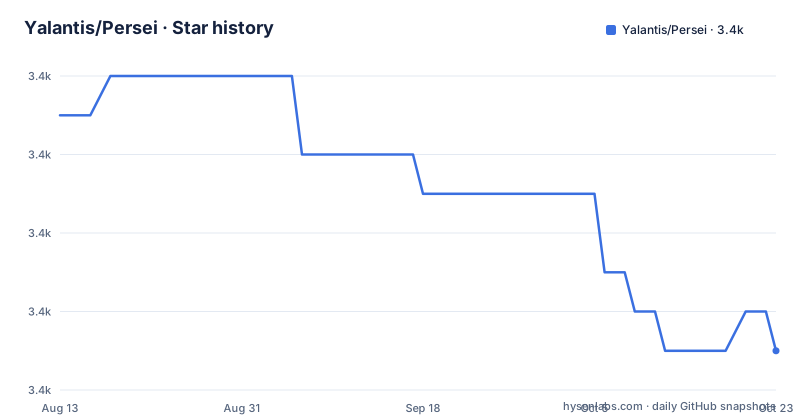
Star history
- Yalantis/Persei3,425 ★ · -6
| Repository | 2026-08-13 | 2026-10-24 |
|---|---|---|
| Yalantis/Persei | 3.4k | 3.4k |
-6 Stars in the last 72 days, measured from the daily GitHub snapshot. Compare with other projects
Editorial analysis
One menu, three scroll views, and a link to a Dribbble shot
The scope is stated in the repository description and it is narrow in a useful way: an animated top menu for a table view, a collection view or a scroll view, written in Swift. It is a component rather than a screen, and the README presents it that way, pointing to the studio's site, to a Dribbble shot of the animation and to a Behance gallery, which is how design-led component libraries usually introduce themselves. The mechanism underneath is a view you instantiate, add as a subview of the scrolling view, and populate; the animation handles the sticky behaviour and the reveal. Nothing in the README describes a theme, a style API or a configuration object, so the surface area you inherit is the menu view, an item struct and a sticky header. It is also a component for a specific platform only: there is no mention of other Apple platforms or of the other platform the studio mentions in its closing note, so this is an iOS library in a repository with one Xcode project and one example application.
The version table stops at Swift 5, and the releases stop in 2017
The README carries a support table that pairs each Swift version with the Persei version written for it: Swift 1.x with 1.1, 2.x with 2.0, 3.x with 3.0, 4.x with 3.1, and 5.x with 4.0, the last of which is the current line. That mapping is the fastest way to date the library, because it ends at Swift 5. The published releases agree with it: 3.0.1 in April 2017, then 3.1 the following October, described as adding Swift 4 and iOS 11 support, and a 3.1.1 hotfix for Swift 3.2 the next day. Nothing has been published since. The last commit on the default branch is dated 22 April 2020, so there is a three-year gap between the last release and the last change, and six years between that change and today.
Three install routes, and the manual one admits that it sucks
Installation is offered through two package managers and one blunt fallback. With CocoaPods you enable frameworks and add the pod at the four series:
use_frameworks!

pod 'Persei', '~> 4.0'
With Carthage you point at the GitHub repository with the same constraint:
github "Yalantis/Persei" ~> 4.0The manual route exists for application targets that cannot use embedded frameworks, with iOS 7 given as the example, and it works by including the source files from the Persei folder directly, optionally wrapping the top level types inside a struct to simulate a namespace. The README's own comment on that workaround, that it sucks, is worth reading as guidance. The steps that follow are eight long instructions: add the repository as a submodule from a terminal in the top level project directory, drag the framework's Xcode project into your app's file navigator, select the application target, make sure the framework's deployment target matches the app's, add it under target dependencies, add a second framework under link binary with libraries, then create a new copy files phase, rename it, set its destination to frameworks and add the framework to it. The framework named in that link step is not Persei itself but a different one, which is a leftover from the library's own history and the sort of instruction worth double checking before you follow it.
Items are a plain struct, and the selected index is optional
The data model is small enough to quote. An item is a struct with an image, an optional image used during selection, a background colour, a background colour for the selected state, and a shadow colour described as the two pixel shadow line at the bottom. The menu's items property takes an array of those, built by mapping over whatever your own model is, which keeps the library free of any opinion about your data. Selection can be set directly by assigning to the selected index, with one subtlety worth remembering: that property is declared as an optional integer and is nil whenever the items array is nil, so code that sets an index on an unpopulated menu has to expect nil rather than zero. The alternative to setting it is a delegate, implemented on the object that owns the menu, whose callback receives both the menu and the index that was chosen; the example in the README uses that to change the mode on a data source and then reload the table view.
Reveal is a boolean toggle, and gravity picks one of three positions
Opening the menu is either a property assignment or a method call. The first toggles a revealed boolean, which is what you would bind to a button; the second takes a target state and an animated flag, for when you want the transition rather than a jump. A second property controls what sticks where: content view gravity has three values, with the content pinned to the top of the view, aligned to the middle of the stretched view, or pinned to the bottom. The menu itself also takes a background colour or a background image, with one requirement on the image, that it must be resizable, since it is stretched to the width of the menu.
The extension point is a sticky header view with a content view and a threshold
When the built in item view is not what you want, the README's answer is a direct subclass of the sticky header view, which it says offers the layout, the positioning and the reveal control. The work is then one assignment: give it your own view, described in the docs with an animated image view as the example, and it becomes the content. Two properties tune the rest. The content height lets your view be a different size from the default one, and the threshold is a float between zero and one that specifies how far the user has to drag before the header reveals. So the animation is parameterised rather than fixed, which is what makes this usable for a header taller than a row of items.
A framework folder, a podspec, an example app and a Travis file
The repository is laid out like a framework distribution rather than an application. The root holds the framework source folder, the Xcode project for it, the podspec, a licence file, a README, a gitignore, a Travis configuration file, a directory of assets and an example application with its own Xcode project. The README closes with an invitation to email the studio a link to any project using the component, and with a note that more components and an interface tutorial are planned. The licence is the MIT text reproduced in full, with a 2017 copyright line, which is a useful date to keep in mind alongside the release history: the legal file and the newest release are from the same year. There is no test directory in the repository root and no mention of one in the README, so what ships as an example is a demo application rather than a test suite you can run to check a change.
Editorial conclusion
Persei suits someone maintaining an older iOS codebase with a menu that should stick to the top of a scrolling list, and who wants the source files rather than a dependency, since the manual integration route copies the code in and lets you rename the top level types. It does not suit a new project, because nothing has been committed since April 2020 and the newest tagged release is from October 2017, so you would be adopting code that has not been touched through several major toolchain generations. Three things to check before you use it: which Swift version your project builds with, because the support table maps Swift versions to Persei versions and stops at 5; whether you can live with the manual integration steps, which are eight long instructions ending in a copy frameworks phase; and whether the delegate protocol and the optional selected index fit your data flow, since the selected index becomes nil the moment the item array is nil.
Frequently asked questions
What is Persei?
Persei is a Yalantis library providing an animated top menu for a table view, a collection view or a scroll view, written in Swift and released under the MIT licence. You create a menu view, add it as a subview of the scrolling view and give it an array of item structs.
How do I install Persei?
Through CocoaPods by enabling frameworks and adding the pod at the four series, through Carthage by pointing at the GitHub repository with a matching constraint, or manually by including the source files from the Persei folder, which is the route for targets that cannot use embedded frameworks and optionally wraps the top level types in a struct to fake a namespace.
Which Swift versions does Persei support?
The README maps them: Swift 1.x to Persei 1.1, 2.x to 2.0, 3.x to 3.0, 4.x to 3.1, and 5.x to 4.0. The newest published release is 3.1.1 from October 2017, described as a hotfix for Swift 3.2 support.
How do I handle menu selection in Persei?
Either set the selected index directly, or implement the menu view delegate and be notified when the selection changes, with a callback that receives the menu and the selected index. The selected index property is declared as an optional integer and is nil whenever the items array is nil.
How do I control when the Persei menu reveals itself?
By toggling a revealed boolean, or by calling the method that takes a target state and an animated flag. A separate property sets the content gravity, with three options for pinning the content to the top, aligning it to the middle of the stretched view, or pinning it to the bottom. For a custom header, a threshold value between zero and one sets how far the user must drag to reveal it.
Is Persei still being worked on?
Not recently, by the evidence in the repository. The last commit on the default branch is dated 22 April 2020, the newest release is 3.1.1 from October 2017, and the supported Swift versions table ends at Swift 5 with Persei 4.0. The library remains available under the MIT licence.
Official sources
Add this badge to your README
If you maintain this project, the badge below links readers to this analysis and shows its maintenance status from the daily GitHub snapshot. Paste the markdown into your README; add ?metric=license or ?metric=stars to the image URL for a different field.

[](https://hysenlabs.com/projects/yalantis-persei)Star history chart for your README
[](https://hysenlabs.com/projects/yalantis-persei)Was this useful?