WebGoat: one container, two services, and a bind you must not widen
WebGoat is a deliberately insecure application
At a glance
- What is it?
- WebGoat is OWASP's deliberately insecure Spring Boot application for learning server-side flaws, and it ships as two services in one container: the lessons on port 8080 and WebWolf on 9090. The safety of a run depends almost entirely on how you publish those two ports, and the jar examples in the docs name a 2023 file while the current release is v2026.5.
- Who is it for?
- WebGoat belongs on a laptop or in an isolated container host where nothing else is running, used with the published 127.0.0.1 port mappings intact. Anyone setting it up for a training class should decide up front whether students need a proxy, because that decision forces host file edits, and should know that the container listens on all interfaces internally.
- Can I use it commercially?
- Check first. The repository uses a licence we do not classify automatically, so read its LICENSE file before any commercial use.
- Is it still maintained?
- Yes. The repository last received commits 6 days ago.
- What is it written in?
- Mainly JavaScript, according to GitHub's language statistics.
Answers come from the project's GitHub data, last synced on November 14, 2026, and from our analysis. They are not legal advice.
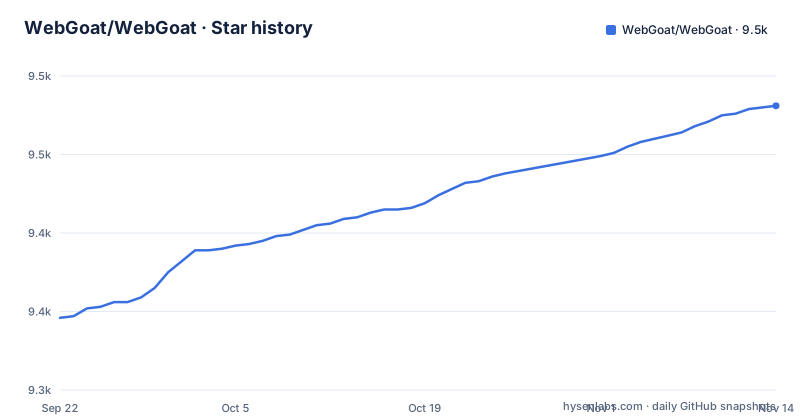
Star history
- WebGoat/WebGoat9,481 ★ · +135
| Repository | 2026-09-22 | 2026-11-14 |
|---|---|---|
| WebGoat/WebGoat | 9.3k | 9.5k |
135 Stars in the last 53 days, measured from the daily GitHub snapshot. Compare with other projects
Editorial analysis
One container serves two applications, not one
The image runs a single process that answers on two ports. WebGoat itself is reachable on 8080 under the /WebGoat path and WebWolf is reachable on 9090 under /WebWolf, and the Dockerfile declares both with two EXPOSE lines. Every run command in the documentation maps the pair, because the two services carry separate configuration: the available settings live in src/main/resources/application-webgoat.properties and src/main/resources/application-webwolf.properties, one properties file per service. When you run the standalone jar the same split shows up as two command line arguments rather than one:
java -jar webgoat-2023.8.jar --webgoat.port=8001 --webwolf.port=8002So changing ports is two numbers, and the failure mode of getting it wrong is quiet. Forward only 8080 and every lesson that calls WebWolf has nothing to talk to. The symptom appears inside the lesson rather than at startup, which reads like a broken exercise instead of a missing port mapping.
The loopback address on the port mapping is the security boundary
The first warning in the README says your machine is extremely vulnerable to attack while the program runs, that you should disconnect from the Internet while using it, and that the default configuration binds to localhost to minimize exposure. The published run command is where that default is enforced:
docker run -it -p 127.0.0.1:8080:8080 -p 127.0.0.1:9090:9090 webgoat/webgoatRead the Dockerfile and you see why the mapping matters. The ENTRYPOINT ends with --server.address=0.0.0.0, so the application listens on every interface inside the container. What limits reachability is the 127.0.0.1 on the left side of each mapping, not the app. Replace it with a bare 8080:8080 and every host on the network can reach a deliberately vulnerable application. The HEALTHCHECK line also reveals an endpoint on the app port, http://localhost:8080/WebGoat/actuator/health, which becomes network visible under the same edit.
Proxy lessons take you out of 127.0.0.1 and into the hosts file
If you plan to drive WebGoat with OWASP ZAP or another proxy, the documentation rules out 127.0.0.1 and localhost, and the replacement is name based host entries:
127.0.0.1 www.webgoat.local www.webwolf.localWith those names in place the container needs to be told which host belongs to which service, otherwise it generates links for a host your browser cannot resolve:
docker run -it -p 127.0.0.1:8080:8080 -p 127.0.0.1:9090:9090 -e WEBGOAT_HOST=www.webgoat.local -e WEBWOLF_HOST=www.webwolf.local -e TZ=America/Boise webgoat/webgoatThe lesson then opens at http://www.webgoat.local:8080/WebGoat/ and its companion at http://www.webwolf.local:9090/WebWolf/. Two costs come with this path. Editing the hosts file needs administrator rights on the host machine, and because both names still resolve to loopback, any other process or container able to reach that address can reach the same services.
Timezone and leftover lesson files both change what you see
Lesson behavior is not a function of the code alone. For some lessons the container has to run in the same timezone as the machine driving it, which is why the TZ variable appears in the examples:
docker run -it -p 127.0.0.1:8080:8080 -p 127.0.0.1:9090:9090 -e TZ=America/Boise webgoat/webgoatThe same class of surprise comes from state. The source build instructions say that if you ran WebGoat before, you should first run mvn clean -Pcleanall to clean up files from your temp and home directories, because those files could fail the tests due to changes in lessons. The Dockerfile makes that home directory concrete: it sets -Duser.home=/home/webgoat and WORKDIR /home/webgoat, and it creates a webgoat user to own it. The practical consequence is that a second run can start from the progress of the first, so a fresh exercise is not fresh until that state is cleared, and a lesson whose answer depends on a timestamp may pass on one machine and fail on another.
The documented jar is still named webgoat-2023.8.jar
The standalone route is a download from the releases page plus a Java command, and the example command carries an older file name than the project currently ships:
export TZ=Europe/Amsterdam # or your timezone
java -Dfile.encoding=UTF-8 -jar webgoat-2023.8.jar
The three most recent releases are v2026.5 from 2026-10-12, v2026.4 from 2026-09-17, and v2026.3 from 2026-09-13, so a literal run of that line against a current download will not find its argument. Match the jar name to whatever you actually downloaded. Note also that this needs a JDK rather than a JRE: the Dockerfile starts from docker.io/eclipse-temurin:25-jdk-noble and carries the comment that some lessons need to be able to compile Java code, and the source build prerequisites name Java 25. A JRE on your PATH is not enough.
Source builds go through the wrapper and expect a clean home
Working from the repository needs Java 25, an IDE, and Git, then a clone and a wrapper build. The wrapper differs by platform, which matters on Windows:
git clone [email protected]:WebGoat/WebGoat.git# On Linux/Mac:
./mvnw spring-boot:run
# On Windows:
./mvnw.cmd spring-boot:runThe install step uses the same split, ./mvnw clean install on Linux and Mac against ./mvnw.cmd clean install on Windows, and a local image can be built from the same tree with docker build -f Dockerfile . -t webgoat/webgoat. Once running, the application answers on http://localhost:8080/WebGoat and redirects to the login page when you are not logged in, where you use LogIn/Create account. Two small friction points: the README numbers two different sections both as section 4, and the mvn clean -Pcleanall step is easy to skip, which is the step that prevents a previous session's lesson files from failing tests.
EXCLUDE_CATEGORIES and EXCLUDE_LESSONS trim the menu, nothing else
The documentation offers a way to run WebGoat with a personalized menu by leaving out whole categories or individual lessons through environment variables, and marks it for specialists. As a jar it looks like this:
export TZ=Europe/Amsterdam # or your timezone
export EXCLUDE_CATEGORIES="CLIENT_SIDE,GENERAL,CHALLENGE"
export EXCLUDE_LESSONS="SqlInjectionAdvanced,SqlInjectionMitigations"
java -jar target/webgoat-2023.8-SNAPSHOT.jar
The values are exact identifiers, so a category or lesson name that does not match leaves that entry in the menu rather than removing it. What these variables do is control what the navigation shows. The README presents them only as a way to personalize the menu, not as a security control, so treat a trimmed menu as a curriculum decision rather than a lockdown.
server.address is the documented way off the loopback bind
One setting in the properties file overrides the safe default, and it is worth seeing exactly what it costs. To change the IP address the documentation says to add the following variable to the WebGoat/webgoat-container/src/main/resources/application.properties file:
server.address=x.x.x.xThat line replaces the localhost default described in the first warning, so after it the application answers on that address rather than on the loopback interface. There are legitimate reasons: a container host reaching into a private network segment, or a lab where a separate machine needs to reach the exercises. The README does not add a safety note to that instruction, so the same edit that makes a lab work makes the application reachable by anything that can route to that address. Verify the network you are on before writing that value, and keep the port mappings on 127.0.0.1 when the client is on the same machine.
Editorial conclusion
WebGoat belongs on a laptop or in an isolated container host where nothing else is running, used with the published 127.0.0.1 port mappings intact. Anyone setting it up for a training class should decide up front whether students need a proxy, because that decision forces host file edits, and should know that the container listens on all interfaces internally. Before trusting any downloaded jar, check its name against the release page: the documented file name is webgoat-2023.8.jar while the newest release is v2026.5. Anyone intending to use these techniques against systems they do not own is outside what this project is for.
Frequently asked questions
What is WebGoat used for?
It is a deliberately insecure web application maintained by OWASP, built as a demonstration of common server-side application flaws. The exercises are meant for people learning application security and penetration testing techniques.
Is WebGoat safe to run?
The README warns that your machine is extremely vulnerable to attack while the program runs and that you should disconnect from the Internet while using it. The default configuration binds to localhost to minimize exposure, which is why the published port mappings use 127.0.0.1.
how to install webgoat
Run the published image with docker run -it -p 127.0.0.1:8080:8080 -p 127.0.0.1:9090:9090 webgoat/webgoat, or download a jar from the releases page and start it with java -Dfile.encoding=UTF-8 -jar webgoat-2023.8.jar, or clone the repository and use the Maven wrapper.
how to access webgoat
Open http://localhost:8080/WebGoat. That link redirects to the login page if you are not logged in, where you use LogIn/Create account to proceed. The companion WebWolf service sits on port 9090 at /WebWolf.
how to use webgoat on windows
The source route has dedicated Windows steps: ./mvnw.cmd clean install to build and ./mvnw.cmd spring-boot:run to start, against ./mvnw on Linux and Mac. The Docker route is the same command on every platform since it runs the application inside the container.
how to install WebGoat on Kali?
The README describes four routes and none of them is distribution specific: the Docker image, the browser based desktop image webgoat/webgoat-desktop, the standalone jar, and the source build with the Maven wrapper. Pick the Docker route and nothing beyond Docker needs to be installed on the distribution itself.
Official sources
Add this badge to your README
If you maintain this project, the badge below links readers to this analysis and shows its maintenance status from the daily GitHub snapshot. Paste the markdown into your README; add ?metric=license or ?metric=stars to the image URL for a different field.

[](https://hysenlabs.com/projects/webgoat-webgoat)Star history chart for your README
[](https://hysenlabs.com/projects/webgoat-webgoat)Was this useful?