minimal-light: a small Jekyll theme for an academic homepage
A simple and elegant Jekyll theme for an academic personal website
At a glance
- What is it?
- minimal-light is a deliberately small Jekyll theme for a personal academic website, derived from the well known `minimal` theme and published under CC0, which means you can take it, change it and share it without attribution. It ships three ways to use it, a fork for GitHub Pages, a remote theme reference, and a folder of prebuilt HTML for people who do not want Jekyll at all.
- Who is it for?
- Adopt minimal-light if you want an academic homepage that is a homepage rather than a site, with publications, services, a CV link and a scholar link in the configuration, and if you are comfortable editing a Jekyll theme. Do not adopt it if you need a blog with tags and archives, a landing page builder, or anything beyond one page, because this is a single layout theme.
- Can I use it commercially?
- Yes. CC0-1.0 is a permissive licence: you can use, modify and sell software built on it, as long as you keep its copyright and licence notices.
- Is it still maintained?
- Yes. The repository last received commits 21 days ago.
- What is it written in?
- Mainly CSS, according to GitHub's language statistics.
Answers come from the project's GitHub data, last synced on November 7, 2026, and from our analysis. They are not legal advice.
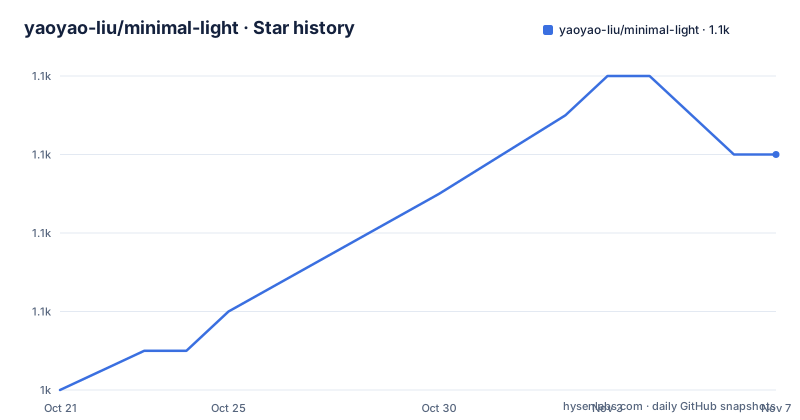
Star history
- yaoyao-liu/minimal-light1,054 ★ · +6
| Repository | 2026-10-21 | 2026-11-07 |
|---|---|---|
| yaoyao-liu/minimal-light | 1k | 1.1k |
6 Stars in the last 17 days, measured from the daily GitHub snapshot. Compare with other projects
Editorial analysis
One page, built on a theme many people already know
The Minimal Light theme is described as a simple and elegant Jekyll theme for an academic personal website, and the README is open about its lineage in the first line, that this is the source code of the author's homepage and that the website is built on the `minimal` theme by orderedlist, with an improved vision credited to a named contributor. The feature list is short and matches the description, with a simple and elegant personal homepage theme, automatic deployment by GitHub Pages, basic search engine optimization, mobile friendliness, support for Markdown and support for dark mode. The repository is published under the Creative Commons CC0 licence, and the README says outright that you can feel free to use and share the source code anywhere you like, which for a theme means you can take it into a company site without an attribution obligation. The author also points to a separate repository holding the latest version of the homepage itself, which is the useful signal for a fork, since the theme and the site that uses it are versioned apart.
Three ways to use it, with one real limitation
The getting started section offers two hosting routes and one escape hatch. The first is the GitHub Pages service, where you fork the repository or use it as a template, rename it to `your-username.github.io`, and enable GitHub Pages for it. The second is a remote theme, which means adding a single line to your own `_config.yml`.
remote_theme: yaoyao-liu/minimal-lightThe README is careful about what that line buys you, noting that adding it directly applies all the default settings in this repository to yours, and that if you hope to edit any files, for example `index.md`, you still need to copy them into your repository. That is the honest catch of the remote theme approach, since a theme that keeps its publications and services in `_includes/` is not editable from a distance. The third option is the plain HTML version, with the compiled files in the `html_source_file` folder, and the README says that if you do not like Jekyll you may directly edit and use that version. For a one page site, that is a genuinely attractive option, since it removes the toolchain from the equation entirely.
Building it locally, and the webrick wrinkle
The local route is the standard Jekyll one with one small addition. You install Ruby and Jekyll, clone the repository, and then run three commands, `bundle install`, `bundle add webrick`, and `bundle exec jekyll server`.
git clone https://github.com/yaoyao-liu/minimal-light.git
cd minimal-light
bundle install
bundle add webrick
bundle exec jekyll server
The `webrick` line is there because modern Ruby no longer ships the server that Jekyll's local preview uses, so without it the preview fails in a way that looks like a broken theme. Once the server runs, the live page is at `localhost:4000` and the generated HTML lands in the `_site` folder, which is the artefact you would deploy. The `CNAME` file in the repository root is the custom domain entry used by the GitHub Pages service, so if you fork this you have to replace it, and the same applies to every other file that names the original author.
The project structure tells you what is content and what is code
The architecture listing in the README is the clearest description of how the theme separates content from presentation, and it is worth reading before you fork. Content lives in `_data/publications.yml`, the YAML file for publications, and in the two included Markdown files, `_includes/publications.md` and `_includes/services.md`, which the README says are included from `index.md` and which support both Markdown and HTML syntax. The page itself is `index.md`, the content of the index page, also supporting Markdown and HTML, and the single layout is `_layouts/homepage.html`. Styling is two Sass files, `minimal-light.scss` compiled into the CSS that controls the style of the page, and `minimal-light-no-dark-mode.scss`, which is the same file with dark mode disabled. The `assets/` directory holds the images, `html_source_file/` holds the compiled HTML, and the `Gemfile` and `_config.yml` are the two build-related files. So the split is conventional Jekyll, and a user who does not want Jekyll edits the compiled HTML instead.
Dark mode, fonts and the two favicons
The configuration section is a list of variables the theme respects if they are set in `_config.yml`, and the dark mode settings are the ones worth understanding. The `auto_dark_mode` option lets you disable the automatic dark theme, and the existence of a separate no-dark-mode Sass file is the structural counterpart, so a site that wants full control of the palette has a supported path rather than a hack. Images are configured with `avatar` for the profile picture and `favicon` and `favicon_dark`, which the README says are used for the light and dark modes respectively, so a fork that ignores them will show the original author's image. Typography is a single setting, `font`, choosing between Serif and Sans Serif, which is a large part of why the theme reads as elegant rather than generic. There is also an `enable_footnote` toggle for the line crediting Jekyll and the theme, and a `google_analytics` identifier that the README asks you to remove if you do not use it.
The academic details: publications, a CV link and a scholar link
The configuration variables are grouped, and the grouping is the design. A basic information block sets the title, the position, the affiliation and the email. A search engine optimization block sets keywords, a description and a canonical URL, which the README says is used to improve traffic from search engines. A links block holds the `google_scholar` link, a `cv_link` pointing at a curriculum vitae file in the assets directory, and the `github_link`, `linkedin` and `twitter` entries, and each of those can be deleted if you do not need it. The two entries that make this an academic theme rather than a personal blog theme are the Google Scholar link and the CV link, and they are configured the same way as a Twitter handle, which is a good sign of how small the surface is. The publications data file and the included publications file are where a publication list is maintained, and the README notes that you may remove the included files if you do not want them.
Translations, releases and the state of the theme
The README is published in four languages, with English, Simplified Chinese, Traditional Chinese and German versions linked at the top, which is a reasonable amount of attention for a theme used by people across institutions. The release history shows a jump from the 1.0 line, with 1.0.2 in August 2022 and 1.0.3 in December 2022, to version 2.0 in September 2024, and the last push was on 2026-07-21, so the theme is being touched even though the version number has moved only once. The domain in the configuration points at the author's own demo site, and the README links a separate repository with the latest version of that homepage, which is the place to look if you want to see the theme used rather than described. The design trade worth stating is the obvious one, since a single page with a data file and two includes is also a single page with no room for growth, so the moment you need a blog, an archive or a second page you are past what this theme does.
Editorial conclusion
Adopt minimal-light if you want an academic homepage that is a homepage rather than a site, with publications, services, a CV link and a scholar link in the configuration, and if you are comfortable editing a Jekyll theme. Do not adopt it if you need a blog with tags and archives, a landing page builder, or anything beyond one page, because this is a single layout theme. Before you start, decide how you will host it, since the remote theme route gives you the defaults but not the ability to edit the included files, and the fork route gives you everything. Note the licence position, since the repository is released under CC0 and the README says you can use and share the source code anywhere you like, with the attribution credit going to the upstream `minimal` theme and the visual improvement to the contributor named in the README. The last push was on 2026-07-21 and the newest release is 2.0 from 2024-09-04.
Frequently asked questions
What licence is the minimal-light theme under?
It is released under the Creative Commons CC0 licence, and the README says you can feel free to use and share the source code anywhere you like. The theme is built on the `minimal` theme by orderedlist, with an improved vision credited to a named contributor.
How do I use minimal-light without forking it?
Add `remote_theme: yaoyao-liu/minimal-light` to your own `_config.yml`, which applies all the default settings from the theme repository to yours. The README notes that if you want to edit files such as `index.md` you still need to copy them into your own repository, since the included files cannot be changed remotely.
Can I use minimal-light without Jekyll?
Yes. The compiled HTML files are in the `html_source_file` folder, and the README says that if you do not like Jekyll you may directly edit and use the HTML version. For a one page site that removes the build toolchain entirely.
How do I run the minimal-light theme locally?
Install Ruby and Jekyll, clone the repository, then run `bundle install`, `bundle add webrick` and `bundle exec jekyll server`. The live page is served at localhost:4000 and the generated HTML ends up in the `_site` folder.
Official sources
Add this badge to your README
If you maintain this project, the badge below links readers to this analysis and shows its maintenance status from the daily GitHub snapshot. Paste the markdown into your README; add ?metric=license or ?metric=stars to the image URL for a different field.

[](https://hysenlabs.com/projects/yaoyao-liu-minimal-light)Star history chart for your README
[](https://hysenlabs.com/projects/yaoyao-liu-minimal-light)Was this useful?