FastCtx: a Rust MCP runtime that keeps one control center behind many stdio proxies
Fast, context-efficient repository tools for AI agents (MCP)
At a glance
- What is it?
- Repository tools for coding agents, written in Rust, distributed through npm, with a shared per-user control center, verified updates that roll back when a restart fails, and a default feature that pulls a pinned PDFium build into every install.
- Who is it for?
- FastCtx is aimed at agents that waste turns on shell mechanics: quoting, escaping, PowerShell syntax, encoding and truncated output. If your agent already reads files cleanly, the argument is thinner, but the tool surface is small enough to audit in a minute and the failure semantics are unusually well specified.
- Can I use it commercially?
- Yes. Apache-2.0 is a permissive licence: you can use, modify and sell software built on it, as long as you keep its copyright and licence notices.
- Is it still maintained?
- Yes. The repository received new commits within the last day.
- What is it written in?
- Mainly Rust, according to GitHub's language statistics.
Answers come from the project's GitHub data, last synced on November 15, 2026, and from our analysis. They are not legal advice.
Star history
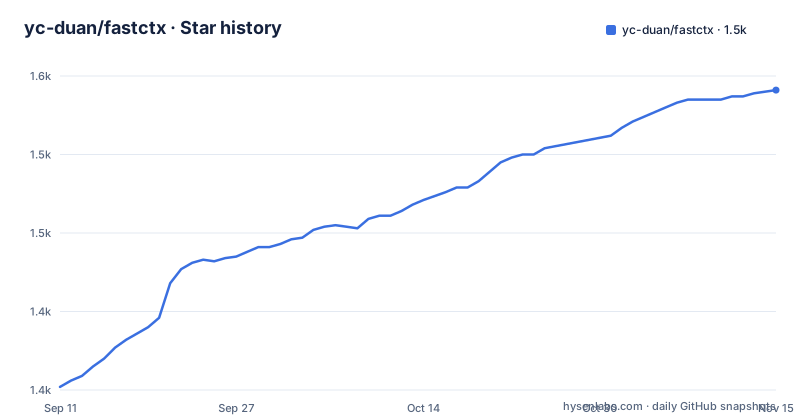
- yc-duan/fastctx1,541 ★ · +189
| Repository | 2026-09-11 | 2026-11-15 |
|---|---|---|
| yc-duan/fastctx | 1.4k | 1.5k |
189 Stars in the last 65 days, measured from the daily GitHub snapshot. Compare with other projects
Editorial analysis
Each serve process is a thin proxy onto one shared control center
The architecture is the interesting part. Repository operations run in a persistent process with stable input schemas and output formats, but each fastctx serve process is described as a thin stdio proxy. Proxies belonging to the same user and the same FastCtx build share one private local control center, and that shared piece owns the search executor and the global admission limits.
Everything else stays per connection. Each MCP connection keeps its own working directory, its own native environment, its own cancellation state and its own background-output cursor. So two editors, two projects and two shells can share one runtime without sharing a working directory or a job queue, while the resources that are expensive to duplicate, the search executor in particular, are pooled.
That split is also what makes the global admission limits coherent: concurrency is capped once for the user rather than once per window, which is the difference between a search pool that scales with your monitors and one that scales with how many editors you left open.
A session dies with its host, and side effects are never replayed
The failure behaviour is stated precisely enough to be worth reading. An MCP session ends when its host ends it, never because the shared runtime had a problem. If the control center becomes unreachable, the proxy answers the calls it can no longer complete with an explicit error, reconnects to a replacement, which means either starting a new control center or running the engine inside the proxy itself, and then carries on over the same stdio transport.
The clause that matters most for anything with consequences is that side-effecting calls are never replayed. A reconnect does not re-run a write or re-issue a mutation that may already have landed, so the failure mode is a visible error rather than a duplicate action.
Lifetimes are just as deliberate. The control center stays resident while any host process that used it is still running, and exits ten minutes after the last of them is gone, and only when there is no connection, no active request and no running background job. A long job is therefore enough to hold the runtime alive past the grace period, which is the behaviour you want when you launched something deliberately.
The tool surface reads, searches, replaces mechanically and runs shells
Eight tools cover the work, and what is missing is as informative as what is there. inspect_local_file reads text, images, PDFs and raw bytes. grep searches file contents, glob finds files, and replace performs mechanical batch replacement. Then four deal with execution: run, run_background, job_output, job_kill and job_list, which together cover running commands and managing persistent long-running jobs.
There is no general-purpose write tool. Writing a new file, or editing one in a way that is not a mechanical substitution, means going through the shell, and the shell is opt-in: one of the control terminal's main actions is enabling the Bash terminal when needed.
Two other controls shape what the model receives. You can adjust the output tier and a provider-aware output protection, which reads as a way to trim or guard output before it reaches a host with its own limits. And grep and glob run on automatic CPU parallelism by default, with the option to set an explicit core limit instead. The stated benefit is that the model spends its attention on the code rather than on whether the command was correct.
npm is the launcher, Node 18 is the requirement, and the binary relocates itself
Installation goes through npm even though the runtime is Rust, because npm ships the launcher:
npm install --global fastctx
fastctx
Node.js 18 or later is the requirement for that path. Running fastctx opens a full-screen control terminal, and the interface carries 17 languages. Its seven main actions are the whole configuration surface: adjust the output tier and output protection, choose automatic or fixed CPU parallelism for search, enable the Bash terminal, set background-job storage, concurrency and list page limits, inspect and stop running jobs across all sessions from a Jobs screen, reset preferences to factory defaults behind a confirmation, and review each host configuration change before restarting the host session.
That last action is what makes the connection durable. Connecting copies the current binary into a managed bin directory and points the host configuration at that stable path, which is why the setup keeps working after an npm cache cleanup or an upgrade. The host no longer depends on the npm installation remaining intact.
Updates verify a checksum, roll back on a bad restart, and skip cargo builds
The updater is the most detailed part of the documentation, and the dependency list explains it. A startup check runs before the main menu and is strictly bounded: offline, timeout or rate limiting and the program enters silently, with a manual check available from a dedicated screen. Successful results are cached for 24 hours in machine-private storage outside the managed directory, so most launches never touch the network.
The two channels are handled differently. npm launches query the exact launcher package through a fresh isolated cache with prefer-online, and an accepted update installs that exact version with lifecycle scripts disabled. Direct GitHub Release builds download the platform archive together with an aggregate SHA256SUMS file, verify the archive before extracting anything, probe the downloaded version, replace the executable atomically, and roll back when the restart health check fails. A failed npm update restores the exact previous package version, and every failure reopens the previous interface with a warning. After a good restart the managed copy is synchronised, while copies you changed yourself are left alone.
Two exclusions matter. Cargo installs are not self-updated, and neither is the runtime inside the managed bin directory. And after an update you are told to restart the host session, because the control center is isolated per build and an old session keeps the old one.
The manifest is edition 2024, pins the MCP SDK, and turns on PDF by default
The crate metadata is a good summary of the engineering. Name fastctx, version 0.2.6, Apache-2.0, documentation on docs.rs, keywords covering MCP, Codex, ripgrep and filesystem work, edition 2024 with a minimum Rust of 1.88. Two dependencies are pinned with an equals sign rather than a caret: the MCP SDK at exactly 2.2.0 with stdio transport, and the PDF renderer at exactly 0.9.2.
The feature block is the part to read before installing:
[features]
default = ["pdf"]
pdf = ["dep:pdfium-render"]
So PDF support is on out of the box, and it drags in a pinned PDFium build. Turning it off is a build-time decision, not a setting.
The rest of the dependency list maps onto the documented behaviour. The ripgrep family of crates plus globset and ignore back the search tools, rayon supplies the parallelism behind the core limit option, chardetng and encoding_rs address the mojibake problem the README complains about, and the image crate is built with only bitmap, gif, jpeg, png and webp features enabled. A tokenizer library counts tokens, a hashing crate backs the archive checksum, a semver crate compares versions, and a process wrapper supplies job objects on Windows.
The crate ships without the Chinese README, and mirrors lag after a release
The include list in the manifest decides what a published crate contains: the build script, the source, the tests, the English README, the licence file, the notice, both third-party licence manifests and the vendored third-party directory. README.zh-CN.md is not in that list, even though the file exists at the repository root and the English README opens by linking to it as the Simplified Chinese version. Anyone reading the package from a registry rather than a clone finds the English text only.
Licensing is handled with tooling rather than by hand. Two licence report templates, a deny configuration and a vendored dependency directory sit alongside the two generated third-party licence manifests, which is what a project with a long tail of dual-licensed Rust dependencies looks like in practice.
The installation section also names its most common failure. Mirror registries copy new releases from the official registry on a delay, so an install through a mirror immediately after a release can fail with a 404 Not Found, most often on the platform package, which npm installs as an optional dependency. That last sentence is where the text on view ends.
In numbers the project has 1446 stars, 55 forks and 25 open issues, with the last push on 5 September 2026 and releases v0.2.6, v0.2.5 and v0.2.4 in August 2026.
Editorial conclusion
FastCtx is aimed at agents that waste turns on shell mechanics: quoting, escaping, PowerShell syntax, encoding and truncated output. If your agent already reads files cleanly, the argument is thinner, but the tool surface is small enough to audit in a minute and the failure semantics are unusually well specified.
Four things are worth checking first. The tool set has no general file write, so bulk changes go through the mechanical replace path and everything else needs the Bash terminal, which you enable deliberately in the control terminal. The default build turns on PDF support, which drags in a version-pinned PDFium, and the image support list is limited to bitmap, gif, jpeg, png and webp, so if you inspect TIFF or SVG files you will find the gap immediately. Installing with cargo means no self-update path at all, because cargo builds and the managed binary in the managed directory are both excluded, so the npm launcher is the route that keeps updating.
The operational rule that catches people is the last one: restart your host session after an update. The control center is isolated per build, so an existing session keeps talking to the old one, and a 404 right after a release is usually a mirror lagging rather than a broken release.
Frequently asked questions
How does FastCtx install and connect to an agent host?
Run npm install --global fastctx, which needs Node.js 18 or later, then run fastctx to open the control terminal and review the proposed host configuration change. Connecting copies the binary to the managed bin directory and points the host at that path.
Does FastCtx have a tool for writing arbitrary files?
No. The tools are inspect_local_file, grep, glob, replace for mechanical batch replacement, and run, run_background, job_output, job_kill and job_list for shell work. Bash execution is enabled deliberately from the control terminal.
Why does FastCtx tell me to restart Codex after an update?
Because proxies are shared per user and per build, and the control center is build-isolated. A session that was already running keeps talking to the old build until the host session is restarted.
Does a cargo-installed FastCtx update itself?
No. Cargo installs are not self-updated, and neither is the runtime inside the managed bin directory. The npm launcher path is the one that keeps updating, and the startup check can be disabled with FASTCTX_DISABLE_UPDATE_CHECK=1.
Official sources
Add this badge to your README
If you maintain this project, the badge below links readers to this analysis and shows its maintenance status from the daily GitHub snapshot. Paste the markdown into your README; add ?metric=license or ?metric=stars to the image URL for a different field.

[](https://hysenlabs.com/projects/yc-duan-fastctx)Star history chart for your README
[](https://hysenlabs.com/projects/yc-duan-fastctx)Was this useful?