yesod in nineteen lines, and the fourteen packages hiding behind them
A RESTful Haskell web framework built on WAI.
At a glance
- What is it?
- yesod is a Haskell web framework on WAI whose minimal example fits in a single code block. Read that block against the repository tree and a few gaps show up: a JSON claim the sample never delivers, a four repository clone list for fourteen package directories, a root with three build configs, and no releases at all.
- Who is it for?
- Use yesod if you already ship Haskell and want typed routes, since the route macro is the part that earns its keep. Check three things first: which stack config the project intends you to use, since the root holds more than one; whether the fourteen package directories are built by default or picked by you; and what authbind is for, because the development image installs it and the example never calls it.
- Can I use it commercially?
- Yes. MIT is a permissive licence: you can use, modify and sell software built on it, as long as you keep its copyright and licence notices.
- Is it still maintained?
- Yes. The repository last received commits 65 days ago.
- What is it written in?
- Mainly Haskell, according to GitHub's language statistics.
Answers come from the project's GitHub data, last synced on November 21, 2026, and from our analysis. They are not legal advice.
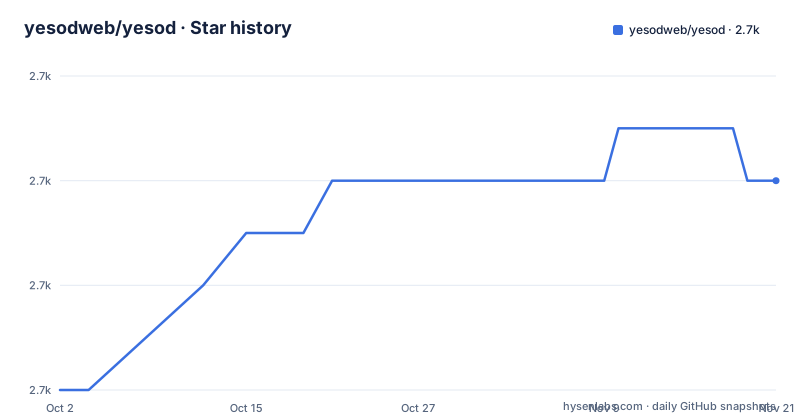
Star history
- yesodweb/yesod2,730 ★ · +4
| Repository | 2026-10-02 | 2026-11-21 |
|---|---|---|
| yesodweb/yesod | 2.7k | 2.7k |
4 Stars in the last 50 days, measured from the daily GitHub snapshot. Compare with other projects
Editorial analysis
One empty record, four extensions, port 3000
The smallest program in the README is nineteen lines long, and the first of them is a LANGUAGE pragma naming four extensions. OverloadedStrings, QuasiQuotes, TemplateHaskell and TypeFamilies all have to be switched on before the rest will compile, so a first Yesod file pays its extension tax before it does anything.
The rest is five pieces. `data App = App` is an empty record whose own comment says to put config and a database connection pool in it. `mkYesod "App" [parseRoutes|/ HomeR GET|]` is TemplateHaskell: the quasiquoter reads a route table and the macro generates the routes, the handler class and the linking code from it. `instance Yesod App` supplies the defaults, with a note that methods in it can be overridden. `getHomeR` has type `Handler Html` and returns `defaultLayout [whamlet|Hello World!|]`, so a handler yields a page rather than bytes. `main` is one line, `warp 3000 App`, which binds port 3000 and hands the app to warp.
What is absent matters as much. No settings, no sessions, no logging, no database. The README's claim that safety and security are guaranteed at compile time has a visible mechanism in that route macro: a handler named for a route that does not exist is a type error rather than a 404 later. It says nothing about the configuration a real deployment needs.
The example is billed as covering JSON, and contains none
One sentence in the getting started section sets up a mismatch. The README says the concepts used in the example are routing, handlers, linking and JSON, then sends the reader to the Basics chapter of the Yesod book for each of them in detail.
Routing, handlers and linking are all in the nineteen lines. JSON is not. There is no encoder, no content negotiation, no data type in the listing, and the handler signature is `Handler Html`, which is the page type rather than a payload type. Linking is the subtlest of the three that do appear, since what `mkYesod` generates is what makes typed URLs possible, and the example never constructs one.
So the sentence describes the book's scope rather than the snippet. It is the only mention of JSON anywhere in the document, and it is the only mention of linking. A reader who follows the pointer expecting a JSON endpoint in the sample will find a page handler that renders one line of HTML through a template, and will have to go to the book to see where JSON enters.
Four repositories to clone, fourteen package directories inside one
The hacking section says Yesod consists mostly of four repositories, and gives one clone command for each:
git clone --recurse-submodules https://github.com/yesodweb/shakespeare
git clone --recurse-submodules https://github.com/yesodweb/persistent
git clone --recurse-submodules https://github.com/yesodweb/wai
git clone --recurse-submodules https://github.com/yesodweb/yesod
Every line carries `--recurse-submodules`; that option initializes submodules, while clone depth is a separate choice. The four names are shakespeare, persistent, wai and yesod, and each repository is then built with `stack build`.
The mismatch is with the tree of the yesod checkout itself. Its root holds fourteen directories named after packages: yesod-core, yesod-auth, yesod-auth-oauth, yesod-bin, yesod-eventsource, yesod-form, yesod-form-multi, yesod-newsfeed, yesod-persistent, yesod-sitemap, yesod-static, yesod-test, yesod-websockets and yesod. A framework described as mostly four repositories ships fourteen package directories inside one of them, and the clone list does not say which of those get built.
Six demo apps line up with six of the fourteen packages
The demo directory holds six example applications, and their names match subpackages rather than features. They are lite, subsite, auth, streaming, streaming-db and appcache.
The names indicate the subjects demonstrated, but they do not establish a one-to-one mapping to the framework packages. Inspect each demo’s imports and build configuration to see which dependencies it actually uses.
The demos illustrate selected workflows; their names alone do not establish package coverage.
Three build files at the root and one build line in the README
The root carries several build descriptions that a reader has to reconcile: stack.yaml, stack.yaml.lock, a second file named stack-lts-22.yaml, and cabal.project for the cabal route. Two of the stack files are the expected pair, a configuration and its recorded snapshot. stack-lts-22.yaml is a second configuration, named after the LTS 22 resolver instead of the tool's default filename.
Nothing in the README names any of them. The only build instruction is that each repository can be built with `stack build`, which takes no configuration flag and therefore reads stack.yaml. The LTS 22 file is reachable only when a caller passes it explicitly.
Resolver choice is what pins the compiler and the package versions around the framework, so which file is authoritative is not a cosmetic question. With one config named for the resolver and another sitting under the default name, a contributor can compile against a different snapshot than the one the project pinned, and the text gives no way to tell which one a new clone is meant to use.
The dev image puts ./ on PATH and grants sudo with no password
The Dockerfile labels itself in its own comments as a development environment, and reads that way. It starts `FROM haskell:7.10`, installs sudo, libssl-dev, ca-certificates, libcurl4-openssl-dev, git and authbind, then creates a user named haskell with a home at /home/haskell. It writes a sudoers entry granting `haskell ALL=(ALL) NOPASSWD: ALL`, and it finishes by installing stackage-update, then stackage-cli, stackage-cabal, stackage-sandbox and stackage-upload, and moving the resulting binaries into /opt/stackage/bin.
Two details are worth knowing before running that image. The PATH line ends with `./`, which puts the current directory on the executable search path for every command in the container, so anything sitting in the working directory becomes runnable by name. And the sudoers grant removes the password prompt, so the unprivileged user can become root without typing anything.
The image also deletes the cabal directory it just filled, with `rm -r /home/haskell/.cabal`, once the binaries have been moved. authbind is installed next to a comment saying it can be useful for exposing ports, which the sample application never uses, since `warp 3000 App` binds 3000 directly.
No releases page, so the install path is a compiler
The repository publishes no GitHub releases. There is no tag list to install from, no prebuilt artifact and no binary download, which puts the entire distribution question onto a toolchain.
The README's answer is to read further rather than to download. It points at the Yesod website and recommends the quick start guide there, which is based on the Haskell build tool stack. The only command given for producing anything is `stack build`. So the practical install is a Haskell toolchain plus a snapshot resolver, not a fetch.
The home page itself is an http address rather than https, which is worth noting for anyone about to type it into a script or a policy file. Between the two links the README offers, one points at yesodweb.com and the other at the Basics chapter of the book, both over plain http, while the clone commands use http as well.
The surrounding numbers are worth reading next to that. The repository has 2,726 stars, 386 forks and 136 open issues, and its last recorded push is 18 September 2026. Everything the page offers assumes a Haskell toolchain already exists on the machine, so a reader without one is not served by any part of it, and there is no fallback page that says so.
Editorial conclusion
Use yesod if you already ship Haskell and want typed routes, since the route macro is the part that earns its keep. Check three things first: which stack config the project intends you to use, since the root holds more than one; whether the fourteen package directories are built by default or picked by you; and what authbind is for, because the development image installs it and the example never calls it. Do not plan around a downloads page, there is not one, and do not plan around a JSON example, because the README points at one that is not there.
Frequently asked questions
How many repositories do you need to build yesod?
Four, according to the hacking section: shakespeare, persistent, wai and yesod, each cloned with `--recurse-submodules`. The yesod checkout itself then holds fourteen package directories, from yesod-core to yesod-websockets.
How do you run the minimal yesod example?
`main = warp 3000 App` binds port 3000 through warp, and the handler returns `Handler Html` by way of `defaultLayout`. The app record is empty, with its own comment leaving config and any database pool to you.
Does yesod publish release binaries?
The repository has no GitHub releases and no tag list to install from. The README sends readers to the quick start guide on yesodweb.com, which is based on the Haskell build tool stack, and gives `stack build` as the only build command.
Does the yesod README show JSON?
It names JSON as one of the concepts behind the example and points at the Basics chapter of the Yesod book, but the listing contains no JSON. The only handler shown has type `Handler Html` and renders one line through a template.
What does the yesod Dockerfile set up?
A development image on haskell:7.10. It installs sudo, libssl-dev, ca-certificates, libcurl4-openssl-dev, git and authbind, creates a haskell user with passwordless sudo, and installs stackage-cli, stackage-cabal, stackage-sandbox and stackage-upload into /opt/stackage/bin.
Official sources
Add this badge to your README
If you maintain this project, the badge below links readers to this analysis and shows its maintenance status from the daily GitHub snapshot. Paste the markdown into your README; add ?metric=license or ?metric=stars to the image URL for a different field.

[](https://hysenlabs.com/projects/yesodweb-yesod)Star history chart for your README
[](https://hysenlabs.com/projects/yesodweb-yesod)Was this useful?