native-feel-skill quotes a 75 item audit, a 70 item list, and a tree that ends mid branch
An Agent Skill for designing cross-platform desktop apps that feel native — distilled from Raycast's 2.0 deep-dive and reverse engineering of Raycast Beta.app. Eight architectural tenets, four-layer architecture, WebKit/WebView2 survival guide, 75-item ship audit.
At a glance
- What is it?
- native-feel-skill is a repository of prose guidance, not code: a skill file, a directory of reference notes and a directory of checklists, meant to be pasted into an agent. Its argument is reverse engineered from a single shipping Mac application, and its own documentation is inconsistent about how many audit items there are.
- Who is it for?
- native-feel-skill fits a team that already chose a webview shell for its desktop app and wants a checklist to argue with, because the most useful thing in it is the part that says when not to use the approach. It fits a team expecting code poorly, since the repository contains no implementation and no test to run.
- Can I use it commercially?
- Yes. MIT is a permissive licence: you can use, modify and sell software built on it, as long as you keep its copyright and licence notices.
- Is it still maintained?
- Yes. The repository last received commits 169 days ago.
- What is it written in?
- GitHub does not report a main language for this repository.
Answers come from the project's GitHub data, last synced on November 15, 2026, and from our analysis. They are not legal advice.
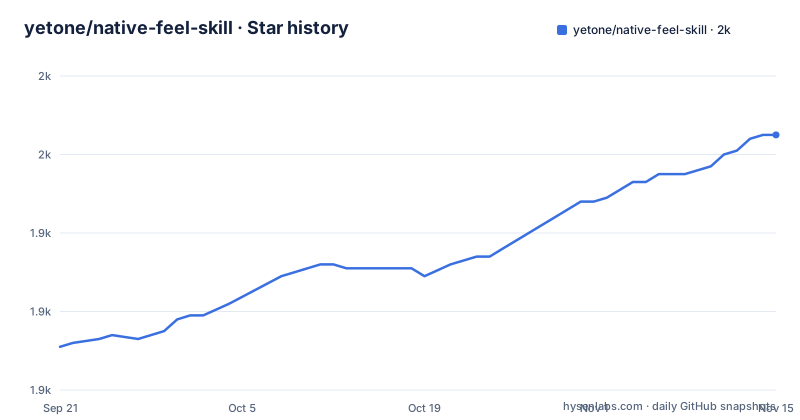
Star history
- yetone/native-feel-skill1,965 ★ · +54
| Repository | 2026-09-21 | 2026-11-15 |
|---|---|---|
| yetone/native-feel-skill | 1.9k | 2k |
54 Stars in the last 55 days, measured from the daily GitHub snapshot. Compare with other projects
Editorial analysis
One install path runs a third-party installer, the other asks your agent to clone it
Two routes are offered and they have nothing in common.
The first delegates the work to a separate tool:
npx skills add yetone/native-feel-skill -gThat runs a package from a registry through a Node execution wrapper, with a flag that installs at user level so every project picks it up. The skill does not need to be on the machine beforehand and there is no pinned version in the command.
The second route is a block of text with instructions in it, addressed to an agent rather than to a person. It asks the agent to clone the repository into a user-level skills directory under a specific name, to verify that the skill file and two subdirectories are present, and to report the path when done.
What the second route cannot tell you is the path. The instructions say to use whatever directory the agent reads skills from on that machine, and offer one example for one specific agent on one operating system. So on any other combination, the block depends on the agent already knowing a convention the block does not state. Both routes are reasonable; only one of them is deterministic.
The layout block ends in the middle of a branch
The repository tree is five entries: a gitignore, a licence, this page, a skill file, and two directories. There is no source directory, no build configuration, no test and no package manifest. The project declares no primary language, which is consistent with a repository of documents.
The layout block inside the page does not survive to the end. It shows the entry file, then the references directory with six numbered files, and then stops at a line containing a vertical bar and a corner. Whatever followed that corner is not on the page.
So the visible layout is partial in the middle of the tree, and the two directories are described unevenly. The references directory gets a file-by-file listing with a one-line gloss for each: a philosophy file described as eight tenets, an architecture file, a webview survival file, an IPC contract file across four languages, a memory file whose comment reads why the activity monitor lies, and a conventions file described as seventy or more items.
The checklists directory gets no listing at all. It is only ever named by file path, three separate times, as a ship readiness checklist, a decision tree, and in the use cases.
The audit is quoted at two sizes, and one example is cut off mid item
How many checks this skill performs depends on which sentence you read.
The header description says a seventy-five item ship audit. The paragraph under it repeats seventy-five. The use cases section then points at a different file and calls it a seventy or more item conventions audit. And the worked example below that says most applications fail the same six to eight items, then lists six of them.
That list is cut off too. It gets through a pointer cursor on rows, a web style modal overlay where a native sheet belongs, a hardcoded brand accent instead of the system accent, a page fade transition, and an opaque window background instead of the platform material. The sixth entry begins and stops partway through the word for a WebKit condition.
The numbers are not necessarily contradictory, since a ship audit and a conventions audit could be different files with different lengths. But nothing on the page says which is which beyond the file names, and a reader who goes looking for item seventy-five in a file the page calls a seventy item list will not find a map of where the counts come from.
The skill spends a section telling you when not to use it
This is the part of the repository that carries the most weight, because it is the part a checklist cannot do for you. There is a dedicated section headed what this is not, and it lists four exclusions.
It is not for single operating system applications, on the grounds that you should just build native. It is not for applications that are satisfied with good enough, on the grounds that the polish budget in this approach is five to ten times higher. It is not for applications with a resident memory floor under 150 megabytes or a cold start under 100 milliseconds, because those floors are described as real. And it is not for games, document editors or media players.
The checklist named as the decision tree asks four questions and gives a direction for each. A cold start budget under 100 milliseconds means build native. A memory floor under 150 megabytes means build native. An extension ecosystem means you need the Node layer regardless. A runway under three months means start on the webview shell rather than pursuing this architecture.
Those thresholds are the concrete part of the whole skill. Everything else is prose about where to place a seam.
The four targets are stated twice and the second statement is cut short
The page states the requirements once as a bulleted list and once as a single architecture sentence.
The list asks for an application that runs on macOS and Windows, with Linux optional, from a single user interface codebase. It asks for a launch under 500 milliseconds and a resident footprint under 500 megabytes. It asks that the result be indistinguishable from a native application, naming four specific tells to avoid: a pointer cursor, a white flash at launch, a WebKit context menu, and a smooth scrolling implementation in script. It asks for a plugin ecosystem in TypeScript, and for performance critical code that can be shared with a mobile client and a server backend.
The architecture sentence then names the four layers in order: a native shell, a system webview, a Node backend, and a Rust core, wired with a single typed inter-process schema that generates clients for every runtime.
That ordering is the actual content of the skill. The interesting consequence is where the seam goes: above the webview the code is shared, below it the code diverges per platform. Everything else in the reference files elaborates on that one decision, and the first of the eight tenets says so directly.
The performance figures are targets, and one reference file is titled after a measurement tool
No benchmark appears anywhere in the repository. There is no table, no chart, no machine description and no test to run. The numbers are thresholds in a requirements list.
The skill is explicit about why it does not offer measurements. One of the eight tenets says performance is a property of perception rather than something an activity monitor reports, and the reference file that covers memory is titled for the claim that the monitor lies. The use cases section reinforces it with a worked question about an application sitting at 450 megabytes resident, which is answered with a list of common mistakes in how that number gets read, and what to measure instead.
That is a defensible position and it is a real one, because the figure a user perceives and the figure a process table shows diverge constantly. It also means the 500 millisecond and 500 megabyte targets in the requirements list have no stated provenance. They read as the author's chosen boundary for acceptable behaviour, which may well be the right boundary, but a reader should not mistake them for results.
The four perceptual tells are more concrete than the two thresholds, because they are the specific things a user notices.
Every structural claim is generalised from one shipping application on two platforms
The provenance is stated twice and it is the same both times. The skill is distilled from a vendor's version two technical deep dive, and grounded in reverse engineering of that vendor's shipping beta application binary.
The details are specific enough to be useful. The IPC reference is described as a pattern based on a single cross-language binding library, giving the exact coordinator and event handler shape the beta application ships. A separate file covers webview quirks and fixes, which the layout comment calls the goldmine, and the use cases list routes a flickering webview question to two numbered causes within it: throttling and startup flicker.
A quotation is attributed to the same vendor, stating that the aim is a native application that uses the web for its interface, rather than a web application with native hooks.
What the page never does is separate what was observed from what was generalised. A pattern observed in one binary on one operating system is a reasonable starting hypothesis for an architecture, and the tenets are written as if they were settled. Since the skill is meant to be installed into an agent and then followed as advice, that distinction is the one a reader most needs and gets least.
No code, no tests, no releases, and a branch still named master
The repository is five entries and one of them is a licence. There is no implementation to review, no test to run and no way to check any of the page's claims mechanically, because the page's claims are about a binary that is not here.
There are also no tagged releases. The last push to the default branch is dated 2026-05-30, and that branch is named master. With no release tags, a user who installed the skill has no version to record and no way to tell whether the guidance they are following changed after they installed it.
The install instructions do not help there either. The command form takes whatever the installer resolves, and the paste-a-prompt form asks the agent to clone the default branch. Neither pins anything.
The rest of the documentation shape is conventional. The page carries a section of use cases, a section on scope, a section on philosophy that opens the eight tenets, a layout block, and a links row in the header. What the page does not have is any statement of who maintains it, how to contribute to it, or how a claim gets corrected, which for a document whose entire value is that someone trusted it enough to follow is the gap worth naming.
Editorial conclusion
native-feel-skill fits a team that already chose a webview shell for its desktop app and wants a checklist to argue with, because the most useful thing in it is the part that says when not to use the approach. It fits a team expecting code poorly, since the repository contains no implementation and no test to run. Before acting on it, check four things. Decide how much of it you will accept as evidence, because the whole body of guidance is generalised from one application's binary and its own author says the number of audit items varies between two numbers. Read the decision checklist before the architecture notes, because the skill itself rules itself out for four categories of project. Confirm your target platforms, since the architecture is a macOS and Windows story and Linux is optional throughout. And treat the launch and memory figures as targets the author chose, not as results anybody measured.
Frequently asked questions
How do I install the native-feel skill?
Two documented routes. One runs an installer through a Node execution wrapper with a global flag so every project picks it up. The other is a block of text to paste to your agent, asking it to clone the repository into a user-level skills directory under a given name and verify that the skill file and two subdirectories are present.
What does the native-feel skill actually contain?
Documents, not code. The repository holds a gitignore, a licence, a readme, a skill entry file, a references directory of numbered notes and a checklists directory. There is no source directory, no build configuration and no test, and the repository declares no primary language.
What architecture does the native-feel skill recommend?
Four layers in order: a native shell, the platform webview, a Node backend, and a Rust core, wired with a single typed inter-process schema that generates clients for every runtime. The stated principle is to share code above the webview and diverge below it.
When should I not use the native-feel skill's architecture?
The page rules itself out for four cases: single operating system apps, apps that only need good enough polish, apps with a resident floor under 150 megabytes or a cold start under 100 milliseconds, and games, document editors or media players. A decision checklist asks four questions and points toward a native build or toward an earlier stage in each case.
How many checks are in the native-feel ship audit?
The page gives two figures. The header and the opening paragraph call it a seventy-five item ship audit, while a later line describes a separate conventions file as seventy or more items. A worked example then says most applications fail the same six to eight items and lists six, with the last one cut off partway through.
Does the native-feel skill include performance measurements?
No. The page contains no benchmark, table or machine description. It gives targets of under 500 milliseconds to launch and under 500 megabytes resident, and one of its principles states that performance is a property of perception rather than something a process monitor reports.
Official sources
Add this badge to your README
If you maintain this project, the badge below links readers to this analysis and shows its maintenance status from the daily GitHub snapshot. Paste the markdown into your README; add ?metric=license or ?metric=stars to the image URL for a different field.

[](https://hysenlabs.com/projects/yetone-native-feel-skill)Star history chart for your README
[](https://hysenlabs.com/projects/yetone-native-feel-skill)Was this useful?