Njengah/claude-code-cheat-sheet: a command reference for Claude Code
Ultimate collection of Claude Code tips, tricks, hacks, and workflows that you can use to master Claude Code in minutes
At a glance
- What is it?
- The repository is a Markdown cheat sheet for Claude Code, organised into six levels from basic commands to power-user workflows, plus a separate subagents page. It is documentation, not software: you adopt it by reading it, and its value depends entirely on how closely it tracks the CLI it describes.
- Who is it for?
- Adopt this if you already run Claude Code and want one page that lists install paths, slash commands, session flags and permission switches without hunting through help output, or if you are onboarding someone who needs the command surface in reading order.
- Can I use it commercially?
- Yes. MIT is a permissive licence: you can use, modify and sell software built on it, as long as you keep its copyright and licence notices.
- Is it still maintained?
- Yes. The repository last received commits 177 days ago.
- What is it written in?
- GitHub does not report a main language for this repository.
Answers come from the project's GitHub data, last synced on November 20, 2026, and from our analysis. They are not legal advice.
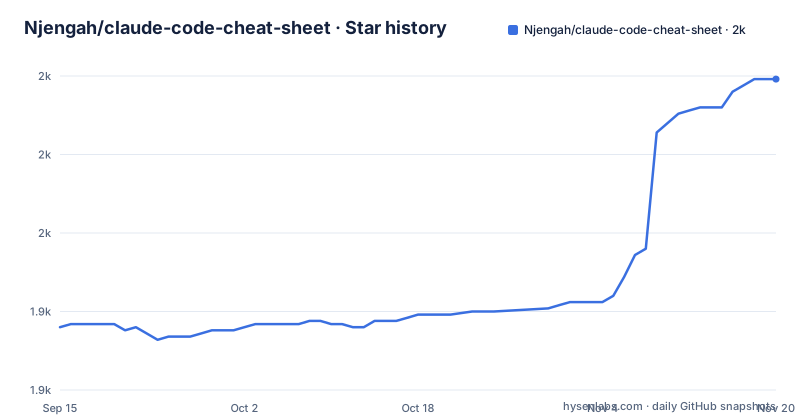
Star history
- Njengah/claude-code-cheat-sheet1,999 ★ · +79
| Repository | 2026-09-15 | 2026-11-20 |
|---|---|---|
| Njengah/claude-code-cheat-sheet | 1.9k | 2k |
79 Stars in the last 66 days, measured from the daily GitHub snapshot. Compare with other projects
Editorial analysis
What the cheat sheet is, and what it is not
This repository is a reading resource, not a program. The top-level entries are .gitignore, LICENSE, README.md, images/, medium/, subagents.md and subagents/. There is no package manifest, no build script, no test directory, and the primary language is listed as unknown. Nothing here installs, runs, or hooks into your editor.
The problem it addresses is real but narrow. Claude Code ships as a terminal tool with a large and growing command surface: install paths that differ per operating system, slash commands, print mode flags, session resumption, permission controls, and keyboard shortcuts. That surface is discoverable through /help and claude --help, but it is not organised by how often you use it. The README frames the project as a guide that takes a reader "from basic to advanced user without wasting time", and the structure follows that claim: six levels, each labelled with a colour emoji, moving from installation and navigation to tool permissions and beyond.
Who it is for: someone who has Claude Code installed or is about to install it, and wants the commands laid out in one document rather than discovered interactively. Who it is not for: anyone looking for a library, a wrapper, a configuration generator, or tooling that automates Claude Code. There is none of that in the repository layout.
How the six-level structure is organised
The README is the whole product, and it is ordered by assumed reader experience. Level 1 covers installation, authentication, basic navigation, file operations, print mode, session management and keyboard shortcuts. Level 2 covers model selection, additional working directories, output formats and session cost commands. Level 3 moves into tool management and slash commands. Levels 4 through 6 are listed in the table of contents as Advanced, Expert, Power User and Master tiers, though the README excerpt does not show their contents.
The mechanism is grouping, not abstraction. Commands sit in fenced code blocks with an inline comment describing each one. A representative entry from the navigation block reads `/compact [instructions]` with the comment "Summarize current history to free context", and `/context` with "Visualize context usage". The keyboard shortcut block is formatted the same way, with `Shift+Tab` described as cycling permission modes and `Esc Esc` described as clearing a draft or opening the rewind menu when the input is empty.
One structural detail is easy to miss: subagents.md and the subagents/ directory sit alongside the README rather than inside it, and the table of contents links to the subagents page separately under a Pages heading. If your interest is in delegating work to specialised agents rather than memorising flags, that file is the relevant one and the README is not.
Installing Claude Code and running a first command
The cheat sheet does not install itself. It documents how to install Claude Code, and the README gives per-platform commands. On macOS, Linux or WSL the recommended native install is a curl pipe into bash, followed by authentication and an interactive start from the root of the project you want Claude to work on.
curl -fsSL https://claude.ai/install.sh | bash
claude auth login
claude
After the install script finishes, `claude auth login` opens the sign-in flow, and bare `claude` starts the interactive REPL. The README also gives the Windows equivalents: an `irm ... | iex` one-liner in PowerShell and a `curl` download of install.cmd in Windows CMD, both followed by the same `claude auth login` and `claude` pair.
To confirm the install worked before trusting anything else in the document, the README lists two verification commands.
claude --version
claude auth status
The first prints the installed version, the second reports sign-in state. Both are worth running because the cheat sheet does not record which version its command list corresponds to. For a first real use, the README suggests starting with an initial prompt rather than an empty session, and also documents print mode for one-shot queries that exit immediately.
claude "summarize this project"
claude -p "explain this function"
The first starts the REPL with that prompt already submitted. The second runs in print mode, answers, and exits, which is the form you want inside a script or a pipe. The README notes that print mode also accepts piped input, for example `cat logs.txt | claude -p "explain"`.
Permission flags and the danger they carry
Level 3 is where the cheat sheet stops being a convenience and starts being a decision aid. It documents four permission-related flags, and the README itself labels one of them dangerous.
claude --allowedTools "Bash(git log:*)" "Bash(git diff:*)" "Write"
claude --disallowedTools "Bash(rm:*)" "Bash(sudo:*)"
claude --dangerously-skip-permissions
The allowlist and denylist forms take tool names with optional argument patterns, so you can permit read-only git inspection while blocking destructive shell commands. The third flag, `--dangerously-skip-permissions`, disables all permission prompts. The README's own comment on that line is "(dangerous)", which is the only editorial guidance it offers. There is no discussion of sandboxing, of what directory scope the agent operates in, or of how the allowlist patterns interact with shell mode entered via `!`.
That gap matters. A cheat sheet that lists a bypass flag next to safe flags, with a one-word warning and no context on when it is appropriate, assumes the reader already understands the risk model. If you are handing this document to a junior engineer, the permission section is the part to walk through rather than paste into a wiki.
Session management and where the reference gets thin
The session commands are the most practically useful part of the document and also the part most likely to drift. The README lists `claude --continue` for the most recent session in the current directory, `claude --resume` with either a session ID or a name, `claude -n auth-refactor` to name a session at startup, `/rename` to rename from inside a session, and `/branch try-streaming-approach` to branch the current conversation. There is also `claude --from-pr 123` for resuming a session linked to a pull request.
The limitation is version drift, and the README does not address it. Claude Code is a fast-moving CLI, and a command list is only as good as the version it was written against. The repository has a single release, v1.0.0, dated 2025-07-07, while the last push to the default branch was 2026-05-27. That push date tells you the file was edited, not that every command in it was re-verified. The README carries a Beta label in its own first heading.
A second, smaller gap: the README documents `claude install stable`, `claude install latest` and `claude install 2.1.118` for installing or reinstalling a specific native version, and separately documents `claude update`. It does not document rollback, so if an update breaks a workflow you rely on, the cheat sheet gives you no procedure. The version-pinned install command is the closest thing to an escape hatch, and you would have to know the version number you want beforehand.
How this compares to reading claude --help
The honest alternative is the tool's own help output. Running `claude --help` and `/help` inside a session gives you the command list for the exact version you have installed, which eliminates the drift problem entirely. That is the correct source of truth for any flag you are about to type.
The difference in approach is ordering and audience. Help output is alphabetical or grouped by the CLI's own taxonomy, and it assumes you know what you are looking for. This cheat sheet is ordered by reader experience, groups commands by the task you are trying to accomplish, and pairs each command with a short plain-language comment. It also covers things help output does not: the install one-liners for three operating systems, the Homebrew and WinGet package manager paths, and a keyboard shortcut table that includes `Alt+P` for switching models and `Alt+T` for toggling extended thinking.
A second alternative, for anyone whose interest is specifically in specialised agents rather than CLI flags, is the project's own subagents.md page, which the README links from its table of contents. That file is part of this repository, not a competitor, but it is a different kind of document from the command list and worth treating separately. If neither help output nor this cheat sheet answers your question, the README points to the author's Medium page as the homepage, which is where the surrounding write-ups live.
Licence, maintenance and the cost of keeping it current
The repository is MIT licensed, which permits reuse, modification and redistribution with the licence and copyright notice retained. For a documentation repository this is permissive in the practical sense: you can fork it, strip the sections you do not need, and keep an internal copy without asking anyone. This is a description of the licence terms, not legal advice; if you are republishing substantial portions, read the LICENSE file at the repository root.
The maintenance picture is mixed and worth stating plainly. The repository is not archived, and the last push to the default branch was on 2026-05-27. The only release is v1.0.0 from 2025-07-07. So the file has been touched more recently than it has been released, which suggests edits without versioned snapshots. There is no changelog in the top-level entries, so you cannot tell what changed between pushes.
The upgrade cost falls on you, not on the maintainer. Because the artefact is prose, there is nothing to install and nothing to break, but there is also nothing that fails loudly when a documented flag is renamed or removed. The only verification mechanism the repository offers is the pair of commands in its own Quick Start: `claude --version` and `claude auth status`. Compare the first against the commands you intend to use, and treat any mismatch as a reason to check `claude --help` before relying on the entry.
Editorial conclusion
Adopt this if you already run Claude Code and want one page that lists install paths, slash commands, session flags and permission switches without hunting through help output, or if you are onboarding someone who needs the command surface in reading order. Do not adopt it as an authority on current Claude Code behaviour: it is a third-party Markdown file under MIT, it carries a Beta label in its own heading, and the README does not state which CLI version the command list was checked against. Before trusting any flag here, run claude --version and claude --help on your own installation and compare. The subagents.md page is the part worth opening first, because it is the only entry in the repository that is not a command list.
Frequently asked questions
How do I use the claude-code-cheat-sheet?
You read it. The repository contains Markdown files, not an installable tool, so there is nothing to run. Start with the README's six levels if you want the command surface in reading order, or open subagents.md if your interest is in specialised agents.
Is the claude-code-cheat-sheet available as a PDF?
The repository's top-level entries are .gitignore, LICENSE, README.md, images/, medium/, subagents.md and subagents/, so no PDF is published there. The images directory contains at least one screenshot used in the README.
Is this the official Anthropic claude code cheat sheet?
No. It is a third-party repository by Njengah, MIT licensed, with the author's Medium page listed as the homepage. The README carries a Beta label and does not state which Claude Code version its commands were verified against.
Which Claude Code commands does the claude-code-cheat-sheet cover?
The README documents installation for macOS, Linux, WSL, Windows PowerShell and Windows CMD, plus authentication, slash commands such as /compact and /context, print mode flags, session resumption, permission flags including --allowedTools and --dangerously-skip-permissions, and a keyboard shortcut table.
Does the claude-code-cheat-sheet work on a Mac?
The README documents a macOS path using the native install script and a Homebrew cask install, followed by claude auth login. It also lists claude --version and claude auth status as the way to confirm the installation.
Official sources
Add this badge to your README
If you maintain this project, the badge below links readers to this analysis and shows its maintenance status from the daily GitHub snapshot. Paste the markdown into your README; add ?metric=license or ?metric=stars to the image URL for a different field.

[](https://hysenlabs.com/projects/njengah-claude-code-cheat-sheet)Star history chart for your README
[](https://hysenlabs.com/projects/njengah-claude-code-cheat-sheet)Was this useful?