GitHubPoster: Turning Activity Data into SVG Posters
Make everything a GitHub svg poster and Skyline!
At a glance
- What is it?
- GitHubPoster is a Python package that converts activity from services such as Strava, GitHub, Duolingo, and GPX files into SVG posters and Skyline images. It supports both API-backed data sources and local files, but some connectors depend on sensitive credentials or browser-derived tokens.
- Who is it for?
- GitHubPoster fits developers who want locally generated SVG activity graphics and can supply the credentials, tokens, or source files required by a connector. It is a poor fit for users who need hosted rendering, documented data retention guarantees, or zero-touch access to every supported service.
- Can I use it commercially?
- Yes. MIT is a permissive licence: you can use, modify and sell software built on it, as long as you keep its copyright and licence notices.
- Is it still maintained?
- Yes. The repository last received commits 1 day ago.
- What is it written in?
- Mainly Python, according to GitHub's language statistics.
Answers come from the project's GitHub data, last synced on November 7, 2026, and from our analysis. They are not legal advice.
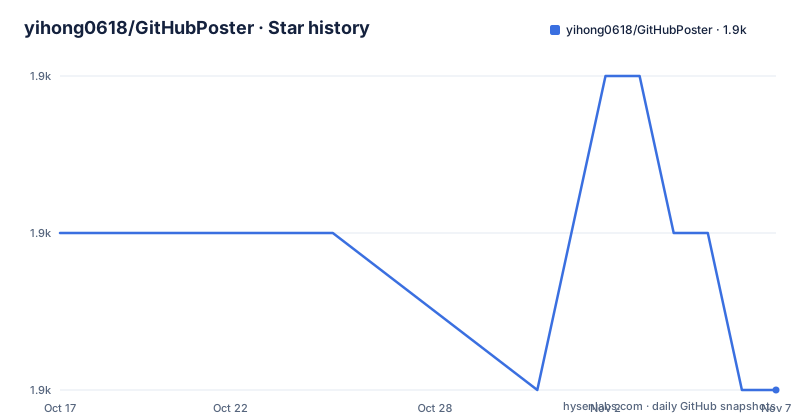
Star history
- yihong0618/GitHubPoster1,854 ★ · -1
| Repository | 2026-10-17 | 2026-11-07 |
|---|---|---|
| yihong0618/GitHubPoster | 1.9k | 1.9k |
-1 Stars in the last 21 days, measured from the daily GitHub snapshot. Compare with other projects
Editorial analysis
GitHubPoster's Local SVG Generation Model
GitHubPoster addresses a specific publishing problem: activity records normally live in account dashboards or exported files, but many profile pages want a compact visual summary. The package gathers records from a selected source, lays out the data as SVG, and writes named output files into OUT_FOLDER. The results can resemble GitHub-style contribution graphics, circular posters, or Skyline graphics. This makes the project relevant to engineers who maintain public profile pages, personal dashboards, documentation sites, or repositories that use generated images.
The package name on PyPI is `github_poster`, while the CLI entry point is `github_poster`. The repository also supports module execution through `python3 -m github_poster`. That distinction matters during setup because cloning the repository and installing the published package expose the same Python package through two invocation paths.
The available connectors extend well beyond GitHub. The README lists Strava, GPX, Duolingo, Nintendo Switch, Shanbay, Bilibili, GitLab, Kindle, WakaTime, Dota2, Nike, Notion, Garmin, Forest, JSON, Todoist, Apple Health, ChatGPT, NeoDB, and AutoSleep. The repository's `examples/` directory contains generated SVG examples for several of these types, including `github.svg`, `strava_circular.svg`, `gpx.svg`, `duolingo.svg`, and `json.svg`. Based on that layout, GitHubPoster is a collection of source-specific adapters feeding a shared poster output format rather than one integration built around GitHub alone.
Connector Inputs, Dependencies, and Output Flow
A GitHubPoster run has a broad shape: select a connector type, provide its credentials or local input, choose a year or year range, generate an SVG, and inspect the named file in OUT_FOLDER. Shared rendering options include `--year`, `--track-color`, `--special-number1`, `--special_number2`, `--special-color1`, `--special-color2`, `--with-animation`, `--animation-time`, `--with-skyline`, `--skyline-with-name`, `--is-circular`, and `--without-type-name`. The README directs users to `python3 -m github_poster <type> --help` for other connector-specific arguments.
The dependency list in `pyproject.toml` separates shared requirements from connector extras. The core dependencies are `colour`, `pendulum==3.0.0`, `requests`, and `svgwrite`. Optional groups include `PyGithub` for `github`, `sdf_fork` for `skyline`, `gpxpy` for `gpx`, `stravalib==0.10.4` for `strava`, `garminconnect` for `garmin`, and `pandas` for `todoist`. The `all` extra bundles the major documented optional packages. This structure lets a user avoid unrelated connector libraries, although it means a command can fail because the matching extra was not installed.
The input path is not uniform. GPX consumes files from GPX_FOLDER or a directory passed through `--gpx_dir`. JSON and CSV examples appear in `examples/`, indicating additional file-based routes. Network services generally require connector-specific arguments. Strava uses a client ID, client secret, and refresh token. Duolingo uses a username and a JWT extracted from the browser cookie. Nintendo Switch uses a session token and device ID. The GitHubPoster CLI passes this material to the selected connector, and the renderer applies the selected poster style.
Installing GitHubPoster with Python 3.11
For a published-package setup, the README gives a `pip` command. This installs the package and its optional dependencies through the `all` extra, which is appropriate when the reader intends to use more than the core rendering path.
pip3 install -U 'github_poster[all]'After installation, the console script should be available as `github_poster`. The repository also provides a source-clone route:
git clone https://github.com/yihong0618/GitHubPoster.gitFor development from the cloned repository, `pyproject.toml` requires Python 3.11 or later, and the README uses `uv` to install all extras:
uv sync --all-extrasThe repository includes `uv.lock`, so its Dockerfile uses a frozen synchronization command to reproduce the locked dependency set:
uv sync --all-extras --frozen --no-devThat Docker command is part of image construction rather than a standalone command for a local installation. The image copies the package, creates `OUT_FOLDER`, `IN_FOLDER`, and `GPX_FOLDER`, switches to an unprivileged `appuser`, and exposes the Python module as its entry point. Because the published package declares `requires-python >=3.11`, installing it into an older Python environment is outside the project's declared compatibility range.
Creating a First GPX Poster
GPX is the clearest first use because the README describes a local-file workflow instead of requiring account credentials. Copy GPX files produced by another application into GPX_FOLDER, or point `--gpx_dir` at an existing directory such as `~/blog/GPX_OUT/`.
python3 -m github_poster gpx --gpx_dir ~/blog/GPX_OUT/ --year 2013-2021An installed console-script invocation is also documented:
github_poster gpx --gpx_dir ~/blog/GPX_OUT/ --year 2013-2021The year range tells the connector which records to include. The generated SVG is written under OUT_FOLDER and named according to its type, although the README says that naming behavior is temporary. If the reader wants Skyline output, the documented shared option is `--with-skyline`; `--skyline-with-name` adds the user name to that Skyline and is intended to accompany it. These are separate rendering choices, not automatic behavior for every run.
For a second rendering option, `--is-circular` requests a circular SVG and can be used with animation. The available examples show that GitHubPoster can produce both ordinary rectangular-style assets and circular output, but the README does not promise a specific default output filename beyond the type-based naming note.
Strava Authorization and Token Constraints
Strava support follows an OAuth setup rather than the local-file model. The README instructs users to create an application under Strava Developers, request access through the Strava authorization URL, extract the returned `code`, and exchange it for a refresh token. The final command requires three values: `strava_client_id`, `strava_client_secret`, and `strava_refresh_token`.
python3 -m github_poster strava --strava_client_id ${client_id} --strava_client_secret ${client_secret} --strava_refresh_token ${refresh_token} --year 2012-2021The documented token exchange is a separate `curl` request. Its use is part of the Strava authorization procedure, not a GitHubPoster command:
curl -X POST https://www.strava.com/oauth/token \
-F client_id=${Your Client ID} \
-F client_secret=${Your Client Secret} \
-F code=${Your Code} \
-F grant_type=authorization_code
This is a real operational constraint. A user must create an application, manage OAuth permissions, protect a client secret, retain a refresh token, and keep all three values available at render time. The README does not document token storage, refresh-token expiration behavior, revocation, or whether credentials can be supplied through environment variables. Those points need direct inspection before putting the command into an automation workflow. Passing secrets directly on a command line may also expose them to local process inspection or shell history, although the README does not prescribe a secure alternative.
Other connectors have similarly source-specific trust boundaries. Duolingo requires a JWT extracted with browser developer tools, while Nintendo Switch requires a session token and device ID. GitHubPoster does not create a universal credential abstraction that removes those setup differences.
Rendering Trade-Offs and Maintenance Boundaries
GitHubPoster's local generation approach differs from a hosted poster service. A hosted renderer can receive an account connection through a maintained web interface and return an image through a URL. GitHubPoster instead runs as a Python CLI and leaves the user responsible for source access, execution environment, output placement, and publication. Its advantage within the documented design is direct control over local GPX or JSON inputs and generated SVG files. Its cost is that connector maintenance remains the user's concern.
The repository has no GitHub releases, so there is no release history on which to base an upgrade cadence. It is not archived, and its last push was on 2026-10-17. The MIT license permits use and modification under its terms, but users are responsible for reviewing the license text and complying with the separate terms of services and APIs whose data they retrieve. The MIT license does not remove platform restrictions, account obligations, or restrictions imposed on exported activity data.
The README does not document rollback procedures, service-version compatibility guarantees, retry behavior, rate-limit handling, or a stable API for calling the renderer programmatically. The repository does contain `tests/`, but the README does not describe test coverage or compatibility guarantees. The pinned versions of `pendulum` and `stravalib`, along with `uv.lock`, make dependency state explicit for repository-based work. A source installation may therefore require more attention when transitive or connector dependencies change.
This project is also the wrong tool when the requirement is a continuously hosted image generated without local execution. It is a poor fit for a service whose private API has changed if no current connector guidance is available, and it is unsuitable for sensitive deployments until the user has reviewed how the selected connector handles credentials. It does fit users who already keep activity exports and want reproducible SVG generation with a shared year and color configuration.
Editorial conclusion
GitHubPoster fits developers who want locally generated SVG activity graphics and can supply the credentials, tokens, or source files required by a connector. It is a poor fit for users who need hosted rendering, documented data retention guarantees, or zero-touch access to every supported service. Before adoption, verify that the required connector and its optional dependency are available, inspect the credential handling for the selected service, and confirm that the generated output in OUT_FOLDER meets your intended publication format.
Frequently asked questions
What Python version does GitHubPoster require?
`pyproject.toml` sets `requires-python = ">=3.11"`, and the repository's Python 3.11 installation instructions use `uv`.
Where does GitHubPoster write generated SVG files?
The README says generated SVG files are written to OUT_FOLDER and are named according to their type, while noting that this naming behavior is temporary.
Can GitHubPoster generate a poster from local GPX files?
Yes. The GPX connector accepts files in GPX_FOLDER or a directory specified with `--gpx_dir`, and the documented example selects a year range.
What credentials does the Strava connector require?
The documented command requires `--strava_client_id`, `--strava_client_secret`, and `--strava_refresh_token`, obtained through the project's described OAuth workflow.
Does GitHubPoster publish versioned GitHub releases?
The repository has no GitHub releases. Its package metadata currently identifies version `2.7.4`, and the repository's last push was on 2026-10-17.
Official sources
Add this badge to your README
If you maintain this project, the badge below links readers to this analysis and shows its maintenance status from the daily GitHub snapshot. Paste the markdown into your README; add ?metric=license or ?metric=stars to the image URL for a different field.

[](https://hysenlabs.com/projects/yihong0618-githubposter)Star history chart for your README
[](https://hysenlabs.com/projects/yihong0618-githubposter)Was this useful?