The NextDNS-Config repository is one README, a license, and an icons folder
Setup guide for NextDNS, a DoH proxy with advanced capabilities
At a glance
- What is it?
- yokoffing/NextDNS-Config is a GPL licensed walkthrough for thirteen NextDNS security and privacy settings, with no configuration file, no exports, and no code. Its value is the reasoning attached to each toggle, including two settings it tells you to disable if you want to set the configuration and forget about it.
- Who is it for?
- This guide suits someone who already uses NextDNS and wants a second opinion on which toggles to leave alone, because the useful content is the set of reasons rather than the settings themselves. Read it with the framing it was written in: the author opens by asking you not to block too much and by documenting his own exceptions to his own rule.
- Can I use it commercially?
- Yes, with conditions. GPL-3.0 is a copyleft licence: if you distribute software that includes it, you must release that software's source code under the same licence. Running it internally without distributing it does not trigger that obligation.
- Is it still maintained?
- Yes. The repository last received commits 2 days ago.
- What is it written in?
- GitHub does not report a main language for this repository.
Answers come from the project's GitHub data, last synced on November 14, 2026, and from our analysis. They are not legal advice.
Star history
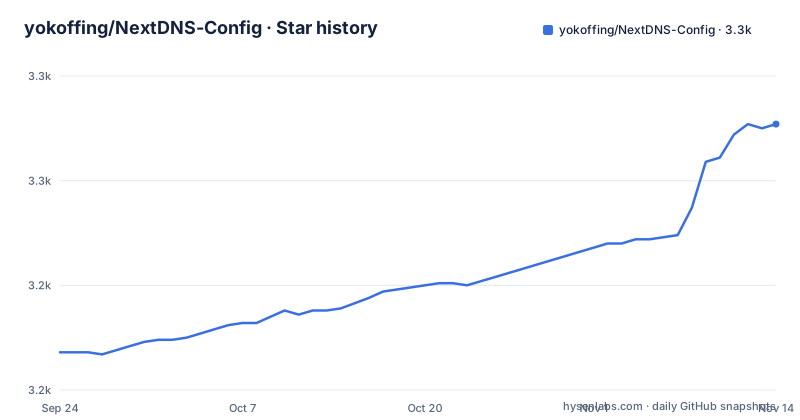
- yokoffing/NextDNS-Config3,277 ★ · +109
| Repository | 2026-09-24 | 2026-11-14 |
|---|---|---|
| yokoffing/NextDNS-Config | 3.2k | 3.3k |
109 Stars in the last 51 days, measured from the daily GitHub snapshot. Compare with other projects
Editorial analysis
The repository is one README, a license, and an icons folder
The top-level listing has four entries: a GitHub directory, a license file, the README, and an icons directory.
There is no source tree, no configuration export, no scripts, and no releases. The repository records no primary language, which follows from the same cause.
So this is a document, not a program. Nothing here can be installed, applied, or version-pinned. Adopting the configuration means reading a list and clicking through thirteen toggles in someone else's dashboard.
That is a real limitation and it is also the honest shape of the thing. A NextDNS setup is a set of booleans and domain lists held in NextDNS's own account, not an artefact that can be committed and deployed. The most this repository could offer is a second opinion on which booleans to set.
What it does offer is the reasoning. Nearly every setting in the security section carries an admonition and at least one footnote link, and several of the footnotes point at open issues in NextDNS's own tracker, which is a stronger signal than an assertion.
The file's own subtitle is a setup guide, and its short description calls NextDNS a DoH proxy with advanced capabilities.
The guide opens by telling you not to block too much
The first two lines of the file set its rules, and neither of them is about security.
The first is to prevent overblocking by using what it calls the law of diminishing returns, with sane, quality blocklists and allowing most top-level domains as its examples. The second is to pass what it calls the grandma test, with few exceptions, and the file says the deviations are documented throughout.
So the organising principle is that a DNS filter which breaks ordinary browsing is a failed filter. Everything in the security section that follows is a setting that could get in the way of a legitimate page, and each one is annotated with that in mind.
The grandma test link points at a dictionary entry rather than at a paper, which tells you the intended reader. So does the sentence in the privacy section asking why anyone should care if they have nothing to hide, which links to a blog post arguing the opposite.
This framing is unusual in a blocking guide and it is the most useful thing in the file. It also means the guide is arguing against itself where it has to, which is where the next section starts.
The two riskiest settings both tell you to disable them if you plan to forget
Thirteen settings are covered, and thirteen of them do not end the same way. Two do.
Blocking newly registered domains carries a warning that it may cause false positives occasionally, advises being selective when adding entries to the allowlist, and says that if you do add any, never give sensitive information to a newly registered domain. Then the line that stands out: if you plan to set-and-forget your configuration, disable this setting.
Blocking top-level domains carries the same instruction in different words. It comes after an important note explaining that blocking a TLD risks blocking legitimate sites along with malicious ones, because the feature stops both site navigations and subrequests, and after a list of twenty-four extensions. Then: if you plan to set-and-forget your configuration, skip this step.
Both are the two settings where a bad entry takes out a whole category of domain rather than one host. A newly registered domain can be anything, and a TLD block cannot be narrowed to a path.
So the guide recommends against itself in exactly the two places where being wrong is expensive, and it says so in the imperative rather than in a footnote.
Twenty-four top-level domains, blocked whole
The TLD list is the one concrete artefact in the file, and it is short enough to read:
.autos
.best
.bid
.boats
.boston
.boutique
.charity
.christmas
.dance
.fishing
.hair
.haus
.loan
.loans
.men
.mom
.name
.review
.rip
.skin
.support
.tattoo
.tokyo
.voto
Twenty-four extensions, and the grouping is legible. A dozen are themed verticals that attract abuse, such as .autos, .boats, .boston, .boutique, .charity, .christmas, .dance, .fishing, .hair, .haus, .skin, .tattoo and .tokyo. A few are finance or lending themed, which is .loan and .loans. Three are typosquat-shaped, which is .men, .mom and .voto. And .support, .review, .name and .rip are reputation-based.
The footnotes for this section are five, and they are the statistical kind rather than the anecdotal kind: top-level-domain statistics from two sites, a report about verified accounts being compromised to send fake suspension notices, and two links into a public anti-malware list and its issue tracker.
The file also points at a larger external list of abused TLDs and warns that you may need to allowlist sites on occasion if you use it.
Google Safe Browsing is recommended with a warning about months to remove a false positive
One setting carries four footnotes, which is the most heavily sourced recommendation in the file.
Google Safe Browsing comes with a caution that it was not designed as a DNS-level blocker and may flag legitimate CNAME domains as scams, and that NextDNS can take months to remove a false positive.
Both halves of that are about the same failure mode. A DNS-level resolver cannot see the page, only the name it is being asked for, so a domain that is a CNAME target for something legitimate can look like the end of an attack path. And if the block is wrong, the remedy is not local.
The four sources behind it are the Safe Browsing transparency page, a post about Apple and Safe Browsing privacy from a cryptography engineering blog, an article on Apple proxying Safe Browsing through its own servers, and the Brave browser's own wiki page listing the Chromium services it disables, where the Safe Browsing service is documented.
That last one is the interesting footnote. It is a competitor's documentation used as evidence, which is what makes the recommendation look measured rather than reflexive.
The other settings in the section carry fewer sources and fewer warnings. DNS rebinding protection, homograph attacks, typosquatting, and domain generation algorithms are enabled without a caution attached.
Feed references point at one pinned commit while the DDNS reference points at a branch
The footnote links are not consistent about how they pin their targets, and the difference matters.
Three settings link into NextDNS's metadata repository at a specific commit hash rather than at the branch. The same thirty-eight-character hash appears in the footnote for threat intelligence feeds, for cryptojacking protection, and for typosquatting protection.
A pinned commit is the careful choice. It means the description of what a feed contains cannot change under the reader, and it means a reader who follows the link sees exactly the list the author was reading.
Then there is the dynamic DNS hostname setting, whose footnote links to the same organisation's suffixes file on a branch, with no commit. So one reference in the same section is frozen and its neighbour is not.
The file is careful about a different kind of stability as well. Every setting carries an explanatory footnote marker in the rendered page, which collects the links at the bottom, and the toggles themselves are written as instructions rather than as a list of values to copy.
Two of the three pinned-hash footnotes point at a JSON file, so the thing being described is machine-readable upstream and human-checkable by a reader who follows the link.
The account link carries a referral code and the file says it supports the page
There is one instruction in the file about creating an account, and it is worded in a particular way.
It says to sign up for NextDNS at a link and support this page. The link carries a referral parameter:
https://nextdns.io/?from=xujj63g5So the reader who follows the setup guide is sent through an attribution link, and the guide names the arrangement rather than hiding it. That is the honest form of it, and worth noticing precisely because referral links in setup guides are usually invisible.
Everything else in the file points outward to documentation rather than to the author's own properties. The threat model links are to NextDNS's help centre and to an independent guide on threat modelling. The privacy spectrum link is to a blog post on another site. The blocklist source is NextDNS's own blocklists repository, on a branch.
The author also links a discussion forum, a chat server, and a personal account, and describes the project as a page rather than a product.
So the relationship to NextDNS is that of a third-party configuration guide, not a fork, a plugin, or an alternative. There is no code and no affiliation claimed, and the guide's own value is the judgment about which toggles are worth the false positives.
Thirteen settings use five levels of warning and two of them disagree with the author's own default
Counting the admonitions gives the shape of the document.
There are thirteen security and privacy settings in the visible part of the file. Three carry a caution, which is used for threat intelligence feeds, Google Safe Browsing, and cryptojacking protection. One carries a warning, for newly registered domains. One carries a tip, for dynamic DNS hostnames, which notes that those services can still reach their own website and update API when the setting is on. Two carry an important note, one of them the general explanation of what blocking top-level domains does to subrequests.
The two features where the warning is strongest are also the two the guide argues against, and both cautions share the same condition. Threat intelligence feeds and cryptojacking protection should be left enabled if you use something other than the recommended blocklists. In other words, they are redundant when the blocklist you already chose covers the same ground, and worth keeping when it does not.
That is the through-line of the whole security section. Nothing here is on unconditionally. Each toggle is tied to a condition about your blocklist, and the file cites the open issues where the disagreement with the defaults is being worked out.
The one setting with no annotation of any kind is the child sexual abuse material block, which appears as a bare toggle at the end of the security section.
Editorial conclusion
This guide suits someone who already uses NextDNS and wants a second opinion on which toggles to leave alone, because the useful content is the set of reasons rather than the settings themselves. Read it with the framing it was written in: the author opens by asking you not to block too much and by documenting his own exceptions to his own rule. Two settings in it are recommended against on the grounds that they cause false positives and are the first things to turn off if you want a configuration you will never revisit. And since there is no file to import, adopting any of this means clicking through a dashboard one toggle at a time.
Frequently asked questions
What is the yokoffing/NextDNS-Config repository?
A GPL licensed setup guide for NextDNS, a DNS-over-HTTPS proxy. The repository holds one README, a license file, a GitHub directory, and an icons directory, with no source code, no configuration export, and no releases. Its content is thirteen settings and the reasoning attached to each.
Which NextDNS security settings does this guide recommend turning off?
Two. Blocking newly registered domains and blocking top-level domains. Both carry a note that if you plan to set-and-forget your configuration you should disable the setting or skip the step, on the grounds that both may produce false positives and that a TLD block stops site navigations and subrequests rather than individual hosts.
What is wrong with enabling Google Safe Browsing in this NextDNS guide?
The guide recommends it with a caution. Google Safe Browsing was not designed as a DNS-level blocker and may flag legitimate CNAME domains as scams, and NextDNS can take months to remove a false positive. It is the most heavily sourced setting in the file, with four footnotes.
Which top-level domains does the NextDNS-Config guide block?
Twenty-four of them: .autos, .best, .bid, .boats, .boston, .boutique, .charity, .christmas, .dance, .fishing, .hair, .haus, .loan, .loans, .men, .mom, .name, .review, .rip, .skin, .support, .tattoo, .tokyo and .voto. The footnotes for that section are statistics and an anti-malware list rather than individual examples.
How does the NextDNS-Config guide set its own rules?
The first two lines of the guide are rules rather than settings. One asks the reader to prevent overblocking using the law of diminishing returns, with quality blocklists and allowing most TLDs. The other asks the reader to pass the grandma test, with few exceptions, and says the deviations are documented throughout the guide.
Official sources
Add this badge to your README
If you maintain this project, the badge below links readers to this analysis and shows its maintenance status from the daily GitHub snapshot. Paste the markdown into your README; add ?metric=license or ?metric=stars to the image URL for a different field.

[](https://hysenlabs.com/projects/yokoffing-nextdns-config)Star history chart for your README
[](https://hysenlabs.com/projects/yokoffing-nextdns-config)Was this useful?