XcodeGen caches by spec path, installs into /usr/local, and tags releases by hand
A Swift command line tool for generating your Xcode project
At a glance
- What is it?
- XcodeGen generates an Xcode project from a YAML or JSON spec and is meant to be committed without the project file. The mechanics underneath are worth knowing before you rely on it: the incremental cache is keyed by a hash of the spec's path rather than its contents, the Makefile installs a binary plus a presets directory into /usr/local, the build is a universal binary built with the sandbox off, and the release target rewrites the README with sed while its tag line is commented out.
- Who is it for?
- XcodeGen fits a team that has decided the Xcode project file is a build artefact rather than something to merge, that can express its targets in a spec, and that runs on a machine with a stable Xcode release. It does not fit a workflow where people are meant to open the project and adjust it, because anything edited there is lost on the next generate, and it does not fit a build agent that cannot write to /usr/local or that treats a cached run as equivalent to a fresh one.
- Can I use it commercially?
- Yes. MIT is a permissive licence: you can use, modify and sell software built on it, as long as you keep its copyright and licence notices.
- Is it still maintained?
- Yes. The repository last received commits 32 days ago.
- What is it written in?
- Mainly Swift, according to GitHub's language statistics.
Answers come from the project's GitHub data, last synced on November 14, 2026, and from our analysis. They are not legal advice.
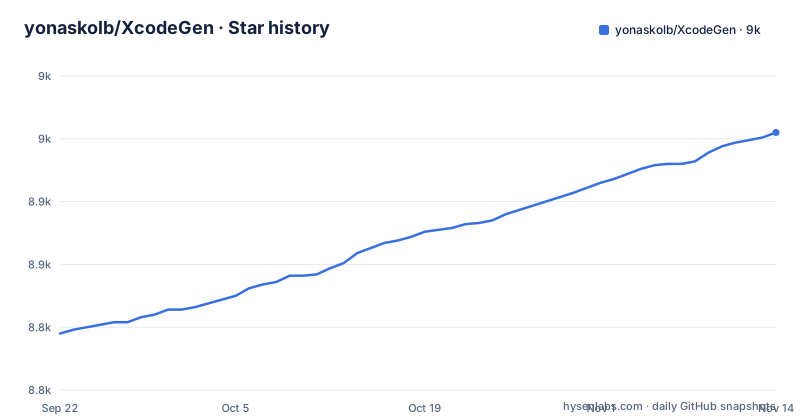
Star history
- yonaskolb/XcodeGen8,955 ★ · +160
| Repository | 2026-09-22 | 2026-11-14 |
|---|---|---|
| yonaskolb/XcodeGen | 8.8k | 9k |
160 Stars in the last 53 days, measured from the daily GitHub snapshot. Compare with other projects
Editorial analysis
The incremental cache is keyed by the spec's path, not its contents
There is an option that stops the tool regenerating a project when nothing relevant has changed. With it set, a cache file is written each time a project is generated, and if the tool runs again and finds the spec together with all the files it contains are the same, it skips the work. The location of that file has a default:
~/.xcodegen/cache/{PROJECT_SPEC_PATH_HASH}There is a separate option to point the cache somewhere else. Consequence: the default key is derived from where the spec lives, so the same spec checked out at two paths keeps two independent caches, and a moved or renamed spec file invalidates nothing but shares nothing either. The cache also lands in your home directory, which means a CI agent with a fresh home regenerates on every run while a developer machine keeps a cache nobody else has. Since the check reaches into the files the spec includes, an included file edited on disk does invalidate it, but that costs a walk of the tree on every invocation.
Comma-separating the spec path makes every other flag shared
The spec is found by default as project.yml in the current directory, and the option that overrides it takes a path to a yml or json file. The documentation adds that it is possible to link to multiple spec files by comma separating them, and then gives a warning in the same sentence: all other flags will be the same. Consequence: the merge is one spec, and the flags describe that one spec. You cannot send one included file to a different output directory, and you cannot make one quiet while another is verbose. That matters when the split is deliberate, since distributing a spec across files is offered as the way to share a base and override parts of it, and the override has nowhere else to point. The README does not state which file wins when two set the same key; it points to the Project Spec documentation for all options.
make install writes a binary and a presets directory, both under /usr/local
The Makefile builds first and then installs into a fixed prefix. The three paths it derives are:
PREFIX = /usr/local
INSTALL_PATH = $(PREFIX)/bin/$(EXECUTABLE_NAME)
SHARE_PATH = $(PREFIX)/share/$(EXECUTABLE_NAME)
The install recipe creates the bin directory, copies the built executable into it, then creates a share directory and copies the SettingPresets folder from the checkout into it. The uninstall recipe removes the executable and the share directory together. Consequence: the documented make install needs write access to /usr/local, which on a stock machine means elevated privileges that the recipe does not request for you, and the prefix is a plain variable so overriding it is the escape hatch. Because the install is two artefacts, removing only the binary by hand leaves the presets behind, and the two paths are what uninstall knows about, not a package manifest.
The release target rewrites two files with sed and leaves tagging to you
The Makefile carries a version variable and a release target that uses it. The target runs two in-place substitutions, one rewriting the version string inside the tool's main source file and one rewriting the from version in the README's Swift Package Manager snippet, then stages everything and commits with a message naming the version. The final line of that recipe is a tag command, and it is commented out:
#git tag $(VERSION)Consequence: the version lives in three places and two of them are kept in step by a text substitution rather than read from one source, so a release is correct only if the patterns still match the files as they are written today. And the target does not tag. Published versions exist, so tagging happens somewhere, but it is not this target, and a release run that forgets it leaves the commit without a matching tag. The archive step that follows does produce an artefact bundle carrying the version and the licence file, which is the piece that has to succeed for a real release.
The build is a universal binary produced with the sandbox switched off
One line controls how the tool is compiled:
SWIFT_BUILD_FLAGS = --disable-sandbox -c release --arch arm64 --arch x86_64The same flags are used by the build target, by the install target through it, and by the shell expression that asks Swift where the binary landed. Consequence: a build from source compiles for both architectures regardless of the machine you are on. Disabling the sandbox applies to every build this Makefile performs, including the one behind an install. The optimisation flag means the artefact you install from source is a release build, which is what you want but leaves no fast local iteration path through this file.
The editing workflow regenerates the tool's own project, not yours
There is a section on editing, and its command is:
swift package generate-xcodeprojThe explanation says this uses Swift Package Manager to create a project file that you can open, edit and run in Xcode. The command reads the package manifest in the current repository, so what it generates is the project for XcodeGen itself, which is how a contributor gets a working project for the tool. Consequence: there is no documented way to open your generated app project and adjust it, and that is the intended design rather than an omission, since the whole premise is that the project file is regenerated from the spec. If you add a build setting or a target in Xcode, the next generate discards it, and the only place that change can live is the spec.
A stable Xcode is required and the library route lets the version drift
The very first line of the installation section says to make sure the latest stable, non-beta, version of Xcode is installed before anything else. Swift Package Manager then offers two distinct routes. One runs the tool from a clone with a single command:
swift run xcodegenThe other adds it to a package manifest as a dependency and imports it in code:
.package(url: "https://github.com/yonaskolb/XcodeGen.git", from: "2.46.0"),Consequence: anyone on the beta channel has no supported configuration. The dependency form uses a from requirement, which lets the resolver move you forward inside the same major version without you changing the manifest, so a build agent can generate a slightly different project from the same spec on a different day. Pin an exact version if the generated project is compared anywhere, because the spec alone no longer determines the output.
Editorial conclusion
XcodeGen fits a team that has decided the Xcode project file is a build artefact rather than something to merge, that can express its targets in a spec, and that runs on a machine with a stable Xcode release. It does not fit a workflow where people are meant to open the project and adjust it, because anything edited there is lost on the next generate, and it does not fit a build agent that cannot write to /usr/local or that treats a cached run as equivalent to a fresh one. Before adopting it, decide where the cache file lives on CI so a stale project is not shipped, confirm the spec and its included files are the only sources of truth, and keep the generated project out of version control from the first commit rather than after the first conflict.
Frequently asked questions
What does XcodeGen do?
It generates your Xcode project from a project spec, which is a YAML or JSON file, using your folder structure on disk. The spec defines targets, configurations, schemes, custom build settings and other options, source directories are parsed and referenced while preserving the folder structure, and sensible defaults apply where you have not specified anything.
what is xcodegen
A command line tool written in Swift. Its stated purpose is to let you generate the project on demand and keep the .xcodeproj out of version control, so groups and files in Xcode stay synced to the directories on disk and merging a generated project file stops being a recurring problem.
How do I install XcodeGen?
Four routes are documented: installing through Mint, cloning and running make install, installing through Homebrew with brew install xcodegen, or cloning and running swift run xcodegen. As a library it can also be added to a package manifest and imported. All of them assume the latest stable, non-beta Xcode is installed first.
how to install xcodegen on mac
The Homebrew route is the shortest, a single brew install xcodegen. The build-from-source route clones the repository, enters it and runs make install, which builds first and then copies the executable and a presets directory into /usr/local, so it needs write access to that prefix. Mint is offered as a third option.
how to use xcodegen
Run xcodegen generate. It looks for a spec called project.yml in the current directory and produces a project named by the spec. Other commands exist, including dump, which prints the resolved spec in several formats or writes it to a file, and help for fuller usage information.
is xcodegen safe
It is MIT licensed and its behaviour is constrained by what it writes: an Xcode project file derived from the spec you supply. Two things are worth knowing rather than assuming. Generation overwrites the project, so anything edited inside Xcode is replaced, and the incremental cache option skips regeneration when the spec and the files it contains are unchanged.
Official sources
Add this badge to your README
If you maintain this project, the badge below links readers to this analysis and shows its maintenance status from the daily GitHub snapshot. Paste the markdown into your README; add ?metric=license or ?metric=stars to the image URL for a different field.

[](https://hysenlabs.com/projects/yonaskolb-xcodegen)Star history chart for your README
[](https://hysenlabs.com/projects/yonaskolb-xcodegen)Was this useful?