appscreen: App Store screenshot composition in a browser canvas
Create screenshots for the iOS App Store
At a glance
- What is it?
- Appscreen composes iOS App Store listing images in an HTML5 canvas, so the tool is a folder of static files you can open from the published page, a local Python server, or an nginx container. Projects live in IndexedDB, and the only outbound call the guide describes is the translation request you trigger yourself.
- Who is it for?
- Adopt appscreen if you ship one iOS app and want store art without a design tool: the published page needs nothing installed, and the canvas plus Three.js stack already covers backgrounds, device frames and headline text in a browser. Skip it if your pipeline needs project files outside one browser profile, since nothing in the README moves an IndexedDB project between machines.
- Can I use it commercially?
- Not without permission. GitHub finds no licence file in the repository, and without a licence all rights are reserved by default: you may read the code but not reuse it. Check the README, or ask the authors, before using it.
- Is it still maintained?
- Activity is slowing. The repository last received commits 6 months ago.
- What is it written in?
- Mainly JavaScript, according to GitHub's language statistics.
Answers come from the project's GitHub data, last synced on November 7, 2026, and from our analysis. They are not legal advice.
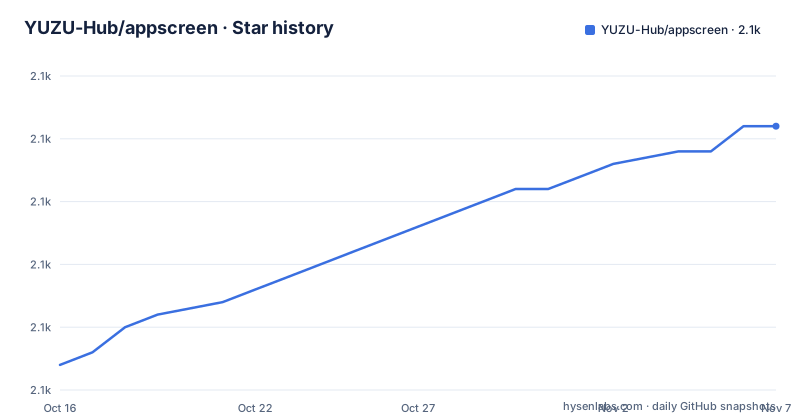
Star history
- YUZU-Hub/appscreen2,096 ★ · +19
| Repository | 2026-10-16 | 2026-11-07 |
|---|---|---|
| YUZU-Hub/appscreen | 2.1k | 2.1k |
19 Stars in the last 22 days, measured from the daily GitHub snapshot. Compare with other projects
Editorial analysis
A static folder that composites store art on an HTML5 canvas
Appscreen has one job: turning raw captures of an iOS app into the marketing images Apple shows on a store listing, with device framing and headline text on top. The runtime is a folder of static files: index.html and app.js, plus styles.css, three-renderer.js, language-utils.js, magical-titles.js and llm.js, with models/ and img/ alongside. Composition runs in an HTML5 canvas for 2D work and in Three.js for the 3D mockup. JSZip assembles the batch archive, and the Google Fonts API fills the picker. No server has to understand your project, which is why a non-technical user can start at the published page while a developer runs the identical files locally. That split suits anyone shipping one app across several iPhone and iPad classes: sizes live in the project instead of in a separate art job per device.
Auto-save writes every project into one browser profile
Persistence is IndexedDB, and the guide is direct about the consequence: you serve the app through a local web server because of it. Opening index.html straight off the filesystem is not a supported path. That is why the setup section offers Live Server, a Python server, a Node server and Docker rather than a double-click shortcut. Once it runs, every edit lands in browser storage as you make it. Projects can be renamed or deleted, the project selector shows a screenshot count for each one, the active tab survives between sessions, and a side carousel previews adjacent screenshots while you work. The boundary is who owns the browser profile. The README does not document a project export, a backup or a migration path. The only export it describes produces ZIP archives of finished screenshots, never editable project state, so work stays in the one profile that created it and cannot be moved to another machine.
Running it from Python, Node or the published page
Three delivery paths carry the same application files. The shortest is the hosted build the README links at the top, yuzu-hub.github.io/appscreen, which needs no installation at all. For local work, the guide gives two one-liners, and it asks for a server because of the IndexedDB storage noted above.
# Using Python
cd appscreen
python3 -m http.server 8000

# Using Node.js
npx serve .
Open http://localhost:8000 afterwards, and in VS Code the same job is done by right-clicking index.html and choosing Open with Live Server. The container path publishes the same tree through nginx on port 8080.
# Using Docker directly
docker run -d -p 8080:80 ghcr.io/yuzu-hub/appscreen:latest

# Using Docker Compose
docker compose up -d
Open http://localhost:8080 once that is up. If you would rather build the image than pull it, the build variant swaps in another compose file.
docker compose -f docker-compose.build.yml up -dYour first pass through the tool is seven steps: drop in screenshots, pick a device size from the sidebar, choose a background, position the shot with presets or by hand, switch to 3D if you want it, type a headline and subheadline, then download the single image or export everything as a ZIP.
The container copies seven files and omits the icon bundle
The Dockerfile is the clearest statement of what the app actually needs. It starts FROM nginx:alpine, wipes the default static assets, then copies seven individual files: index.html, app.js, styles.css, three-renderer.js, language-utils.js, magical-titles.js and llm.js. Two directories follow, models/ and img/, and nginx.conf replaces the default server config. The repository root also lists lucide-icons.js, and that name never appears in a COPY instruction anywhere in the build, so the image the registry serves and the tree in the repository are not the same set of files. Whether a view degrades without that bundle depends on how index.html pulls its icons in, which the repository listing cannot settle. The compose file adds a runtime contract that neither lightweight local server provides:
services:
  appscreen:
    image: ghcr.io/yuzu-hub/appscreen:latest
    container_name: appscreen
    ports:
      - "8080:80"
    restart: unless-stopped
    healthcheck:
      test: ["CMD", "wget", "--no-verbose", "--tries=1", "--spider", "http://localhost/health"]
      interval: 30s
      timeout: 3s
      retries: 3
      start_period: 5s
Both compose and Dockerfile probe http://localhost/health every 30 seconds with a 3 second timeout, 3 retries and a 5 second start period. Nothing named health sits in the repository root, so that route has to come from nginx.conf. Run the same check against python3 -m http.server 8000 and there is no file behind the path.
Tauri scripts with no Tauri section in the guide
package.json is where the repository contradicts its own guide. Its scripts object defines serve, tauri, tauri:dev and tauri:build, and devDependencies carries @tauri-apps/cli at ^2. A src-tauri directory sits in the repository root as well. The setup section offers four routes, Claude Desktop, a local server, VS Code Live Server and Docker, and Tauri appears in none of them. No native build step is described anywhere, so anyone who wants the desktop packaging has to work from the package scripts alone. Two details in that file catch people out. The script named serve runs python3 -m http.server 8000, a Python command inside a Node project, so a machine without Python cannot use it even with Node installed. There is no start script either, which matters because the Claude Desktop route tells non-technical users to type start the app and let an agent start the server for them, an instruction that leans on the CLAUDE.md file at the root rather than on package.json. That same route states that changes are committed to Git automatically once you approve a commit message.
Every screenshot carries its own device, text and language
The composition model is per screenshot, not per project. Each entry carries its own background, device settings and text, so a six-image listing set never has to share one look. Sizes come from a fixed list of App Store classes: iPhone 6.9", 6.7", 6.5" and 5.5", plus iPad 12.9" and 11", with custom sizes on top. Framing runs in two modes. The 2D mode exposes position, scale, rotation and corner radius; the 3D mode is an interactive iPhone 15 Pro Max mockup you drag to rotate. Position presets cover centered, bleed, tilt left or right and perspective. Drop shadows take colour, blur, opacity and offset, and borders take width and opacity. Backgrounds accept multi-stop gradients with draggable colour stops and an angle control, preset gradients, solid fills, uploaded images with blur, overlay and fit options, and a noise overlay. Text has separate headline and subheadline controls, each with its own enable toggle, plus weight, italic, underline, strikethrough, top, center or bottom placement with an offset, and adjustable line height for multi-line strings. Localisation is the part that scales with a real listing. Languages can be added freely, each with a flag icon in the switcher, and a single screenshot can hold different text per language. Language-specific images are detected from the filename at upload time, and a dialog then offers replace, create new or skip when an upload matches something already in the project. Export can write the current language only or every language into separate folders, with the archive assembled by JSZip.
Translation runs on a key you paste into the browser
Translation is the only feature that reaches the network, and it is opt-in. Settings opens a provider picker for Claude, OpenAI or Google, you paste that provider's API key from its own console, and the translate action is labelled Auto-translate with AI. The README says the key is stored locally in your browser and sent only to the provider you chose. Nothing is bundled: no shared key, no server-side proxy, no account. The translator stays unusable until you bring your own credentials, and every language you add is billed to your own account. Retranslation is cheap in that setup, since each screenshot's text can be refreshed whenever the copy changes and per-screenshot languages let one image carry a different string per market. The catch is that a key pasted into a browser profile sits in the same place as your projects, and the IndexedDB database is not separated from it. That is the design the guide describes, and it is why the Claude Desktop path, which runs the files locally, and the GitHub Pages path, which does not, end up handling a credential very differently even though the file tree is identical.
Who shipped with it, and what the commit history shows
Adoption evidence is thin. The section headed Apps Using This Project stops mid-sentence at Built something with this to, so no adopter list is published and nothing here can be compared against another store-listing tool. Two sources disagree on permission: the repository record shows the licence as unknown, while package.json declares an MIT licence string and the README carries an MIT badge pointing at a LICENSE file, so read that file before relying on either claim. The last push was on 2026-05-04 and the repository has no GitHub releases, which leaves the 1.0.0 string in package.json as the only version marker on offer. Upgrade cost is therefore guesswork from the outside. Nothing in the guide or the compose files describes what happens to an existing IndexedDB database when file formats change, or how a fork should track the published page. The compose file pins nothing: the image tag is ghcr.io/yuzu-hub/appscreen:latest, and the Dockerfile starts from nginx:alpine without a digest, so a rebuild can pick up whatever base and file set that tag resolves to on the day you pull.
Editorial conclusion
Adopt appscreen if you ship one iOS app and want store art without a design tool: the published page needs nothing installed, and the canvas plus Three.js stack already covers backgrounds, device frames and headline text in a browser. Skip it if your pipeline needs project files outside one browser profile, since nothing in the README moves an IndexedDB project between machines. Verify first that lucide-icons.js is not load-bearing in your views, because the Dockerfile never copies it, and settle where your translation key will sit before you let anyone else open that profile.
Frequently asked questions
How do I run YUZU-Hub/appscreen locally?
Serve the folder over HTTP instead of opening the file directly, because the app stores data in IndexedDB. Two commands are given, python3 -m http.server 8000 or npx serve ., and you then open http://localhost:8000 in the browser.
Does YUZU-Hub/appscreen keep my projects on a server?
No. All changes are saved automatically to browser storage, with IndexedDB listed as the persistence layer, and the local run paths serve static files only. No account and no server-side project storage are described anywhere.
Which AI providers can YUZU-Hub/appscreen use for translation?
Claude, OpenAI and Google, picked from the Settings panel. You paste that provider's API key yourself and then use Auto-translate with AI, and the key stays in your browser and is sent only to the provider you chose.
Which App Store screenshot sizes does YUZU-Hub/appscreen produce?
iPhone 6.9", 6.7", 6.5" and 5.5", plus iPad 12.9" and 11", with custom sizes available as well. Each screenshot keeps its own settings, and the set can be downloaded one image at a time or exported together as a ZIP.
Does YUZU-Hub/appscreen ship a desktop app?
The repository carries Tauri wiring that the guide never explains: tauri, tauri:dev and tauri:build scripts, a @tauri-apps/cli devDependency at ^2, and a src-tauri directory. All four routes the guide does cover stop in the browser, whether that is the published page, a local server, Live Server or the Docker container.
Official sources
Add this badge to your README
If you maintain this project, the badge below links readers to this analysis and shows its maintenance status from the daily GitHub snapshot. Paste the markdown into your README; add ?metric=license or ?metric=stars to the image URL for a different field.

[](https://hysenlabs.com/projects/yuzu-hub-appscreen)Star history chart for your README
[](https://hysenlabs.com/projects/yuzu-hub-appscreen)Was this useful?